Check out the conversation on Apple, Spotify and YouTube.
Brought to you by:
Amplitude: The market-leader in product analytics
Pendo: The #1 software experience management platform
Testkube: Leading test orchestration platform
Product Faculty: Get $550 off the AI PM Certification with code AAKASH550C7
Bolt: Ship AI-powered products 10x faster
Today’s episode
There is a term Andrej Karpathy coined last year: vibe coding.
We have the same for product management: Vibe PMing.
You describe the problem. The agent pulls the data. Analyzes the chart. Synthesizes the feedback. Drafts the spec. Files the ticket.
That is not theory. That is what I walked through in today’s episode with a principal PM at Amplitude who builds MCP and agent products for a living. He showed it live, on screen, in real time.
If you tune in, you’ll learn the full end-to-end workflow:
If you want access to my AI tool stack - Dovetail, Arize, Linear, Descript, Reforge Build, DeepSky, Relay.app, Magic Patterns, Speechify, and Mobbin - grab Aakash’s bundle.
Newsletter deep dive
As a thank you for having me in your inbox, here is the complete guide to vibe PMing with Claude Code and your analytics tool.
What vibe PMing actually means
How to set up Claude Code with MCP
Five workflows that replace hours of manual PM work
The biggest mistakes people make with MCP
How to become an AI-native PM in 2026
1. What vibe PMing actually means
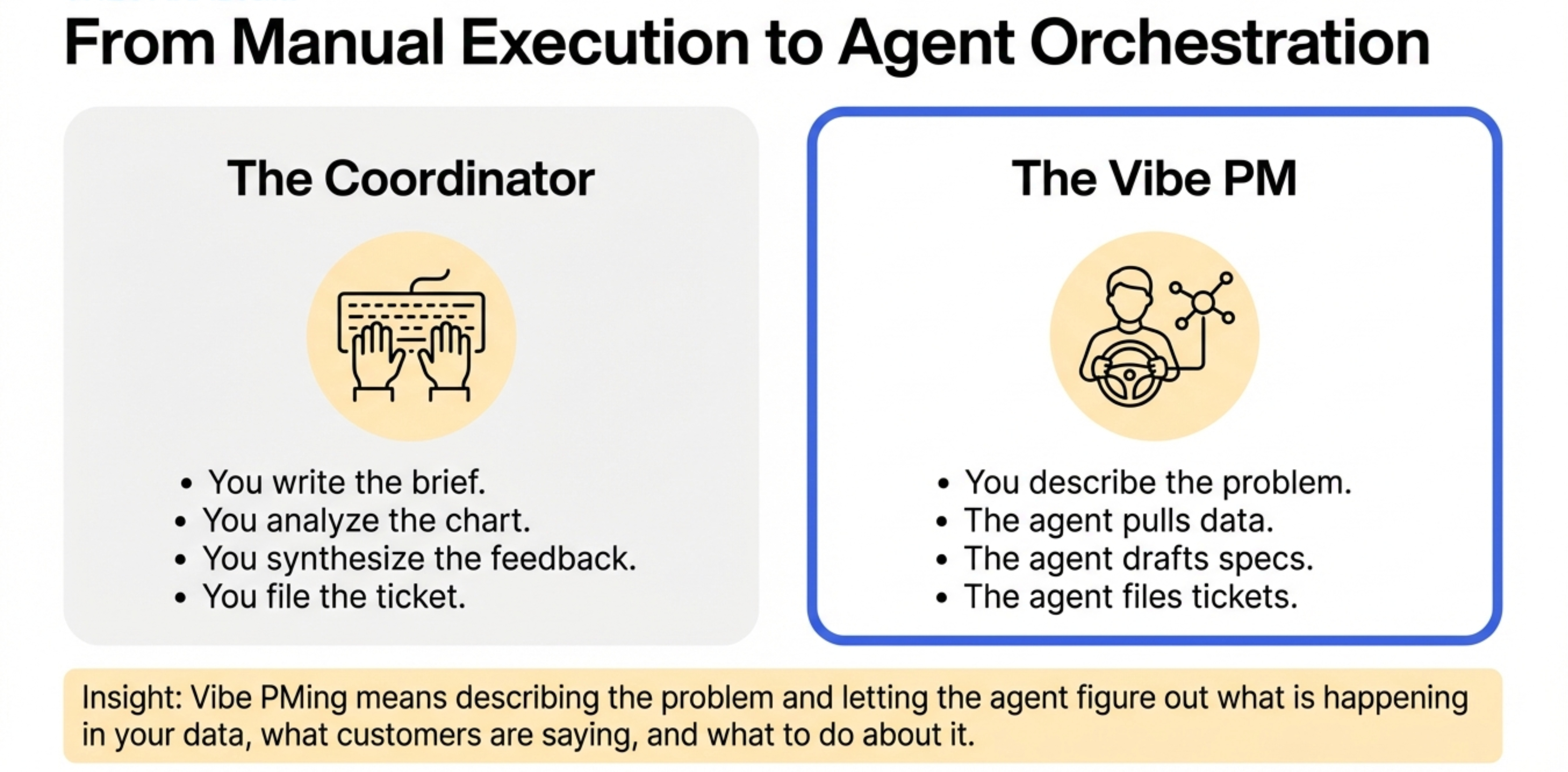
You as a PMs use Claude as a writing tool. you paste in a brief, get a draft, copy it into a doc.
That is using 10% of what is available to you.
The real unlock is connecting Claude Code to the tools where your actual work lives. Your analytics platform. Your ticket system. Your customer feedback. Your meeting notes.
When you do that, something changes. The agent is not just a writing partner anymore. It is a product analyst, a spec writer, and a ticket filer, all running while you are in your next meeting.
This is what vibe PMing means. Same way vibe coding let engineers describe what they want and let the agent build it, vibe PMing lets you describe the problem and let the agent figure out what is happening in your data, what customers are saying, and what to do about it.
The term is new. The workflow is not complicated. But most PMs have not made the jump yet, and that gap is widening fast.
2. How to set up Claude Code with MCP
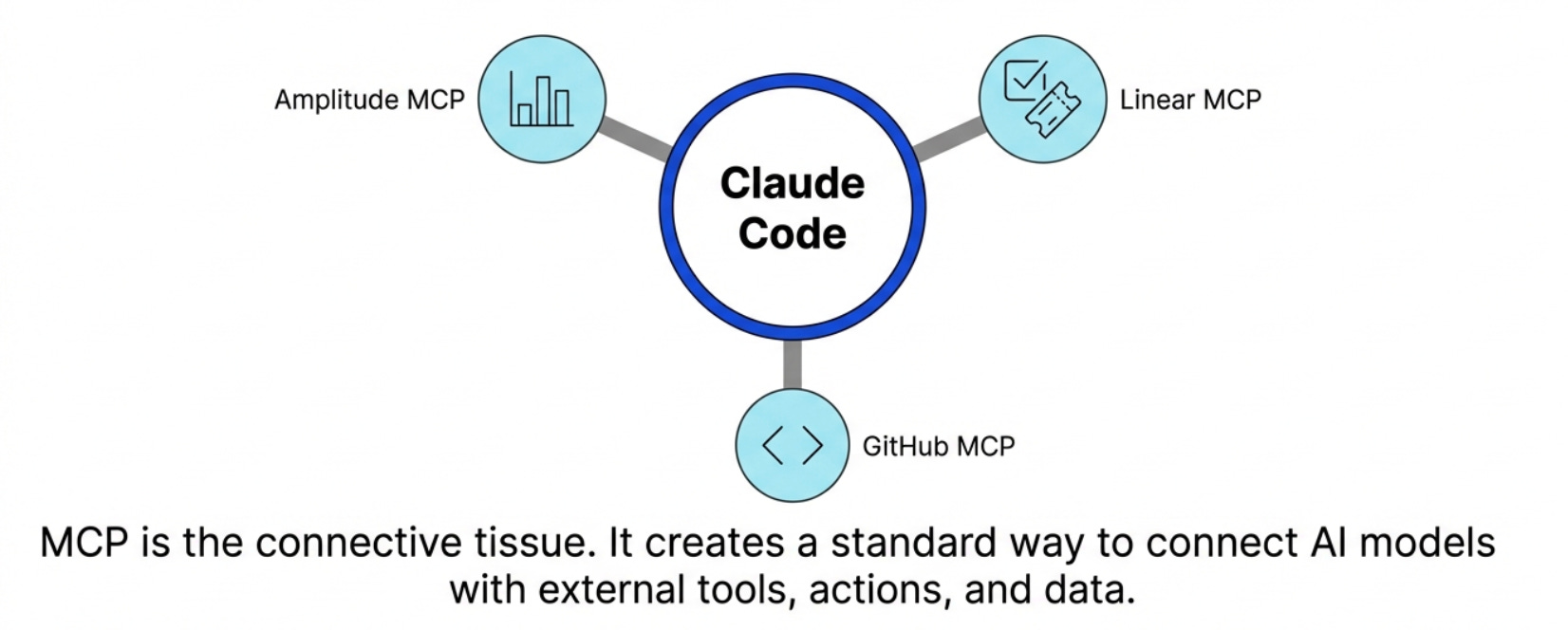
MCP stands for Model Context Protocol. The simplest way to think about it -
It is the easiest way to connect your AI models with any external tool, action, and data.
When you hook Claude Code up to your analytics provider via MCP, the agent can read your charts, query your dashboards, pull your customer feedback, and navigate your product taxonomy, all from terminal. Here is how to set it up.
Step 1 - Build your product repo
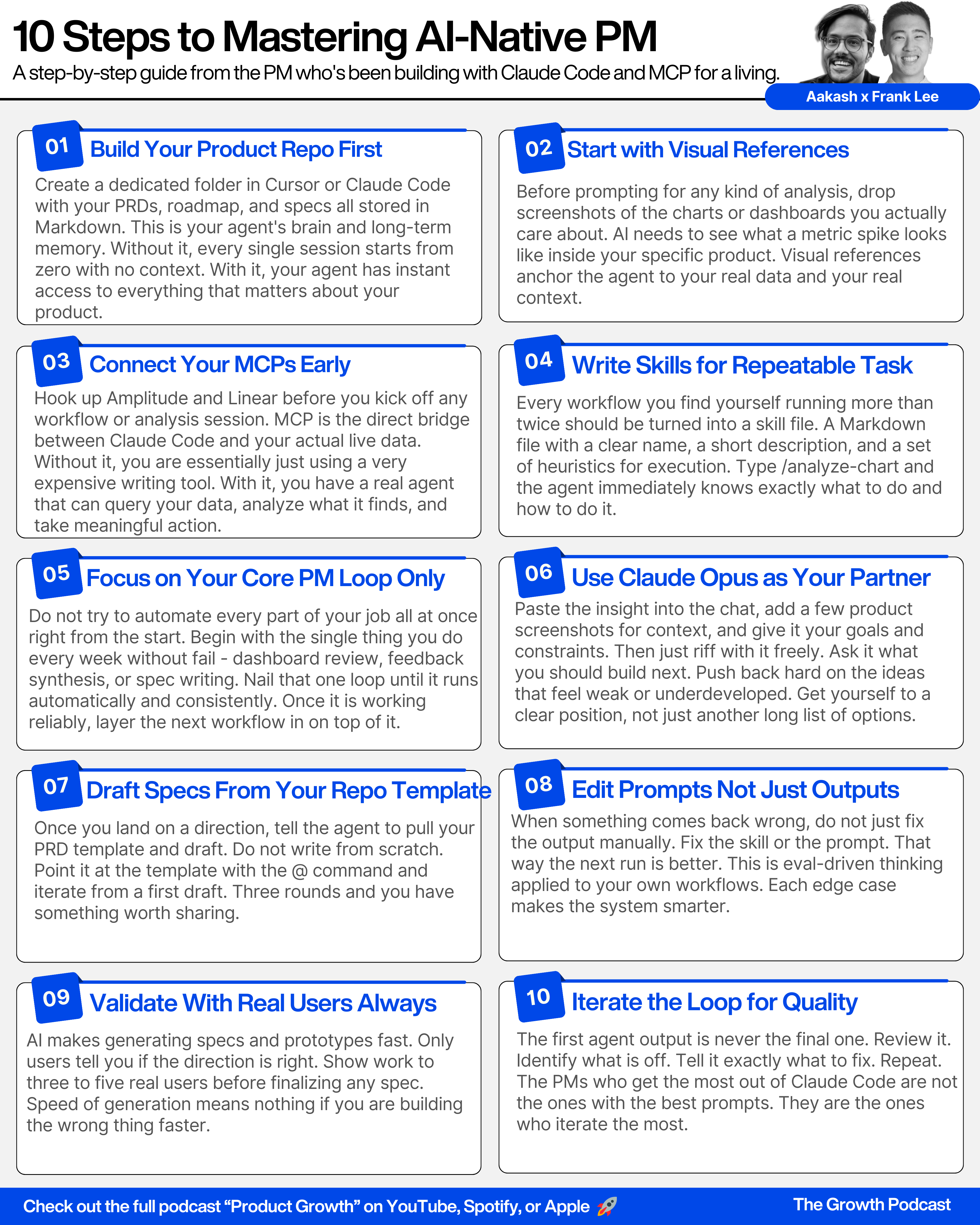
Start in Cursor or Claude Code. Create a folder structure for your product context. This is where you store your PRDs, your Q1 plans, your roadmap notes, your specs, all in Markdown files.
Once they are in there, you reference them with the @ command. The agent immediately pulls that context. No copy-pasting. No searching through docs.
Step 2 - Connect your MCPs
In Claude Code, you add your MCP servers. At minimum your analytics provider like Amplitude, and your ticket system like Linear.
Each MCP gives the agent access to the tools and data in that platform. Amplitude’s MCP gives Claude Code access to your charts, dashboards, feedback, experiments, and feature flags.
The key detail - the MCP works best when it is well-configured. The tool names, descriptions, and instructions all get passed as context to the model. Clear names mean fewer wrong tool calls. This is worth spending time on upfront.
Step 3 - Write your skills
Skills are the secret weapon most people skip. A skill is a Markdown file with three parts - a name, a description of when to use it, and a set of heuristics for how to execute it.
You write a skill once. From then on, you just type:
/analyze-chart or /analyze-feedback
and the agent knows exactly what to do, which tools to call, and what format to return. This is what separates a one-off experiment from a repeatable system.
Step 4 - Manage context deliberately
Claude Code shows you what percentage of your context window you are using. When you hit around 80-90%, do not wait for it to compact on its own. Run a command to write a Markdown summary of your progress and what is left to do. Then start a fresh session with that file as context.
Also be selective about which MCPs you have active at any given time. Too many loaded at once means the agent is processing irrelevant tool descriptions on every query, which slows responses and introduces noise.
3. Five workflows that replace hours of manual PM work
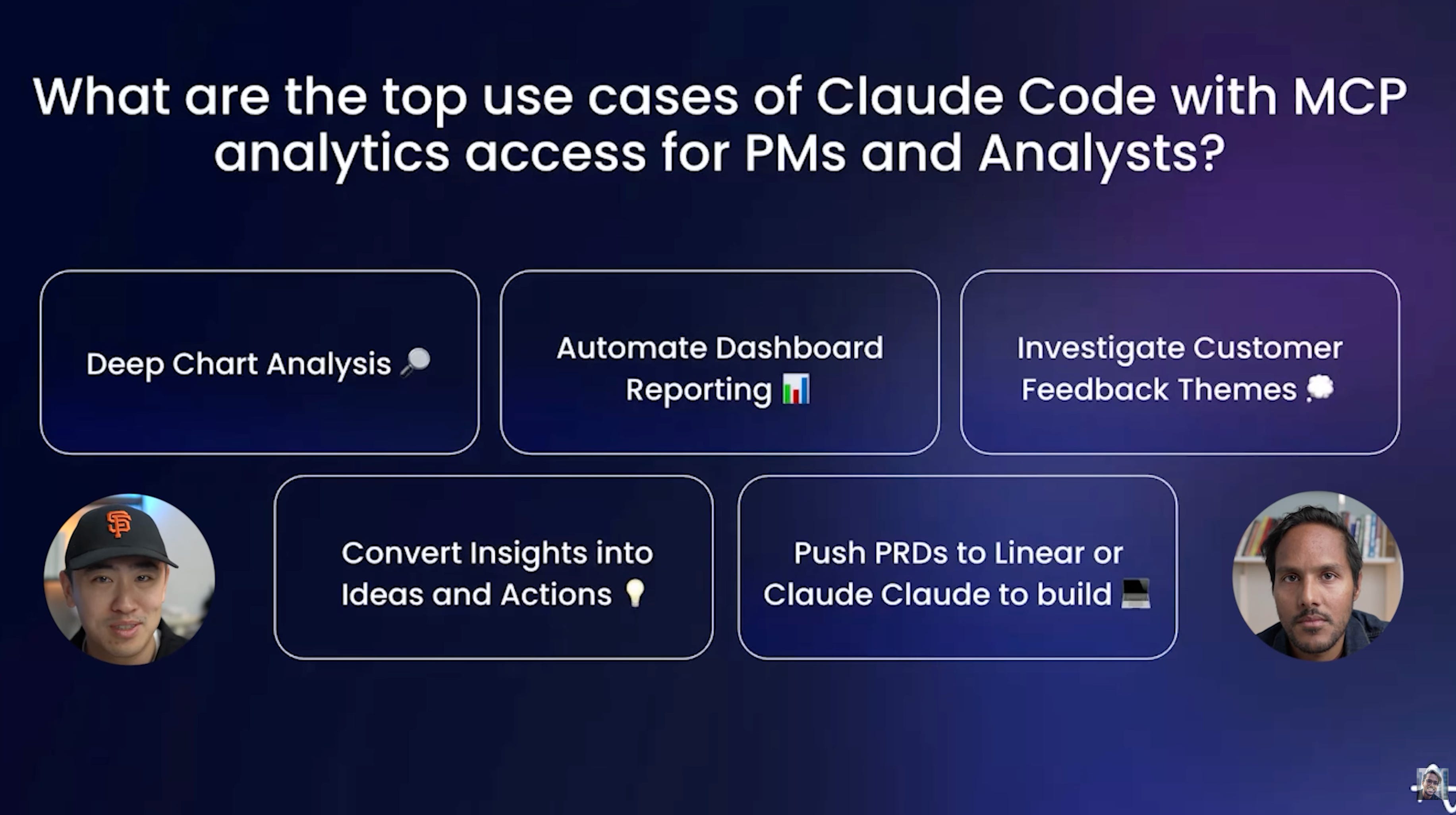
This is the core of today’s episode. Five workflows I now run regularly.
Workflow 1 - Deep chart analysis
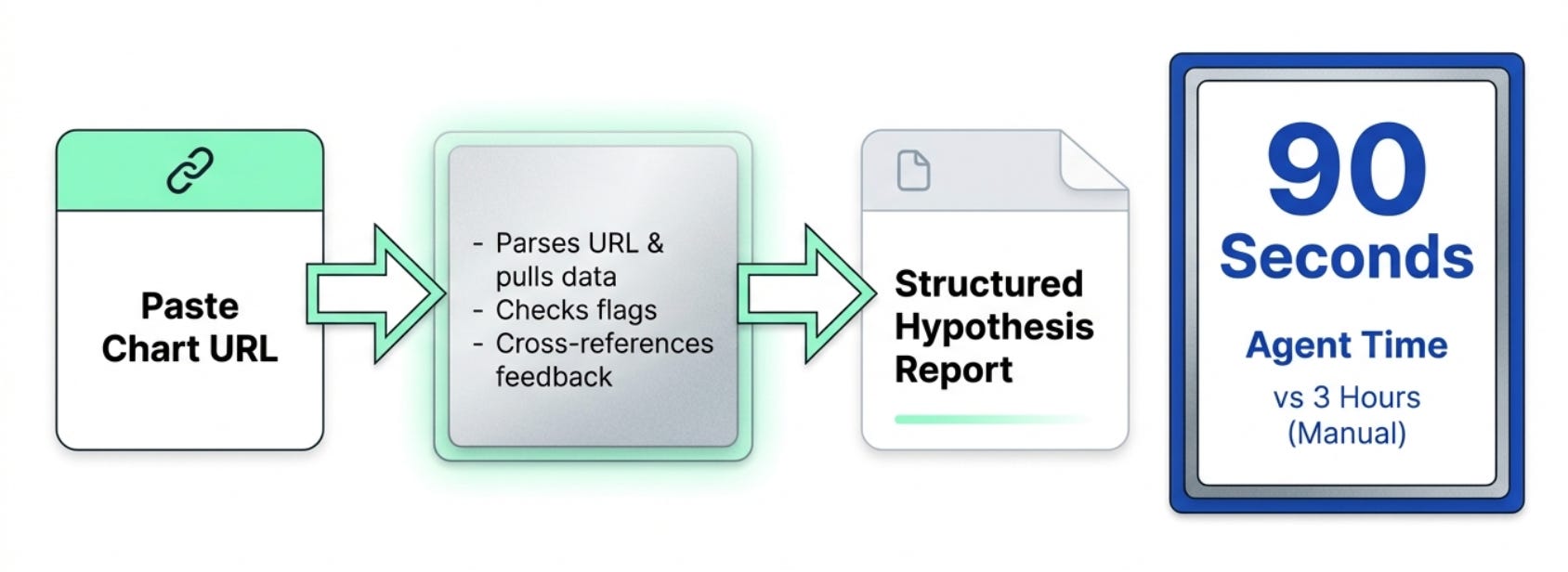
When a metric spikes or drops and you do not know why, this is the workflow.
Drop a chart URL into Claude Code. Run the analyze-chart skill. The agent parses the URL, pulls the underlying data, looks at related charts and events, checks for relevant feature flag changes, and returns a structured report.
What happened and when
The most likely hypothesis
Supporting evidence
What it means for the business
What would have taken a data analyst three hours, navigating the taxonomy, building the breakdown charts, investigating multiple hypotheses, the agent does in about 90 seconds.
The part that surprised me - the agent also cross-references your customer feedback and annotations automatically. So it is not just telling you what moved. It is hypothesizing why, using qualitative context alongside quantitative data.
Workflow 2 - Automated dashboard reporting
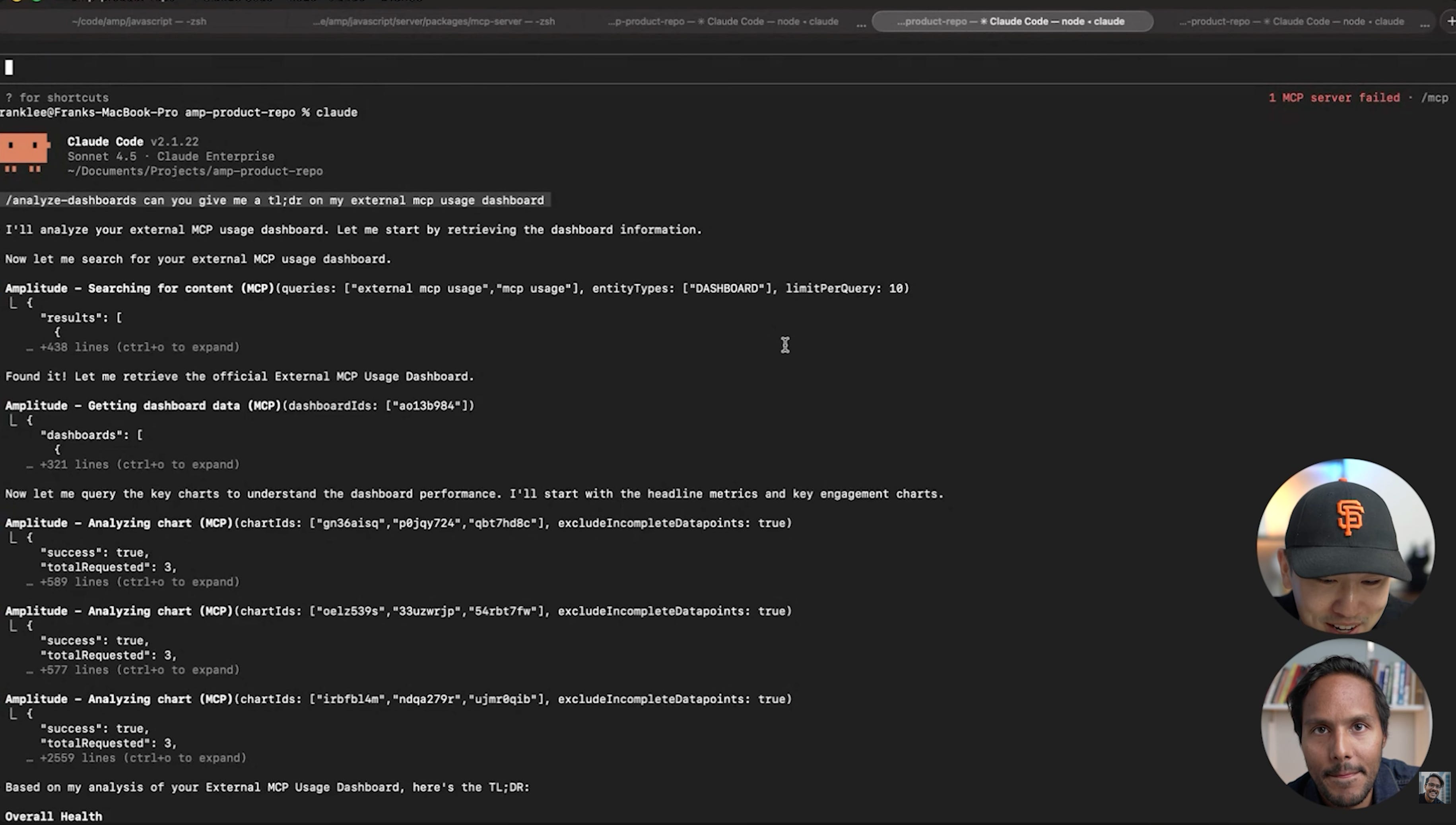
This one hit close to home. If you have ever spent a Sunday pulling metrics together for a Monday business review, you know exactly what I am talking about. At Amazon, that was a three-to-five hour ritual every single week. At Epic Games, same thing.
Here is the new workflow. You point a dashboard agent at the four or five dashboards you care about. Every Monday morning, you get a clean report in your inbox.
Top three to five insights across all your metrics
What changed week over week
The one urgent thing that needs your attention
You do not analyze the dashboards anymore. You just react to what already matters. The report goes into Slack. Your whole team has context before the first meeting.
Workflow 3 - Customer feedback synthesis
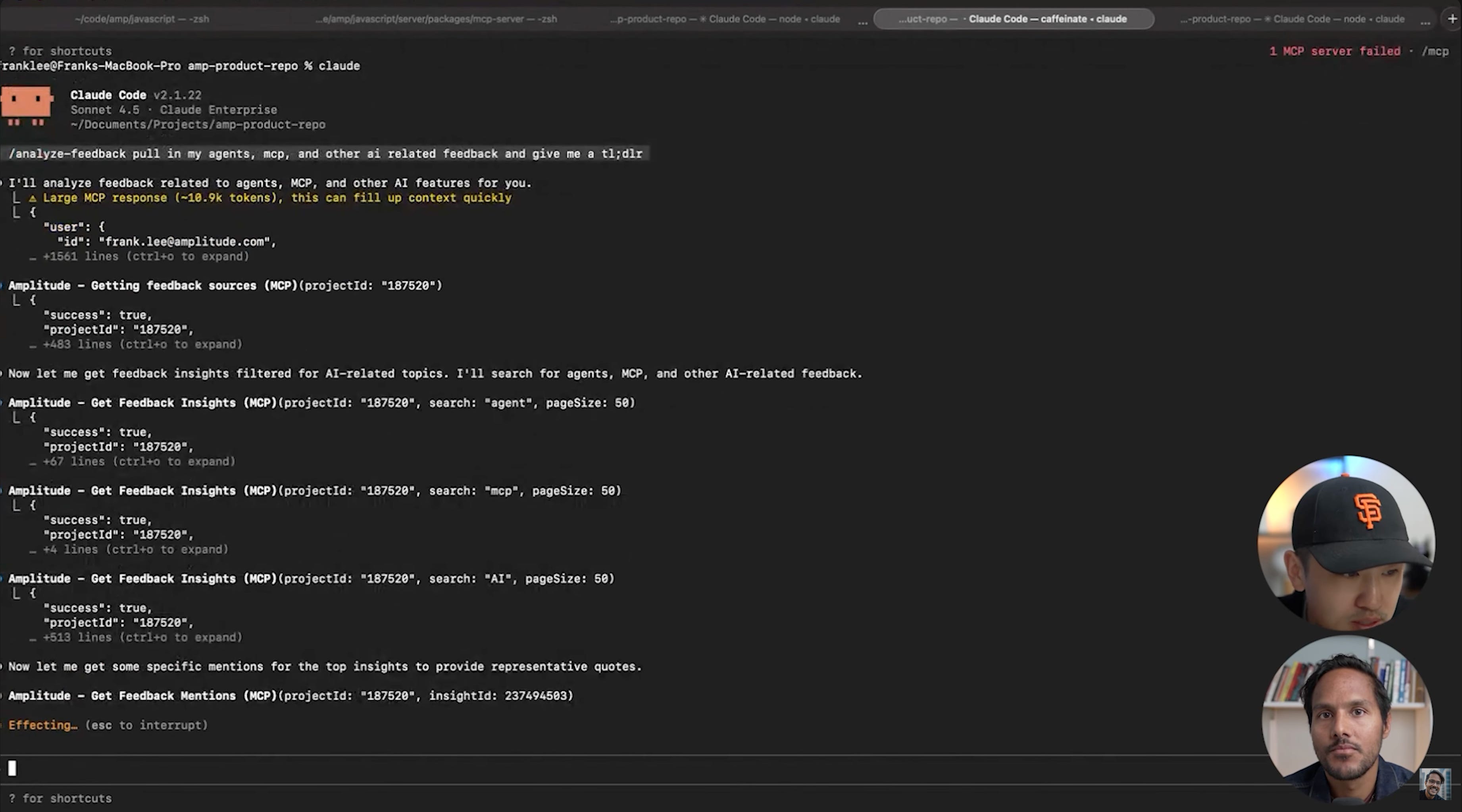
Most teams have customer feedback scattered everywhere. Zendesk, Slack, Gong, app store reviews, NPS surveys. Nobody reads all of it. The stuff that reaches the roadmap is whatever was loud enough to find its way into a conversation.
With Amplitude’s AI feedback product plus MCP, all of that data gets piped into one place. Then you run your analyze-feedback skill against it. You can ask it to focus on a specific product area. The agent navigates the feedback insights, clusters them, and returns a structured report.
Top feature requests
Urgent issues
The number one thing customers loved that week
Nobody has to skim Slack threads anymore. The synthesis happens automatically and it is sitting in your inbox when you get to your desk.
Workflow 4 - From insight to spec
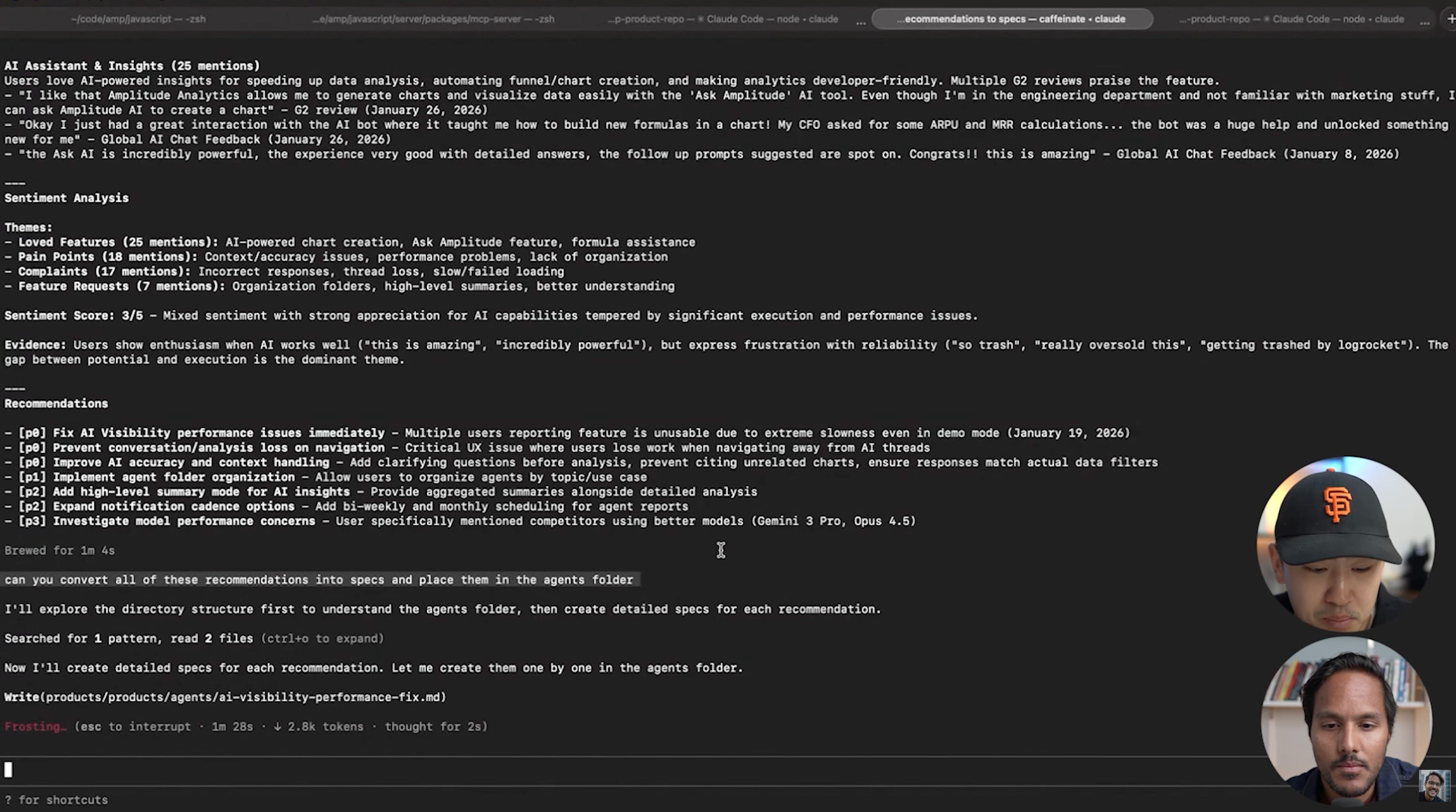
Most PMs stop at the insight. They have the chart analysis. They have the feedback summary. And then they open a blank Google Doc and start writing from scratch.
You do not have to do that anymore.
Once the analysis is done, you drop the insight into Claude Code along with a few images of the current product experience. You give it your goals and your constraints. Then you just talk to it. What should we build? What are the tradeoffs? What would we cut?
Claude Opus is the best brainstorming partner I have used for product strategy. It thinks in specifics. It pushes back when an idea is weak. It helps you get to a position, not just a list of options.
When you land on a direction, you tell it to draft the PRD using the template in your repo.
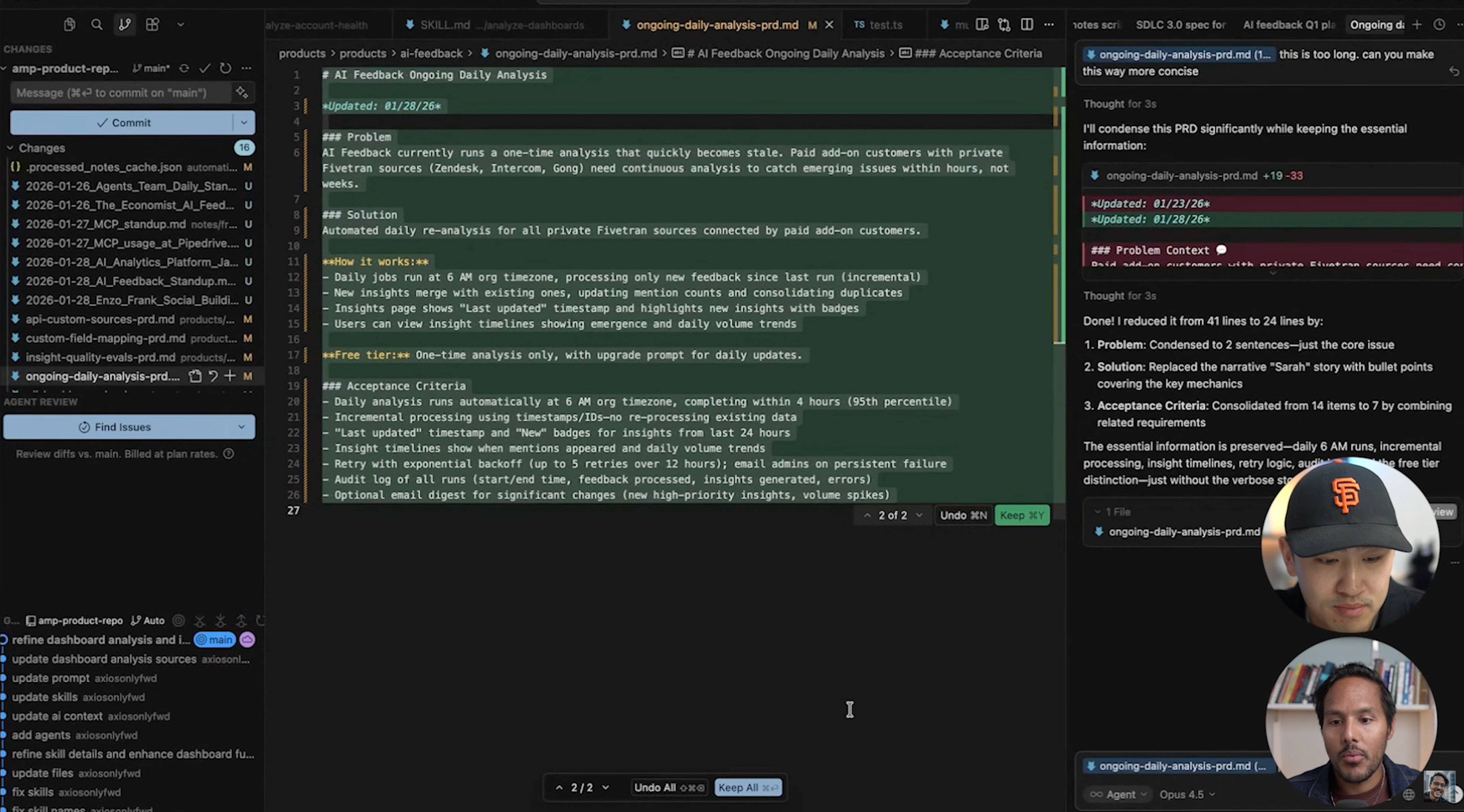
Draft this as a PRD using the template in /docs/prd-template.mdThe agent pulls your PRD template from the repo and generates a first draft in your format, using the context it already has from the analysis. If the draft is off, you tell it. Too long. Wrong framing. Acceptance criteria are vague. Two or three rounds and you have something worth sending.
The whole thing takes 20 minutes instead of two hours. And you spent those 20 minutes thinking, not typing.
Workflow 5 - From spec to shipped
This is where most workflows fall apart. You have a good spec. Now what?
Two paths, depending on what it is.
If it is a small fix, a UI tweak, a copy change, a minor behavior adjustment, you drop it straight into Claude Code or Cursor and point it at your repo. The agent picks it up and starts working while you go to your next meeting. You come back, review the diff, and either ship it or give feedback.
If it needs the team, you hit the Linear MCP from the same terminal:
File this under the AI capabilities project, assign it to Richard,
add the feedback analysis from this session as context
Done. You can also skip the ticket entirely for simpler things and pipe it straight to the engineer via Slack MCP.
You are not writing tickets anymore. You are routing decisions. The agent handles the formatting, the filing, the context. You just tell it where things should go.
That is what it means to vibe PM. Not doing less thinking, doing more of it, and letting the agent handle everything else.
4. The biggest mistakes people make with MCP
Two that come up constantly.
Wrong expectations
People assume MCP can orchestrate complex multi-step workflows out of the box. It cannot. MCP is the easiest way to connect your AI to external data and actions. That is it. You still have to write the skills and prompts that tell the agent what to do with that access.
“Set the right expectations for yourself on what MCP is used for. It is by far the easiest way to connect external systems with most of the AI clients you are using.”
Too many MCPs loaded at once
Every MCP you have connected adds tool descriptions to your context window on every query, even when those tools are not relevant. This slows responses and can confuse the model.
Be surgical. Only keep MCPs active that are relevant to your current workflow. And when you are building an MCP yourself, invest time in the tool names and descriptions. The clearer they are, the fewer wrong tool calls you get. Think of it like eval-driven development. When you find an edge case, you optimize the descriptor, not just the prompt.
The good news - most clients like Cursor and Claude now use dynamic tool calling, so they do not load all tools into context on every query. The context rot problem is largely being solved at the client level.
5. How to become an AI-native PM in 2026
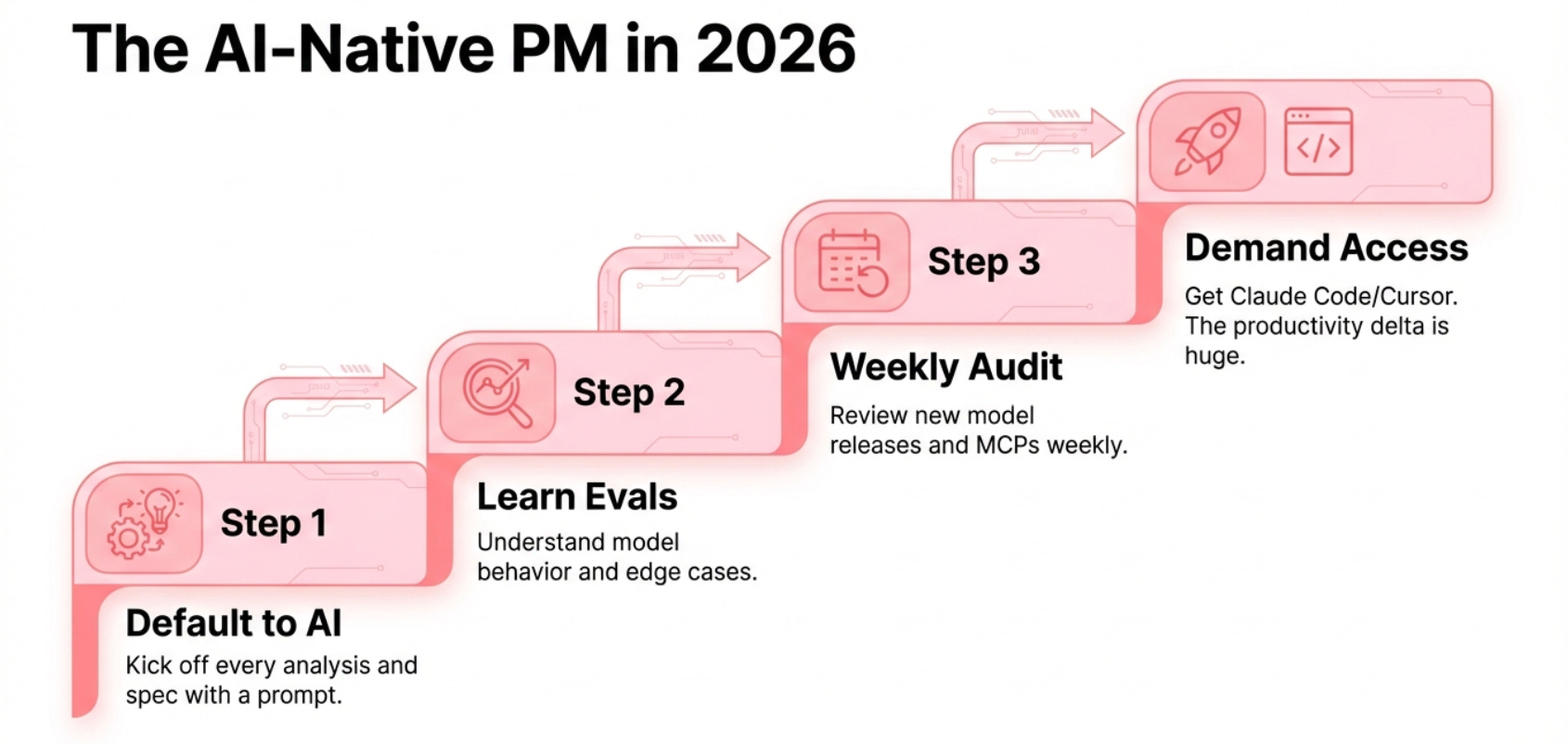
The simplest version of the advice: default to AI on most tasks.
Treat it as a thought partner. Kick off every analysis, every spec, every strategy session by firing a prompt first and seeing what comes back. You can participate in every part of the process now, pulling data, building analysis, generating prototypes, making recommendations on a draft PR, routing tickets to your team. Most PMs are still only doing one or two of these. The ones doing all five are operating at a different level.
A few tactical things worth building into your week:
Spend a few hours each weekend looking at what shipped in the last seven days. New model releases, new agent capabilities, new MCP integrations. The surface area of what is possible changes weekly right now. Staying current is not optional if you want to stay relevant.
Learn the AI-specific frameworks. Understanding how evals work. Knowing when you are managing a traditional product process versus when you need to think about edge cases and model behavior. Everyone has an AI feature now. Not everyone knows how to manage one properly.
If your org is not giving you access to Claude Code, Cursor, and GitHub, make the request. The productivity delta is not subtle. Show them this episode.
The PMs who figure this out in the next six months will look like wizards to everyone still writing tickets manually.
The modern AI PM stack
For reference, the full stack that makes this work:
Claude Code - your primary agent harness and terminal interface
Cursor - for IDE workflows, direct file edits, faster model switching
Amplitude MCP - to pull charts, dashboards, feedback, and session data
Linear MCP - to route specs and tickets without leaving terminal
Granola - for meeting notes that feed directly into your product repo
Wisprflow - to dictate instructions and orchestrate agents hands-free
The real power is not any single tool. It is the connections between them. Context from your meetings flows into your repo. Your repo feeds your agent. Your agent queries your analytics. Your analytics surfaces insights. Those insights become specs. Those specs become tickets or code.
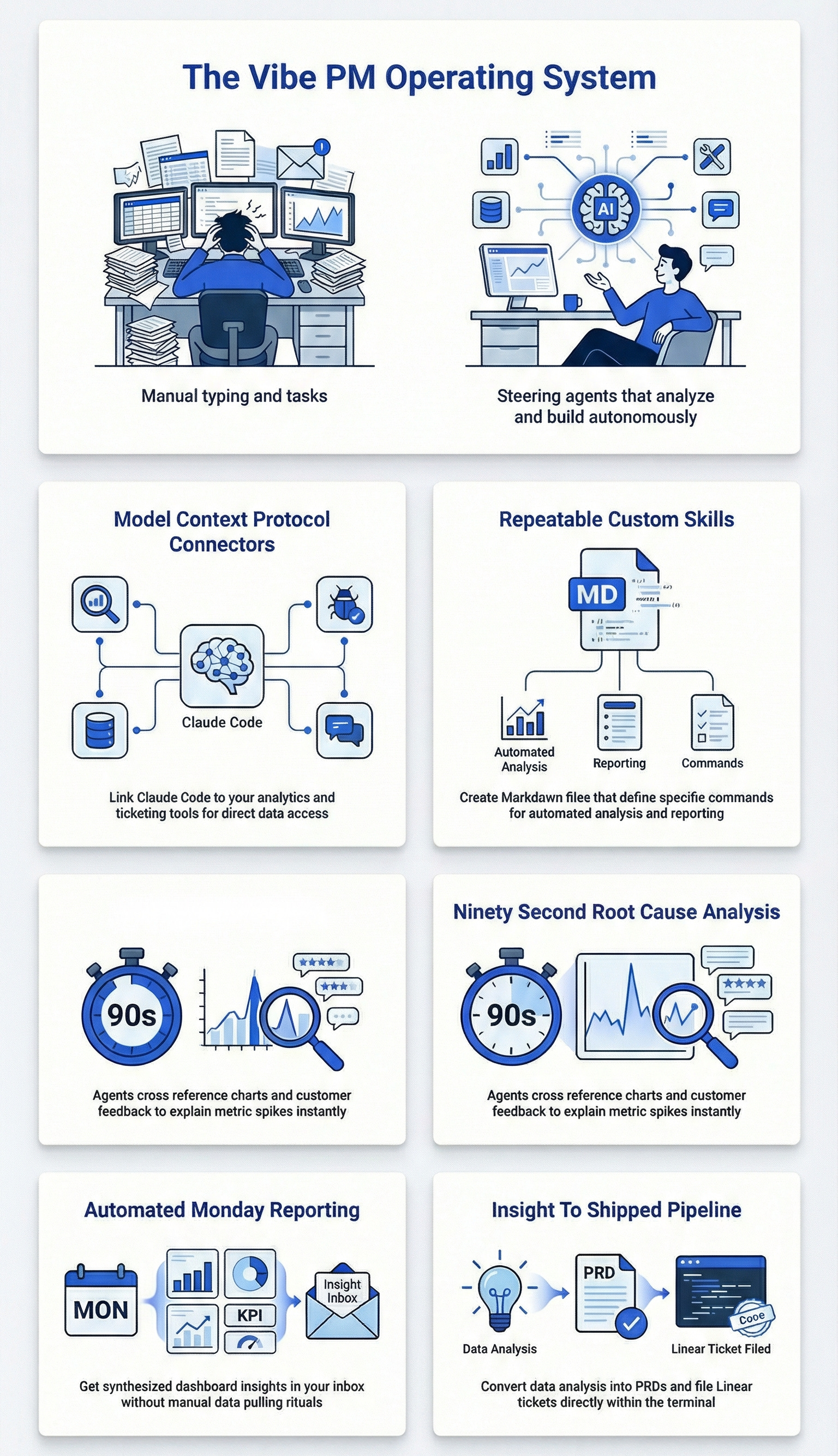
When that loop is running, you stop feeling like a coordinator and start feeling like an operator.
Related content
Newsletters:
Podcasts:
PS. Please subscribe on YouTube and follow on Apple & Spotify. It helps!