Check out the conversation on Apple, Spotify and YouTube.
Brought to you by - Reforge:

Get 1 month free of Reforge Build (the AI prototyping tool built for PMs) with code BUILD
Today’s Episode
Ankit Shukla is BACK after his gangbusters episode, that is my #2 most popular of all time. This time he's diving deep on one of the most important new AI skills for PMs: Evals.
Whether you're working on AI features now or not, this is a skill you want to have an intuitive understanding of. So, I'm building on my library of eval episodes with today's drop.
I've never heard someone explain evals from first principles as intuitively as Ankit has with this one. Hope you enjoy as much as I did!
If you want access to my AI tool stack - Dovetail, Arize, Linear, Descript, Reforge Build, DeepSky, Relay.app, Magic Patterns, Speechify, and Mobbin - grab Aakash’s bundle.
Newsletter Deep Dive
As a thank you for having me in your inbox, I’ve written up a complete guide to AI evals.
Why AI evals matter for all PMs
The fundamental nature of LLMs
How to build your evaluation rubric
The complete eval metrics framework
How to build LLM judges step-by-step
Production monitoring that actually works
1. Why AI Evals Matter for Every PM
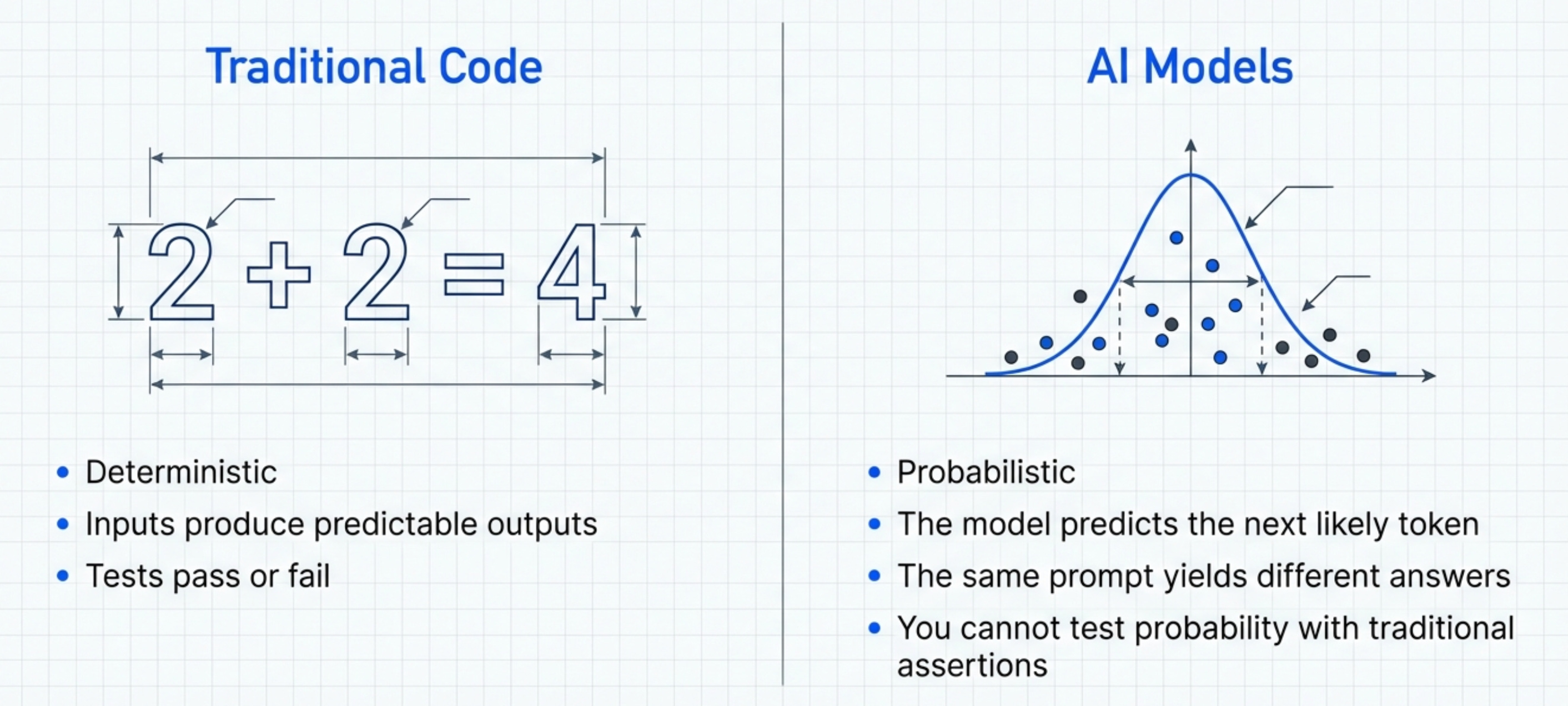
AI evals matter for every PM because AI is just another API you might call. And once you call that API, you need to know if it’s working.
When you build a traditional feature, you know what’s happening. The code is deterministic. If you write “2 + 2”, you get 4. Every single time. AI doesn’t work like that.
The same prompt can give you different answers. The same user query can produce wildly different results. You don’t control the output the way you control traditional code.
This creates a fundamental problem for product management. You can’t just “test” an AI feature the way you test a normal feature. You need a completely different approach.
The Three-Part Eval System
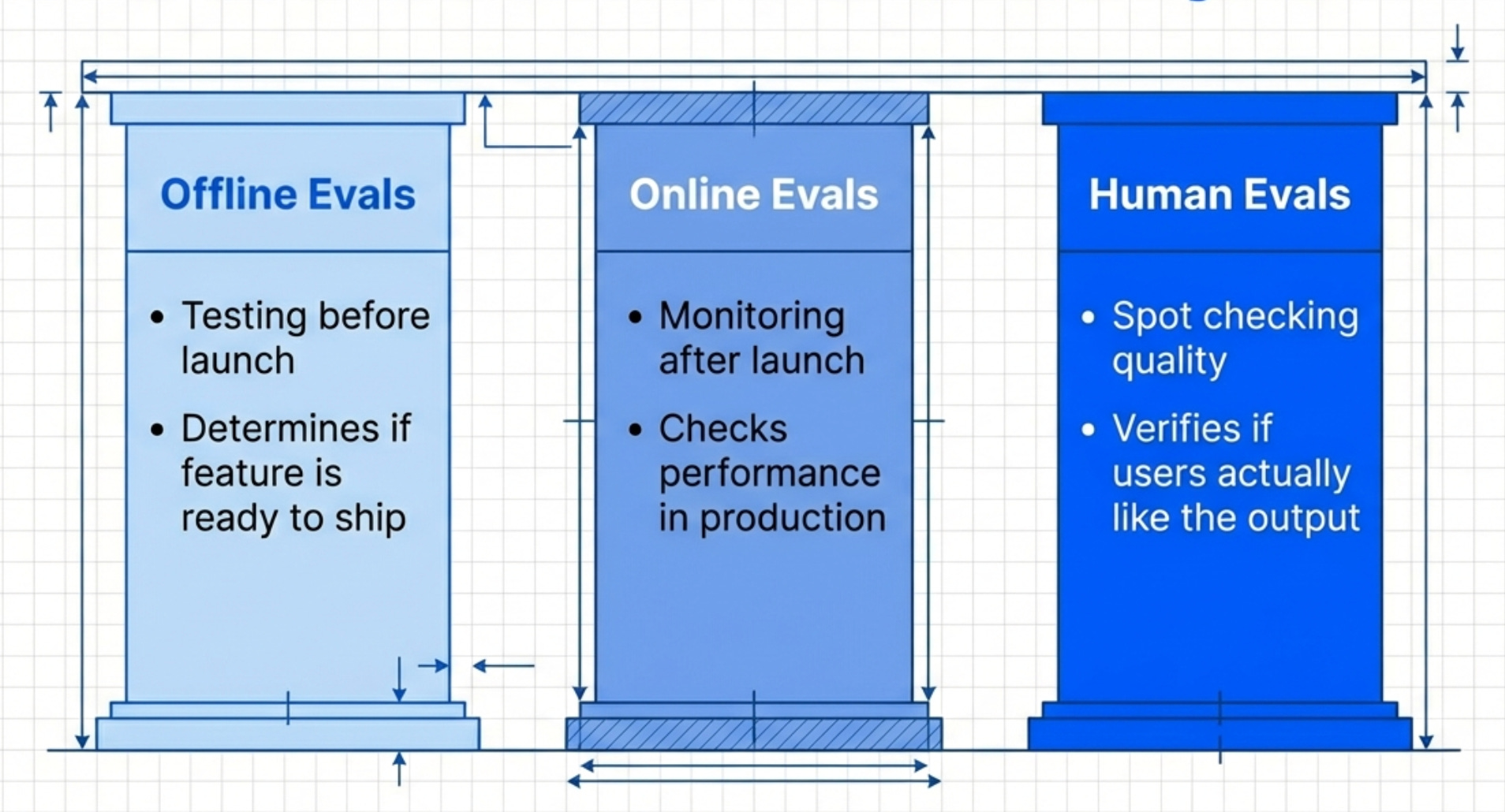
There are three types of evaluations you need:
Offline evals - Testing before launch
Online evals - Monitoring after launch
Human evals - Spot-checking quality
Most teams only do offline evals. Some do online evals. Almost nobody does human evals properly.
You need all three. Offline evals tell you if the feature is ready to ship. Online evals tell you if it’s working in production. Human evals tell you if users actually like it.
Skip any of these and your feature will fail.
Why PMs Should Own This
Product leaders like Todd Olson (CEO of Pendo) and Rachel Wolan (CPO of Webflow) all say the same thing.
AI evals is the most important new skill for PMs.
Why?
Because PMs sit at the intersection of business, customer, and technology. You understand what success looks like. You understand what the customer needs. You understand how the business measures value.
Engineers understand the code. Data scientists understand the models. But PMs understand the outcome.
That’s why AI product managers need to own evals.
The Cost of Not Doing Evals
Here’s what happens when you skip evals.
Your prototype works great in the demo. You show it to stakeholders. Everyone loves it. You get approval to ship.
Then you launch.
Users start complaining. The AI hallucinates. It gives wrong answers. It misunderstands simple queries. Your support tickets explode.
You scramble to fix it. But you don’t know what’s broken. You don’t have metrics. You don’t have baselines. You’re flying blind.
Eventually you roll back the feature. Six months of work down the drain.
2. The Fundamental Nature of LLMs
Before you can build good evals, you need to understand how LLMs actually work.
Most PMs don’t understand this. They treat LLMs like a black box. Type in a prompt, get an answer. Magic.
But LLMs aren’t magic. They’re statistical models. And understanding how they work changes how you evaluate them.
LLMs Are Probabilistic
LLMs don’t “know” anything. They predict the next token based on probability distributions.
When you ask “What’s the capital of France?”, the LLM doesn’t “look up” the answer. It predicts that the most probable next tokens are “The capital of France is Paris.”
This seems like a small distinction. But it matters. Because sometimes the LLM predicts wrong. Not because it’s “broken”. But because the probability distribution led it to a different answer.
This is why the same prompt can give different results. The model samples from a distribution. Different samples = different outputs.
The Temperature Problem
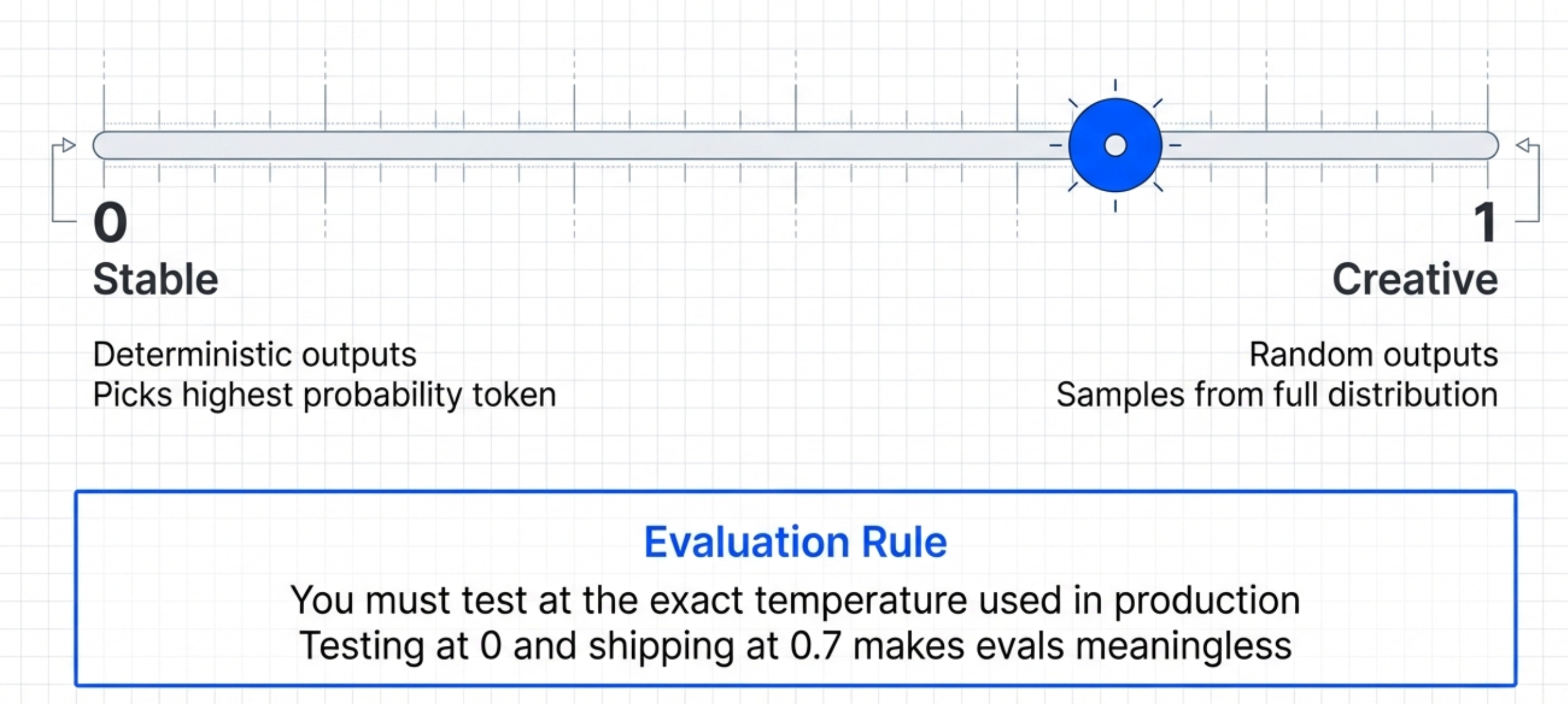
Temperature controls randomness.
Temperature = 0 → Deterministic outputs (always picks highest probability token) Temperature = 1 → More random outputs (samples from full distribution)
Most products use temperature between 0.3 and 0.7.
Why does this matter for evals?
Because you need to test at the temperature you’ll use in production. If you eval at temperature 0 but ship at temperature 0.7, your evals are meaningless.
The Context Window Problem
LLMs have limited context windows. GPT-4 has 128K tokens. Claude has 200K tokens.
But here’s what most PMs don’t realize.
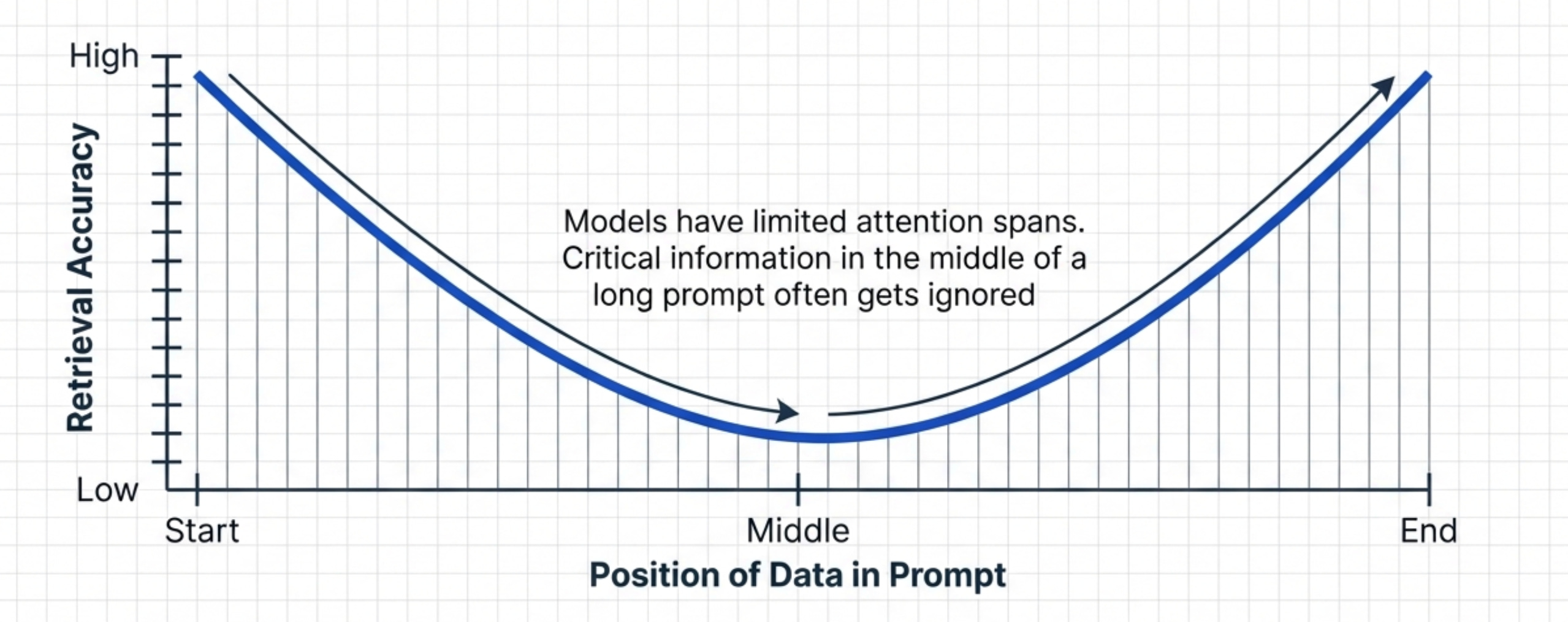
The quality of responses degrades as you fill the context window. The model “pays attention” to the beginning and end of the context more than the middle.
This creates the “lost in the middle” problem.
If you put critical information in the middle of a long prompt, the LLM might miss it. Even though it’s technically within the context window.
This means your evals need to test different context lengths. A prompt that works at 1K tokens might fail at 50K tokens.
The Prompt Sensitivity Problem
Small changes in prompts create large changes in outputs.
Change “Please summarize this document” to “Summarize this document” and you get different results. Add “Be concise” and you get different results again.
This is called prompt sensitivity.
It makes AI products incredibly fragile. A tiny change breaks everything.
Your evals need to test prompt variations. Not just one canonical prompt. Multiple variations that users might actually type.
The Hallucination Problem
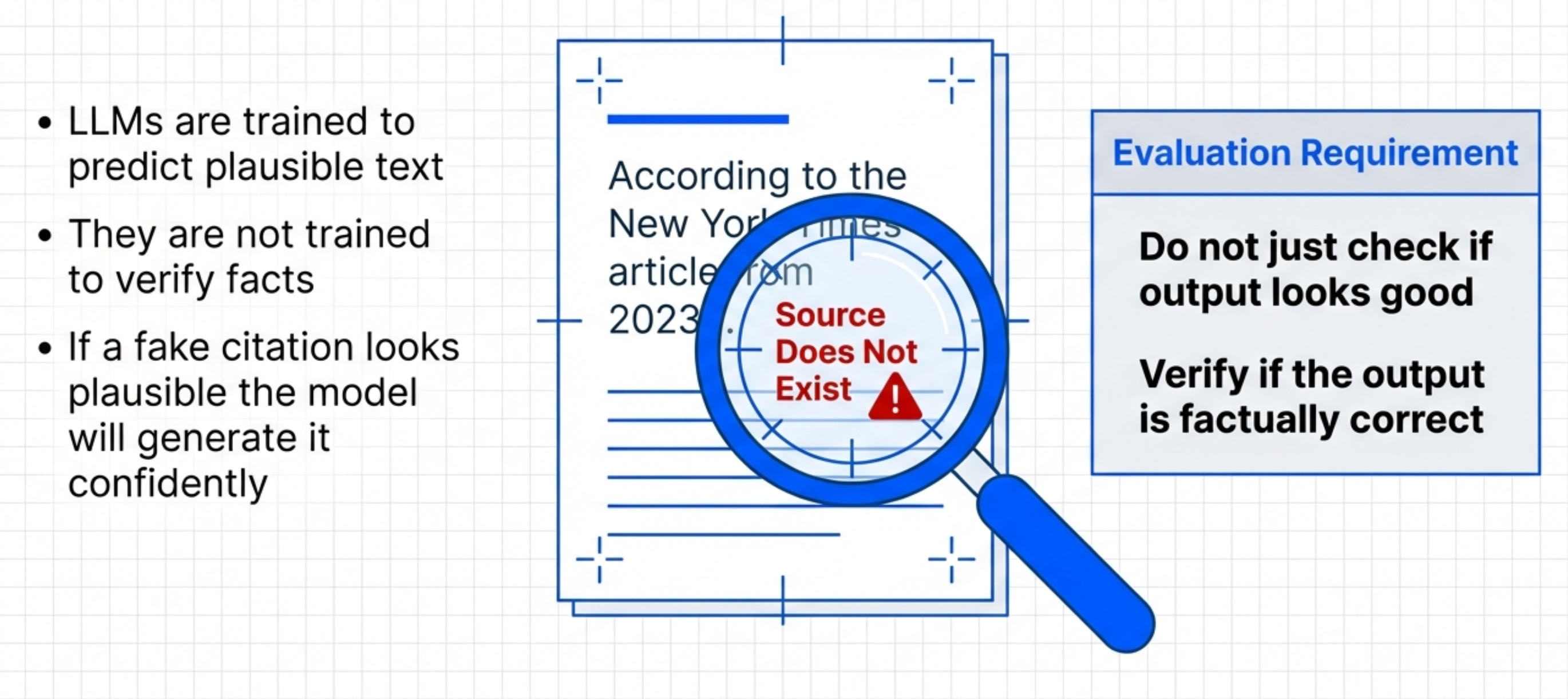
LLMs hallucinate. They make up facts. They cite sources that don’t exist. They invent details.
Why?
Because they’re trained to predict plausible text. Not accurate text. Plausible.
If the most plausible completion is a fake citation, the model will generate it. Confidently.
You can’t just check if the output “looks good”. You need to verify it’s actually correct.
3. How to Build Your Evaluation Rubric
Now let’s build an evaluation rubric step by step.
A rubric defines what “good” looks like. Without a rubric, you can’t measure quality. You’re just guessing.
Start With User Scenarios
Don’t start with the AI. Start with the user.
What are the top 10 scenarios your users will encounter?
For a customer support chatbot:
User asks about return policy
User asks about shipping times
User asks about product specifications
User asks about account issues
User asks unclear questions
For a code generation tool:
User requests a simple function
User requests a complex algorithm
User requests refactoring
User requests bug fixes
User requests tests
Write these down. These become your test cases.
Define Success Criteria
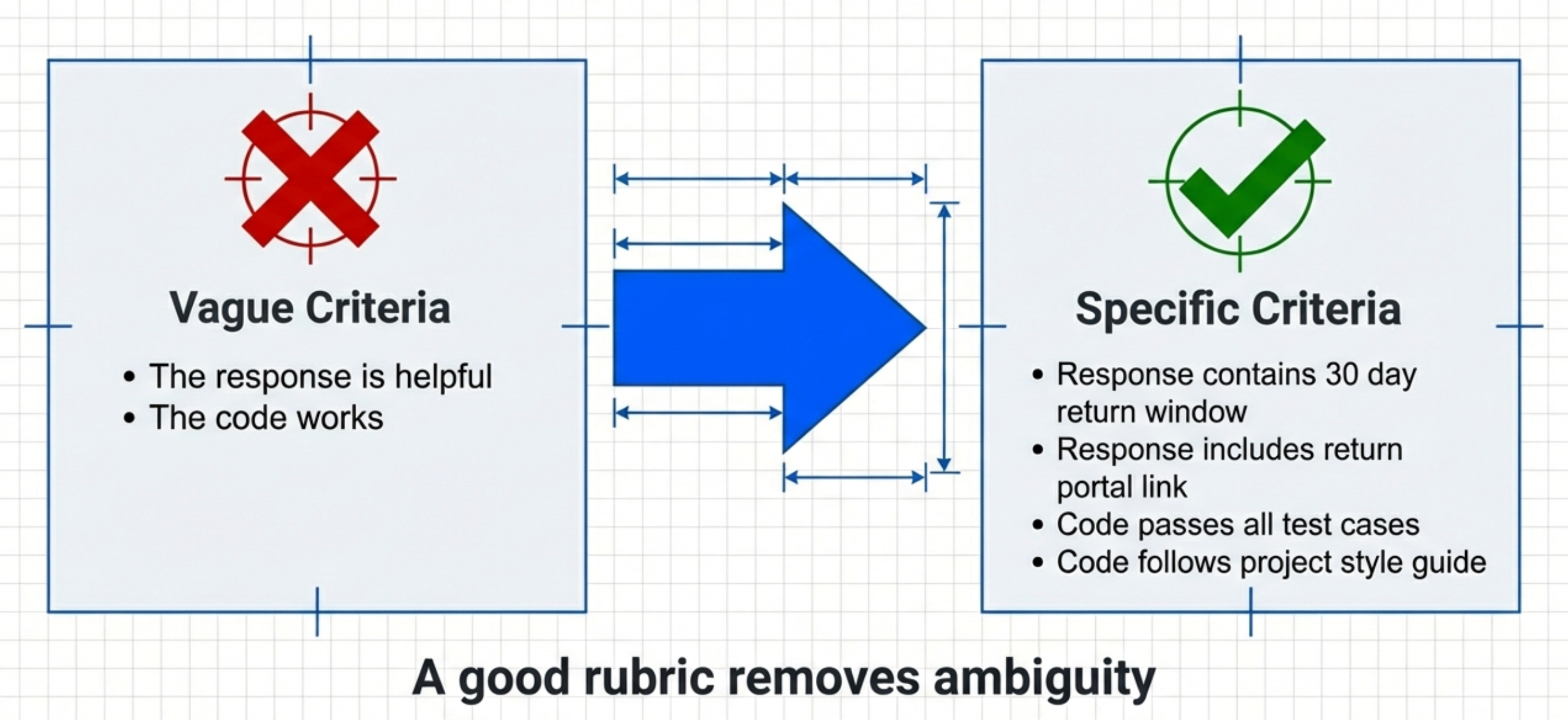
For each scenario, define what success looks like.
Bad success criteria: “The response is helpful” Good success criteria: “The response contains the correct return window (30 days) and includes the return portal link”
Bad success criteria: “The code works” Good success criteria: “The code passes all test cases, follows project style guide, and includes error handling”
Specific. Measurable. Unambiguous.
Build Your Rubric Categories
A good rubric has 4-6 categories:
Correctness - Is the answer factually correct?
Completeness - Does it address all parts of the query?
Clarity - Is it easy to understand?
Tone - Does it match brand voice?
Safety - Does it avoid harmful content?
Efficiency - Is it concise without being terse?
Each category gets a 1-5 scale:
Completely fails the criteria
Mostly fails with some success
Partially succeeds
Mostly succeeds with minor issues
Fully succeeds
Define what each score means for each category. Don’t leave it ambiguous.
Create Reference Examples
This is the part most teams skip. Don’t.
For each category and score level, create a reference example.
Example for “Correctness” in a support chatbot:
Score 5: “Our return policy allows returns within 30 days of purchase. Visit returns.company.com to start your return. You’ll receive a full refund within 5-7 business days.”
Score 3: “You can return items within 30 days. Check our website for details.”
Score 1: “We don’t accept returns.” (Factually wrong)
These examples become your ground truth. They show evaluators (human or LLM) what quality looks like.
Test Your Rubric
Have 2-3 people independently grade the same 10 outputs using your rubric.
Calculate inter-rater reliability. If people disagree on scores, your rubric is ambiguous.
Refine the rubric until multiple evaluators give similar scores.
This step is critical. A bad rubric produces bad evals. A good rubric produces reliable evals.
4. The Complete Evaluation Metrics Framework
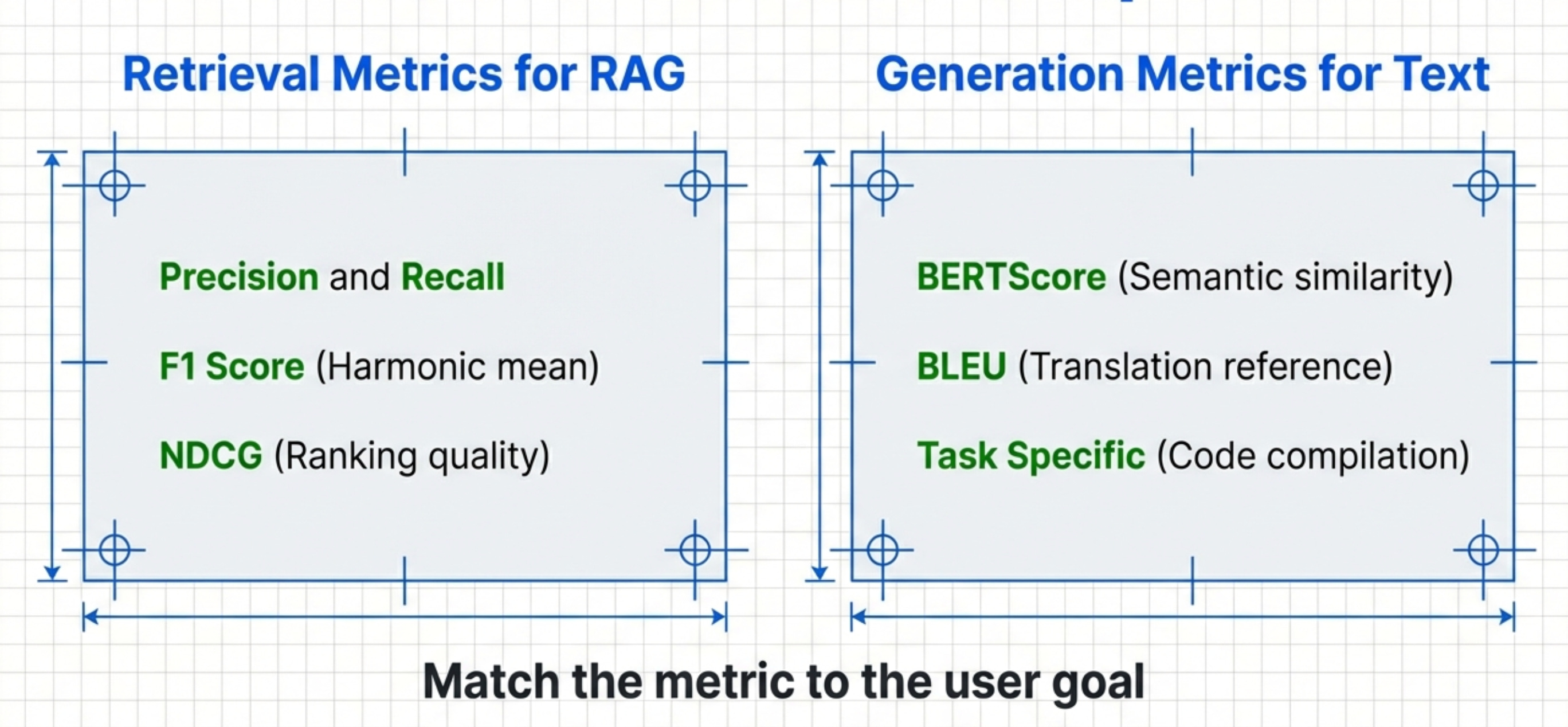
Now let’s talk metrics.
You need different metrics for different use cases. There’s no “one size fits all” metric for AI evaluation.
Retrieval Metrics
If your AI retrieves information (like RAG systems), you need retrieval metrics.
Precision - Of the documents retrieved, how many are relevant?
Recall - Of all relevant documents, how many did you retrieve?
F1 Score - Harmonic mean of precision and recall
MRR (Mean Reciprocal Rank) - How quickly do you surface the right document?
NDCG (Normalized Discounted Cumulative Gain) - Weighted scoring based on position
For most AI PM use cases, F1 and NDCG matter most.
Generation Metrics
If your AI generates text, you need generation metrics.
BLEU - Compares generated text to reference text (good for translation) ROUGE - Measures overlap between generated and reference text (good for summarization)
METEOR - Accounts for synonyms and stemming (better than BLEU for most uses)
BERTScore - Uses embeddings to measure semantic similarity (best for most products)
Most AI products should use BERTScore. It’s the most robust.
Task-Specific Metrics
Some tasks need custom metrics.
For code generation:
Does it compile?
Does it pass tests?
Does it follow style guide?
What’s the cyclomatic complexity?
For customer support:
Does it contain the correct information?
Does it include required links?
Does it match brand tone?
Does it resolve the issue?
For summarization:
Does it capture key points?
Does it omit irrelevant details?
Is it the right length?
Is it coherent?
Define the metrics that matter for your specific product.
LLM-as-Judge Metrics
This is where it gets powerful.
Instead of using traditional metrics, use an LLM to grade outputs.
Ask GPT-4 or Claude: “On a scale of 1-5, how helpful is this response?”
This works surprisingly well. LLM judges often correlate better with human judgment than traditional metrics.
The key is giving the judge a good rubric. Feed it your scoring criteria. Give it reference examples.
Then let it grade outputs automatically.
Choosing the Right Metrics
Use this decision tree:
If you’re retrieving documents → Precision/Recall/F1 If you’re generating text similar to references → BERTScore If you’re doing a specific task → Task-specific metrics
If you’re measuring quality holistically → LLM-as-judge
Most products need multiple metrics. Don’t rely on just one.
5. How to build LLM judges step-by-step
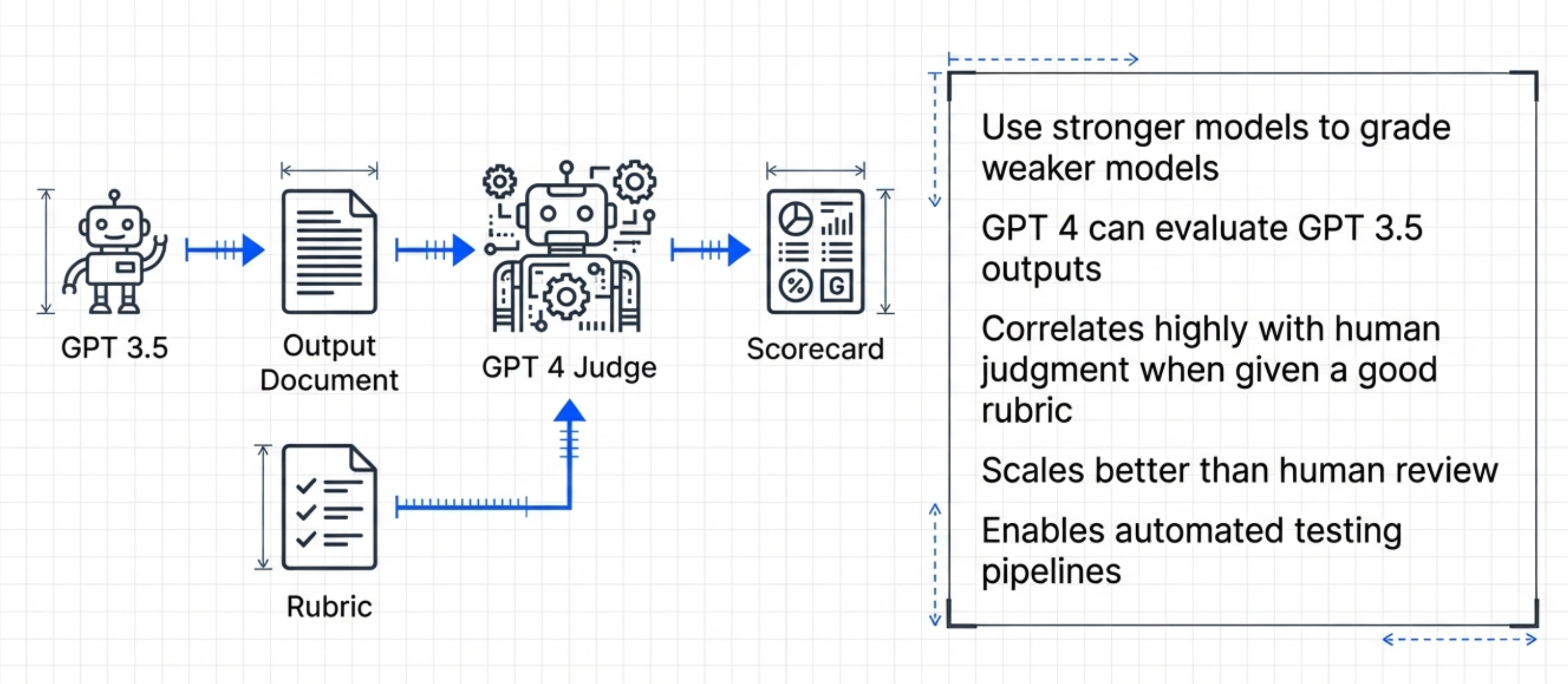
Now let’s build an LLM judge from scratch.
This is where most teams get stuck. They understand the concept. They don’t know how to implement it.
Here’s the step-by-step process.
Step 1 - Define Your Evaluation Prompt
Your evaluation prompt needs four components:
The rubric (scoring criteria)
Reference examples
The input query
The output to evaluate
Here’s a template:
You are an expert evaluator for a customer support chatbot.

Evaluate the following response on these criteria:

1. Correctness (1-5): Is the information factually accurate?
2. Completeness (1-5): Does it fully address the query?
3. Clarity (1-5): Is it easy to understand?
4. Tone (1-5): Does it match our friendly, helpful brand voice?

Reference examples:
[Insert your 5-point and 1-point reference examples here]

User query: {query}
Assistant response: {response}

Provide scores for each criterion and a brief justification.
Step 2 - Test on Known Examples
Before automating, test manually.
Take 10 outputs where you know the correct score. Run them through your LLM judge. Compare the judge’s scores to your ground truth.
If the judge scores match your expectations, great. If not, refine your prompt.
Common fixes:
Add more reference examples
Make criteria more specific
Add chain-of-thought reasoning (”Explain your reasoning before scoring”)
Use a better model (GPT-4 vs GPT-3.5)
Iterate until the judge is reliable.
Step 3 - Implement with Claude Code
You don’t need to write this yourself. Take your evaluation prompt from Step 1, your test dataset, and give Claude Code a prompt like:
Here’s a template:
"Build me an eval pipeline that takes a CSV of test cases (columns: query, response, expected_score), runs each one through Claude as a judge using this evaluation prompt [paste prompt], parses the scores, and outputs a summary CSV with per-criterion averages and a flagged list of any responses scoring below 3.5 on any dimension."That gets you a working eval pipeline in minutes. You can iterate from there - add visualizations, connect it to your production logs, set up scheduled runs.
The PM’s job is defining the rubric, curating the test cases, and interpreting the results. The implementation is a solved problem now.
Step 4 — Read the Results and Find the Gaps
Once your pipeline runs, you need to know what to look at.
Tell Claude Code:
“Generate a summary dashboard from my eval results. Show me mean score per criterion, the distribution of scores, the 10 worst-performing examples, and the 10 best-performing examples.”Then do your PM job: look at the worst performers. Why did they fail? Is there a pattern? Are certain query types consistently weak? Is one criterion dragging everything down?
This is where your product sense matters. The numbers tell you where to look. Your judgment tells you what to do about it.
Step 5 - Set Quality Thresholds
This is a pure product decision. No tool makes this call for you.
Define minimum acceptable scores for each criterion. Example:
Correctness: Must be ≥4.0 average
Completeness: Must be ≥4.0 average
Clarity: Must be ≥3.5 average
Tone: Must be ≥3.5 average
If any criterion falls below threshold, the feature isn’t ready to ship.
Once you’ve decided your thresholds, add them as pass/fail gates in your pipeline. Tell Claude Code:
“Add pass/fail checks to my eval pipeline. Flag the run as failed if any criterion average drops below these thresholds: [paste thresholds]. Output a clear pass/fail summary at the end of each run.”Step 6 - Run Evals Continuously
Don’t eval once. Eval continuously.
Run your eval suite before every release, daily in production on a sample of traffic, after every prompt change, and after every model update. This catches regressions before users see them.
Tell Claude Code:
“Set up my eval pipeline to run nightly against a random 1% sample of yesterday’s production traffic. Send me a Slack notification if any criterion drops below threshold.”Now you have a system, not a one-off test.
Common LLM Judge Pitfalls
Pitfall 1 - Using the same model as your judge and your product Solution: Use a stronger model as your judge (e.g., GPT-4 to judge GPT-3.5 outputs)
Pitfall 2 - Not calibrating your judge Solution: Regularly compare judge scores to human scores and adjust prompts
Pitfall 3 -Judging too many dimensions at once Solution: Break complex rubrics into multiple judge calls
Pitfall 4 -Not using temperature=0 for judges Solution: Always use temperature=0 for evaluation (you want deterministic scores)
6. Production Monitoring That Actually Works
Evals don’t stop at launch. Production monitoring is where most teams fail.
You shipped the feature. Users are using it. Now what?
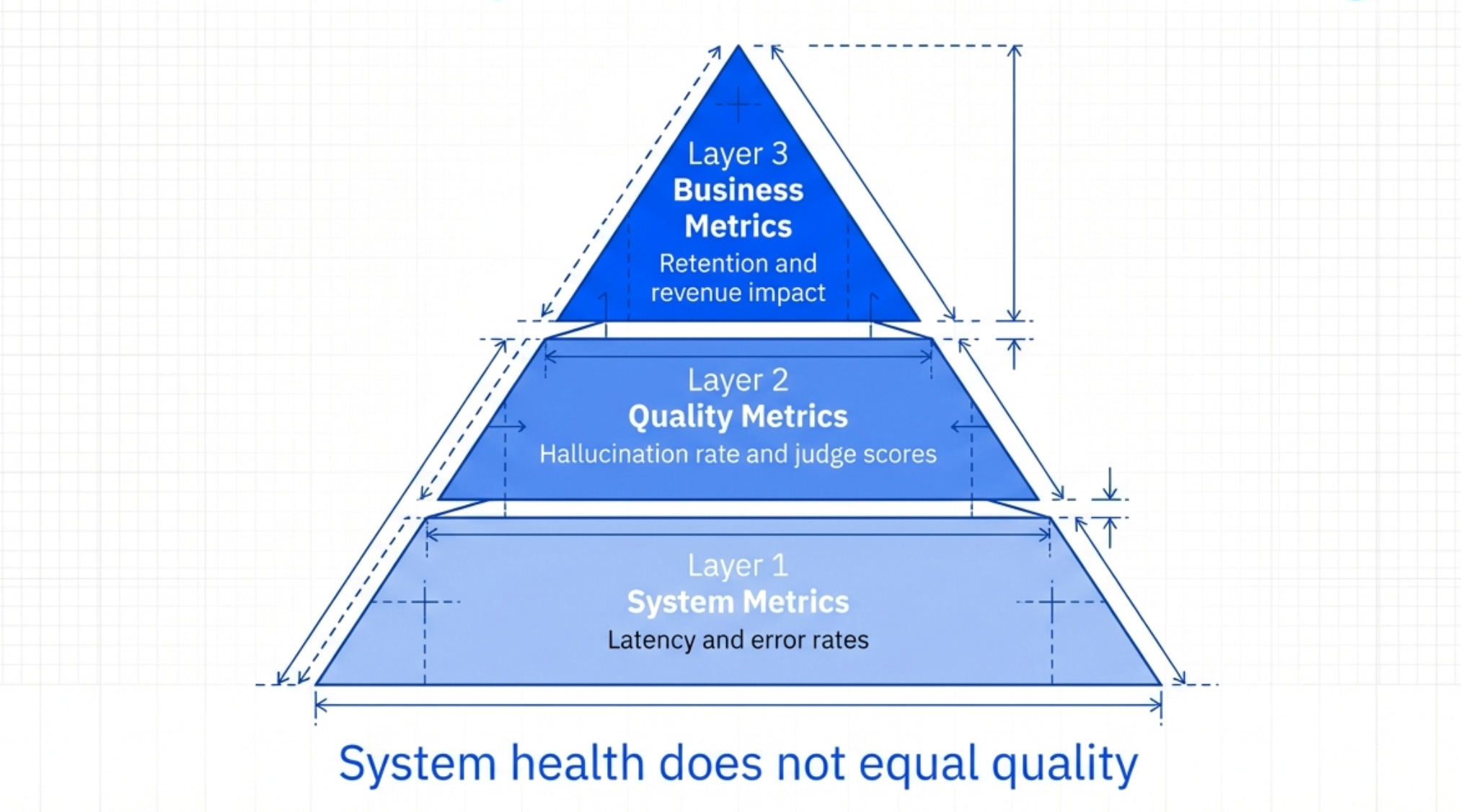
The Three Layers of Production Monitoring
Layer 1 - System Metrics These are the basic health metrics:
Latency (p50, p95, p99)
Error rate
Token usage
API costs
Timeout rate
If these metrics spike, something’s wrong with your infrastructure.
Layer 2 - Quality Metrics
These measure if your AI is performing well:
Average LLM judge scores
Human feedback scores (thumbs up/down)
Task success rate (did the user get what they wanted?)
Hallucination rate (how often does it make things up?)
These tell you if your feature is actually working.
Layer 3 - Business Metrics These measure if your AI is driving value:
Feature adoption rate
User retention
Customer satisfaction (CSAT/NPS)
Support ticket deflection
Revenue impact
These tell you if the feature is worth keeping.
You need all three layers. System metrics without quality metrics = blind to bad outputs. Quality metrics without business metrics = no idea if it matters.
Setting Up Automatic Alerts
Don’t just monitor. Alert.
Set up alerts for:
Quality scores drop below threshold
Error rates spike above 1%
Latency exceeds 3 seconds for p95
Hallucination rate exceeds 5%
When alerts trigger, investigate immediately.
The Human Review Queue
Sample 1% of production traffic for human review.
Every day, have someone on your team review 10-20 real user interactions. Grade them manually using your rubric.
This catches things LLM judges miss. It keeps you connected to real user experiences.
If human scores diverge from LLM judge scores, recalibrate your judge.
The Feedback Loop
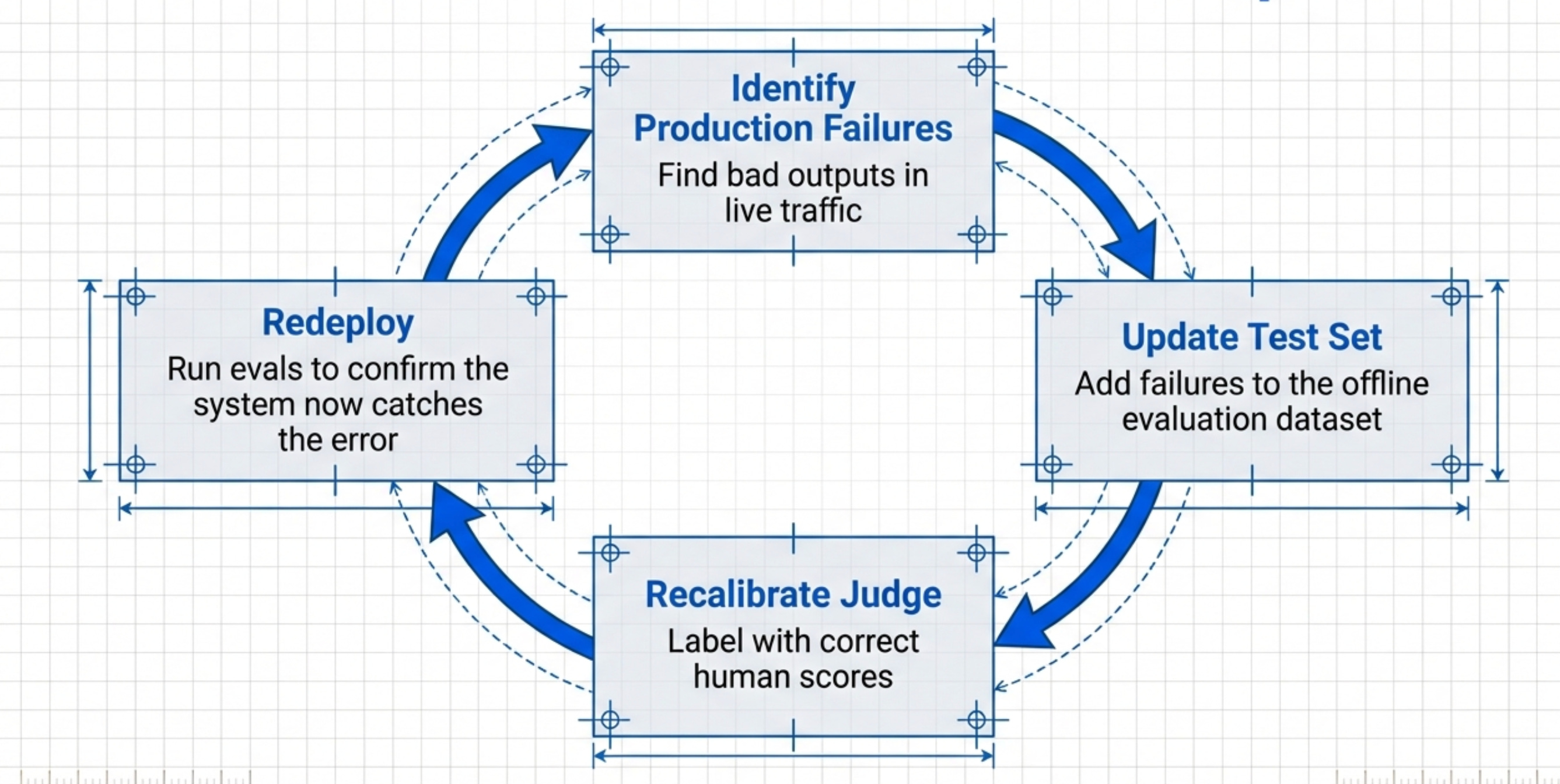
Production monitoring should feed back into your eval dataset.
When you find bad outputs in production:
Add them to your test dataset
Label them with correct scores
Rerun evals to confirm your system would catch them now
This creates a virtuous cycle. Your evals get better over time.
When to Rollback
Define rollback criteria ahead of time.
Example criteria:
Quality score drops >10% from baseline
Error rate exceeds 5%
More than 3 critical bugs reported in first 24 hours
Business metrics show negative impact
If any criterion is met, rollback immediately. Don’t wait to see if it “gets better”.
Final Words
AI evals isn’t just testing with a new name.
It’s a fundamentally new skill that combines product sense, technical understanding, and statistical thinking.
Here’s what you need to do:
Build a comprehensive evaluation rubric for your product
Implement the right metrics (retrieval, generation, task-specific, LLM-as-judge)
Create an LLM judge that automates evaluation
Set quality thresholds before launch
Monitor quality continuously in production
Feed production learnings back into your eval dataset
And most importantly: don’t ship without evals.
Where to find Ankit Shukla
Related Content
Newsletters:
Podcasts:
PS. Please subscribe on YouTube and follow on Apple & Spotify. It helps!