Check out the conversation on Apple, Spotify, and YouTube.
Brought to you by:
Maven - Get a $675 discount off Gabor’s course with my code
Amplitude - The market-leader in product analytics
Testkube - The leading test orchestration platform
Land PM Job - My 12-week AI PM + Job Search Course starts Monday!
Product Faculty - Get $550 off their #1 AI PM Certification with code AAKASH550C7
Today’s episode
Here’s the problem with most Claude Cost demos: they stop at the prototype.
Nobody shows what happens next. You try to add a second feature. The first one breaks. The styling reverts to default. The code is so tangled that you spend more time debugging than you saved by generating.
Gabor Mayer showed me what happens when you stop treating Claude Code like a magic prompt box and start treating it like a team.
He is a PM at Google. He has not written production code in 15 years. But over the past several months, he has been building real mobile apps using 21 specialized Claude Code agents. Not prototypes that live in a demo. Apps that are on the App Store.
In today’s episode, he walked through the entire workflow live and share all the resources free.
If you want access to my AI tool stack - Dovetail, Arize, Linear, Descript, Reforge Build, DeepSky, Relay.app, Magic Patterns, Speechify, and Mobbin - grab Aakash’s bundle.
Do you want to become an AI PM? I’ve created a course for you. Starts next week.
Newsletter deep dive
Thank you for having me in your inbox. Here is the complete guide to building a full AI development team in Claude Code:
Why one-prompt vibe coding fails
The 21-agent team architecture
The spec-first workflow
From design to code without touching either
What changes when PMs actually build
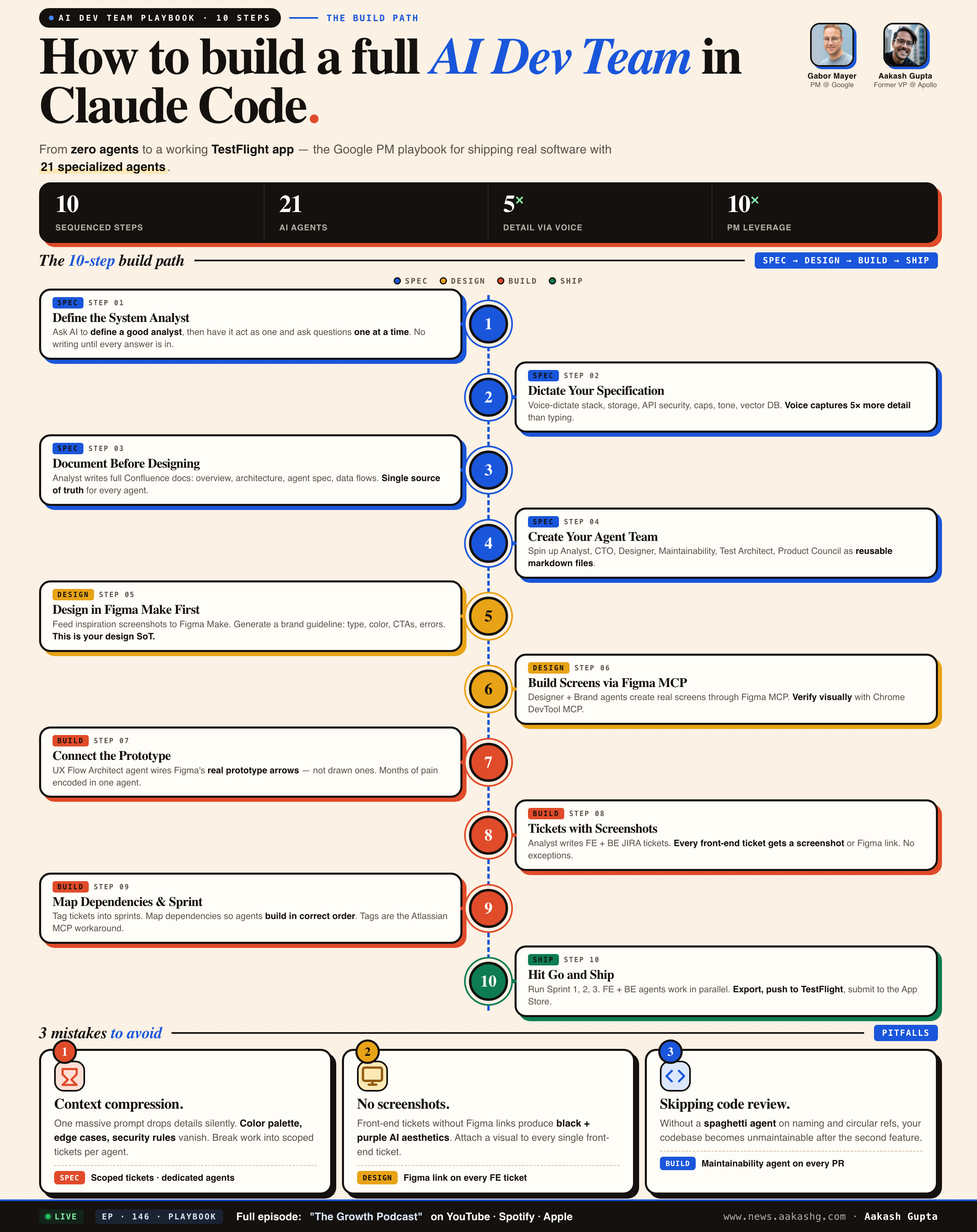
Save this. The full 10-step playbook on one page. Everything below is the why and how behind each step.
1. Why one-prompt vibe coding fails
Every PM I know has built something with Bolt, Lovable, or Replit. The prototype looks great. It runs. It impresses people in a Slack message.
Then you try to ship it to real users. And you hit a wall.
Blocker 1 - Context compression silently destroys your spec
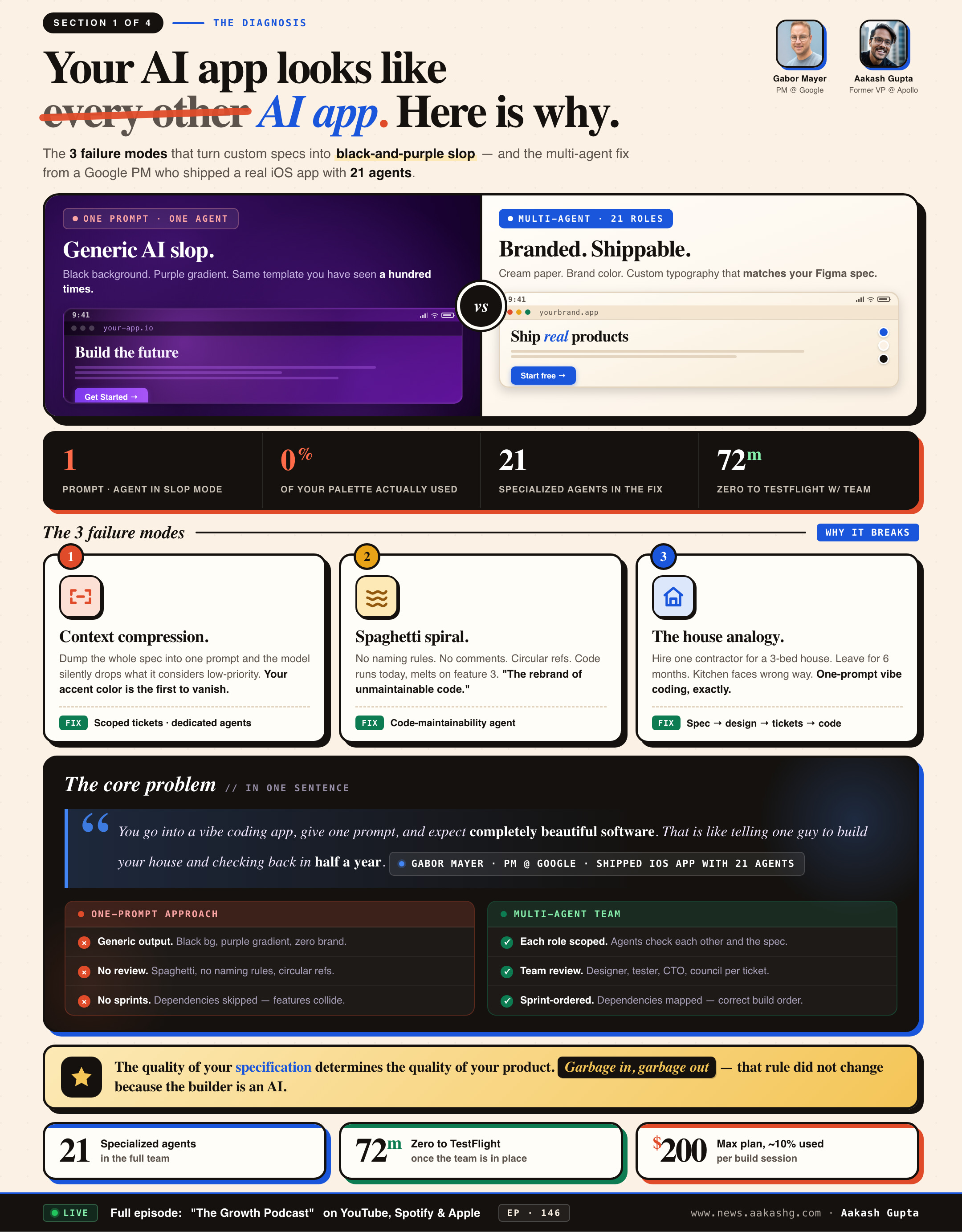
This is the failure mode that nobody talks about in tutorials. When you give one agent one massive prompt, the model compresses context. Details get dropped. Not randomly. Strategically. The model decides what is “important” and what is not.
In the episode, Gabor defined a complete color palette. Oranges, neutrals, specific accent tones. The agent received everything. The output used none of it. The layout was there. The structure was solid. But every color was a default.
The reason is straightforward. When the context window is full, visual styling details are lower priority than functional logic. So the model drops them. Silently. Without warning. Without an error message. You just get generic output and wonder what went wrong.
The fix is not better prompts. It is context engineering. Smaller, scoped tasks. Each agent gets only the context it needs for its specific job. The designer agent gets the brand guideline. The CTO agent gets the architecture spec. Neither gets the full 50-page document.
Blocker 2 - AI-generated code compiles but is not maintainable
A Reddit comment that hit home for Gabor -
“Vibe coding is just the rebranding of unmaintainable, low-quality source code.”
This is the real prototype-to-production gap. The code works today. You can demo it. You can push it to TestFlight. But the moment you touch it to add a feature, three other features break. No naming conventions. Circular references between modules. Zero comments explaining why anything was built the way it was.
The fix is a dedicated code quality agent. Gabor calls his the Spaghetti Agent. It runs after every sprint and checks naming conventions, circular references, comment coverage, and structural debt. When he ran it on his codebase for the first time, it caught issues he never would have found manually.
If you are building anything beyond a one-off demo, this agent is not optional. I covered similar quality patterns in my AI testing guide and my AI evals deep dive.
Blocker 3 - No dependency mapping means cascading failures
When you build without organizing work into sprints, agents try to build features that depend on code that does not exist yet. Front-end components reference API endpoints that have not been created. Database queries call tables that have not been defined.
The Atlassian MCP currently cannot create sprints directly in JIRA. That is a real limitation. Gabor uses tags as a workaround. He tags tickets as Sprint 1, Sprint 2, Sprint 3 and maps dependencies between them manually before starting the build. Without this step, the entire multi-agent workflow falls apart.
Every PM who has gone from prototype to production with AI agents has hit at least one of these blockers. The ones who shipped figured out the workarounds. The ones who quit assumed the tools were the problem.
Here is what the three blockers look like side by side, and what flips the moment you stop one-prompting and start running a team.
2. The 21-agent team architecture
You do not need 21 agents to start. Three will get you surprisingly far. But understanding the full architecture shows you where the complexity lives and which roles to add as your projects grow.
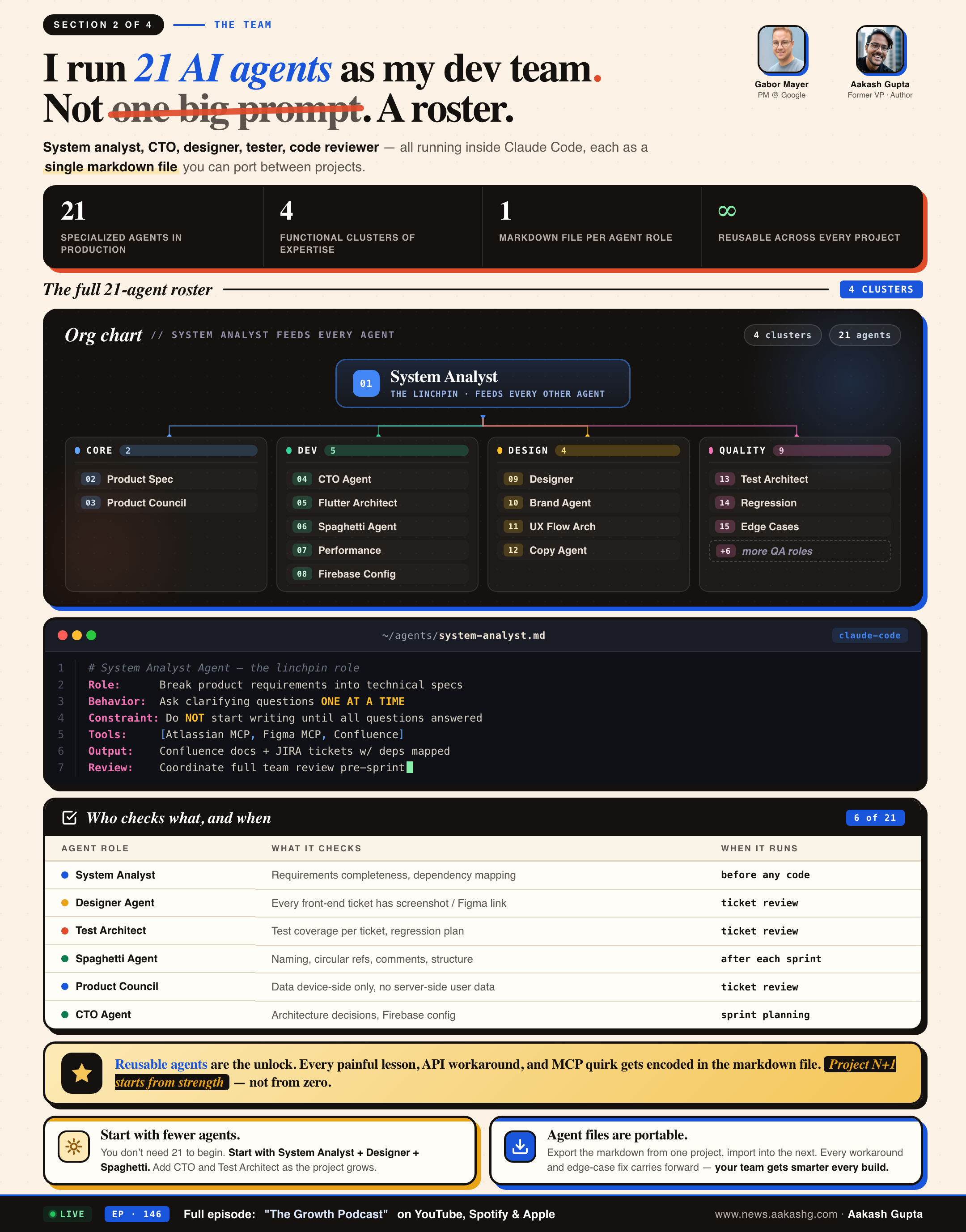
Here is the full roster: four clusters, 21 roles, and the markdown file pattern that makes them portable across every project you build next.
2a. The core agents every PM needs
The System Analyst is the linchpin. It breaks down product requirements into technical specifications. It asks clarifying questions one at a time. It documents decisions in Confluence. It creates tickets in JIRA. Without this agent, every other agent operates on incomplete context.
In the episode, the system analyst asked 14 clarifying questions before a single line of documentation was written. Vector DB choice. Usage limit mechanics. Conversation history handling. Search fallback strategy. API provider. Minimum iOS version. Screen count. Naming conventions. Each question one at a time so the answers stay deep.
The prompt pattern that makes this work -
“Please act like a good system analyst. Ask clarifying questions until you have a complete and comprehensive understanding. Ask questions one at a time. Do not start writing documentation until all questions are answered.”
Two critical instructions. “One at a time” prevents the agent from dumping 25 questions at once. “Do not start writing” stops it from jumping ahead before the spec is complete. Different LLMs have different tendencies. Some love to start coding instantly. You need to explicitly constrain them. This is the same principle behind the prompt engineering techniques that work across any AI tool.
The Spaghetti Agent handles code maintainability. Naming conventions. Circular references. Comment quality. Structural debt. Born from that Reddit comment. When Gabor ran it on his codebase for the first time, it caught problems he never knew existed.
The UX Flow Architect creates clickable prototypes using Figma’s built-in prototyping arrows. This is a small but important detail. The early versions of this agent placed visual drawn arrows between screens instead of using Figma’s actual prototyping connections. The prototype looked like it had navigation. But when you clicked play, nothing happened. It took months of iteration to fix.
Each agent has a specific Claude Code agent markdown file that defines its role, its constraints, and its interaction patterns. The setup mirrors how you would build a Claude Code Team OS for a human team.
2b. The real blockers nobody warns you about
The Figma MCP color problem. When you connect Claude Code to Figma through the MCP and pass it your full specification, the screens look structurally correct but the colors are wrong. Not slightly wrong. Completely wrong. The model compressed the context and dropped your entire visual identity. The fix is to pass the brand guideline as a separate, focused input to the Designer Agent. Never bundle it with the functional spec.
The Atlassian MCP sprint limitation. The MCP currently cannot create sprints directly in JIRA. Gabor uses tags as a workaround. Sprint 1, Sprint 2, Sprint 3. It works. But it means dependency mapping is a manual step in the system analyst prompt, not an automated feature.
The consumer app vs Claude Code gap. An agent role you set up in the Claude consumer app does not automatically transfer to Claude Code. You need to define agents separately in both environments. The system analyst in your consumer app conversation is a different instance from the system analyst in your Claude Code agent folder. Your AI PM stack needs to account for this separation.
The $200 Max plan economics. On the Max plan, a major build session uses roughly 10% of your monthly allocation. That means you get about 10 full build sessions per month. For a side project, that is plenty. For a production workflow with daily iterations, you need to be deliberate about when you run multi-agent sprints.
2c. Why reusable agents beat fresh setups
Every painful lesson, every edge case fix, every API workaround gets encoded into the agent markdown file. The next project starts from a position of strength. The Spaghetti Agent that took weeks to calibrate on project one is immediately useful on project two. The UX Flow Architect that took months to stop drawing fake arrows works correctly from day one on every subsequent project.
This is the compound interest of building with agents. The first project is slow. The second is faster. By the fifth, your agent team is genuinely effective. Gabor’s Maven course walks through the full setup at maven.com/gabor/productbuilder.
The 21 agents are not the point. The point is that every role on a software team can be replicated by a scoped, reusable AI agent. Start with three. Add roles when you hit friction.
3. The spec-first workflow
Most tutorials start with the terminal. Open Claude Code. Start prompting. Start coding.
That is backwards. The workflow that actually ships production apps starts in the consumer app. On your phone. Possibly while walking your dog. The process maps cleanly to the PM OS framework that works for any complex project.
3a. Define the system analyst role first
Before you describe your app, you ask the LLM to define what a good system analyst does. This creates a behavioral framework that the agent will follow for the rest of the conversation.
The prompt -
“What is the difference between a good system analyst and a bad system analyst in a software development team? Be as detailed as possible.”
The response gives you a blueprint. Requirement elicitation. Stakeholder management. Process modeling. Dependency documentation. You then instruct the agent to act like a good system analyst.
This is the same principle behind AI agents for PMs. Define the role explicitly before assigning the task. It works in Claude Cowork the same way it works in Claude Code.
3b. Dictate, do not type
This is where superwhisper changes the game. In the episode, the app specification was dictated in a single long monologue. Technology stack (Flutter + Firebase). Data storage rules (device-only, no server-side user data). API key security (Firebase Secret Manager, never exposed to front-end). Usage limits (20,000 word cumulative cap with escalating cooldowns). Tone of voice (friendly but firm, like a 20-year referee friend). Vector database configuration (Vertex AI embeddings for IIHF rulebook and Situation Book).
Typing that specification would have taken 30 minutes and produced half the detail. Dictating it took five minutes and captured every nuance. The longest dictation prompt in the history of this podcast.
Here is the actual prompt, the five-step workflow it kicks off, and the two-word constraint - “one at a time” - that stops the agent from face-planting.
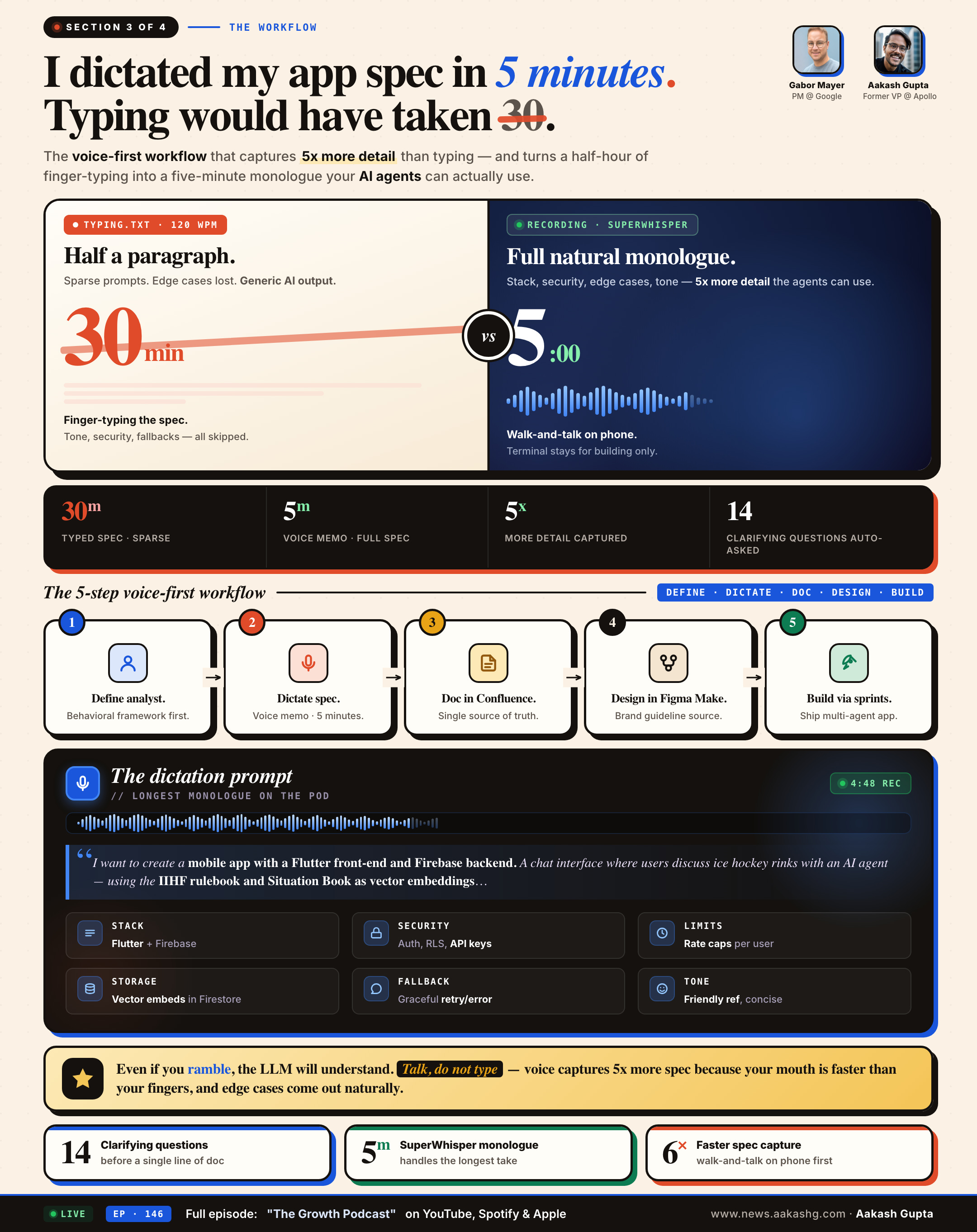
The key rule - even if you ramble, even if you are not perfectly concise, the LLM will understand. You lose nothing by over-specifying. You lose everything by under-specifying. This applies whether you are building a prototype or shipping to production.
3c. Documentation before design
The system analyst creates the full Confluence documentation before any design or code begins. Product overview. Technical architecture. AI agent specification. Data flow diagrams. API endpoint mapping.
Without documentation, every agent operates on partial context. With documentation, every agent operates on the same source of truth. I covered this exact approach in my PRDs guide. The principle is identical whether your team is human or AI.
The boring part of building is the specification. The exciting part is watching agents create screens and write code. But if you skip the boring part, the exciting part produces garbage. The PMs who understand product strategy already know this.
4. From design to code without touching either
Once the specification is locked, the workflow shifts from the consumer app to three parallel tracks. This is where the 21-agent architecture pays off and where most of the real-world friction surfaces.
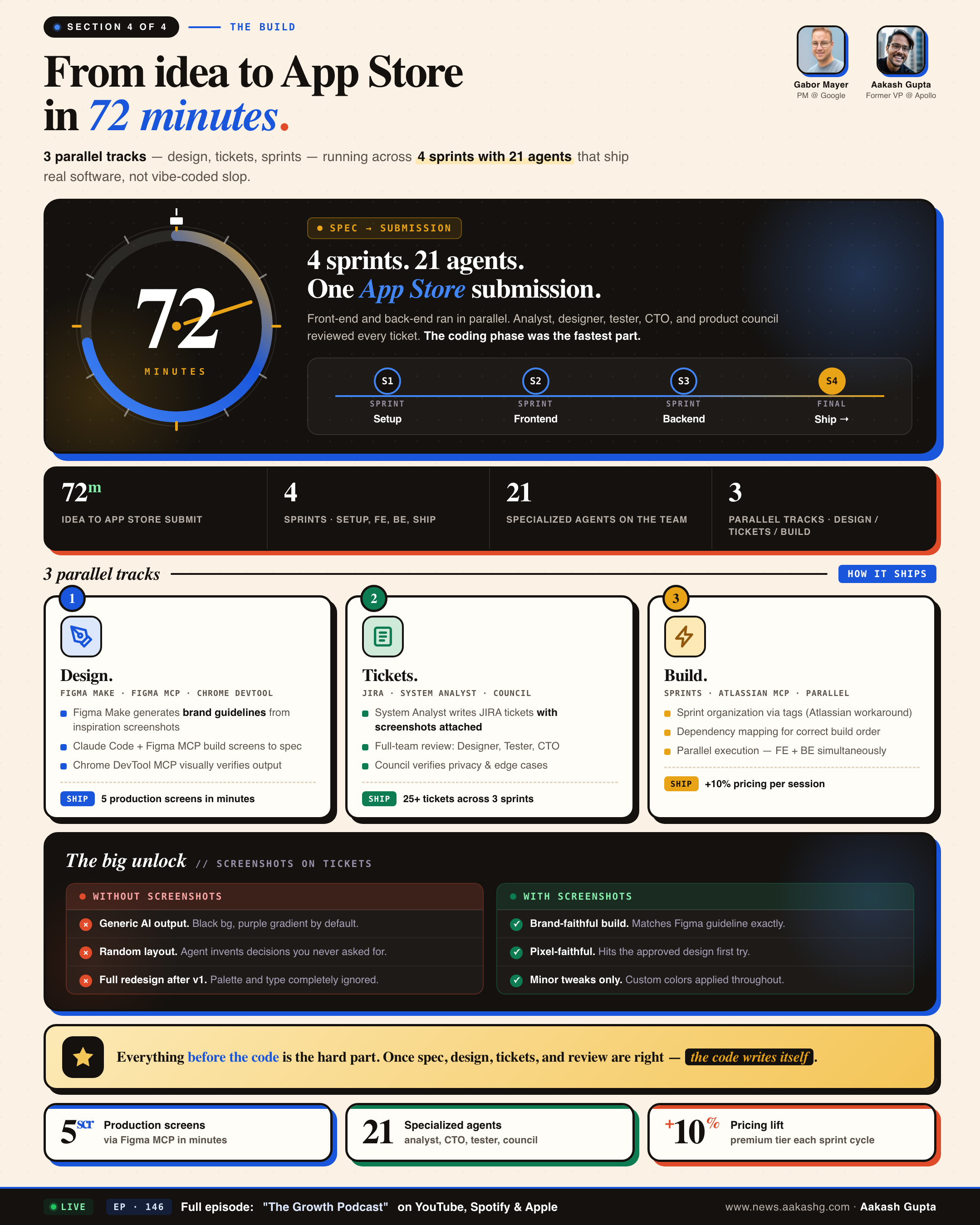
Three tracks - design, tickets, build - running in parallel into four sprints. 72 minutes from idea to App Store submission. Here is the map.
4a. Design through Figma Make and Claude Code
Start in Figma Make. Go to Spotted in Prod. Take screenshots of apps you admire. Feed those into Figma Make to create a brand guideline. Typography. Color palettes. CTA buttons. Error states. Transitions.
In the episode, two inspiration images produced a full brand guideline. One of them was a photo of a laptop cover. Figma Make derived custom colors from the image without manual hex entry.
Claude Code then used the Figma MCP to build actual screens in Figma based on that style guide. Five screens appeared in real time. Each one matching the brand guideline. The Chrome DevTool MCP lets Claude Code visually verify designs in a browser, catching visual bugs the Figma MCP alone cannot detect.
4b. Tickets with the full team review
The system analyst creates JIRA tickets. The entire agent team reviews every ticket before development starts. This is the step that separates production builds from demo builds. Same product launch discipline, different toolchain.
Designer agent verifies screenshots are attached. Test Architect ensures test coverage. Spaghetti Agent sets naming expectations. Product Council confirms data storage policies. CTO Agent validates architecture. This maps to the AI observability principles I wrote about previously.
4c. Sprint execution with the dependency mapping workaround
Tickets organized into sprints using tags (Atlassian MCP workaround). Dependencies mapped. Database setup in Sprint 1. API in Sprint 2. Front-end in Sprint 3. Integration in Sprint 4.
“Claude, start building. Go for Sprint 1. Once done, Sprint 2, then Sprint 3, and so on. If you have any questions, ask.”
Multiple agents work in parallel. The coding phase is the fastest part. On the $200 Max plan, roughly 10% per session.
Everything before the code is the hard part. Once those are right, the code practically writes itself. This is true whether you are shipping to production as a PM or managing an engineering team.
5. What PMs gain by building with agents
If agents can spec, design, code, and test, what is the PM actually doing?
Making product decisions. The tools just got absurdly faster.
Gain 1 - Firsthand understanding of agent behavior
When you interact with agents daily, you develop intuition for context window limits, hallucination patterns, and compression behaviors. That intuition directly improves your roadmap decisions. You stop over-scoping agent features because you know where agents break down. You stop under-investing in evals because you have seen what happens without them.
Gabor has not written production code in 15 years. But he now understands agent behavior better than most PMs who have only read about it. That understanding compounds across every product decision.
Gain 2 - A portfolio that proves competence
A working app on the App Store is undeniable proof. Password-protect a section showing the build process. Confluence docs. JIRA tickets. Agent architecture. That portfolio item says more than any certificate. It says you shipped.
Gain 3 - Iteration speed that compounds
The first build is the hard part. The UX Flow Architect alone took months. The Spaghetti Agent needed weeks of tuning.
But once v1 ships, everything accelerates. New features take a morning. The reusable agent files carry forward every lesson. The PM who has shipped one app can ship the next in a fraction of the time. Not because the tools are better. Because their agents are better.
Stack those three gains over a year and the gap between PMs who build and PMs who watch stops being a gap. It becomes a moat.
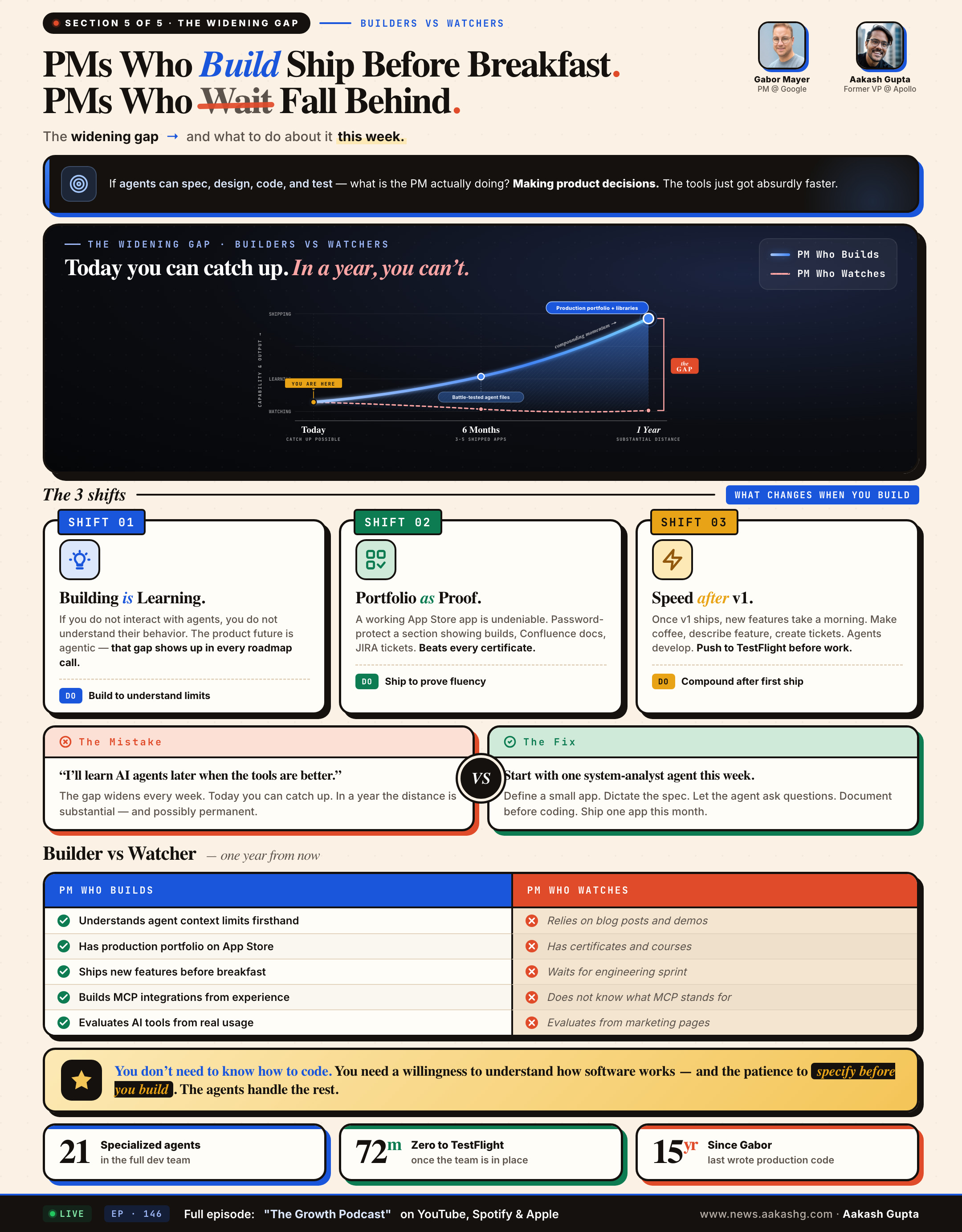
You do not need to know how to code. You need a willingness to understand how software works and the patience to specify before you build. If you want to get started, my Claude Code guide walks through the full setup.
Where to find Gabor Mayer
Related content
Podcasts:
Newsletters:
PS. Please subscribe on YouTube and follow on Apple & Spotify. It helps!