Check out the conversation on Apple, Spotify, and YouTube.
Brought to you by:
Bolt: Ship AI-powered products 10x faster
Jira Product Discovery: Plan with purpose, ship with confidence
Kameleoon: Leading AI experimentation platform
Amplitude: The market-leader in product analytics
Product Faculty: Get $550 off their #1 AI PM Certification with my link
Today’s episode
If you want to run a truly AI-pilled product team, you need to get everyone on a Team OS.
When Hannah Stulberg (PM @ DoorDash, Author of In The Weeds) first described this concept I had never heard of it, but after she showed it to me, I realized it’s absolutely genius.
We’ve done a lot of Claude Code episodes on this podcast, but this episodes is something genuinely new and impactful for PMs.
It’s the architecture and steps to building a Team Operating System so that you can scale your impact as a PM and product team:
You checking in every single thing you do to a repo
Team members checking it before checking with you
Everyone building one shared, compounding knowledge base
If you are building a team that runs on AI, this is the episode to watch.
If you want access to my AI tool stack - Dovetail, Arize, Linear, Descript, Reforge Build, DeepSky, Relay.app, Magic Patterns, Speechify, and Mobbin - grab Aakash’s bundle.
I’m starting the third cohort of my Land PM Job program soon. Join us.
Newsletter deep dive
As a thank you for having me in your inbox, here is the complete guide to building a Team OS with Claude Code:
The Team OS structure
Context management theory
Scaling analytics across functions
How to write 10x docs with planning
The learning flywheel
1. The Team OS structure
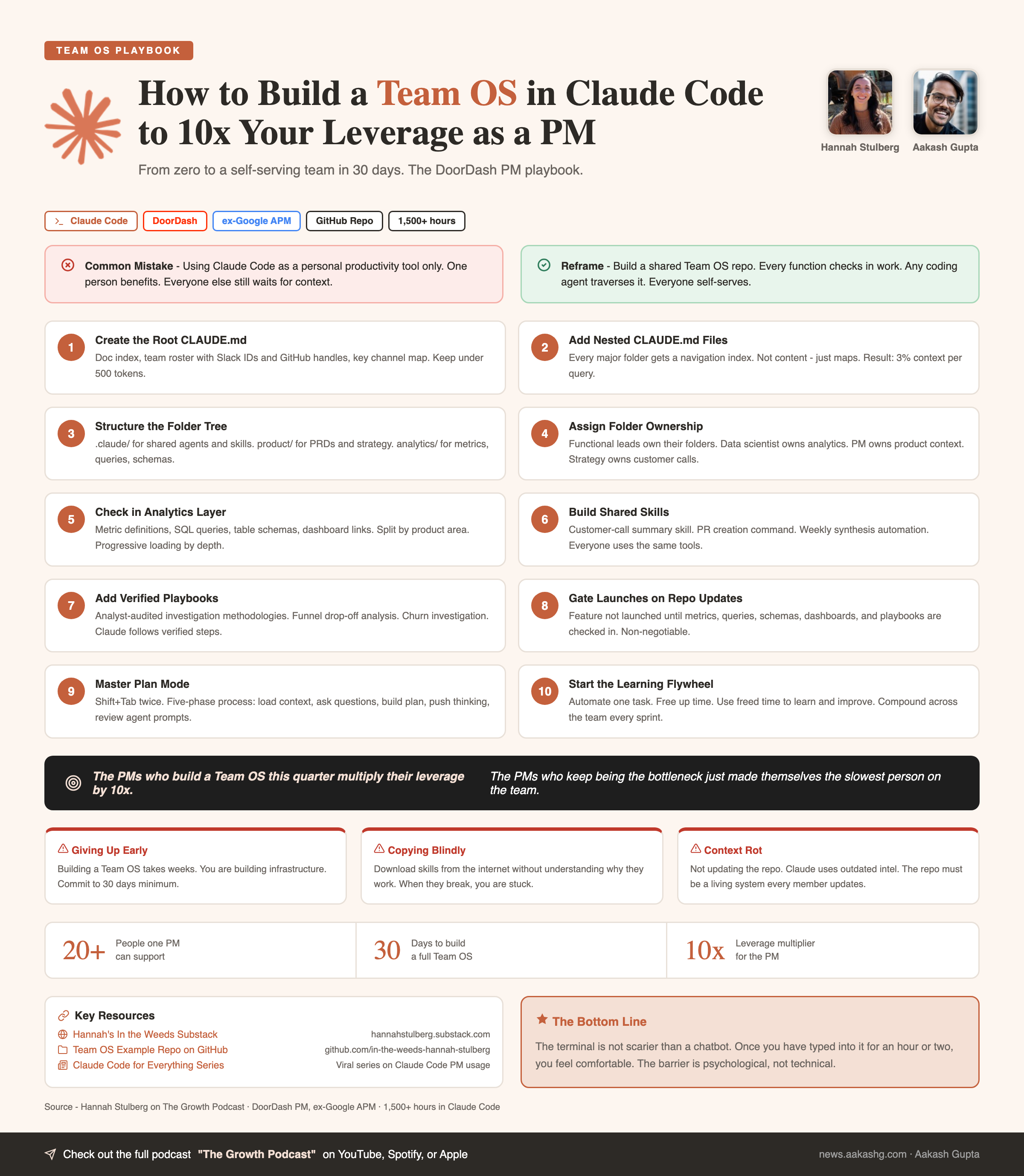
As a PM, you are the human router. Every question goes through you. Every answer lives in your head or in a doc no one can find. That does not scale when one PM supports 20 people across five functions.
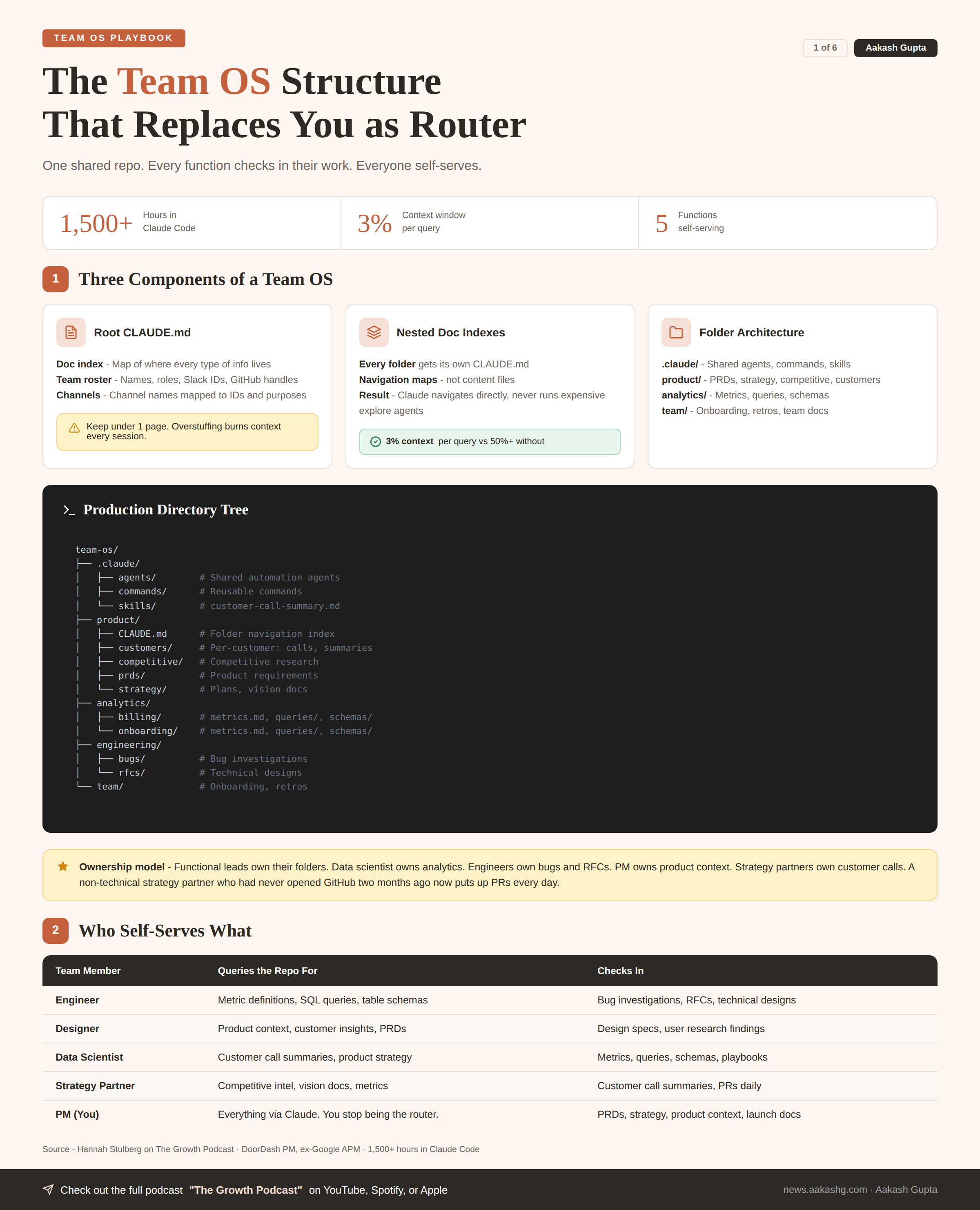
A Team OS fixes this. One shared GitHub repo. Every function checks in their work. Any coding agent traverses it. Everyone self-serves.
Component 1 - The root Claude MD
The root file loads every session. Keep it to three things -
Doc index. A map telling Claude where every type of information lives. Without it, Claude runs expensive explore agents searching your file system. With it, Claude navigates directly on the first try.
Team roster with handles. Every person, their role, their Slack ID, their GitHub handle. Enables natural language queries like “Slack Alex about the bug from today’s call.”
Key Slack channels. Channel names mapped to IDs and purposes. “Send this in the product channel” just works.
Don’t stuff too much into the root file. If it is longer than one page, you are burning context on information not needed in 80% of sessions.
I covered the foundations of building a PM operating system in my setup guide. The root Claude MD is the single most important file in that system.
Copy-pasteable template -
# Team OS

## Doc index
- product/       - PRDs, strategy, competitive research, customers
- analytics/     - Metrics, queries, schemas, dashboards, playbooks
- engineering/   - Bug investigations, RFCs, technical designs
- team/          - Onboarding, retros, team-level docs
- .claude/       - Shared agents, commands, skills

## Team
- Alex Chen (eng lead) - @alexc (Slack) / @achen (GitHub)
- Morgan Li (designer) - @morganl (Slack) / @mli (GitHub)
- Taylor Kim (analyst) - @taylork (Slack) / @tkim (GitHub)
- Jordan Wu (strategy) - @jordanw (Slack) / @jwu (GitHub)

## Channels
- #product-team    - Daily standups and feature updates
- #eng-team        - Engineering discussions and PRs
- #data-insights   - Weekly metrics and analysis reports
Component 2 - Nested doc indexes
Every major folder gets its own Claude MD. These are not content files. They are navigation maps.
In the episode, a query about customers consumed only 3% of the context window. Claude did not touch analytics. Did not read engineering docs. Navigated directly to the right files.
Without nested Claude MDs, Claude runs explore agents across your entire repo. Burns tokens. Takes longer. Leaves less thinking room.
Template for every folder -
# [Folder name]

## Doc index
- subfolder/file - What it contains and when to read it
- subfolder/file - What it contains and when to read it

## Key context
1-2 sentences needed in 80%+ of sessions in this folder
Component 3 - The folder architecture
A production Team OS has three top-level sections -
.claude/folder. Shared agents, commands, skills. Customer call summary skill. PR creation command. Weekly synthesis automation. Everyone uses these.Product development. Customers, competitive research, PRDs, strategy docs, launch emails, meeting summaries, analytics (metrics/queries/schemas), engineering (bugs/RFCs). Organized by function, then product area.
Team folder. Onboarding guides, retros, team-level docs.
The full directory tree -
team-os/
├── .claude/
│   ├── agents/
│   ├── commands/
│   └── skills/
│       └── customer-call-summary.md
├── product/
│   ├── CLAUDE.md
│   ├── customers/
│   │   ├── CLAUDE.md
│   │   ├── acme-corp/
│   │   │   ├── CLAUDE.md
│   │   │   ├── calls/
│   │   │   └── summaries/
│   │   └── forge-labs/
│   ├── competitive/
│   ├── prds/
│   ├── strategy/
│   │   ├── plans/
│   │   └── vision/
│   └── workflows/
├── analytics/
│   ├── CLAUDE.md
│   ├── billing/
│   │   ├── metrics.md
│   │   ├── queries/
│   │   └── schemas/
│   └── onboarding/
├── engineering/
│   ├── bugs/
│   └── rfcs/
└── team/
    ├── onboarding/
    └── retros/
The ownership model matters too. On the team in the episode, functional leads own their folders but the whole team agrees on structure. The data scientist owns analytics. Engineers own bugs and RFCs. The PM owns product context. Strategy partners own customer calls.
A non-technical strategy partner who had never opened GitHub two months ago now puts up PRs every day. This is not just for technical people.
Every level of nesting is a context-saving decision. The more precisely you organize, the less Claude has to read. That is the whole game.
2. Context management theory
You open Claude Code. You paste in a PRD. A competitive analysis. Three customer call transcripts. You have already consumed half your context window before you even ask a question.
No thinking room left. That is the trap.
The Team OS is built on the opposite principle. Load only what you need, when you need it.
The four pillars
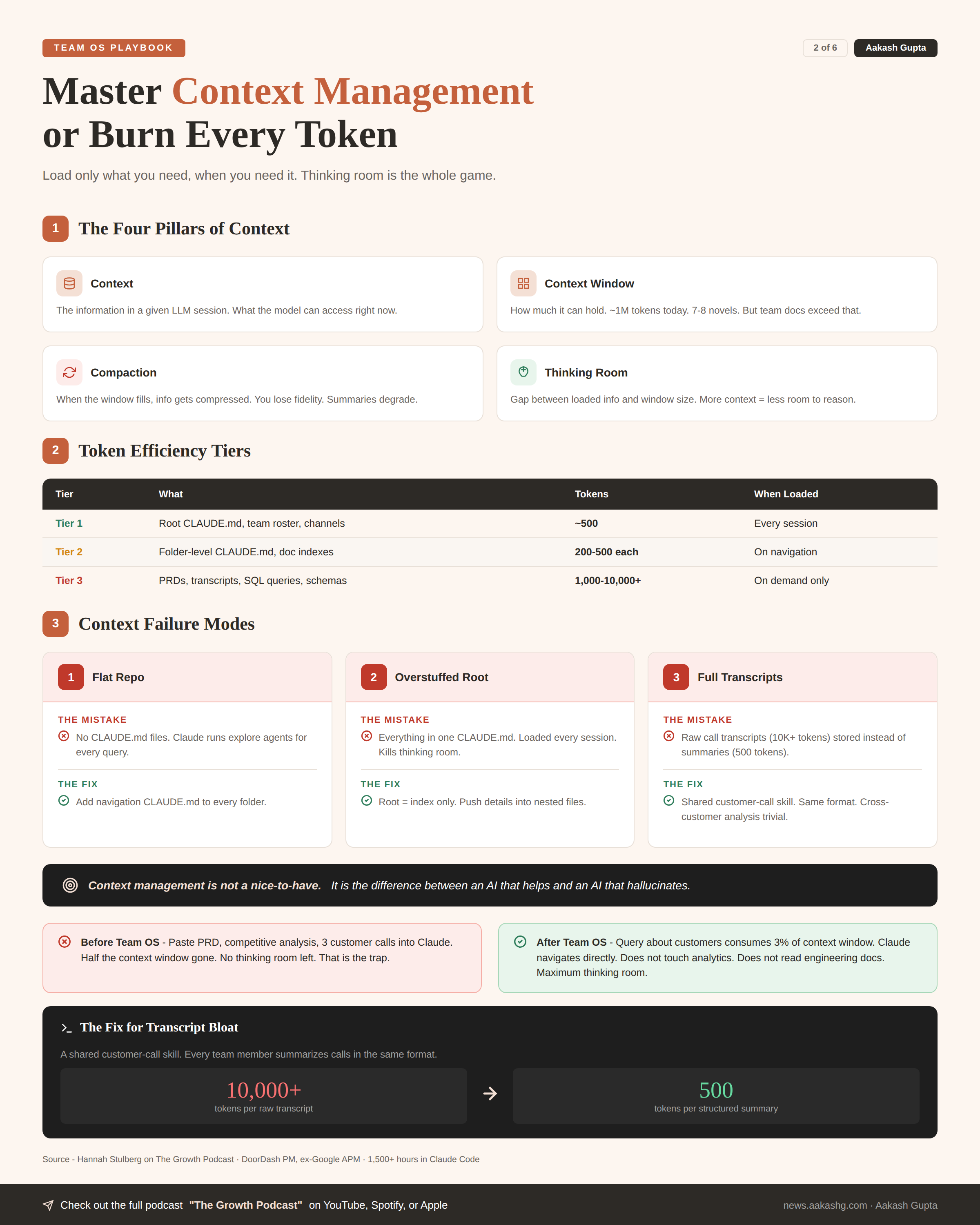
Context. The information in a given LLM session. What the model can access right now.
Context window. How much it can hold. ~1M tokens today. Seven to eight novels. But the docs produced by a single team far exceed that.
Compaction. When the window fills, information gets compressed. You lose fidelity. Compressed summaries are much less useful than originals.
Thinking room. The gap between loaded info and window size. This is where the model reasons. More context loaded = less room to think.
I wrote about these foundations in my context engineering guide with an OpenAI product leader.
The token efficiency framework
Not all context is equal. A well-structured repo has three tiers -
Tier 1 - Always loaded. Root Claude MD. Team roster. Channel map. Under 500 tokens. Loaded every session.
Tier 2 - Loaded on query. Folder-level Claude MDs. Doc indexes. 200-500 tokens each. Only loaded when Claude navigates to that folder.
Tier 3 - Loaded on demand. Actual content files. PRDs, transcripts, SQL queries. Hundreds to thousands of tokens. Only loaded when specifically needed.
The magic is in the split. If you only need to know what a metric measures, Claude reads metrics.md and stops. Does not pull SQL queries. Does not pull table schemas.
Someone who burns hundreds of thousands of tokens and hits their usage limit in 30 minutes generally has unstructured, unoptimized context. The Team OS eliminates this.
Failure modes that burn context
Flat repo with no Claude MDs. Claude runs explore agents for every query. Burns thousands of tokens just navigating. I have seen teams hit usage limits in 30 minutes because of this.
Overstuffed root file. Everything dumped into one Claude MD. Loaded every session whether needed or not. Kills thinking room before you even start working.
Full transcripts instead of summaries. A one-hour customer call is 10,000+ tokens. A structured summary is 500. The repo points Claude to summaries first. Full transcripts only if the summary does not answer the question.
The skill that fixes the third failure mode - a shared customer call skill. Every team member summarizes calls in the same format. Same structure. Same fields. Cross-customer analysis becomes trivial.
Here is the pattern. You have ten people taking calls with twenty different customers. Without the skill, every summary looks different. With the skill, Claude can compare apples to apples across hundreds of calls in seconds.
Context management is not a nice-to-have. It is the difference between an AI that helps and an AI that hallucinates.
3. Scaling analytics across functions
Your engineer is on call at 2 AM. Something looks wrong with billing. They need to check a dashboard. They need the query for churn by segment. They need the table schema to validate the data.
You are asleep. Your analyst is asleep. The engineer is stuck.
This section pays for the entire Team OS investment.
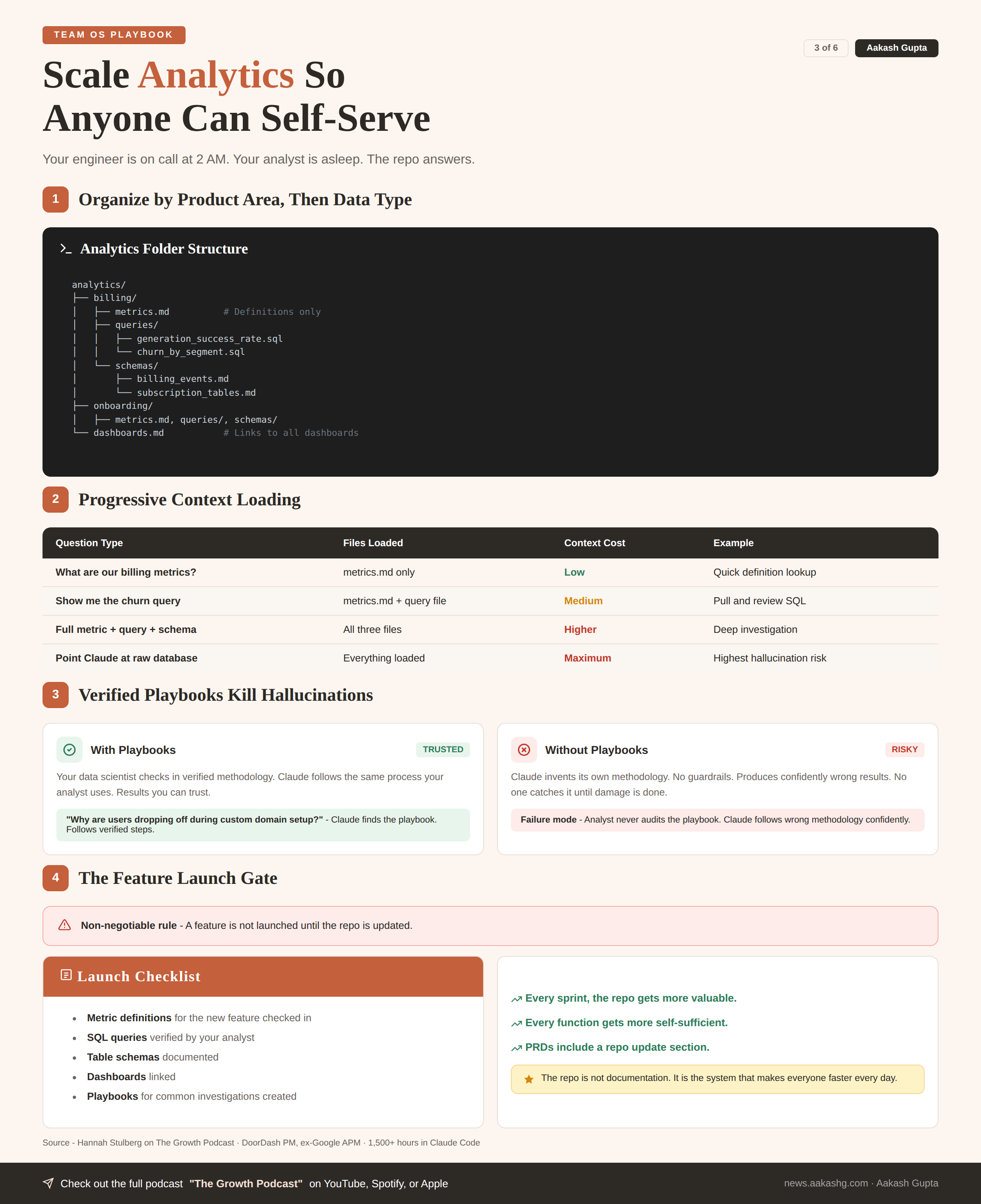
Layer 1 - Metrics, queries, and schemas
Organize by product area, then by data type -
analytics/
├── billing/
│   ├── metrics.md          # Definitions only
│   ├── queries/
│   │   ├── generation_success_rate.sql
│   │   └── churn_by_segment.sql
│   └── schemas/
│       ├── billing_events.md
│       └── subscription_tables.md
├── onboarding/
│   ├── metrics.md
│   ├── queries/
│   └── schemas/
└── dashboards.md           # Links to all dashboards
The split is intentional -
What are our billing metrics? - Claude reads
metrics.mdonly. Low context.Show me the churn query. - Claude reads metrics + query file. Medium.
Full metric + query + schema. - All three files. Higher but still targeted.
Point Claude at the raw database. - Everything loaded. Maximum burn. Maximum hallucination risk.
The prompt that shows the power - “How do we calculate generation success rate? Show me the metric definition, the SQL query, and the table schema.” Claude navigates to the right product area. Pulls exactly three files. Gives you everything.
Hook this up to Snowflake MCP or another analytics tool. Claude does the actual analysis using verified approaches your analyst checked in.
Layer 2 - Playbooks and verified approaches
Your data scientist has a process for investigating funnel drop-off. That process belongs in the repo as a playbook.
When you ask “why are users dropping off during custom domain setup?” Claude finds the playbook. Follows the same methodology your analyst uses. Produces a result you can trust.
This is how you kill hallucinations in data analysis. Not by hoping. By giving Claude verified approaches.
The failure mode to watch for - not having the analyst audit the playbooks. If Claude follows a wrong methodology, it produces confidently wrong results. Your data scientist must own and verify the analytics folder.
Layer 3 - The feature launch gate
Make this non-negotiable. A feature is not launched until the repo is updated.
The checklist -
Metric definitions for the new feature checked in
SQL queries verified by your analyst
Table schemas documented
Dashboards linked
Playbooks for common investigations created
This is how shared context compounds. Every sprint, the repo gets more valuable. Every function gets more self-sufficient.
I covered the broader launch process in my product launch playbook. Add repo updates as a hard gate.
A second gate worth adding - the repo is part of the PRD itself. When you write a PRD for a new feature, include a section specifying what metrics, queries, and schemas will be checked into the repo as part of the launch.
The repo is not documentation. It is the system that makes everyone on the team faster every single day.
4. How to write 10x docs with planning
You type a prompt. Claude makes all the decisions. You get something back. You spend two hours fixing it.
That is not Claude Code’s fault. That is a planning failure.
The junior employee metaphor is perfect. You hired a brilliant junior. Then gave them zero guidance.
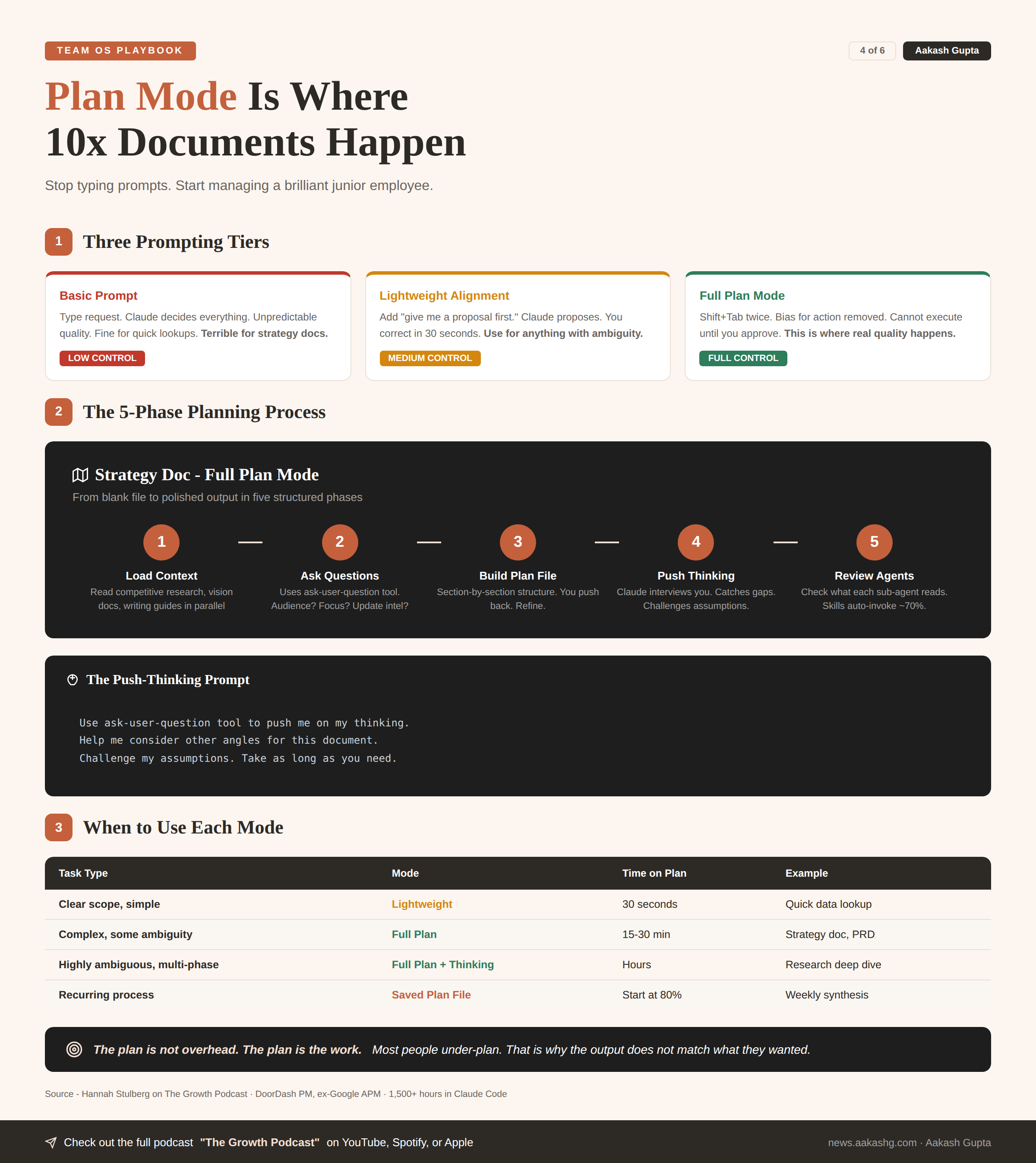
Three prompting tiers
Basic prompt. Type request. Claude decides everything. Unpredictable quality. Fine for quick lookups. Terrible for strategy docs.
Lightweight alignment. Add “give me a proposal first.” Claude proposes an approach. You correct direction in 30 seconds. I use this for anything with even slight ambiguity.
Full plan mode. Press Shift+Tab twice. Claude’s bias for action is removed. Cannot execute until you approve the plan. This is where real quality happens.
In the episode, even the lightweight alignment produced dramatically better results. Claude used the repo context to generate a competitive analysis proposal without being told to. Found the right folders. Read the right docs. Proposed the right structure.
The full planning process
Five phases for a strategy doc -
Phase 1 - Load context. Claude reads competitive research, vision docs, writing guides in parallel. Structured repo = only relevant files loaded.
Phase 2 - Ask user questions. Claude uses the ask-user-question tool. Who is the audience? What is the focus? Should we update competitive intel?
Phase 3 - Build the plan file. Section-by-section document structure. You read the plan. Push back. Refine.
Phase 4 - Push your thinking. The advanced move -
Use ask-user-question tool to push me on my thinking.
Help me consider other angles for this document.
Challenge my assumptions. Take as long as you need.
Claude interviews you. Catches gaps. Suggests sections you missed.
Phase 5 - Review agent prompts. For complex plans, check what each agent will be prompted with. What files will it read? What writing guide? Skills auto-invoke only ~70% of the time. Always explicitly specify in the plan.
Here is the thing. Most people rush in. Let it write a bad first draft. Then yell at it for getting things wrong. The fix is not better prompting after the fact. It is better planning before you start.
I covered the Claude Code setup foundations. Plan mode is where intermediate users become advanced.
Parallel agents and temp files
A single agent cannot read 40 context files and write a great long doc. Context fills. Quality degrades.
Fix these by doing followling-
Split the document across agents. Each gets specific context files and your writing guide.
Each agent writes to a temp file. If ten agents return work to the parent simultaneously, the context window overflows. You lose everything. You must prompt Claude to use temp files - it does not always do this automatically.
The orchestrating agent compiles the final document from temp files.
Two more advanced techniques -
Verification prompts. Tell Claude how to self-check. Require sources for claims. Use Playwright MCP to verify front-end output.
Save plan files to the repo. Native plan files get wiped every 24-72 hours. If you spent three hours on a plan, save it. Next time you start at 80% done. Your team can reuse it. OpenAI published that they made plan files first-class artifacts of their engineering repos.
The decision matrix for when to plan -
Straightforward task, clear scope - lightweight proposal. 30 seconds.
Complex doc, some ambiguity - full plan mode. 15-30 minutes on the plan.
Highly ambiguous, multi-phase research - full plan mode with thinking partnership. Could be hours spread across a day.
Recurring process - saved plan file in the repo. Start at 80% done every time.
Most people under-plan. That is why the output does not match what they wanted. The plan is not overhead. The plan is the work.
5. The learning flywheel
After 1,500 hours, Hannah is still iterating on her setup every single day. You should be, too.
The beginner’s mindset
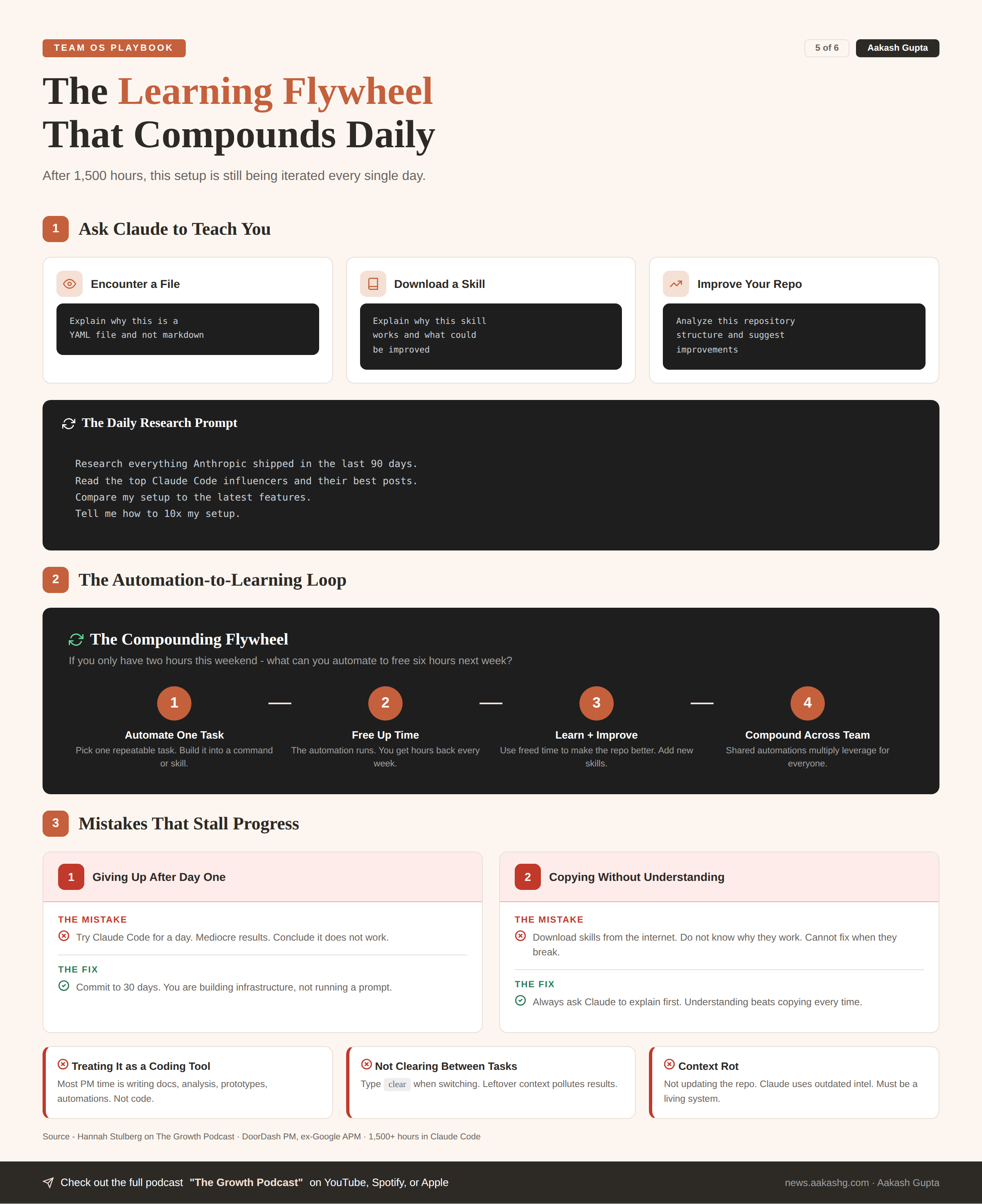
Ask Claude to teach you. This one habit accelerates learning faster than anything else.
When you encounter a file you do not understand - explain why this is a YAML file and not markdown
When you download someone else’s skill - explain why this skill works and what could be improved
When you want to improve your repo - analyze this repository structure and suggest improvements
The prompt I run every day -
Research everything Anthropic shipped in the last 90 days. Read the top Claude Code influencers and their best posts. Compare my setup to the latest features. Tell me how to 10x my setup.Claude’s training data gets stale. This prompt forces it to find what is new and apply it to your system.
I covered this progression in my AI PM learning roadmap. Claude Code fluency is one of the highest-leverage skills on it.
The automation-to-learning loop
If you only have two hours this weekend, ask one question - what can I automate to free up six hours next week?
The flywheel -
Automate one task → Free up time
Use freed time to learn → Improve your repo
Better repo → More automation possible
More automation → Even more time freed
Every MCP you hook up makes the system more powerful. The rule from the episode - any core software you use daily should be connected. The limit does not exist.
Shared automations compound the flywheel across the team. A weekly customer research synthesis that posts to Slack. A PR notification command that tags the right reviewer. A metrics check that runs every morning.
Mistakes that stall progress
Giving up after day one. Building a Team OS takes weeks. You are building infrastructure, not running a prompt. Commit to 30 days.
Copying without understanding. People download skills from the internet. Do not know why they work. When they break, they cannot fix them. Always ask Claude to explain first.
Treating it as a coding tool. The most misleading name in AI. Most PM time in Claude Code is writing docs, doing analysis, building prototypes, running automations. Not writing code.
Not clearing between tasks. Type
clearwhen switching. Leftover context pollutes results.Context rot. Not updating the repo. Claude uses outdated competitive intel. Outdated metrics. The repo must be a living system that every team member updates as part of their workflow.
The terminal is not scarier than a chatbot. Once you have typed into it for an hour or two, you feel comfortable. The barrier is psychological, not technical.
The PMs who build a Team OS this quarter multiply their leverage by 10x. The PMs who keep being the bottleneck for context just made themselves the slowest person on the team.
Where to find Hannah Stulberg
Related content
Podcasts:
Newsletters:
PS. Please subscribe on YouTube and follow on Apple & Spotify. It helps!