
Let’s be honest: realistically, Claude Opus 4.6 is the best new AI tool to arrive for PMs in the past year.
But here’s the thing: Bolt.new is the best harness for that power when it comes to AI prototyping for PMs.
$40M ARR in 5 months. Over 7 million users. A $700M valuation. And a $105M Series B. Those numbers are a signal: AI prototyping has changed how modern PMs work.
I sat down with Eric Simons, the CEO, on my podcast last year. What he told me changed how I think about prototyping, PRDs, and the entire product development lifecycle:
Since that conversation, I’ve spent months using Bolt.new, building prototypes, testing with users, and comparing it head-to-head against every major competitor.
This newsletter is the result.
For the full interactive experience -- with comparison tools, a tool picker quiz, animated walkthroughs, and more -- check out the companion Learn Bolt.new Guide we built entirely inside Bolt. Read the Learn Bolt.new Guide
Today’s Post
Here’s everything we’re covering:
How to Understand Bolt.new
The Role of AI Prototyping for Modern PMs
How Bolt.new Fits Into Your Product Development Process
The PM’s Tactical Guide to Bolt.new
Advanced Bolt.new Tips & Techniques
Bolt.new vs. The Competition
Real-World Case Study: landpmjob.com
Building Your PM Portfolio with Bolt.new
Prototype to Production
1. How to Understand Bolt.new
Let’s start with what Bolt.new actually is.
Bolt.new is a cloud development environment that lets you go from a natural language prompt to a full-stack, working web application in minutes. You describe what you want in plain English. Bolt.new generates the frontend, backend, and database. You iterate by chatting with it. And you deploy with one click.
That sounds like every other AI coding tool. Here’s what makes it different.
The entire environment runs in your browser
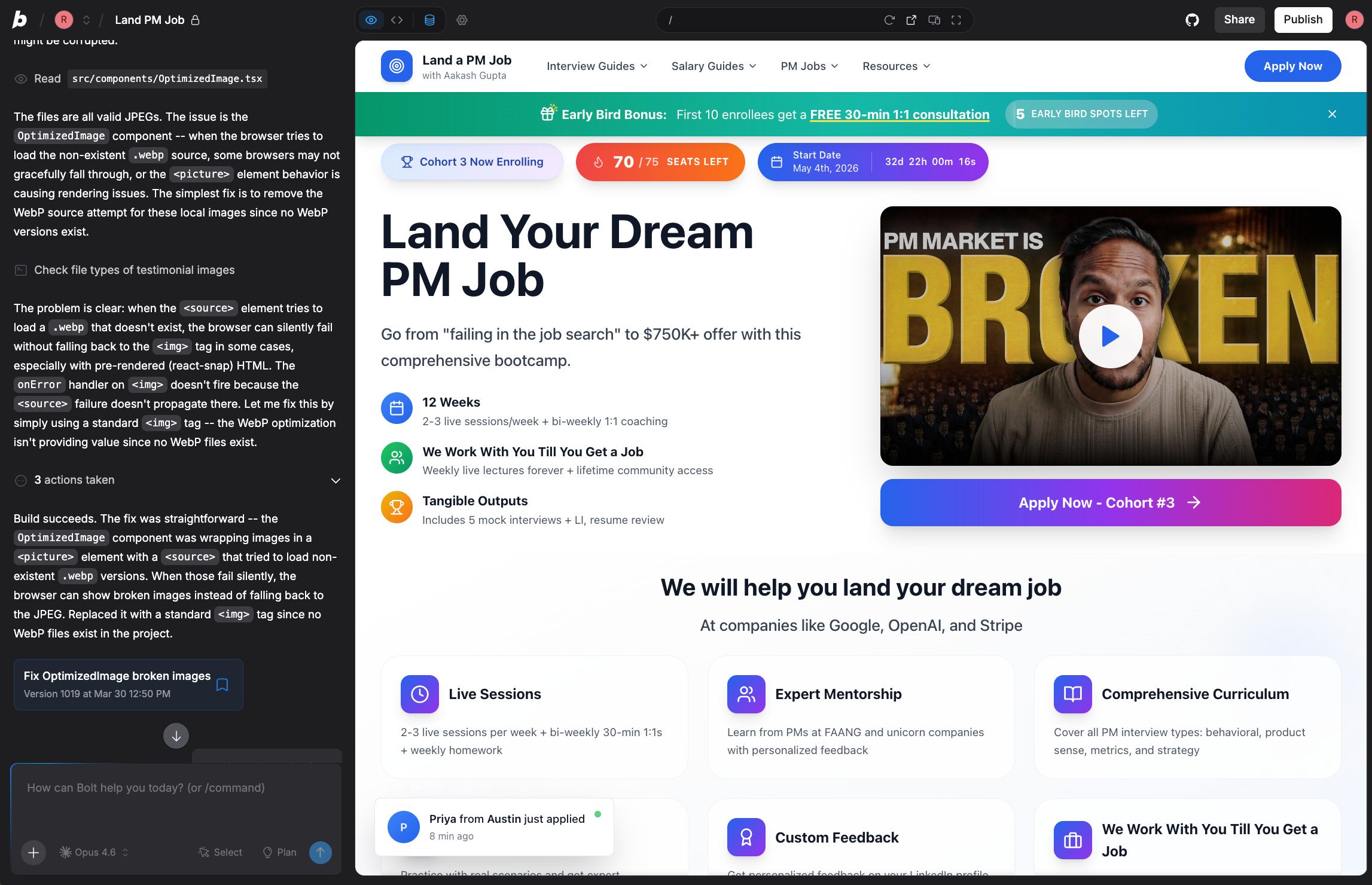
Bolt.new uses WebContainers - a technology built by the StackBlitz team that runs a full Node.js development environment directly in your browser tab. No waiting for servers to provision. Everything is instant.
This is a meaningful technical distinction. It’s why Bolt.new feels fast.
The key facts:
Founded by: Eric Simons and Albert Pai (born out of StackBlitz, which built WebContainers)
AI backbone: Claude Opus/Sonnet power the code generation
Pricing: Token-based (free tier available, Pro ~$20/mo)
Deployment: One-click to Netlify, Vercel, or Bolt.new Cloud
Integrations: Supabase, Figma, GitHub, Stripe, plus 170+ MCP integrations (via Pica) for connecting to external services
What it generates: Full-stack web apps (Vite by default, with support for React, Next.js, Astro, and other popular JS frameworks) with backend, database, and auth
For PMs, the relevant framing is this: Bolt.new is the tool that lets you build the prototype yourself, in minutes, without asking engineering for help.
2. The Role of AI Prototyping for Modern PMs
Before we dive into tactics, let’s talk about why AI prototyping matters and how to think about it strategically.
Good Ways to Use AI Prototyping
Start with Clear Product Problems. Use prototypes to explore solutions to well-defined problems, not to figure out what problem you’re solving.
Good: “Users abandon onboarding at step 3. Let’s prototype 3 different onboarding flows.”
Bad: “Let’s build something cool and see what happens.”
Prototype to Learn, Not to Build. The goal is learning and validation, not production code. Optimize for speed of learning, not code quality. Build 3 rough prototypes in a day to test different approaches, then pick the winner to refine.
Test with Real Users Early. Put prototypes in front of actual users within 24-48 hours. Don’t polish in isolation. Ship a prototype to 10 users by end of day, collect feedback, iterate tomorrow.
Use Prototypes in PRDs. Attach working prototypes to your PRDs. Show, don’t just tell. This eliminates ambiguity. Instead of writing “The dashboard will show KPIs”, link to a prototype: “Here’s what I mean: [prototype]”
Bad Ways to Use AI Prototyping
Treating Prototypes as Production Code. Prototypes are disposable. Over-investing in code quality slows learning velocity. Instead: Build fast, learn fast, throw away. Only productionize after validation.
Endless Iteration Without User Feedback. Polishing in isolation leads to solutions that miss the mark. You need user signal. Instead: Ship rough, get feedback, iterate. Repeat daily.
Using AI to Avoid Thinking. AI accelerates execution, not strategy. You still need to define what to build and why. Instead: Do the hard thinking first. Use AI to execute faster, not to decide for you.
The tool makes you faster at testing hypotheses. It doesn’t generate the hypotheses for you.
3. How Prototyping Fits Into A Modern Product Development Process
Forward-thinking teams are moving beyond documents and closer to the “bare metal” of the pixels that actually define a product. In the old way, prototypes were rare and came late. In the new way, prototypes are everywhere from day one.
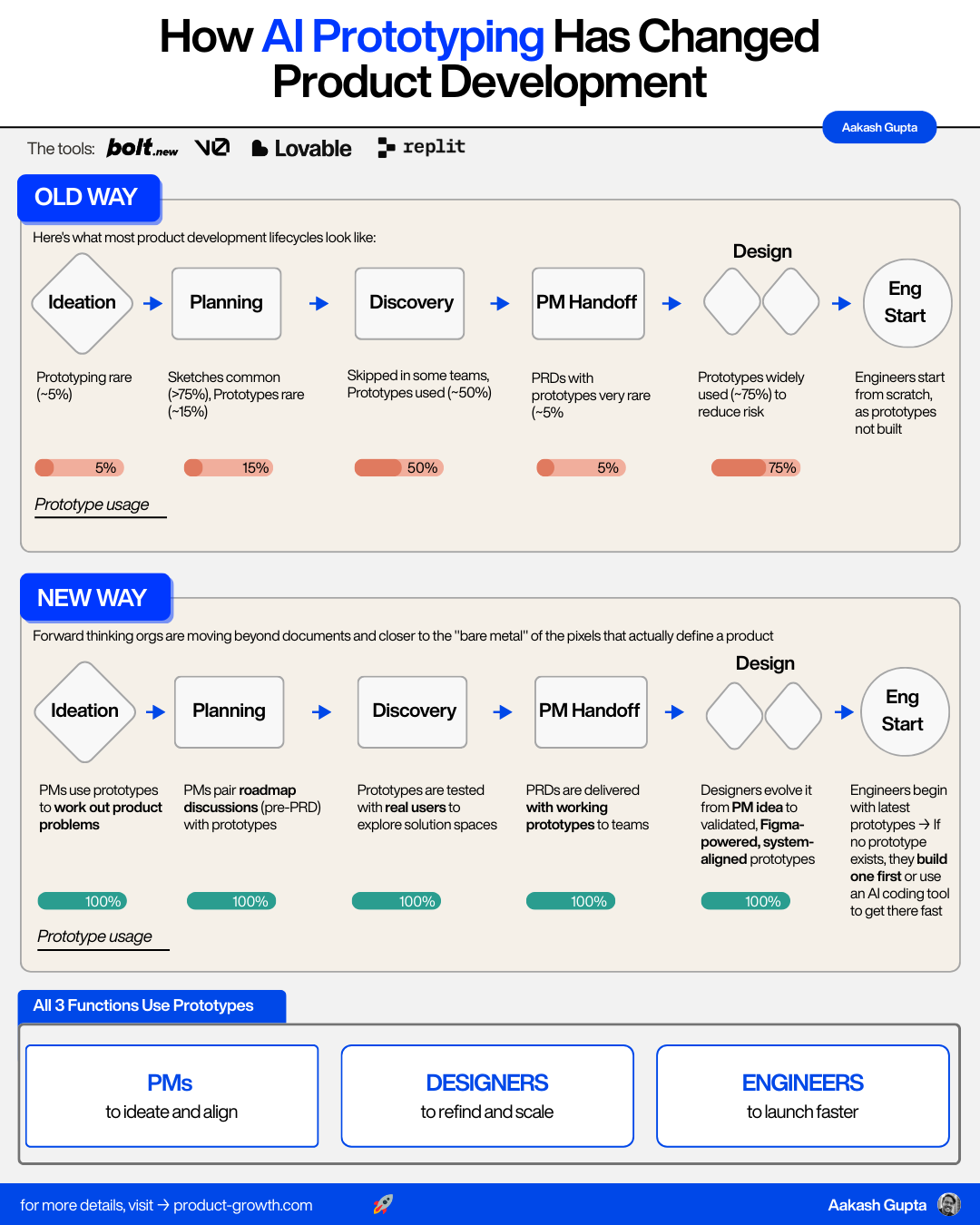
The Old Way
Ideation: Most teams barely prototype. A rare few exceptional PMs do (~5%).
Planning: Some teams use prototypes, but sketches and mockups are far more common (>75%).
Discovery: In empowered companies, many teams test prototypes (~50%). In feature factories, this step is skipped entirely.
PM Handoff: It’s rare for PMs to include prototypes in their PRDs -- often met with side-eyes from designers (5%).
Design Exploration: This is where most prototypes finally appear (~75%).
Engineering Start: Engineers typically start from scratch with a final design.
The New Way
Ideation: You use AI prototyping to work out product problems. You build 3-4 quick prototypes of different approaches in an afternoon.
Planning: You pair roadmap discussions with working demos. “Here’s what I’m proposing” goes from a paragraph in a doc to a clickable app.
Discovery: You put functional prototypes in front of real customers the same day you build them.
PM Handoff: You attach working prototypes to your PRDs. Engineers can see exactly what you mean. Designers can see your intent and elevate it.
Design Exploration: Designers go from your PM-fidelity prototype to a design-level prototype that fits into the design system.
Engineering Start: Engineers can use the prototype code as a starting point, then polish it with tools like Cursor or Windsurf for production.
In other words: all three of PM, design, and engineering are now using these tools. And the PM is leading the charge.
Anthropic does this internally. They build prototypes for every customer problem they’re considering. They launch them internally. They see what people actually use. Then they decide what to productionize.
4. The PM’s Tactical Guide to Prototyping
Now let’s get tactical. Here’s exactly how to use Prototyping effectively as a PM.
The 4-Step Workflow
Step 1 -- Start with Context. Give Bolt.new a clear picture of what you want. You can describe the design you’re after in your prompt, use Bolt.new’s Design agent to generate a beautiful starting point automatically, or import a Figma mockup for pixel-level precision. The more visual context you provide, the fewer assumptions the AI makes.
Step 2 -- Create a PRD. Before diving in, create a concise PRD that outlines core functionality, user flows, and critical requirements. You can ask Bolt.new itself to help generate this.
Step 3 -- Build. Start by describing the entire feature at a high level, then break it down into components. Be explicit about functionality and interactions.
Step 4 -- Iterate, One Step at a Time. Change one thing at a time. Create a copy before significant changes. Provide specific feedback about what is and isn’t working.
Good vs. Bad Prompts
The difference between a mediocre prototype and a great one often comes down to prompt quality. Here are real examples:
Building a Feature:
Bad: “Create a task management app”
Good: “Create a task management app with a sidebar showing projects, a main area showing task lists grouped by status (To Do, In Progress, Done), and a detail panel on the right. Use a clean minimal design with a blue accent color.”
Fixing a Bug:
Bad: “The button doesn’t work”
Good: “I want the Save button to store the form data to Supabase and then redirect to the dashboard page. Currently nothing happens when I click it.”
Design Feedback:
Bad: “Make it look better”
Good: “The card spacing is too tight. Add 16px gap between cards, round the corners to 12px, and add a subtle box shadow on hover.”
The pattern: specificity wins. The AI can’t read your mind. Tell it exactly what you want.
The Debugging Playbook
Debugging can feel like the scariest part for non-technical PMs. It doesn’t have to be. Follow these four principles:
Principle 1: Use a System Prompt. When starting a new project, define not just what your app should do, but how it should be built. System prompts should focus on architecture and development guidelines.
Principle 2: Create Instructions First. Before fixing an issue, explicitly state what you’re trying to accomplish. Don’t say “the button doesn’t work.” Say “I want the Save button to store the form data and redirect to the dashboard.”
Principle 3: Plan Before Code. When facing a complex bug, ask the AI to make a plan first without writing any code. This forces systematic thinking rather than jumping to solutions.
Principle 4: Learn Code Patterns. You don’t need to become a developer. But learning to recognize basic patterns in HTML structure, React components, and database calls helps tremendously.
5. Advanced Bolt.new Tips & Techniques
Once you’ve mastered the basics, get good at these 6 techniques:
Advanced Tip 1 - Use Different Models for Different Tasks
Switch between Claude Opus for complex architecture, Sonnet for balanced speed/quality, and Haiku for simple UI tweaks. Each model has different strengths and costs.
Example: Use Opus to design your data model and core logic, then switch to Sonnet for implementing features.
Advanced Tip 2 - Leverage Plan Mode
Before implementing, ask Bolt.new to create a plan. Review the plan, provide feedback, then execute. This prevents wasted iterations.
Example: Say “Create a plan for adding user roles and permissions” before diving into implementation.
Advanced Tip 3 - Use Design Context Strategically
Bolt.new’s Design agent can generate polished, on-brand UIs from a prompt alone. For teams with existing Figma files, importing high-fidelity mockups gives Bolt.new precise visual targets and improves first-pass quality even further.
Example: Describe your design direction in the prompt and let the Design agent handle the aesthetics, or import Figma screens when you need exact design-system alignment.
Advanced Tip 4 - Checkpoint Before Major Changes
Create explicit save points before attempting risky refactors. Use Bolt’s version history to roll back if needed.
Example: Say “Save current state as checkpoint” before major architectural changes.
Advanced Tip 5 - Publish with Built-in Security Audit
When deploying via Bolt.new Cloud, it automatically runs security checks for common vulnerabilities, exposed secrets, and auth issues.
Example: Bolt.new will warn you if API keys are hardcoded or if authentication is misconfigured before going live.
Advanced Tip 6 - Create Progress Tracker MD Files
Use markdown files to track progress, decisions, and next steps. Bolt.new can read these files to maintain context across sessions.
Example: Create a PROGRESS.md file: “Built user auth | Working on dashboard | Next: Add analytics”
6. Bolt.new vs. The Competition
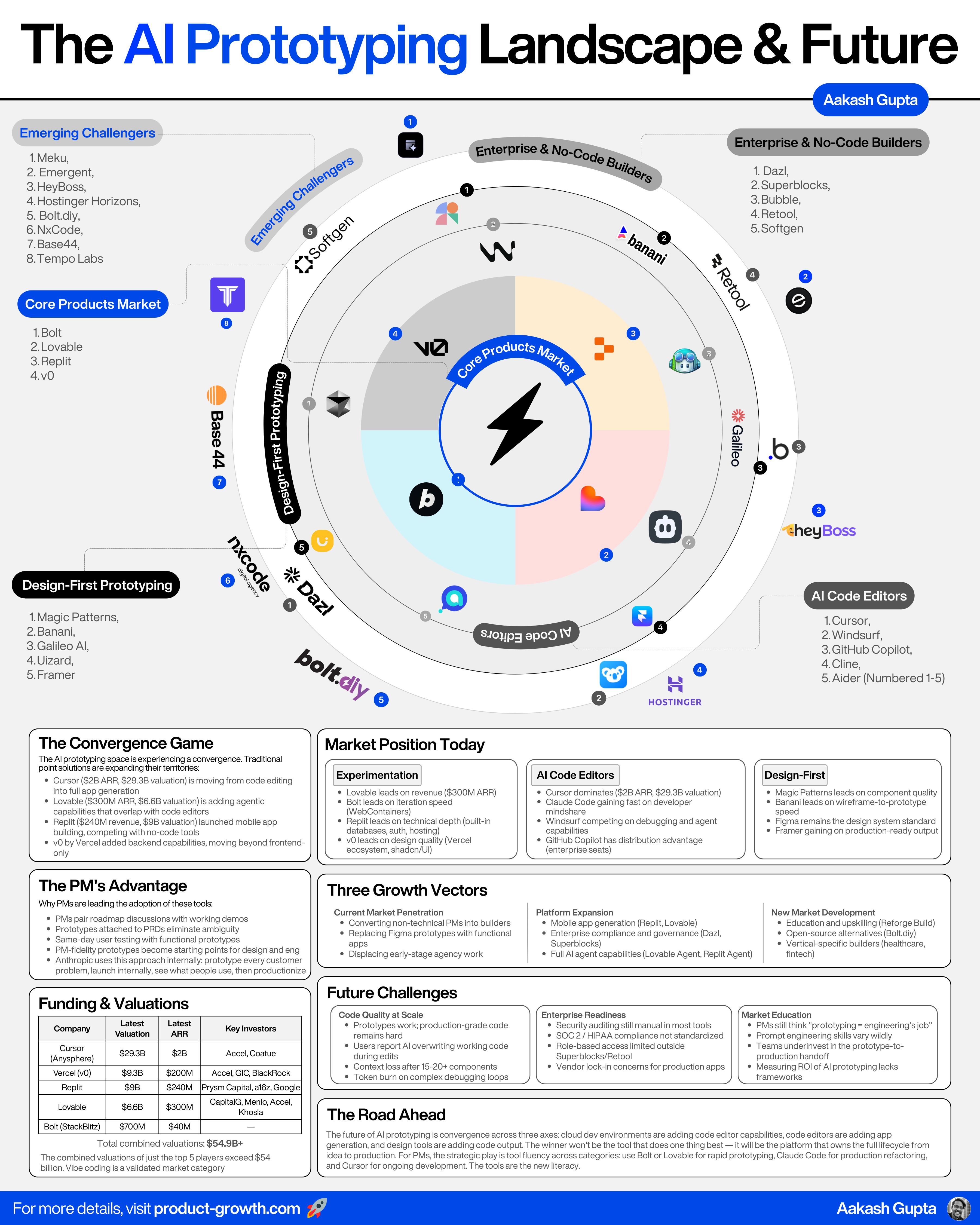
The Big Four
Bolt.new -- Quick prototypes with flexible iteration power to expand
Lovable -- Easy to use for non-technical users
Replit -- Products that require working with persistent data or internal tools
v0 -- Beautiful front-end design by default
Bolt’s strength is iteration speed. Entire environment runs in the browser (instant, no VM spin-up). Most flexible -- you pick the tools and libraries. Best for PMs who want speed and control.
Lovable has surged to $400M ARR. Its selector tool and Supabase sync make it friendlier for non-technical PMs than any other option. If your team has zero technical background, start here.
Replit, valued at $1.16B, dominates with full-stack power. Built-in databases, built-in auth. The pick for PMs building lasting tools that need to scale into real products. It sacrifices speed for depth.
v0, by Vercel (valued at $3.25B), shines at crafting polished front-end prototypes. If visual design quality is your top priority, v0 will give you the most beautiful output by default.
Additional Specialized Tools
Reforge Build -- Product education platform with hands-on AI prototyping curriculum and cohort-based learning, available in my bundle (Education)
Dazl -- Enterprise-focused AI app builder with compliance and governance features (Enterprise)
Magic Patterns -- Design-first prototyping tool with beautiful defaults and component libraries, also in my bundle (Design-First)
Base44 -- Purpose-built for building an entire app on top (Startup)
Adjacent & Complementary Tools
Claude Code (Highly Recommended) -- The most powerful AI coding assistant. It reads your entire codebase and makes complex multi-file edits autonomously. While Bolt.new gives you the prototype, Claude Code helps you take it to production with intelligent refactoring.
Cursor -- VS Code fork with built-in AI for inline editing and chat. Complements Bolt.new for local development and production code editing.
Windsurf -- Cursor alternative with strong debugging capabilities. Complements Bolt.new for complex debugging workflows.
Figma -- Industry-standard design tool with Bolt.new integration. Import Figma designs directly into Bolt.new to jumpstart prototypes.
ChatGPT -- Good for brainstorming and one-off prototypes. Complements Bolt.new for ideation phase before building.
Supabase -- Postgres database with auth, real-time, and storage. One-click integration with Bolt.new for instant backend.
My take: Use Bolt.new for rapid prototyping and iteration. Once you’re ready to take a prototype to production, use Claude Code to refactor, optimize, and scale the codebase. This combination is unbeatable.
7. Real-World Case Study: landpmjob.com
I host my entire landpmjob.com cohort platform on Bolt.new:
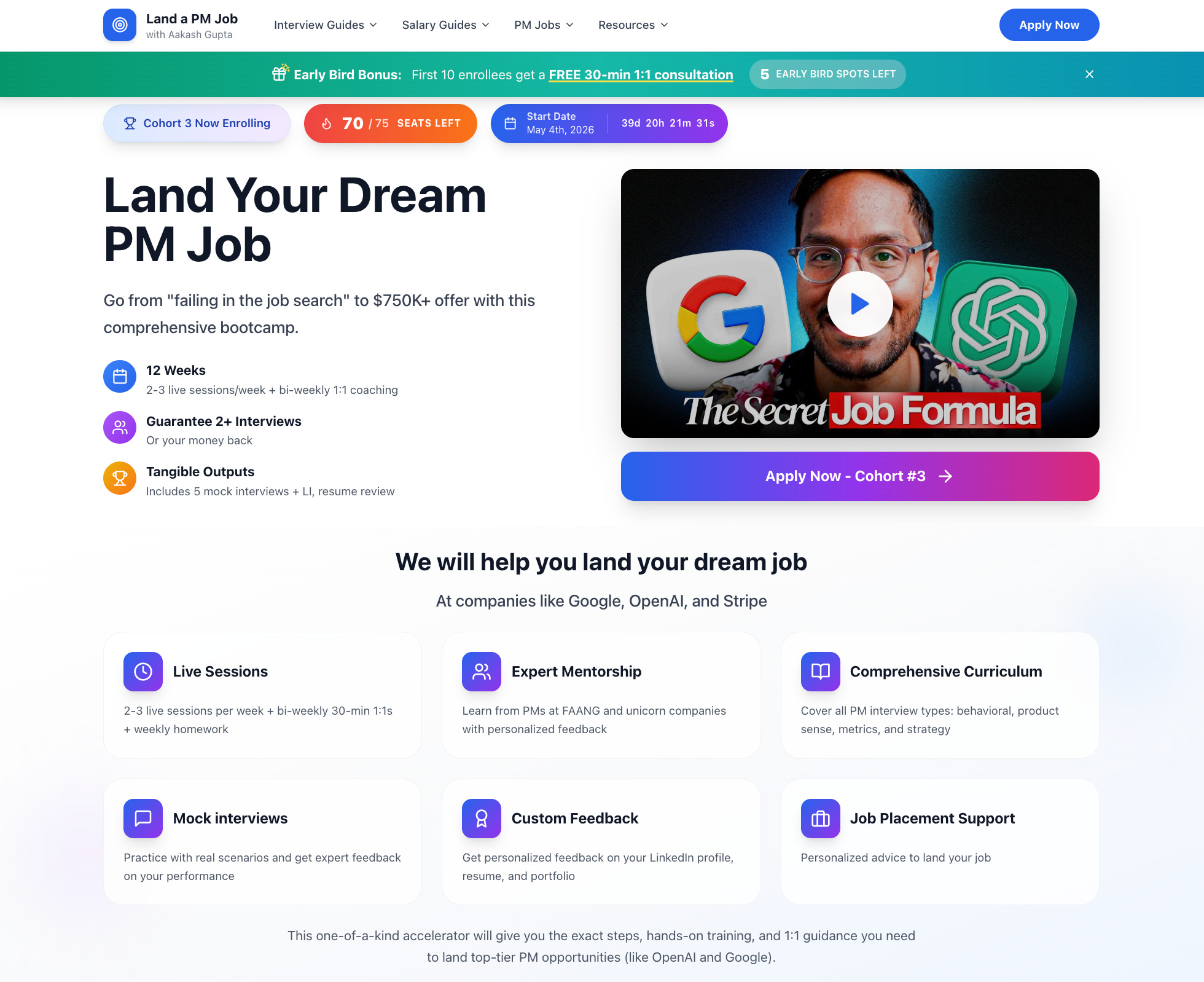
It’s a >$1M/year business hosted entirely on Bolt.new.
Key Features I’ve built in Bolt.new:
SEO Optimization -- Custom meta tags, structured data, and optimized loading for search rankings
AI Applications -- Resume analyzer, interview prep bot, and job matching algorithm built into the platform
Free Tools -- Publicly accessible tools (resume checker, salary calculator) that drive top-of-funnel traffic
Comparison Pages -- Dynamic comparison tables (PM bootcamps, certifications) that rank well in search and convert visitors
Payment Integration -- Stripe integration for course payments with automatic access provisioning
Content Delivery -- Video hosting, progress tracking, and certificate generation -- all built in Bolt
Bolt.new isn’t just for throwaway prototypes. With the right approach, it can power real businesses at scale.
8. Building Your PM Portfolio with Bolt.new
One of the highest-ROI uses of Bolt.new: creating a professional PM portfolio that showcases your work and helps you land interviews.
More than 80% of PMs don’t have a portfolio. But the 18% who do are seeing outsized success in the job market. With Bolt.new, you can build a portfolio in 30 minutes that would have taken days before.
Why a PM Portfolio Matters
Get Discovered -- Publish on the open web so recruiters and hiring managers can find you
Stand Out -- Put it atop your resume so applicants can learn more about your work in detail
Convert Inbound -- Feature it on LinkedIn to convert more profile visits into conversations
Quick Start Prompt for Bolt
“Create a professional PM portfolio website with a hero section, career highlights showcasing 4 achievements with metrics, detailed case study pages, skills section, and contact page. Use a clean, modern design with a professional color scheme. Make it mobile responsive.”
The AI PM Portfolio is especially powerful. If you’re targeting AI PM roles but don’t have AI features on your resume, build AI prototypes as side projects and showcase them in your portfolio. This flips a weakness into a strength.
What to Include
Hero Section -- Your unique positioning, professional photo, contact info
Career Highlights -- 4-5 achievements with metrics showing your impact
Case Studies -- Detailed stories of 2-3 projects with data and work products
Skills & Tools -- Technical skills, PM tools, domain expertise
About Page -- Your story, background, what makes you unique
9. Prototype to Production
Eventually, some prototypes need to graduate to production apps (like my cohort). Here’s how to make that transition smoothly:
Security & Secrets. Don’t hardcode credentials. Always use environment variables. Move all sensitive information to proper secrets management. Bolt.new Cloud automatically checks for vulnerabilities.
Authentication. Most prototypes use simplified auth. For production, implement proper user management -- Supabase Auth, Auth0, or Clerk.
Scaling Servers. Prototyping environments have limited resources. Migrate to Vercel, Netlify, or AWS Amplify for real traffic.
Custom Domains. Give your app a professional appearance. Configure through Bolt.new Cloud or your deployment platform.
Refactor with Claude Code. Use Claude Code to refactor your Bolt.new prototype into production-grade code. It can read your entire codebase and make complex improvements.
Remember: scaling is optional. Many internal tools can live permanently as prototypes. Only invest in scaling when you’re confident in product-market fit. The best product decision is often knowing when a prototype is “good enough.”
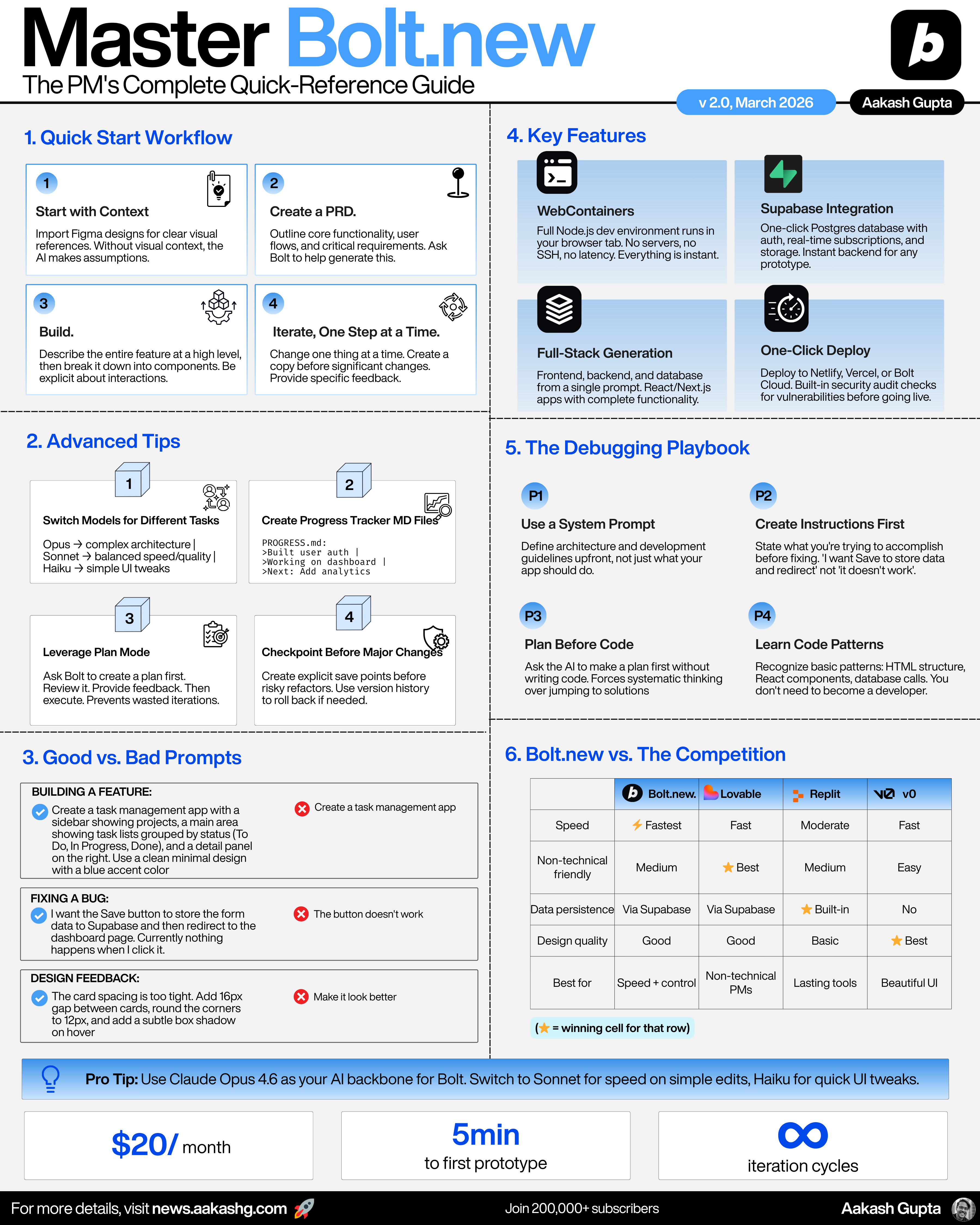
[Bonus] Takeaways Poster
Final Words
AI prototyping is redefining the PM role. Not replacing it. Redefining it.
The PMs who will win in 2026 and beyond are the ones who think in interactions rather than features. Who embrace experimentation over specification. Who seek early disconfirmation rather than building false certainty.
You don’t need to become a developer. You don’t need permission from engineering. You need a problem worth solving, a clear prompt, and 30 minutes.
Now go build something.
For the full interactive version with comparison tools, tool picker quiz, animated walkthroughs, and step-by-step workflows to build your first prototype or PM portfolio, check out the Learn Bolt.new Guide.
Cheers,
Aakash
Thanks to Bolt for making today’s post free for everyone. Hope you enjoyed yesterday’s Job Search OS drop. Tomorrow for paid subscribers I’ll have an awesome walkthrough on Anthropic’s latest features. And on Friday, a podcast with Designers at OpenAI and Figma.
The least discussed part of Bolt is that it changes the internal economics of product ideas. Before tools like this, an idea had to clear a fairly high threshold before it became visible: design time, engineering time, roadmap negotiation, sprint capacity.
That meant many ideas died before they were tested. But it also meant some bad ideas were filtered out by friction. Now a PM can turn a thesis into a working artifact before the org has decided whether the thesis deserves attention. That creates a new role for PMs: not just writing PRDs, but making an internal market for ideas.