Check out the conversation on Apple, Spotify, and YouTube.
Brought to you by:
Bolt: Ship AI-powered products 10x faster
Amplitude: The market-leader in product analytics
Pendo: The #1 software experience management platform
NayaOne: Airgapped cloud-agnostic sandbox
Product Faculty: Get $550 off their #1 AI PM Certification with my link
Today’s episode
Sometimes, I get access to the wildest guests on this podcast. Today, we get the awesome opportunity to look inside the design processes at OpenAI and Figma:
And they worked with me to put together a masterclass on how to design in the AI era.
If you want to design like the leading AI companies, this episode is for you: complete with screen shares and everything else you need to adopt the new AI design workflow.
If you want access to my AI tool stack - Dovetail, Arize, Linear, Descript, Reforge Build, DeepSky, Relay.app, Magic Patterns, Speechify, and Mobbin - grab Aakash’s bundle.
I’m accepting applications for my third LandPMJob cohort. Join Me.
Newsletter deep dive
As a thank you for having me in your inbox, here is the complete guide to the new code-plus-canvas design workflow:
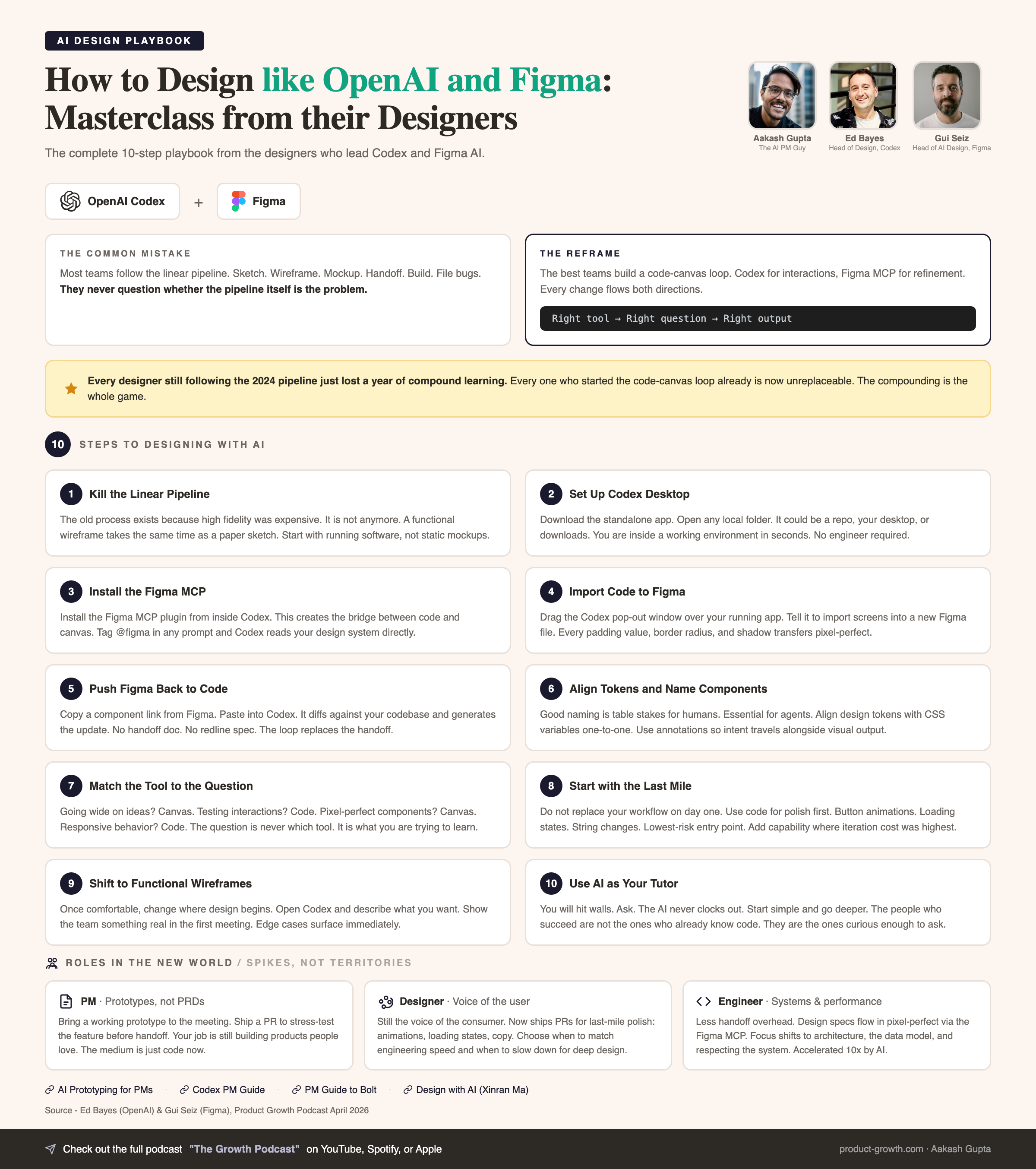
Why the linear design pipeline is dead
The code-canvas loop
Codex to Figma
Figma to Codex
When to use which tool
The 5-step adoption roadmap
Total football for product teams
1. Why the linear design pipeline is dead
You know the process. Everyone does. It was unchanged for 15 years:
Paper sketches. Wireframes. High-fidelity mockups. Developer handoff. Engineering builds it. Design files bug tickets because the spacing is off by 4 pixels.
Every single stage in that pipeline existed for one reason: the next stage was too expensive to start with.
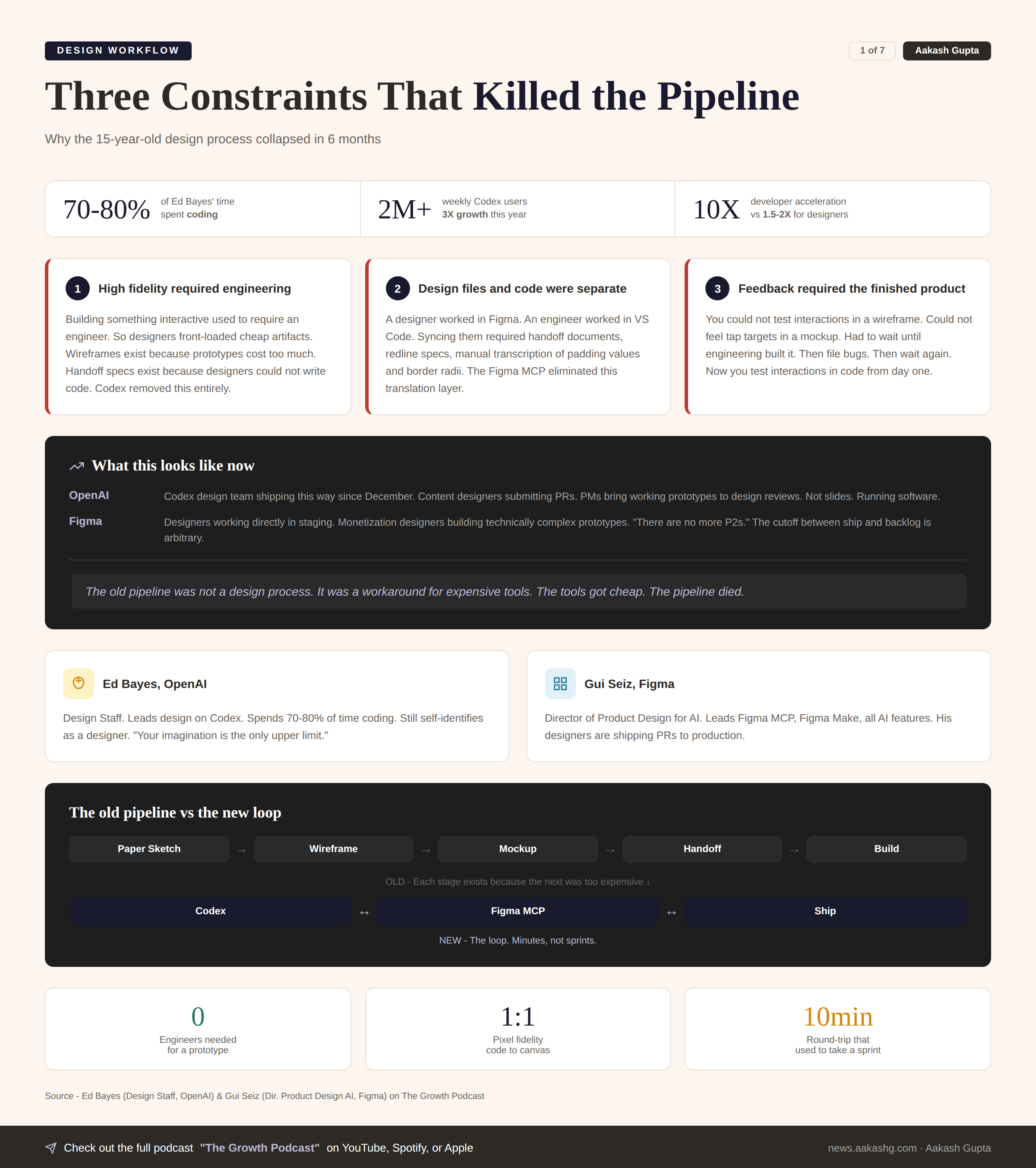
Constraint 1 - High fidelity required engineering
Building something interactive used to require an engineer. So designers front-loaded cheap artifacts. Wireframes exist because prototypes cost too much. Handoff specs exist because designers could not write code.
Codex changed this. A designer can now build a functional prototype in minutes. No engineer required. No sprint ticket. No two-week wait.
Constraint 2 - Design files and code were separate worlds
A designer worked in Figma. An engineer worked in VS Code. Getting them in sync required handoff documents. Redline specs. Manual transcription of padding values and border radii.
The Figma MCP changed this. Design files and codebases now read from each other directly. One click. Pixel-perfect. No translation layer.
Constraint 3 - Feedback required the finished product
You could not test interactions in a wireframe. You could not feel tap targets in a mockup. You had to wait until engineering built it. Then you filed bugs. Then engineering fixed them. Then you filed more bugs.
Now you test interactions in code from day one. Before a single engineer touches it. The feedback loop collapsed from weeks to minutes.
What this looks like in practice
Inside OpenAI. The Codex design team has been shipping this way since December. Something changed when the models hit a capability threshold. Content designers are submitting PRs. PMs bring working prototypes to design reviews.
Inside Figma. Designers are working directly in staging. Monetization designers who never wrote code before are building technically complex prototypes. The phrase I keep hearing is there are no more P2s. The cutoff between ship and backlog is arbitrary now.
I covered the foundations of this shift in my AI prototyping for PMs guide. The difference now is that the tools on both sides have converged.
The old pipeline was not a design process. It was a workaround for expensive tools. The tools got cheap. The pipeline died.
2. The code-canvas loop
The new workflow is code + canvas in a loop.
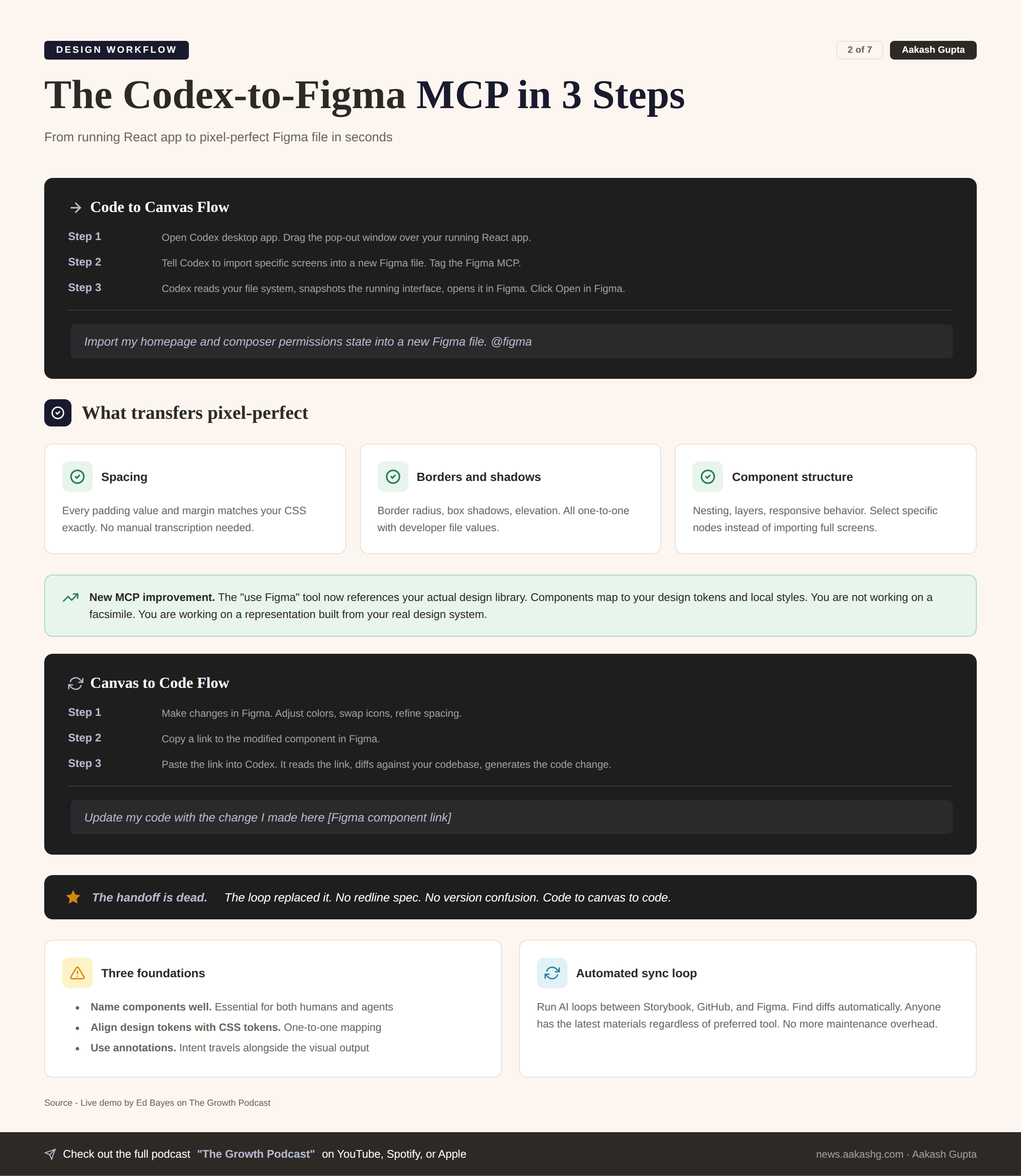
The most common question about this workflow. Will it be lossy? Will things break when you translate between tools?
Short answer: it is already remarkably high fidelity. And it only gets better with every model improvement.
Direction 1 - Codex to Figma
You have a React app running locally. You have been building a composer system in code. You need to feel how buttons morph. How permissions prompts expand. Where tap targets land. Static mockups cannot answer these questions.
Now you want to go deep on the visual layer. Get pixel-perfect on a component. Swap icons. Test type scales.
Open the Codex desktop app. Drag the pop-out window over your running app. Type this -
Import my homepage and composer permissions state into a new Figma file. @figma
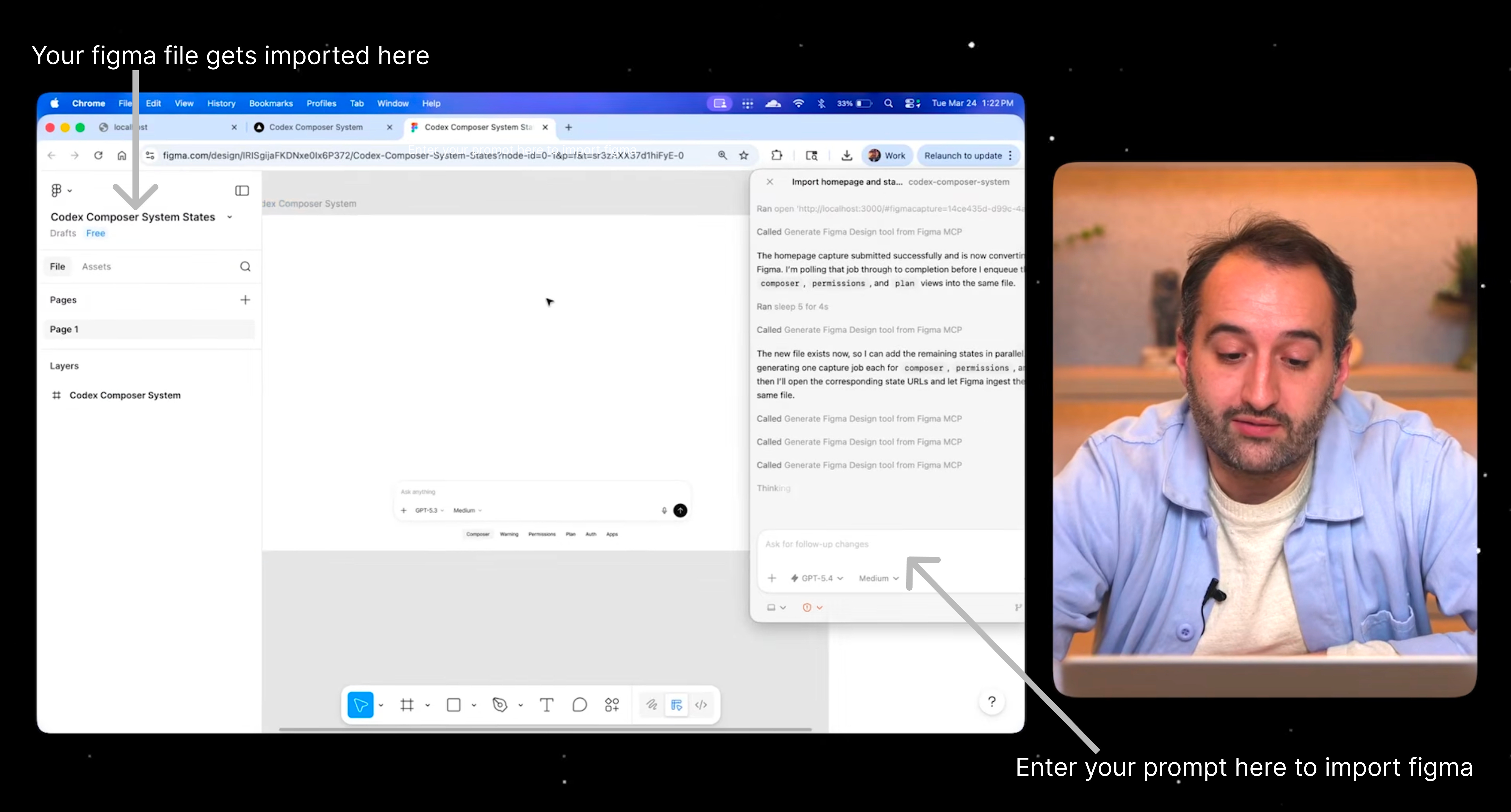
Three things happen -
Reads your file system. Codex understands the React structure, components, CSS
Snapshots the running interface. The Figma MCP captures your live app state
Opens it in Figma. Click Open in Figma. You get a real, editable design file
The result is not a screenshot. Everything is responsive.
Every padding value matches your CSS exactly
Every border radius is one-to-one
Every shadow transfers without manual transcription
You can select specific component nodes instead of full screens
The newest MCP improvement. The use Figma tool now references your actual design library. Components map to your design tokens and local styles. You are not working on a facsimile. You are working on a representation built from your real design system.
The snapshot is not a copy. It is a living bridge between your code and your canvas.
Direction 2 - Figma to Codex
The reverse direction is just as fluid.
You have been iterating in Figma. Changed the model name in the picker. Adjusted a color. Refined spacing on a card.
Copy a link to the modified component. Paste it into Codex -
Update my code with the change I made here [Figma component link]
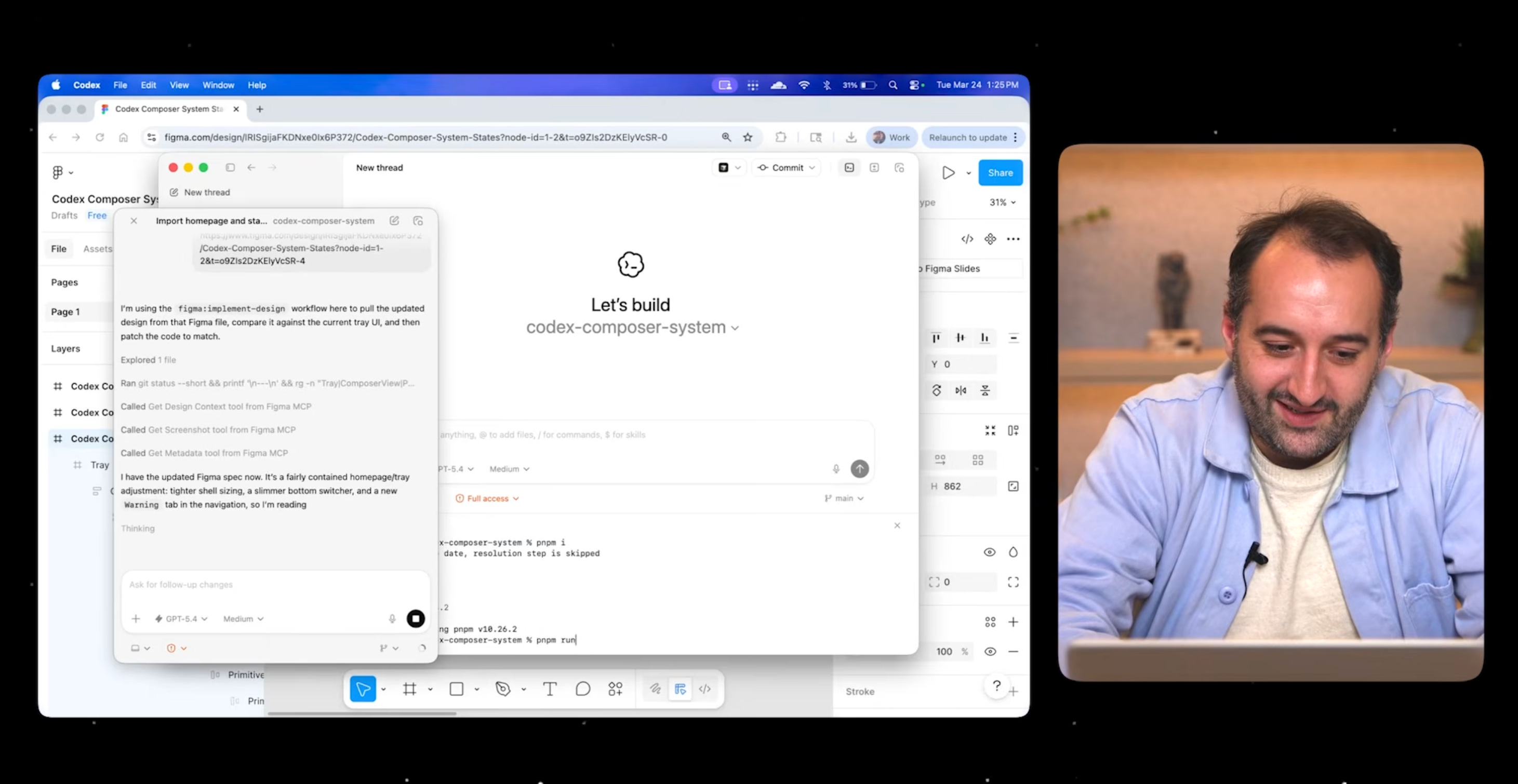
Codex reads the link through the MCP. Diffs against your local codebase. Generates the code change.
For non-coding designers this is the unlock. You are no longer blocked. Make changes in Figma. Your engineer pastes the link into Codex. The change propagates automatically.
One engineer recently demonstrated aligning Storybook to GitHub to Figma with AI running the loop and finding diffs between them. The maintenance overhead of keeping design systems in sync, the thing every team complains about, can now be automated.
Three foundations that make this work
Name components well. Good naming is table stakes for humans. Essential for agents
Align design tokens with CSS tokens. Border radius, spacing scale, color palette. One-to-one mapping
Use annotations. Read annotations into the MCP so intent travels alongside the visual output
The handoff is dead. The loop replaced it.
Where AI still falls short
AI isn’t still where it needs to be for lossless movement. These areas are limited:
Shader effects do not translate to a static canvas
Complex CSS transitions cannot be fully represented in Figma yet
Edge case decisions that only exist in code because an engineer solved something that never got recorded in the design file
Web-specific effects that Figma’s canvas does not yet support
Annotations help bridge some of these gaps. But the designer’s judgment is still critical for the last mile.
The good news. Every model improvement makes this better. OpenAI’s model 5.4 produced a material jump in quality. Internal designers say it is meaningfully better at working with the Figma MCP than anything before.
If you tried this six months ago and gave up, try again. The reliability has crossed into daily-use territory.
The tools have limits. But those limits are shrinking every month instead of staying fixed.
3. When to use which tool
The biggest mistake teams make with this workflow. Trying to do everything in code. Or everything in canvas.
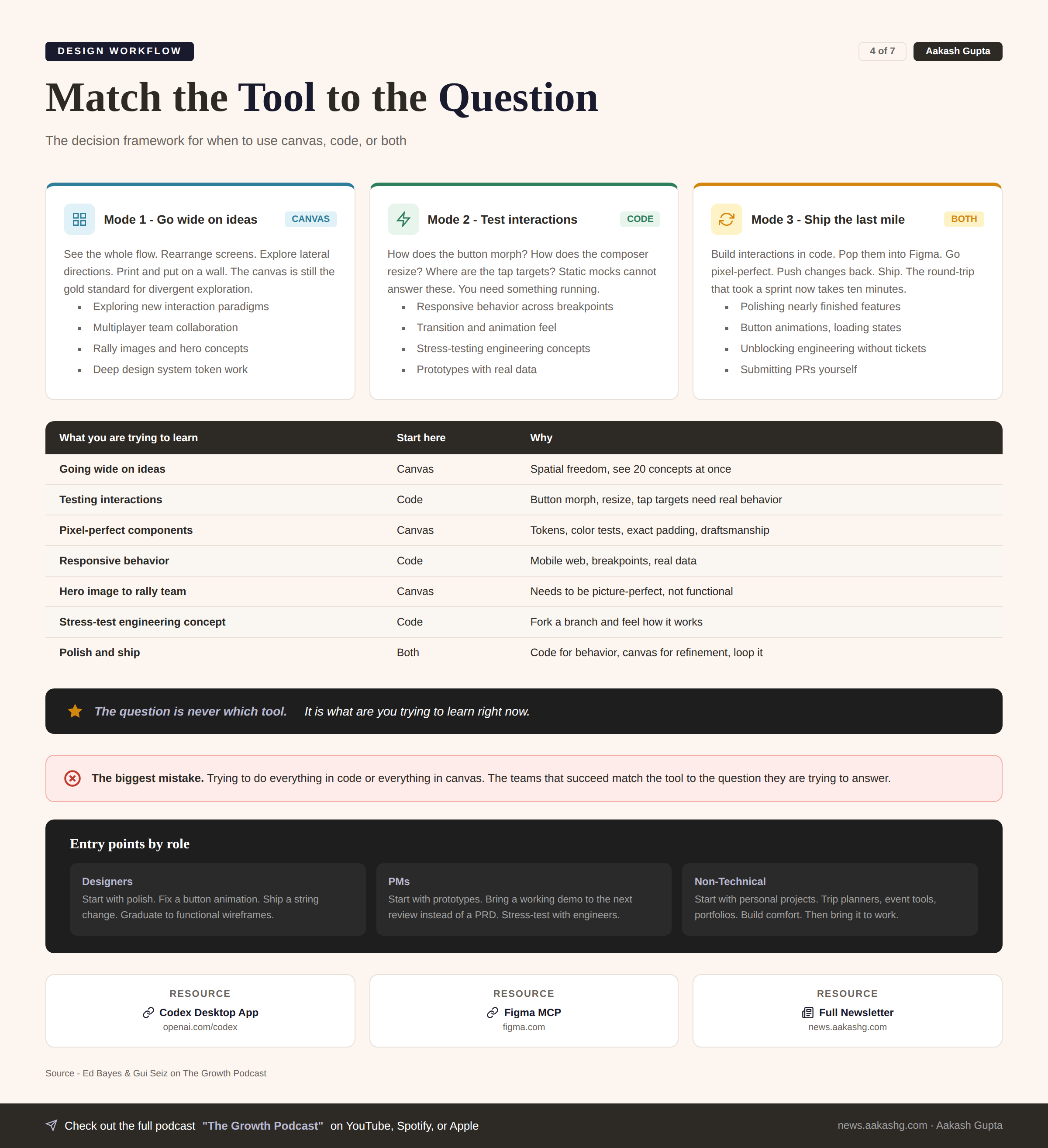
Match the tool to the question you are trying to answer.
Mode 1 - Go wide on ideas
Use the canvas.
You can see the whole flow in front of you. Rearrange screens. Explore lateral directions. Print it out and put it on a wall and tear it down.
The canvas is still the gold standard for divergent exploration. No code tool matches the spatial freedom of dragging artboards around and seeing twenty concepts at once.
When to pick this -
You are exploring completely new interaction paradigms
You need multiplayer collaboration with the whole team
You want to rally people around a hero image
You are doing deep design system work with tokens and color tests
Mode 2 - Test interactions in code
Use Codex.
How does the button morph? How does the composer resize? Where are the tap targets? What happens at different breakpoints?
Static mocks cannot answer these questions. You need something running.
When to pick this -
You are testing responsive behavior across mobile, tablet, desktop
You need to feel how transitions work in real time
You want to stress-test an engineering concept by forking a branch
You are building a prototype that needs real data
Mode 3 - Ship the last mile
Use both.
Build interactions in code. Pop them into Figma through the MCP. Go deep on pixel-perfect details. Push changes back to code. Ship.
This is where the loop becomes the most powerful. The round-trip that used to take a sprint now takes ten minutes.
When to pick this -
You are polishing a nearly finished feature
You need to fix button animations, loading states, string changes
Engineering is waiting and you want to unblock them without filing a ticket
You want to submit a PR yourself
I covered the decision frameworks in my Codex PM guide. The underlying principle is simple.
The question is never which tool. It is what are you trying to learn right now.
4. The 5-step adoption roadmap
If you are at a traditional company, and your design team follows the linear pipeline, and your company has not have procured these tools yet, here is the path:
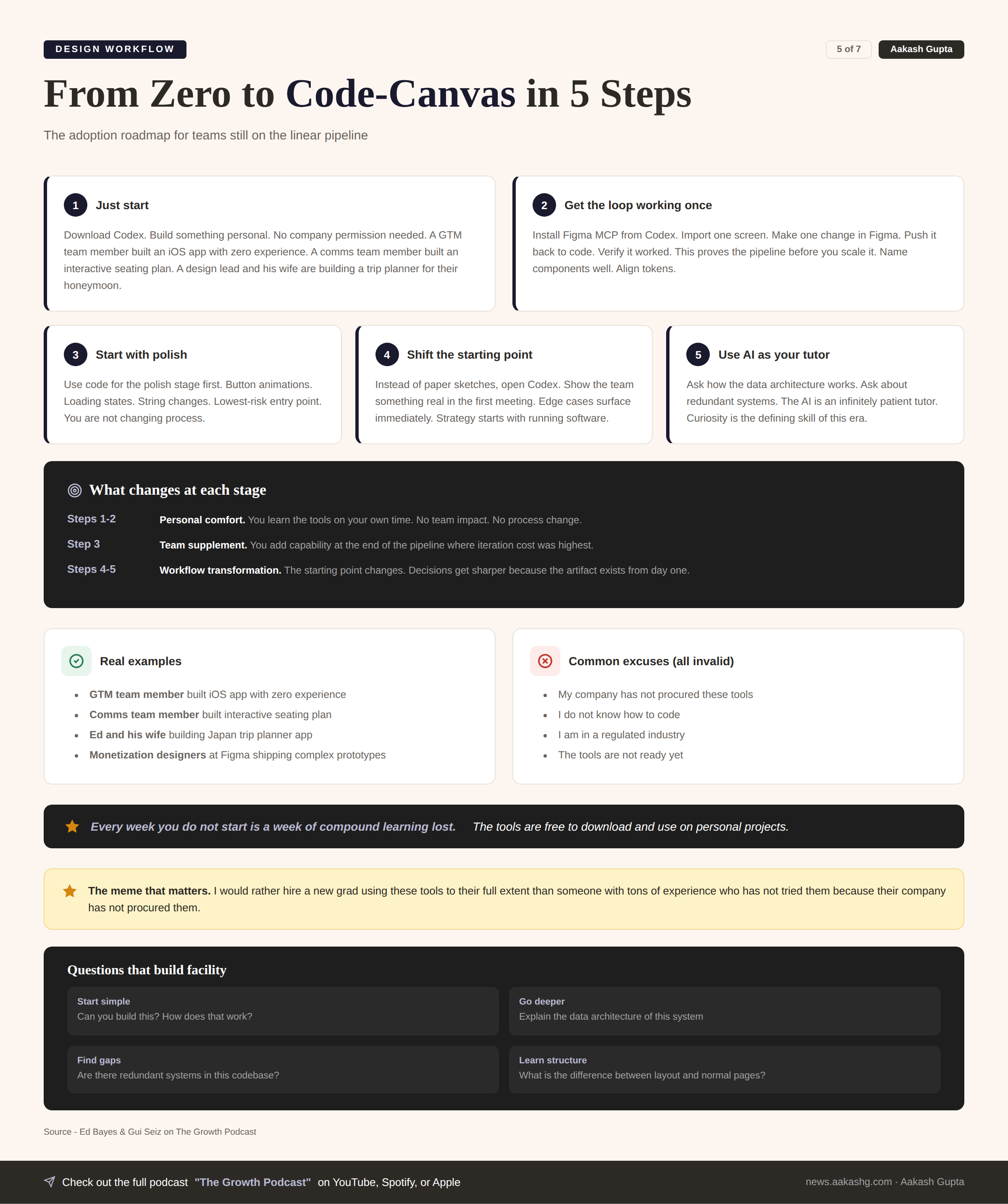
Step 1 - Just start
Download the Codex desktop app. You do not need your company’s permission. Build something for yourself.
Real examples from inside OpenAI -
A GTM team member built an entire iOS app with zero iOS experience
A comms team member designed an interactive drag-and-drop seating plan in HTML
A design lead and his wife are building a Japan trip planner for their honeymoon
None of these people are engineers. They downloaded the app and started.
If you do not know what to build, ask yourself one question. What would I build if I could build anything? Then build it.
Step 2 - Get the loop working once
Install the Figma MCP plugin from the Codex app. Open a project you already have.
The checklist -
Import one screen from code to Figma
Make one change in Figma
Push that change back to code
Verify it worked
Get the loop working once end to end. This proves the pipeline before you scale it.
The foundation matters. Name your components well. Align design tokens with CSS tokens. Clean up your Figma file structure. If your files are messy it is harder for both colleagues and agents to get up to speed.
Step 3 - Start with polish not process
Do not replace your existing workflow on day one. Use code for the polish stage first.
The button animation that never feels right
The loading state engineering skipped
The string change stuck in the sprint backlog for three weeks
The spacing tweak that would take 30 seconds but requires a whole ticket
This is the lowest-risk entry point. You are not changing how the team designs. You are adding a new capability where the cost of iteration was always highest.
Step 4 - Shift the starting point
Once comfortable, change where design begins.
Instead of paper sketches or low-fi Figma frames, open Codex and describe what you want. Show the team something real in the first meeting.
What changes -
Edge cases surface in the first conversation instead of the third sprint
Product strategy discussions start with working software instead of static decks
Your wireframe gives the team more dimensionality to the problem than any mockup
Feedback is immediate because the thing exists
Step 5 - Use AI as your tutor
You will hit walls. You will not understand why a React component renders the way it does.
Ask. The AI is an infinitely patient tutor that never clocks out.
Questions that build facility -
Start simple. Can you build this? If it does something, ask how does that work
Go deeper. I just inherited this system. Can you explain the data architecture
Find gaps. Are there redundant systems? Look through the entire codebase
Learn structure. What is the difference between a layout page and a normal page
The people who succeed in this era are not the ones who already know how to code. They are the ones curious enough to keep asking questions.
The roadmap is not learn to code. It is learn to be curious in a world where every question gets answered.
5. Total football for product teams
The natural question from above is: If designers can code and engineers can design and PMs can prototype, do we even need separate roles?
Yes. And understanding why is the most important takeaway.
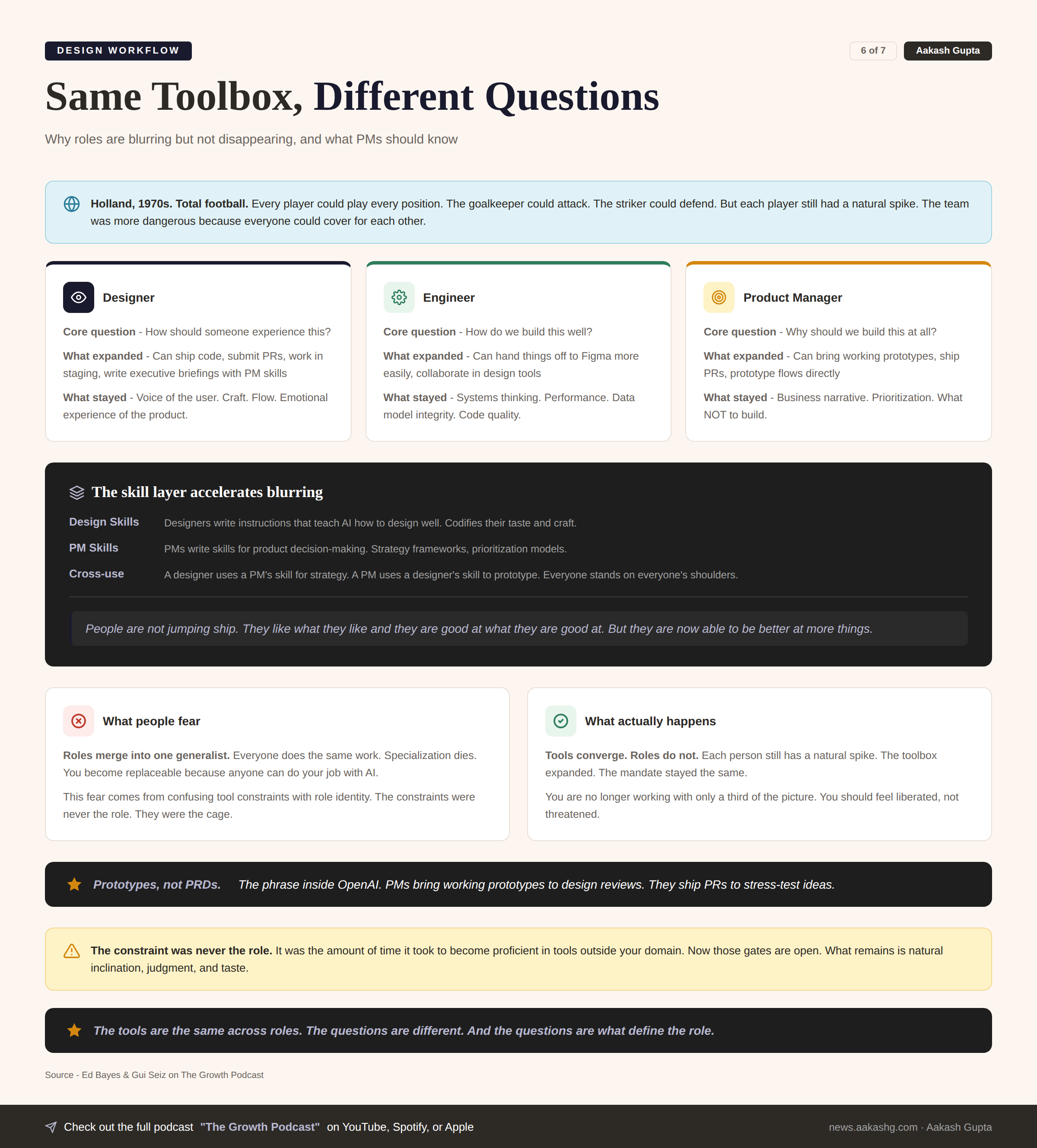
The tools are converging. The roles are not.
The three questions that define each role
Engineers ask how do we build this well
Designers ask how should someone experience this
PMs ask why should we build this at all
A designer who ships code still self-identifies as a designer. They still care about being the voice of the user. They still think about craft and flow and emotional experience. The medium changed. The mandate did not.
The skill layer accelerates the blurring
Inside Figma, designers are writing skills that teach AI how to design well. PMs write skills for product decision-making. Anyone can use anyone else’s skill.
A designer uses a PM’s skill to work through a strategic decision
A PM uses a designer’s skill to prototype a flow
An engineer uses a design skill to ship polish to production
The skill layer means you are no longer limited to a third of the picture. You can lean into adjacent domains without switching careers.
Why roles survive despite tool convergence
The constraint was never the role. It was the amount of time it took to become proficient in tools outside your domain. If you wanted to learn code that gated you. If you wanted to learn design that gated you.
Now those gates are open. What remains is natural inclination. Judgment. Taste.
The mental model is total football. In 1970s Holland, every player could play every position. The goalkeeper could attack. The striker could defend. But each player still had a natural spike. The team was more dangerous because everyone could cover for each other.
The phrase inside OpenAI - prototypes, not PRDs. PMs bring working prototypes to design reviews. They ship PRs to stress-test ideas with engineers. The artifact that aligns teams is now running software, not static documents.
The bottleneck has moved. If developers have been accelerated 10x, designers have been accelerated maybe 1.5 to 2x. Design can become the bottleneck if you are not coding yourself.
The tools are the same across roles. The questions are different. And the questions are what define the role.
Where to find Ed Bayes
Where to find Gui Seiz
Related content
Podcasts:
Newsletters:
PS. Please subscribe on YouTube and follow on Apple & Spotify. It helps!