Check out the conversation on Apple, Spotify, and YouTube.
Brought to you by:
Bolt: Ship AI-powered products 10x faster
Amplitude: The market-leader in product analytics
Pendo: The #1 software experience management platform
NayaOne: Airgapped cloud-agnostic sandbox
Product Faculty: Get $550 off their #1 AI PM Certification with my link
Today’s episode
Claude Code hit $2.5 billion in annualized revenue in 12 months.
It is the fastest B2B software product ramp in history.
So why are most people still using it like a chatbot?
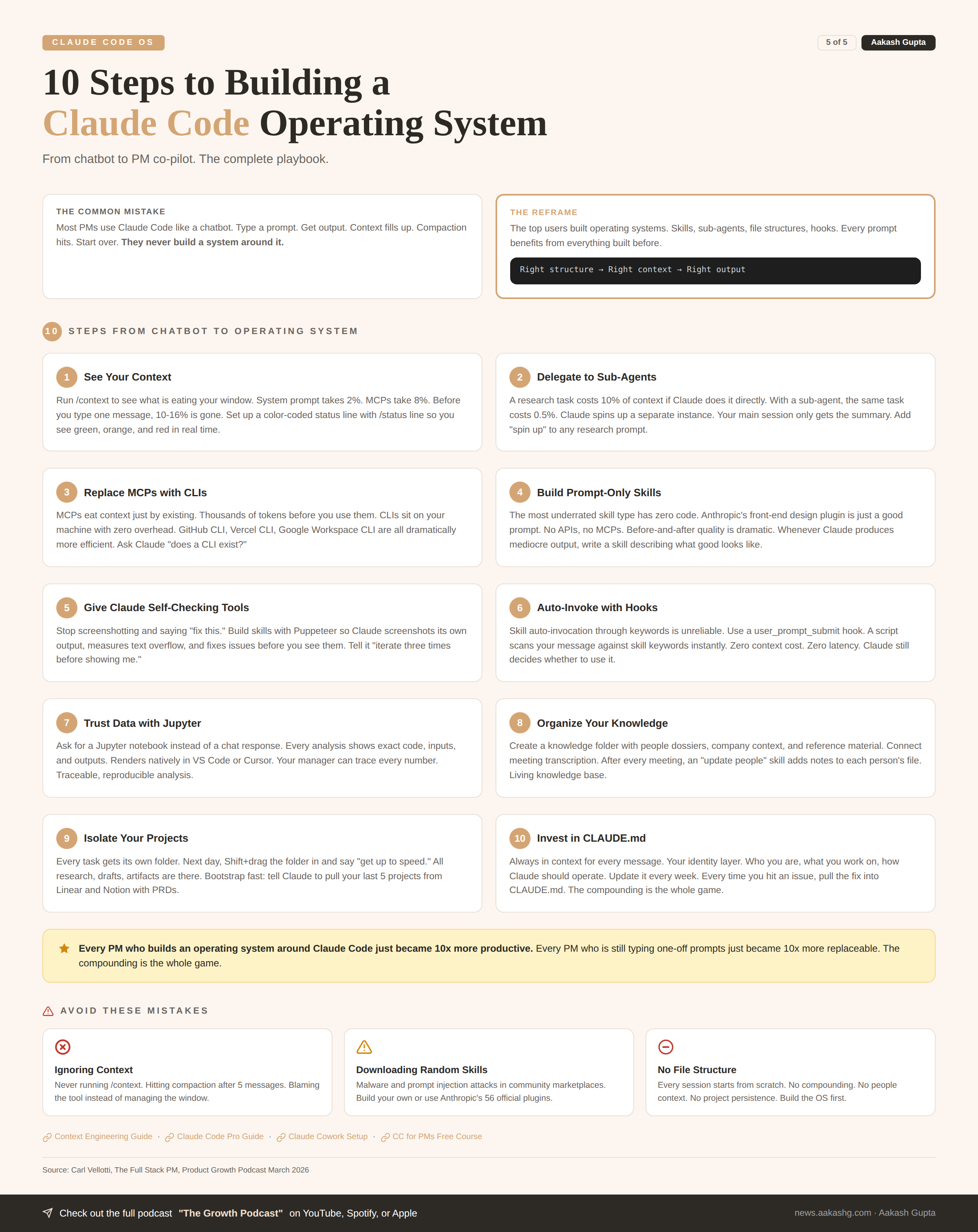
This is how most people use Claude Code. Type a prompt and get output. The context fills up. It compacts. You lose everything. You start over.
The top users flipped it. They built operating systems. Skills, sub-agents, file structures, hooks. Every prompt benefits from everything built before.
I sat down with Carl Vellotti for the third time. His first episode was the beginner course. His second episode was the advanced masterclass. Together they crossed over a million views across platforms.
Today is the operating system layer. If you are already an 80 out of 100 on Claude Code, this episode will bring you to a 95.
If you are living in Claude Code 8 to 10 hours a day and want to stop fighting the tool, this is the one episode to watch.
If you want access to my AI tool stack - Dovetail, Arize, Linear, Descript, Reforge Build, DeepSky, Relay.app, Magic Patterns, Speechify, and Mobbin - grab Aakash’s bundle.
I’m putting on a free webinar on Behavioral and AI PM interviews. Join me.
Newsletter deep dive
As a thank you for having me in your inbox, here is the complete step-by-step guide to building your own Claude Code operating system.
Two starter repos you can fork today. Every file explained. Every technique from the episode plus what I have learned building my own PM OS.
Fork your starter OS
The CLAUDE.md file
The compounding file system
Mastering context
Skills that fix weaknesses
Data you can actually trust
The daily loop
1. Fork your starter OS
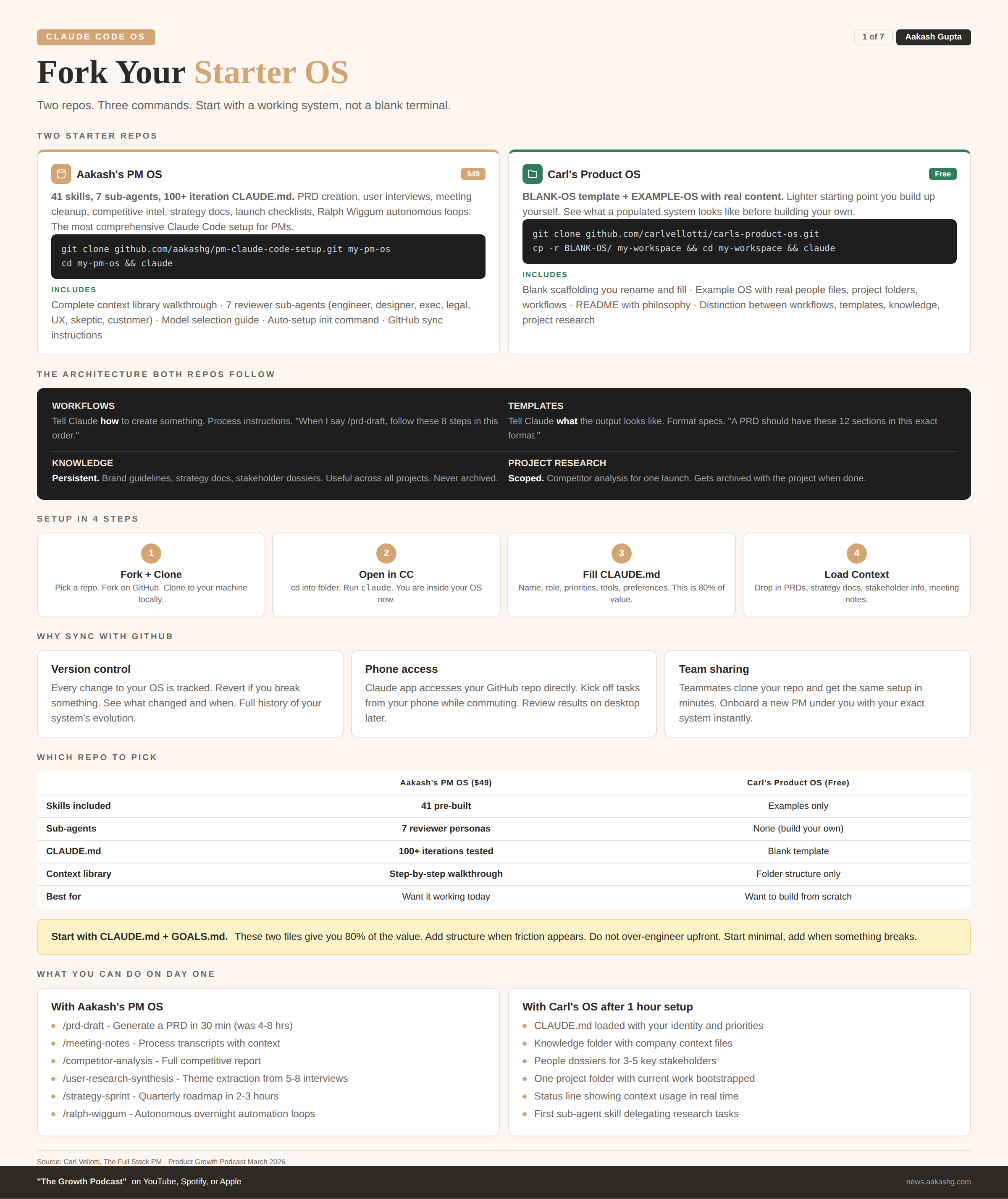
You do not need to build from scratch. Carl open-sourced his personal operating system at github.com/carlvellotti/carls-product-os. I open-sourced mine at github.com/aakashg/pm-claude-code-setup.
Carl’s repo comes with a BLANK-OS folder you rename and fill in, plus an EXAMPLE-OS with real content so you can see what a populated system looks like.
Step 1 - Fork and clone
# Carl's OS (lighter starting point, free)
git clone https://github.com/carlvellotti/carls-product-os.git
cp -r BLANK-OS/ my-workspace && cd my-workspace

# Or mine (41 skills, 7 sub-agents, $49)
git clone https://github.com/aakashg/pm-claude-code-setup.git my-pm-os
cd my-pm-os
Step 2 - Open in Claude Code
That is it. You are inside a pre-structured operating system. Every folder, every placeholder, every workflow is in place. Fill it with your data.
Carl draws a useful distinction. Workflows tell Claude how to create something. Templates tell Claude what the output looks like. Knowledge is reference material useful across projects. Project research is scoped to one project and gets archived with it. Your brand guidelines go in knowledge. Competitor research for a specific launch goes in the project folder.
You do not need everything on day one. Start with CLAUDE.md + GOALS.md. These two files give you 80% of the value. Add structure when friction appears.
2. The CLAUDE.md file
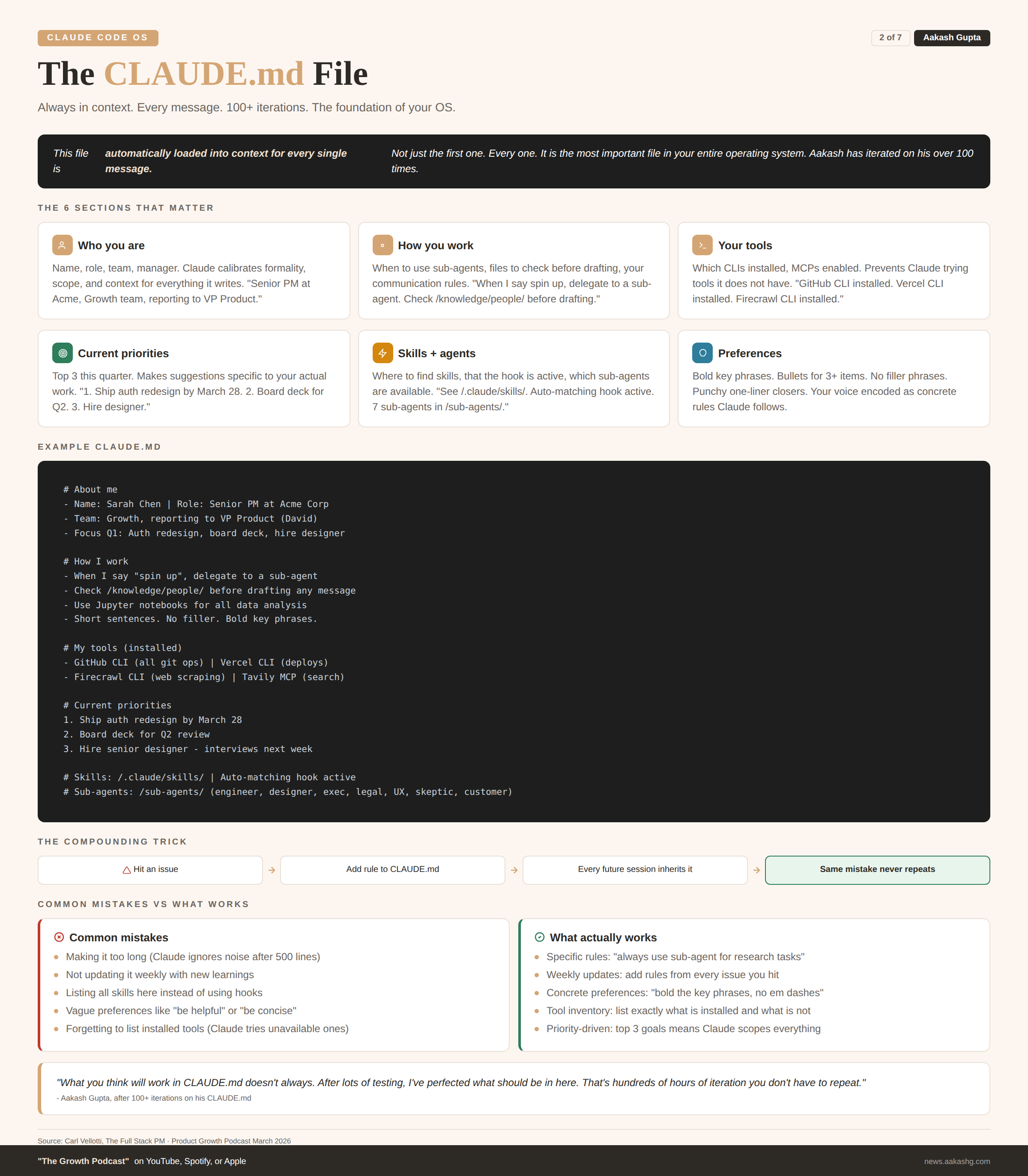
This is the most important file in your operating system. It is automatically loaded into context for every single message. Not just the first. Every one.
I have iterated on my CLAUDE.md over 100 times. What you think will work does not always. After lots of testing, here is what actually matters.
What goes in it
# About me
- Name: [Your name]
- Role: Senior PM at [Company]
- Team: Growth, reporting to [Manager name]
- Current quarter: Launching [feature], improving [metric]

# How I work
- Short, direct communication. No filler.
- Show reasoning before conclusions.
- When I say "spin up", delegate to a sub-agent.
- Check /knowledge/people/ before drafting any message.
- Use Jupyter notebooks for any data analysis.

# My tools
- GitHub CLI: installed (use for all git operations)
- Vercel CLI: installed (use for deployments)
- Firecrawl CLI: installed (use for web scraping)
- Tavily MCP: enabled (use for web search only)

# Current priorities
1. Ship auth redesign by March 28
2. Prepare board deck for Q2
3. Hire senior designer

# My skills
See /.claude/skills/ - auto-matching hook is active.

# Preferences
- Bold key phrases in documents
- Bullet points for 3+ items
- End sections with a punchy one-liner
The compounding trick
Update this file every week. Every time you hit an issue with Claude Code, pull the fix in. “Do not run research in the main session. Always use a sub-agent.” “When I say spin up, delegate to a separate instance.” Over months, this file becomes an incredibly precise instruction set. Claude feels like it already knows you.
I covered the CLAUDE.md deep dive in my Dave Killeen episode, where the CPO at Pendo told me his Claude Code system is better than the human EA he used to have. The CLAUDE.md was the foundation of everything he built.
If you only set up one file, make it this one.
3. The compounding file system
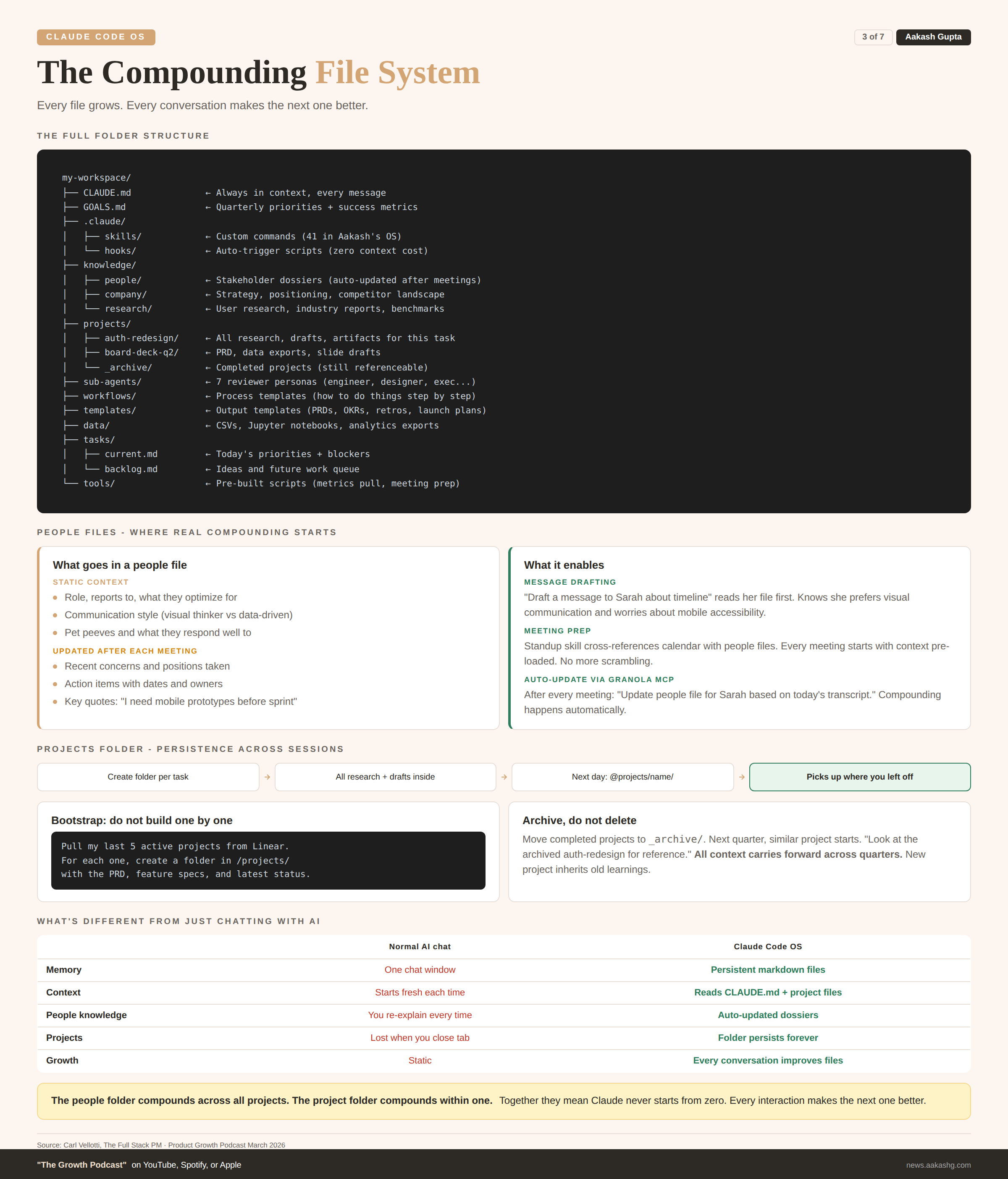
The fundamental difference between a Claude Code OS and just chatting with AI is that everything is a markdown file. And those files are alive.
In a normal AI conversation, everything lives in one chat window. Close it and it is gone. In a Claude Code OS, the AI reads and writes to persistent files. Every conversation makes the files better. Every file makes the next conversation better. That is the compounding loop.
The folder structure
my-workspace/
├── CLAUDE.md              ← Always in context, every message
├── GOALS.md               ← Quarterly priorities
├── .claude/
│   ├── skills/            ← Custom commands
│   └── hooks/             ← Auto-trigger scripts
├── knowledge/
│   ├── people/            ← Stakeholder dossiers
│   ├── company/           ← Strategy, positioning, competitors
│   └── research/          ← User research, industry reports
├── projects/
│   ├── [project-name]/    ← One folder per active project
│   └── _archive/          ← Completed projects
├── sub-agents/            ← Reviewer personas
├── workflows/             ← Process templates
├── templates/             ← Output templates (PRDs, OKRs)
├── data/                  ← CSVs, Jupyter notebooks
├── tasks/
│   ├── current.md
│   └── backlog.md
└── tools/                 ← Pre-built scripts
The knowledge folder
People files are where the real compounding happens. Create one for each stakeholder at knowledge/people/[name].md:
# Sarah Kim - Design Lead
- Reports to: VP Design
- Cares about: User research, accessibility, craft
- Communication style: Visual thinker. Wants mockups, not docs.
- Pet peeve: Decisions made without user data

## Recent context
- Pushing back on the auth redesign timeline
- Concerned about mobile accessibility
- Liked the competitive analysis I shared last week

## Meeting notes
### March 21 - Auth redesign sync
- Wants mobile prototypes before eng sprint
- Asked for usability report from last iteration
- Action: I owe her the report by Friday
Connect a meeting transcription tool like Granola via MCP. After every meeting, tell Claude: “Update the people file for Sarah based on today’s meeting.” Over time, when you draft a message to Sarah, Claude already knows she prefers visual communication and is concerned about mobile. The output is dramatically different from a generic draft.
Company files hold strategy, positioning, and competitive landscape. Research files hold user interviews, industry reports, and anything you reference across projects.
The projects folder
Every new task gets its own folder. When you come back the next day:
@projects/board-deck-q2/ Get up to speed on this project,
then help me finish the revenue slide.
Claude reads every file in the folder. All the research, all the drafts, all the data. It picks up exactly where you left off.
Bootstrap fast. Do not build project folders one by one. Connect Linear or Notion via MCP and run:
Pull my last 5 active projects from Linear. For each one,
create a folder in /projects/ with the PRD and latest status.
The people folder compounds across all projects. The project folder compounds within one. Together they mean Claude never starts from zero.
4. Mastering context
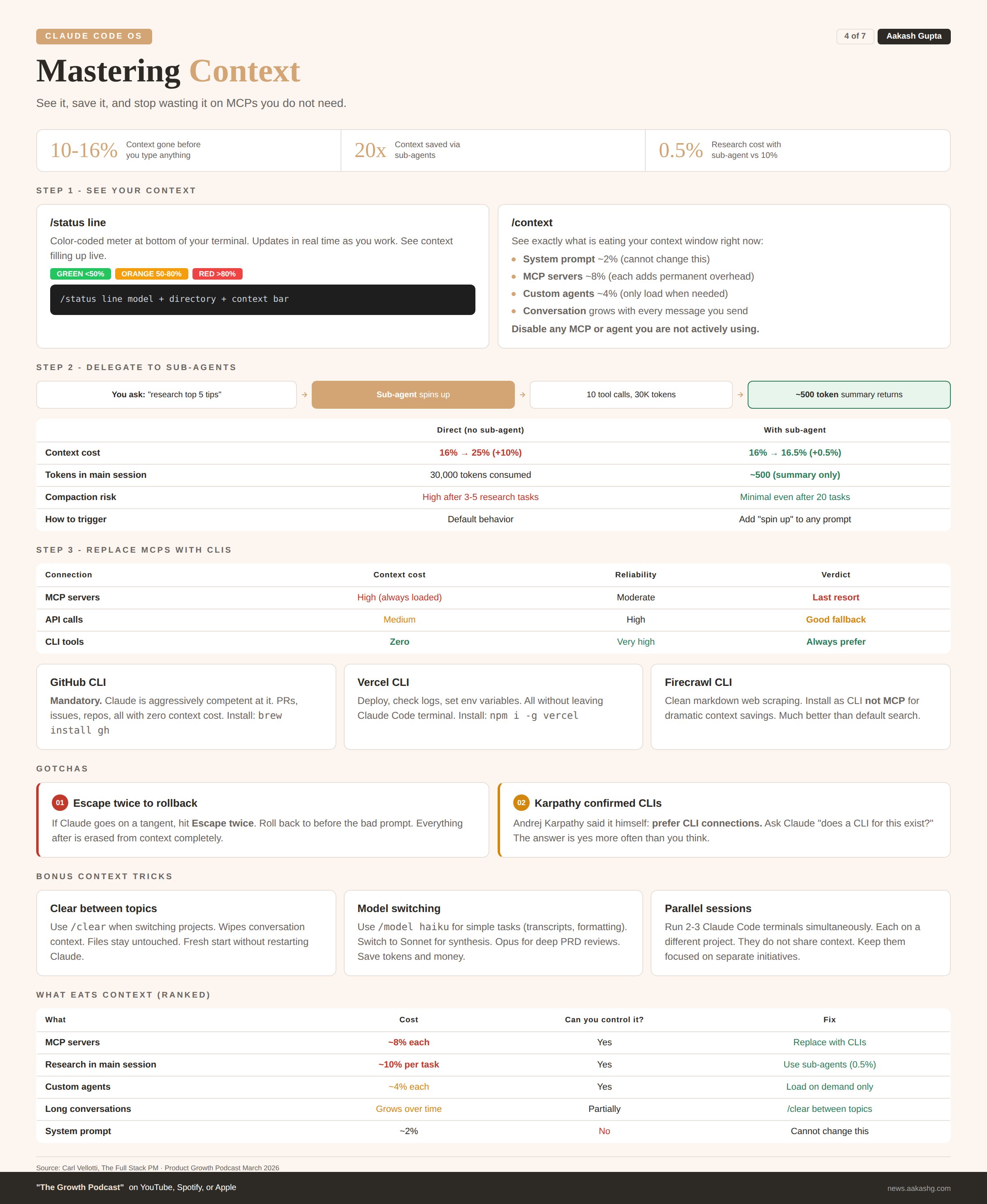
You have the file system. Now the biggest technical challenge: making sure Claude can actually use it without running out of context.
I covered the foundations in my context engineering guide. Here is how it works inside Claude Code specifically.
Step 1 - See your context
Run this right now:
/status lineAsk for a color-coded context meter. Green under 50%. Orange 50-80%. Red over 80%. Then run /context to see exactly what is eating it:
System prompt - ~2% (cannot change)
MCP servers - ~8%+ (each one adds permanent overhead)
Custom agents - ~4%
Conversation - grows with every message
Before you type a single message, 10% to 16% is already gone. Disable anything you are not actively using.
Step 2 - Delegate to sub-agents
Without sub-agents, a research task pushes context from 16% to 25%. Almost 10% of your window gone for one question.
With a sub-agent, the same task costs 0.5%. Claude spins up a separate instance. That instance does all the web searches and page reads. Your main session only gets the summary.
The numbers from the episode:
Without sub-agent - 16% to 25% context (+10%)
With sub-agent - 16% to 16.5% context (+0.5%)
Sub-agent used 10 tool calls and 30,000 tokens, all outside main session
Two ways to trigger this:
Inline - Add “spin up” or “use a sub-agent” to any prompt
Skill - Build a skill at
.claude/skills/delegate-research.mdthat automatically delegates research tasks. Both repos include this.
Bonus trick: If Claude goes on a tangent, hit Escape twice. Roll back to before the bad prompt. Everything after it is erased from context completely.
Step 3 - Replace MCPs with CLIs
This is the hierarchy most people get backwards. MCPs eat context just by existing. CLIs sit on your machine with zero context overhead.
Connection Context cost When to use MCP High (always loaded) Last resort API Medium Custom integrations CLI Zero Always prefer
Andrej Karpathy confirmed it. The CLIs to install today:
GitHub CLI (
gh) - Claude is aggressively competent at it. PRs, issues, repos, zero context cost.Vercel CLI - Deploy, check logs, set env variables without leaving Claude Code.
Firecrawl CLI - Clean web scraping without MCP overhead.
The test: for every MCP you have enabled, ask Claude “does a CLI for this exist?” More often than you think, the answer is yes.
Every MCP you replace with a CLI is context you get back for actual work.
5. Skills that fix weaknesses
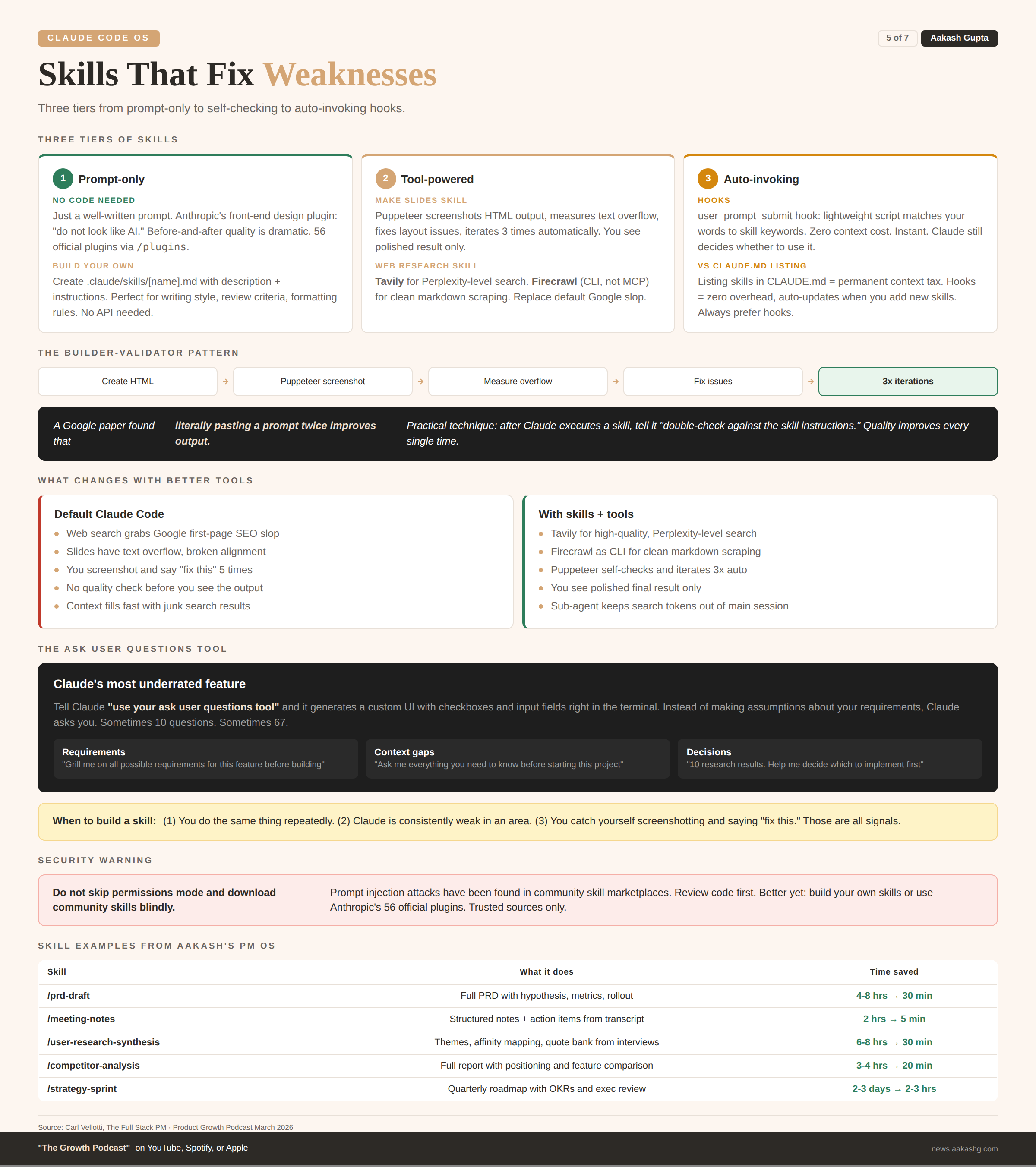
Every time someone says “Claude Code is bad at X,” the real problem is the same. Claude does not have the right tools or instructions. I covered the basics in my Claude Code guide. Here is the advanced version.
Tier 1 - Prompt-only skills
No code. No APIs. Just a well-written prompt. Anthropic has 56 official plugins you can install with /plugins. The front-end design one is the best example. All it does is tell Claude “do not look like AI.” Before-and-after quality is dramatic.
To build your own, create a file at .claude/skills/[name].md:
---
name: write-like-me
description: Use when the user asks to write, draft, or edit.
---

# Writing Style Skill

1. Short sentences. One idea per sentence.
2. Use "you" and "your" when teaching.
3. Open with the problem, not the solution.
4. Bold the key phrases.
5. End every section with a punchy one-liner.
Tier 2 - Tool-powered skills
Give Claude tools to check its own work. The make slides skill from the episode includes Puppeteer so Claude can screenshot its HTML output, measure text overflow, and fix issues automatically. Tell it “iterate 3 times before showing me” and the first result is already polished.
The web research skill replaces Claude’s unreliable default web search (basically Google first-page results) with Tavily for higher-quality search and Firecrawl for clean markdown scraping. Install Firecrawl as a CLI, not an MCP, to save context.
A key finding from a Google paper: literally pasting a prompt twice improves output. The practical version: after Claude executes any skill, tell it “double-check your output against the skill instructions.” Quality improves every time. This is the builder-validator pattern.
Whenever you catch yourself screenshotting and saying “fix this” repeatedly, that is a signal. Build a self-checking skill.
Tier 3 - Auto-invoking with hooks
Skills are supposed to auto-invoke from keywords. It does not work reliably. The fix is a user_prompt_submit hook that runs a lightweight script matching your message against skill keywords. Zero context cost. Instant. Claude still decides whether to use it.
This beats listing skills in CLAUDE.md because it adds no permanent context overhead and auto-updates when you add new skills. Both repos include the hook script ready to use.
The ask user questions tool
This was Carl’s favorite Claude Code feature, and one I had never used before this episode.
Tell Claude “use your ask user questions tool” and it generates a custom UI with checkboxes and input fields right inside the terminal. Instead of making assumptions, Claude asks you. Sometimes 10 questions. Sometimes 67.
Use it for:
Requirements gathering - “Use your ask user questions tool to grill me on all possible requirements for this feature”
Filling context gaps - “Ask me everything you need before starting this project”
Decision making - “Here are 10 research results. Help me decide which to implement”
The main reason people do not like AI output is assumptions. This tool eliminates them.
Skills are what you do. Hooks are how you compound. The ask user questions tool is how you eliminate assumptions.
6. Data you can actually trust
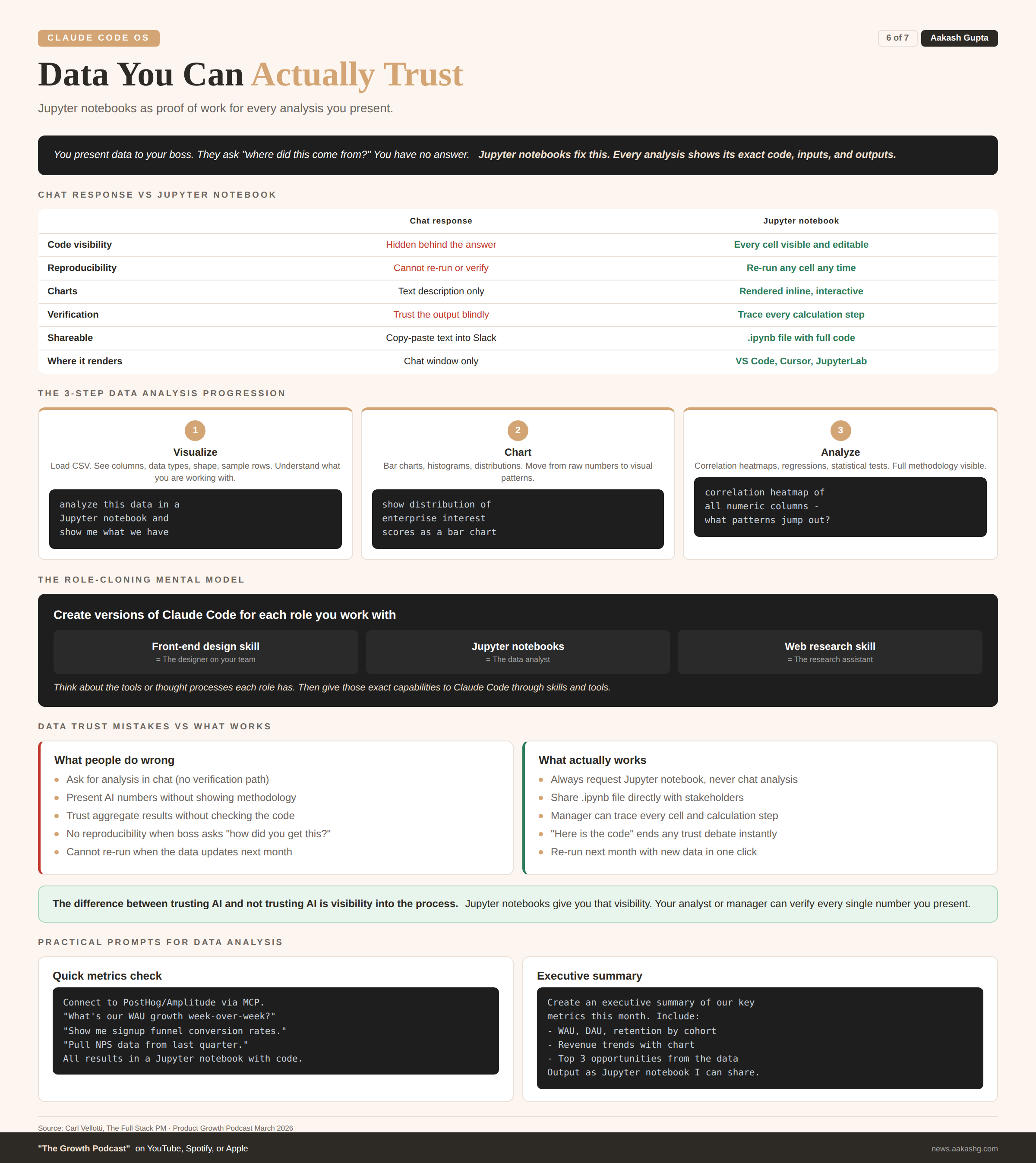
The biggest question PMs have about AI outputs: how can I trust this?
You are presenting numbers to your boss. They ask “where did this come from?” You need proof of work.
The answer is Jupyter notebooks. Tell Claude “analyze this data in a Jupyter notebook” and it creates a .ipynb file showing every query as a code cell, every result as output, every chart rendered inline. Renders natively in VS Code or Cursor.
The progression Carl demonstrated live:
Visualize - Load the CSV, see columns, shape, sample rows
Chart - Distribution charts, bar charts, segment breakdowns
Analyze - Correlation heatmaps, regression, statistical tests
At each step, your data scientist or manager can read every cell, verify the methodology, and check the results. The code is the proof.
The mental model: take the roles you work with and create versions of Claude Code for each one. The front-end design skill is the designer. Jupyter notebooks are the data analyst. The web research skill is the research assistant.
The difference between trusting AI and not trusting AI is visibility into the process.
7. The daily loop
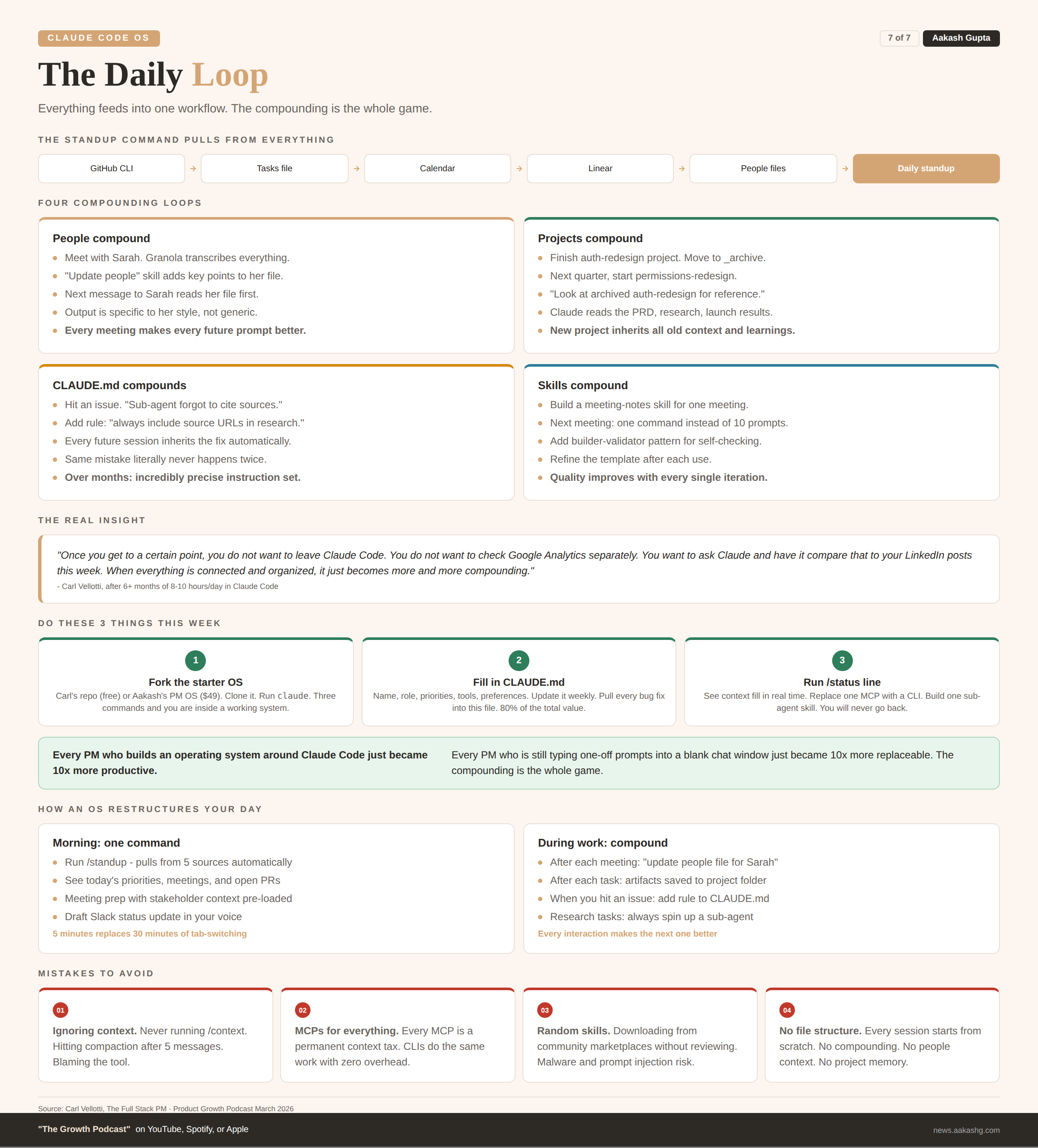
This is where the operating system comes alive. Everything from sections 1 through 6 feeds into one daily workflow.
Create a standup skill that pulls from all your sources. GitHub CLI for recent commits. Tasks/current.md for priorities. Calendar for meetings. Linear for ticket status. Knowledge/people/ for meeting prep with stakeholder context already loaded.
One command. No tab switching. No manual assembly.
The compounding loop
You have a meeting with Sarah. Granola transcribes it. Your “update people” skill pulls key points into Sarah’s people file. Later, you draft a message to her about the timeline. Claude reads her file. It knows her concerns from the last meeting. The message is specific, not generic.
You finish a project. You move it to _archive/. Next quarter, you start something similar. You tell Claude “look at the archived auth-redesign project.” It reads the PRD, the user research, the launch results. Your new project starts with all the context of the old one.
You hit an issue with Claude Code. You add a rule to CLAUDE.md. Every future session inherits that rule. The same mistake never happens twice.
That is what an operating system is. Not a folder full of files. A system where every interaction makes the next one better. The compounding is the whole game.
How to start today
Fork the starter OS. Go to Carl’s product OS or mine. Clone it. Open it in Claude Code.
Fill in your CLAUDE.md and GOALS.md. These two files give you 80% of the value.
Set up the context status line. Run /status line. You will never unsee how fast your context fills up.
If you want the full system with 41 skills, 7 sub-agents, and the CLAUDE.md I have iterated 100+ times, get the PM OS here. If you want Carl’s free course that teaches Claude Code inside Claude Code, go to ccforpms.com.
Every person file you update, every project folder you populate, every skill you build makes the next prompt dramatically better. That is what turns Claude Code from a chatbot into an operating system.
Where to Find Carl Vellotti
Related content
Podcasts:
Newsletters:
PS. Please subscribe on YouTube and follow on Apple & Spotify. It helps!