Check out the conversation on Apple, Spotify and YouTube.
Brought to you by
Pendo: The #1 software experience management platform
Jira Product Discovery: Plan with purpose, ship with confidence
Amplitude: The market-leader in product analytics
NayaOne: Airgapped cloud-agnostic sandbox
Product Faculty: Get $550 off their #1 AI PM Certification with my link
Today’s Episode
This episode is a real life example of how a CPO actually uses Claude Code to do everything:
His morning daily plan
His career planning
His meeting prep
All with real data plugged into his real systems: CRM, calendar, etc..
He thinks it’s better than the human EA (executive assistant) he used to have. And in today’s episode, he demonstrates everything.
Dave Killeen has a 25 year career in PM, so when he embraces a new AI tool this thoroughly, it’s worth checking out:
If your product team doesn’t have access yet, send this to your manager or skip-level.
If you want access to my AI tool stack - Dovetail, Arize, Linear, Descript, Reforge Build, DeepSky, Relay.app, Magic Patterns, Speechify, and Mobbin - grab Aakash’s bundle.
If you want my PM Operating System in Claude Code, click here.
Newsletter Deep Dive
As a thank you for having me in your inbox, here is the complete guide to running your entire work life in Claude Code:
The daily plan command
How to connect everything with MCP servers
Skills vs MCP vs hooks
The compounding file system
From backlog to PRD to Kanban board
Career planning inside your OS
How to get started today
1. The Daily Plan Command
Here is the core problem with how most PMs start their day.
You open six or seven tabs. Calendar in one. CRM in another. Meeting notes buried somewhere. LinkedIn messages you meant to respond to three days ago. By the time you've assembled the picture, you've burned 30 minutes and lost your flow state.
The fix: one slash command. Five minutes later, you have a full daily plan.
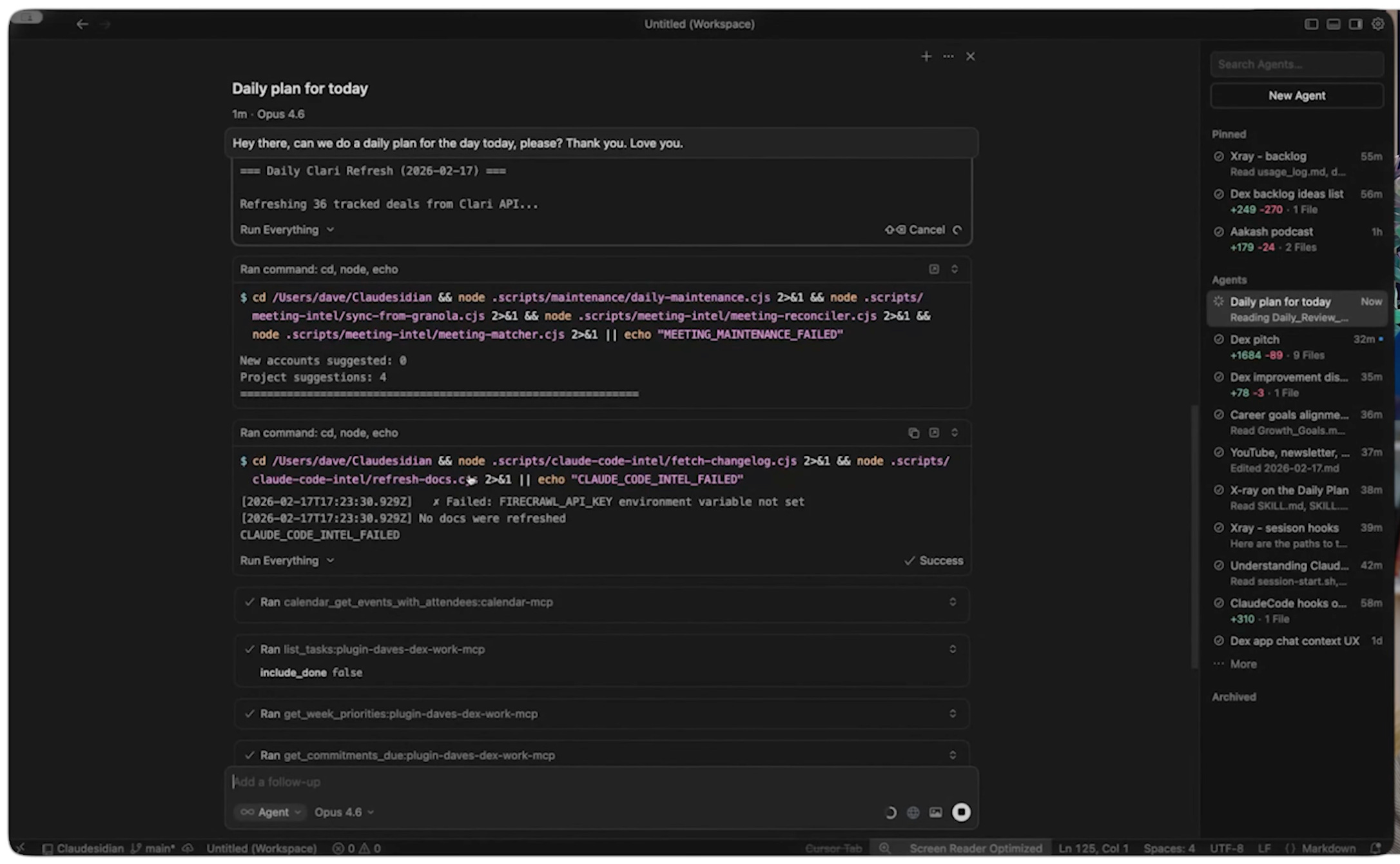
Here is what the command does under the hood:
Step 1 - Check what intel has already run
Before assembling the plan, the system checks whether all of its intelligence digests have already run for the day. Has it pulled LinkedIn data? Twitter data? Newsletter summaries? If any are missing, it executes those first.
Step 2 - Pull structured data through MCP
It pulls your calendar, weekly priorities, quarterly goals, tasks, and CRM data through MCP servers. Your specific connections will vary. Dave connects to Clari (Pendo’s sales tool), Granola (meeting notes), LinkedIn via Phantom Buster, YouTube transcripts, and 120 newsletters. You start with whatever tools you already use. Calendar is the easiest first connection.
Step 3 - Assemble and surface what matters
Everything gets assembled into a single markdown page. Three priorities for the day. Which accounts need attention, because it has been listening to customer conversations through Granola. Which LinkedIn messages are connected to existing enterprise accounts. It even writes the Slack messages to send to his team.
One command. No tab switching. No manual assembly. The AI does it all for you.
2. How to connect everything with MCP, APIs, or CLIs
The daily plan works because every tool is connected.
Most PMs hear “MCP” and “API” and assume it requires engineering work. It does not! The process is simpler than most people expect.
Step 1 - Find the documentation
Go to whatever tool you want to connect. Your calendar is the easiest starting point. Find the API, MCP, or CLI docs.
Step 2 - Tell Claude to build the server
Tell Claude through voice:
Here is the API/CLI/MCP documentation for this tool. <I have an API key for you.> Connect with it.Claude reads the documentation, builds the server, and you are connected.
Step 3 - Point the AI at new use cases
Once the server is built, you can ask Claude:
Knowing what you know of the API documentation, how can we make this even better? What could we do?It comes back with use cases you had not thought of, because it has ingested all the API documentation into your system.
Dave’s rule is simple. If he has access to an API, he connects it. Everything and anything gets connected. The more data flows in, the smarter every command becomes.
Why MCP instead of raw API calls? Because MCP acts as guardrails. It defines exactly how the AI should interact with each service, what data to pull, and in what format. That makes the results far more deterministic than pointing Claude at a raw API and hoping for the best.
3. Skills vs MCP vs hooks
This is where most people building Claude Code workflows get confused. There are three building blocks, and each one does something fundamentally different.
Building block 1 - Skills (now synonymous with commands)
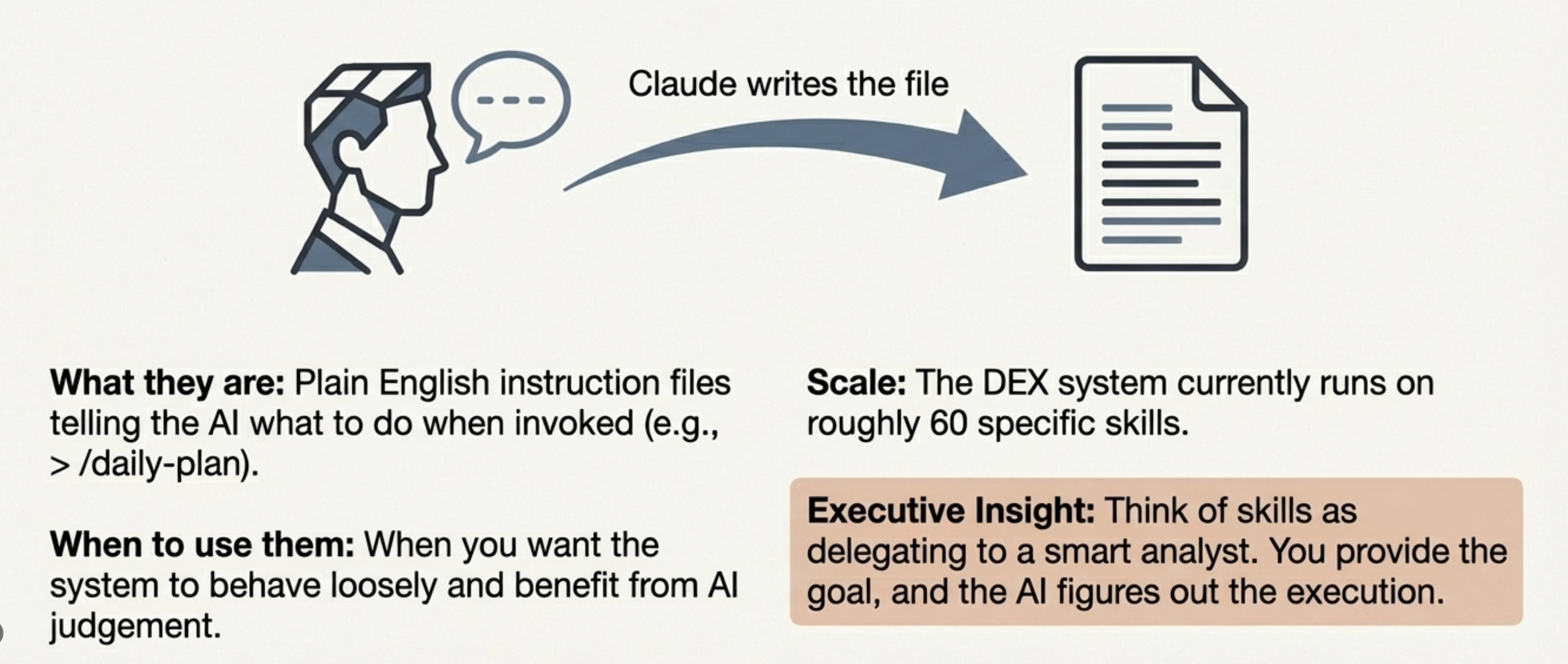
A skill is a plain English instruction file that tells the AI what to do when you invoke it. Think of it as a job description. “When I say /daily-plan, pull my calendar, check my goals, scan my intel digests, and assemble a plan in this format.”
Skills are flexible and easy to create. Describe what you want in a conversation and Claude writes the skill file for you. Dave has about 60 in his system. You’ll probably start with five or six and grow from there.
If you want something to behave loosely and benefit from AI judgment, make it a skill.
Building block 2 - MCP servers
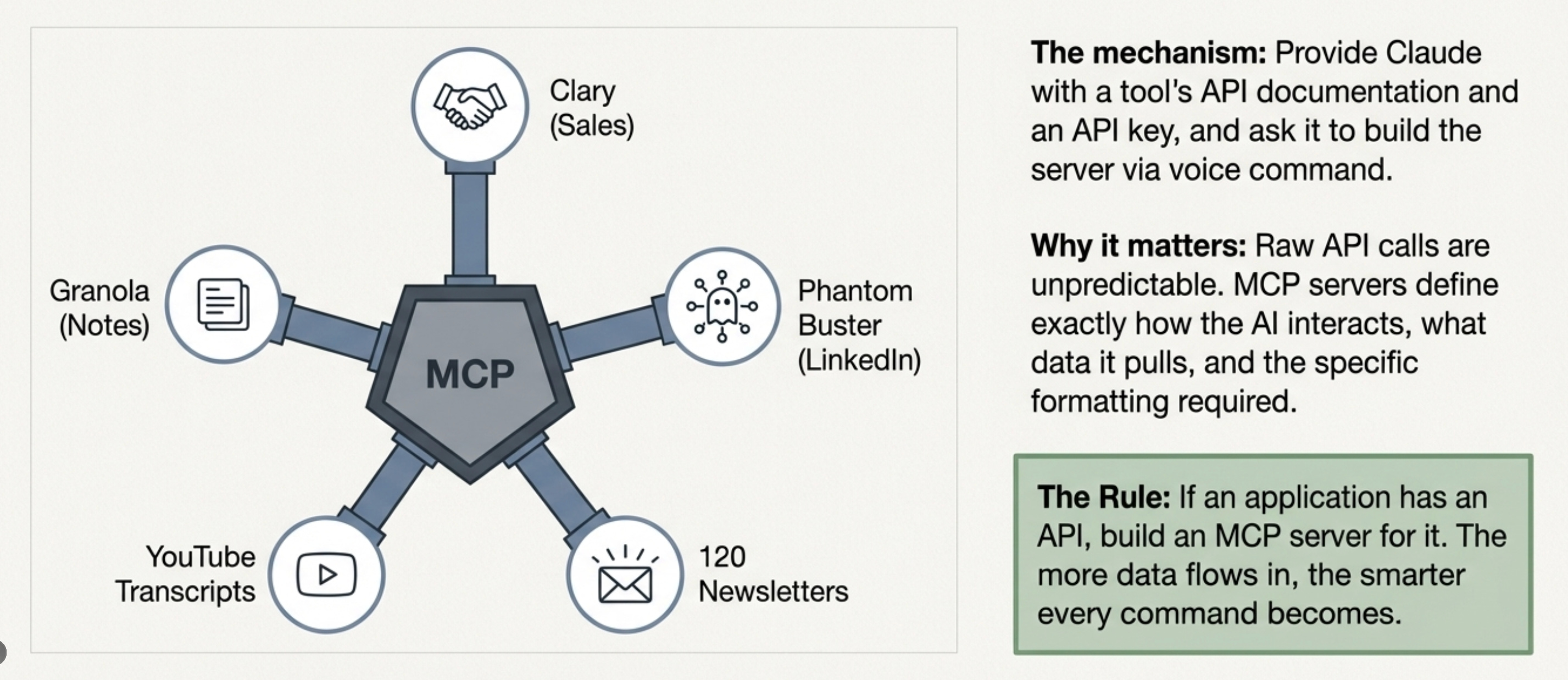
MCP servers are structured integrations that tell the AI how to interact with external services. Tighter than skills. They enforce guardrails around what data gets pulled, what format it comes in, and what steps the AI follows.
Example: a task MCP server ensures tasks get created in a consistent way every time, always attached to the right project and the right strategic pillar. Without the guardrails, the AI might skip the project link or categorize tasks differently each run.
If you want something to behave the same way every single time, make it an MCP server.
Building block 3 - Hooks
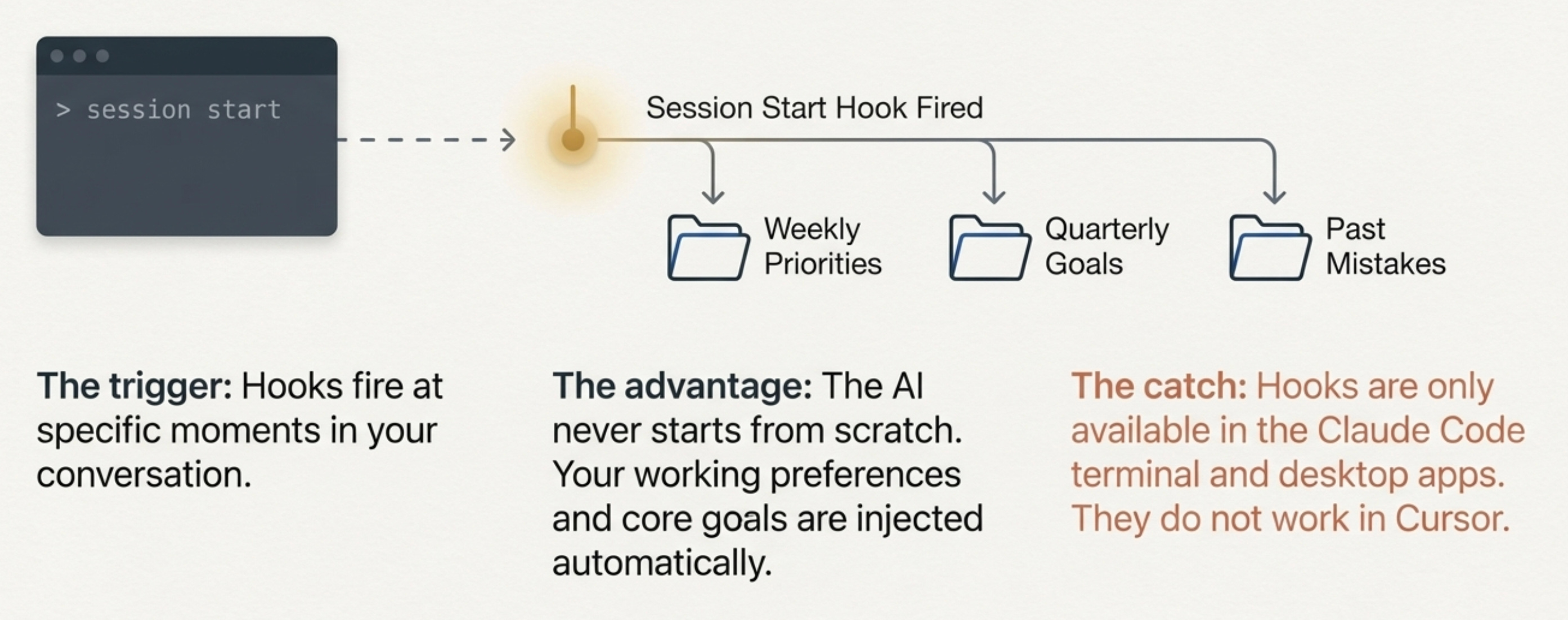
Hooks are triggers that fire at specific moments in your conversation with Claude. The most powerful one is the session start hook. Every time Dave opens a new Claude Code chat, the hook automatically injects his weekly priorities, quarterly goals, working preferences, and past mistakes into the context. The AI never starts from scratch.
Hooks are only available in Claude Code terminal and Claude Code desktop. Not in Cursor. This is the single biggest reason to graduate from Cursor to terminal.
Skills are what you do. MCP is how you connect. Hooks are how you compound.
4. The Compounding File System
Here is the fundamental difference between this approach and just chatting with ChatGPT.
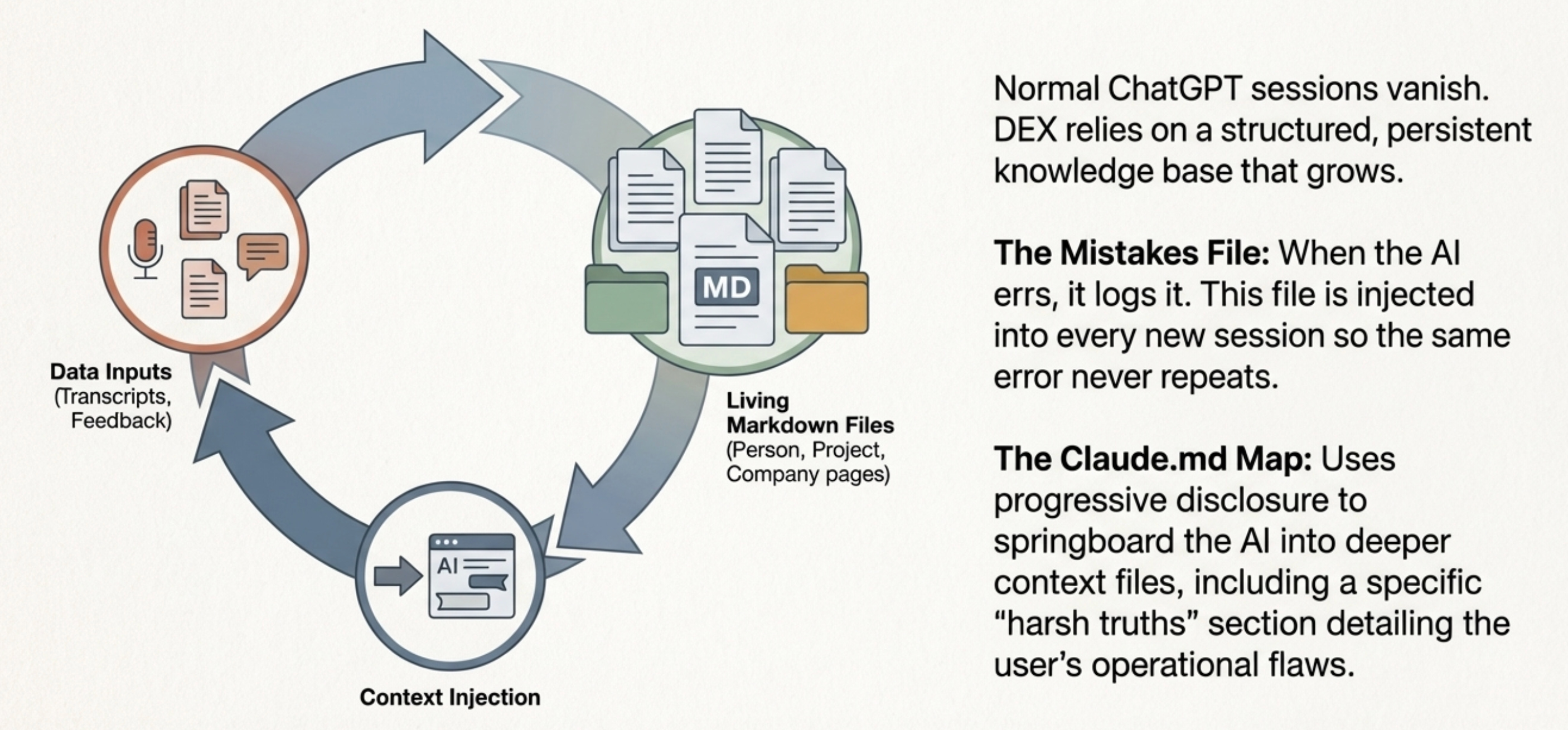
In a normal AI conversation, everything lives in that one chat window. Maybe the AI encodes something into its memory. But there is no structured, persistent knowledge base that grows over time.
In a Claude Code operating system, everything is a markdown file. And those files are alive.
How it compounds
When a new Granola meeting transcript comes in with actions from it, or there is a new angle from a stakeholder on a call, that information gets appended to the stakeholder’s person page, to the project’s page, and to the company page if there is a company connected to it. Every time the AI later pulls on that entity, it has all that fresh context. You can ask, “What do you know of this particular project?” The AI knows where to look because the file already holds months of accumulated context.
The mistakes file and working preferences
Dave has a mistakes file that the AI writes to whenever it makes an error. That file gets injected into every new session through the session start hook, so the same mistake never happens twice. He also has a working preferences file that captures how he likes to work. Every time he says, “Hey Claude, why did you do that?” the AI picks it up and logs it.
The Claude MD file
Your Claude MD file acts as a map. (Grab my Claude.MD file here.) Keep it short. Anthropic calls the technique “progressive disclosure” - the Claude MD springboards the AI into other files where deeper context lives, rather than stuffing everything into one giant file.
One trick worth stealing from Dave’s setup: he has a section called “harsh truths for Dave” that the AI wrote after he asked it to audit his system for bloat. That section gets injected into every session.
The more you dance with the AI, the more the files get smarter. That is the whole game.
5. From backlog to PRD to Kanban board
Most PMs stop at one part of the cycle. Dave has the full loop running inside his system.
Step 1 - Collect and rank ideas
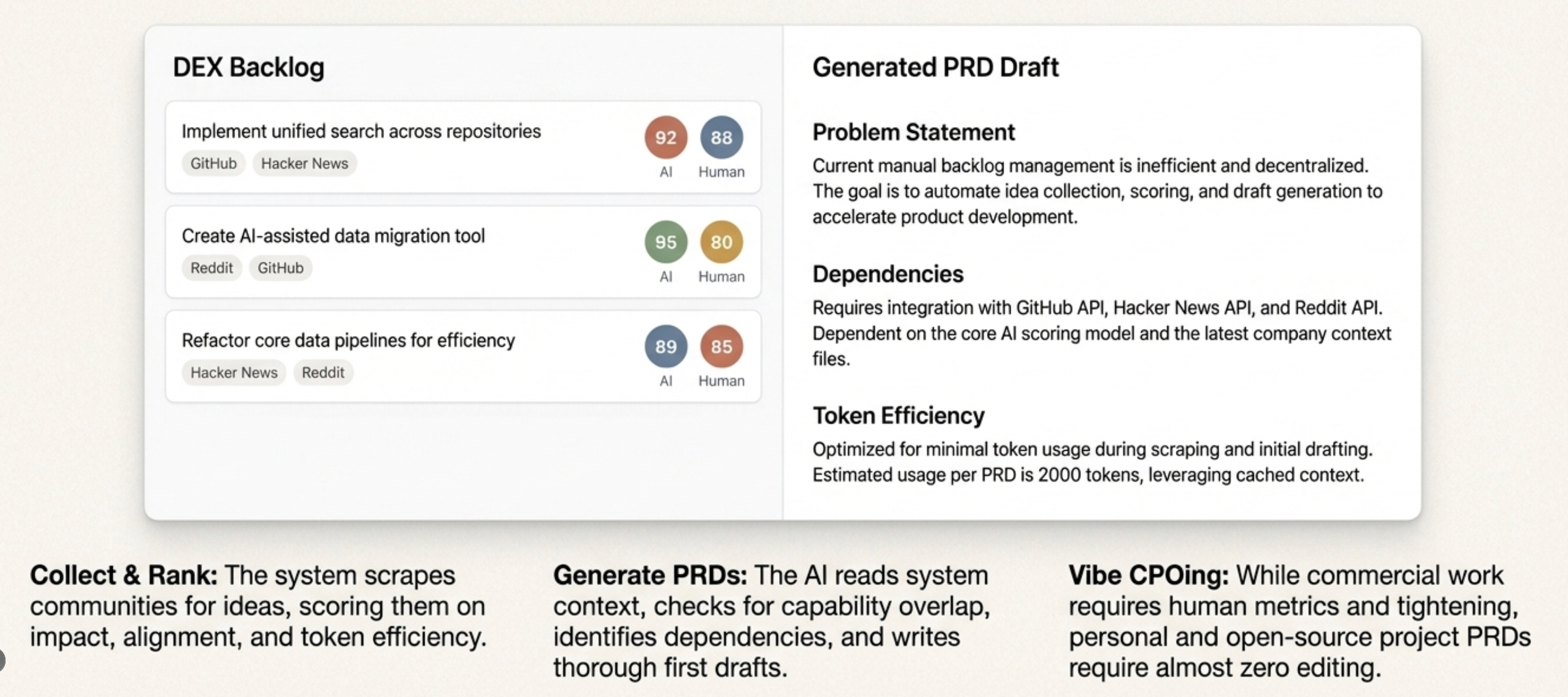
Maintain a backlog inside your system. Some ideas come from you. Some come from the AI scanning GitHub repos, Hacker News, and Reddit communities for relevant projects.
Step 2 - Generate a PRD from any idea
Pick an idea from the backlog. Tell Claude to write the PRD. The AI reads the full system context, checks for overlap with existing capabilities, recognizes dependencies, and produces a thorough first draft. Dave’s honest assessment as a CPO is that these are strong first drafts. He would want commercial context and tighter metrics before shipping at work. But for personal and open source projects, he has largely stopped editing them. He calls it “vibe CPOing.”
Step 3 - Manage everything on a Kanban board
When PRDs started piling up, Dave described the pain point to Claude. “I have too many PRDs in flight, I need a way to see what is shipped and what is next.” Claude built the entire web UI in three hours. Each card contains a PRD. Each card has a play button. The AI ranks the cards and tells him what to work on next.
That is malleable software. You have a pain point. You describe it. The AI builds the tool. If it works, keep iterating. If it does not, kill it.
6. Career planning inside your OS
Most PMs manage their product backlog with obsessive rigor and manage their own career with almost none.
Dave built a career MCP server that changes that. It does three things automatically.
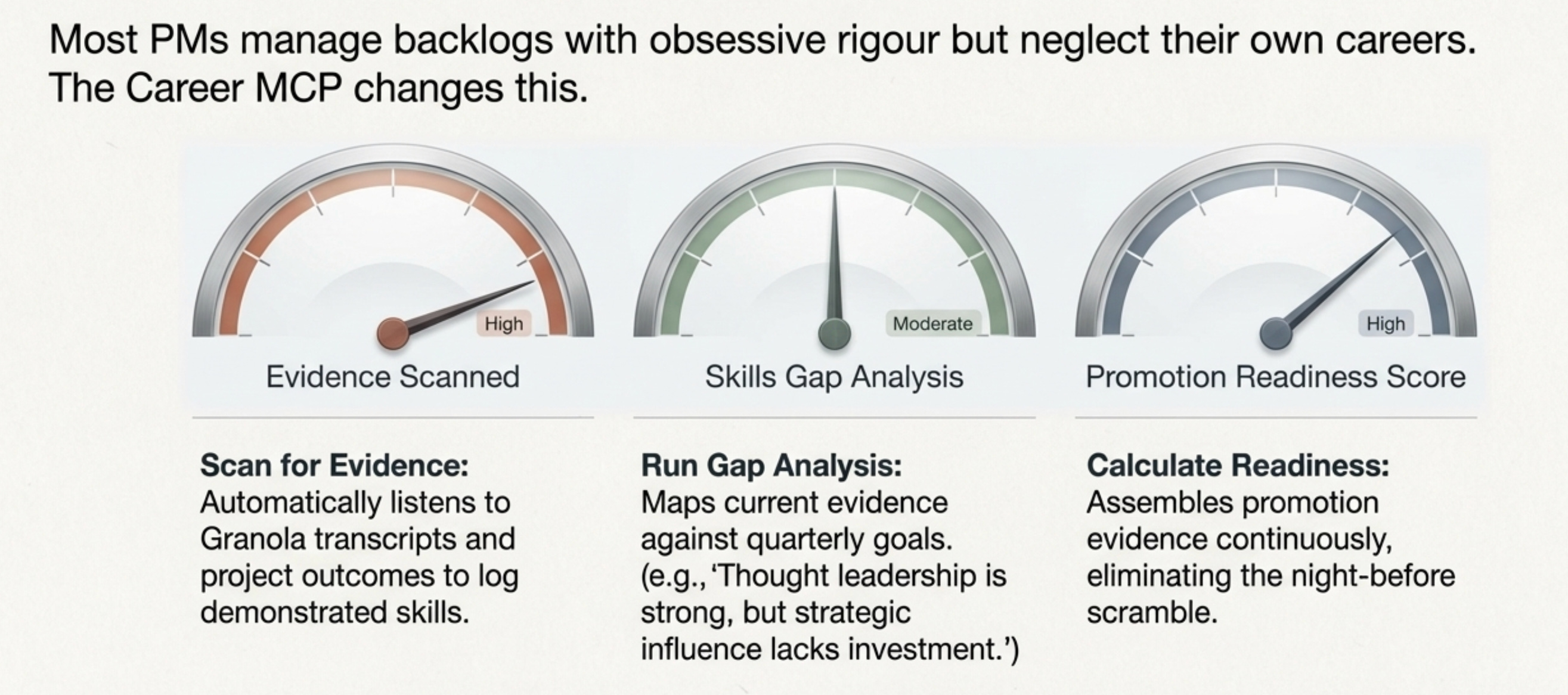
Function 1 - Scan for evidence
As Dave works with the AI every week, it listens for evidence of skills demonstrated, feedback received, and outcomes delivered. Granola transcripts, conversations, project outcomes. Everything gets collected automatically.
Function 2 - Run skills gap analysis
Based on his career goals, the system identifies where he is strong and where the gaps are. It maps those gaps against his quarterly goals and weekly priorities. When he runs his weekly plan, it says, “Your thought leadership is strong, but you have not invested in expanding strategic influence across the wider business this quarter. Here are the gaps. Here is what your weekly plan should include.”
Function 3 - Calculate promotion readiness
The system calculates a score based on accumulated evidence. When review time comes, the evidence is already assembled. Not scrambled together the night before.
The career system uses the same compounding principle as everything else. Evidence accumulates over time. Gaps get narrower. And your career roadmap stays connected to your daily work instead of living in a document you never open.
7. How to get started today
Dave’s system is open source. It is called DEX, and it is on GitHub. Or you can use mine (free for founding members).
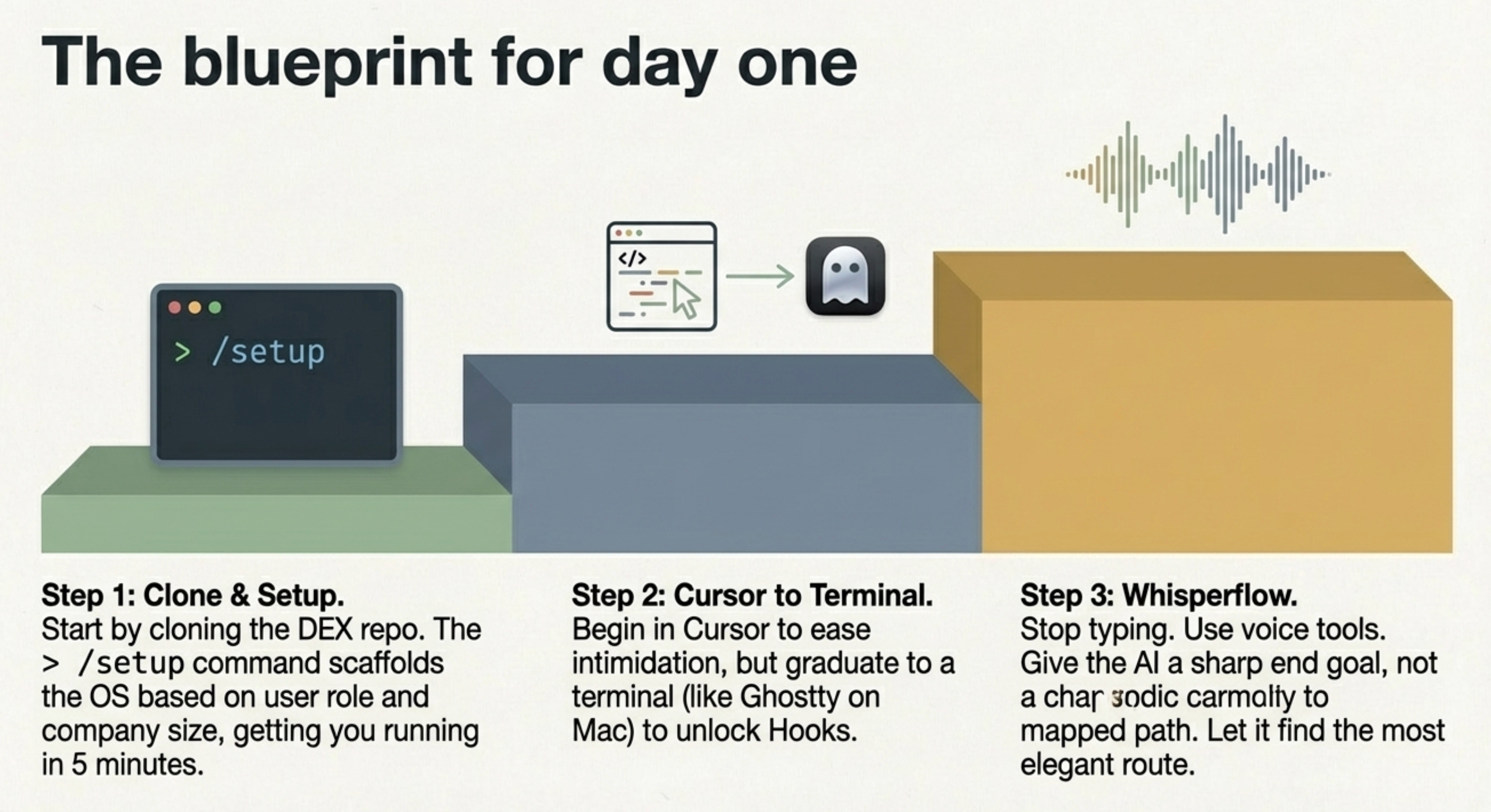
Step 1 - Clone the repo and run setup
You clone the repo, follow the step-by-step guide, and run /setup. It asks for your name, your role, your company size, and your goals. Then it scaffolds the entire system around your situation. Within five minutes, you are up and running.
Step 2 - Start in Cursor, graduate to terminal
Start in Cursor if the terminal feels intimidating. Do not worry about the messy file tree on the left. Trust the AI to organize things. Then once you are comfortable, move to Claude Code in the terminal. That is where hooks live. That is where compounding lives. On Mac, Ghostty is a cleaner terminal experience than the default.
Step 3 - Use your voice
Do not type. Use Wispr Flow or Speechify. Talking to Claude instead of typing completely changes the dynamic. And be very clear about your goal. Do not tell the AI how to get somewhere. Tell it where you want to end up. Give it a precise, sharp goal, and let it figure out the most elegant path on its own.
There has never been a better time to be a product geek. The PMs who build their own operating systems will compound their advantage every single day. The ones still switching between 15 tabs every morning will keep losing 30 minutes before they even start.
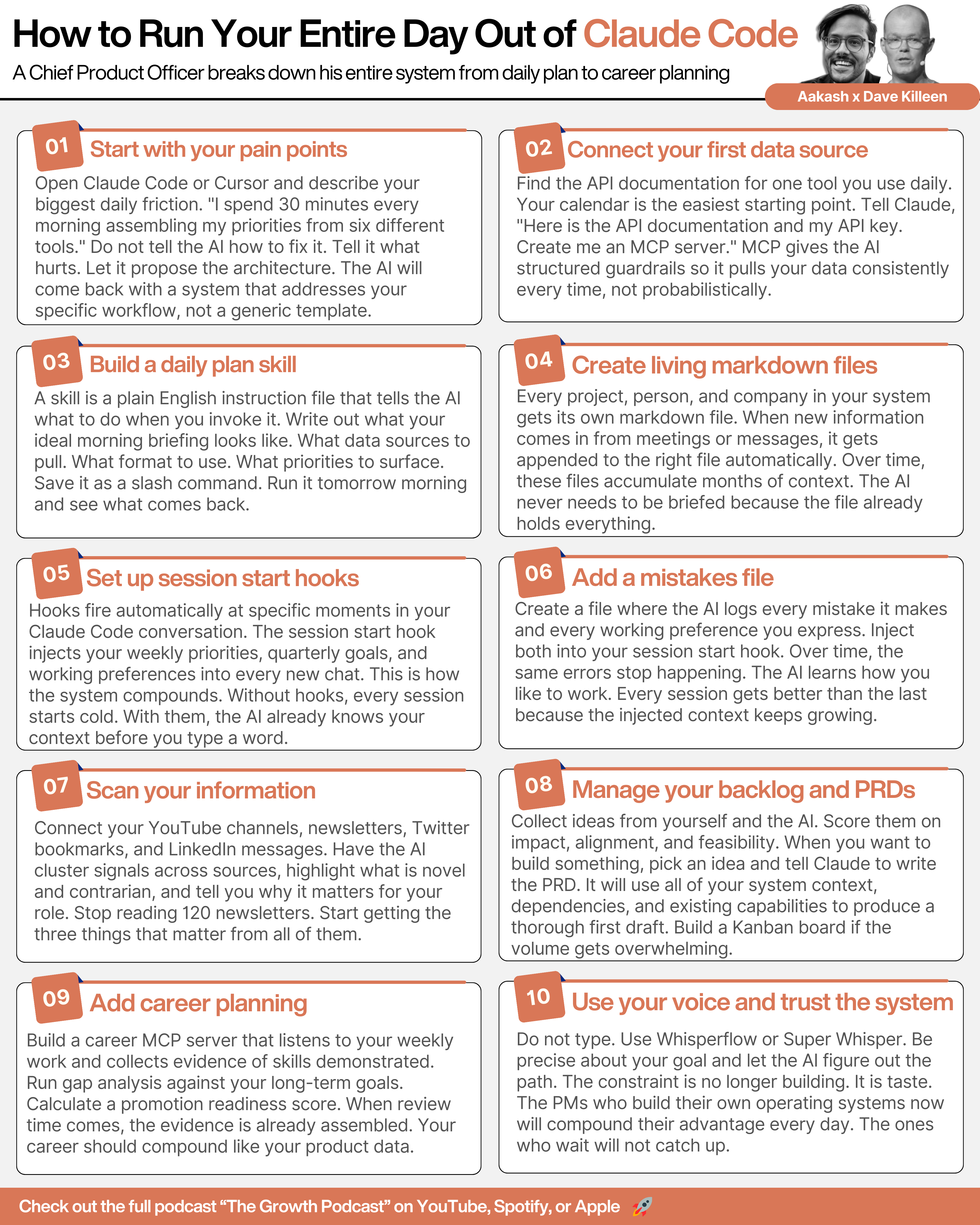
[Bonus] Takeaway Visual
Where to find Dave Killeen
Related Content
Newsletters:
Podcasts:
PS. Please subscribe on YouTube and follow on Apple & Spotify. It helps!