Check out the conversation on Apple, Spotify, and YouTube.
Brought to you by Arize: Ship AI agents and features faster, with fewer regressions.
Today’s episode
If you’ve gotten an enterprise Claude subscription, you want to get the most out of it.
And the first question is: When do you use Claude Chat vs Cowork vs Code?
The second question is: How do you use each of them best?
Today’s episode answers both questions. I’ve brought back Pawel Huryn for a record fourth time. You guys loved his prior episodes on discovery, AI PM, and n8n.
Now, he’s back with a masterclass on the Claude ecosystem for PMs:
If you want access to my AI tool stack - Dovetail, Arize, Linear, Descript, Reforge Build, Relay.app, Magic Patterns, Speechify, and Mobbin - become an annual subscriber ($150), and grab Aakash’s bundle.
If you want access to my AI PM customizations - PM OS, Job Search OS, and Prompt Library - become a founding subscriber ($250).
The roadmap from here
We’ve built the complete guide to building a self-improving AI PM operating system across Cowork, Claude Code, and Dispatch:
Why chat is a dead end for serious PM work
The Cowork power setup
What Claude Code unlocks that Cowork cannot
The self-improving knowledge system
The 24/7 PM workflow
1. Why chat is a dead end for serious PM work
We’ve all used ChatGPT and Claude Chat to do work. But you shouldn’t be anymore.
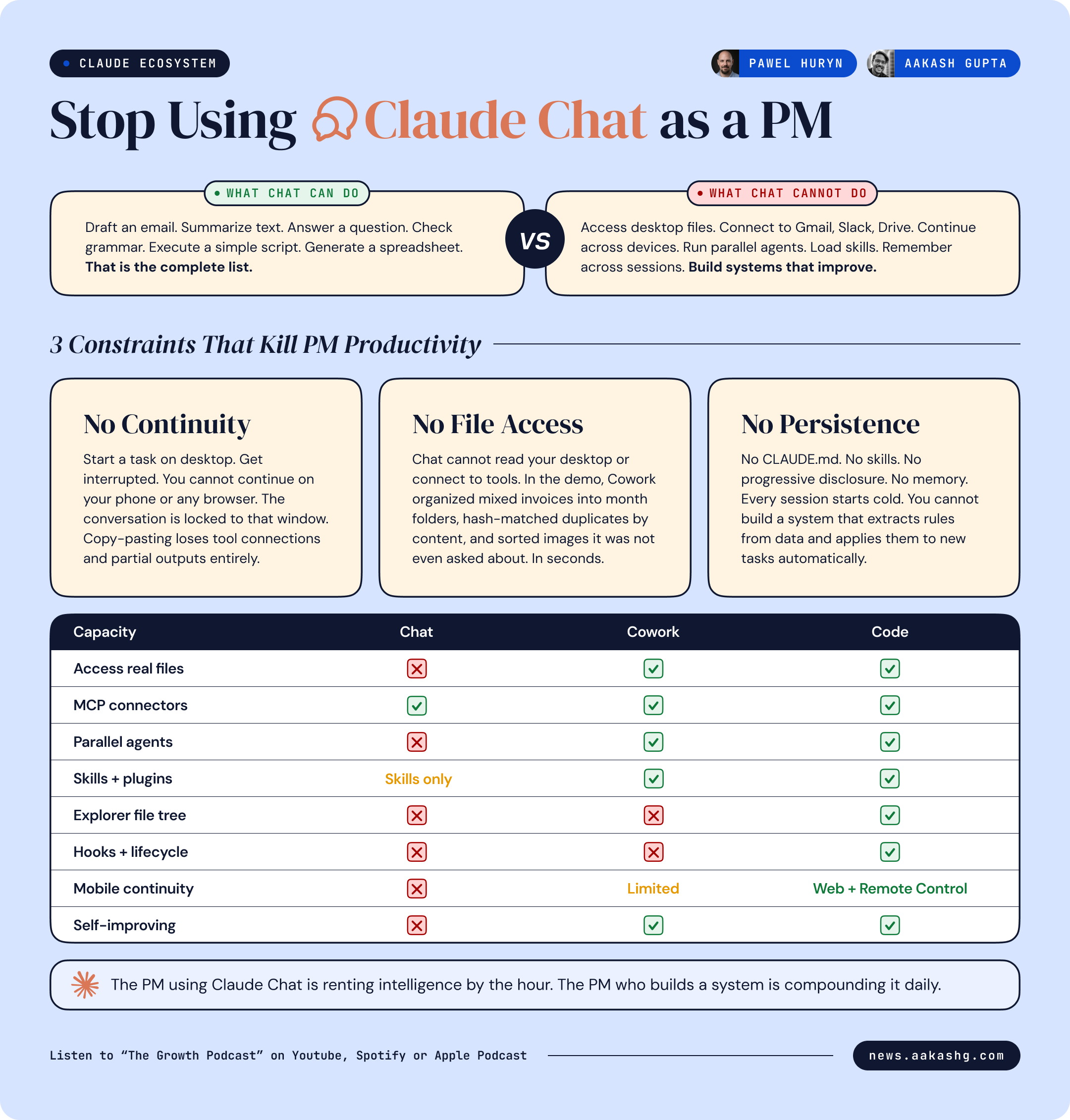
Chat has three hard constraints that make it a dead end:
No continuity across devices or sessions
No access to your real files or tools
No systems that persist and improve
Each one is worth marinating on for a little bit.
Constraint 1 - No continuity
If you start a complex task on your desktop and then get pulled into a meeting, you cannot pick up that same session on your phone. You cannot resume it from a web browser.
Your only option is to copy the entire conversation into a new context and hope the agent reconstructs your state correctly.
Cowork and code do not have this limitation. You can build a multi-agent system with file access, tool connections, and persistent project context.
Constraint 2 - No file access
Chat cannot read your desktop. It cannot organize your invoices.
In the episode, Pawel dropped a folder of mixed invoices - PDFs, images, different months, duplicates with different filenames - into Cowork.
Then he plugged in a single prompt. From there, the agent built a step plan, extracted dates from PDFs, identified duplicates using hash functions, created month folders, move files, and verified. Four folders appeared in seconds. Duplicates removed. Images that were also invoices got sorted correctly even though the prompt only said “PDF invoices.”
Chat would have described how to organize invoices. Cowork organized them. On a real desktop. In a real file system.
Constraint 3 - No persistence
Chat has very little controllable memory across sessions.
You cannot build a system that learns from its mistakes, extracts patterns from your data, and applies those patterns to the next task automatically.
We’ll show you how to in Code and Cowork.
Putting it all together
So how should you be using the three surfaces? Here is Pawel’s setup:
70% Dispatch + Claude Code web sessions
25% Claude Code locally
5% chat
But you don’t need to get there right away. You can use cowork instead of code, too (as I’ll show in the next section). The real key point is you should keep chat to 5%, and use more powerful surfaces for everything.
2. The Cowork power setup
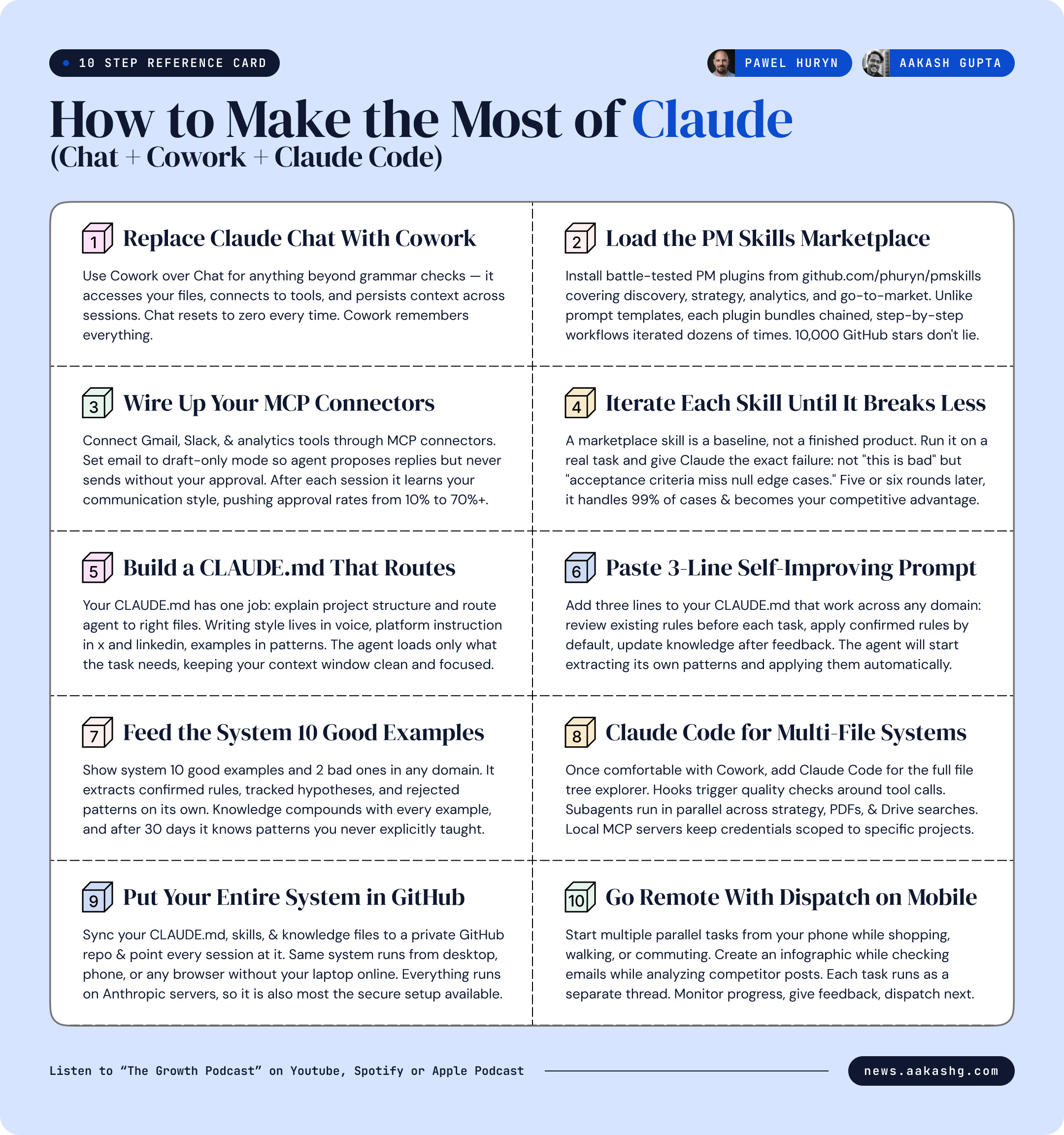
So if you shouldn’t be using Chat, what should you use? The next level up is Cowork. It’s a user-friendly skin on Code. Here’s how to set it up like a power user:
Step 1 - Skills + plugins
I wrote about this on Monday. Skills are the new prompts.
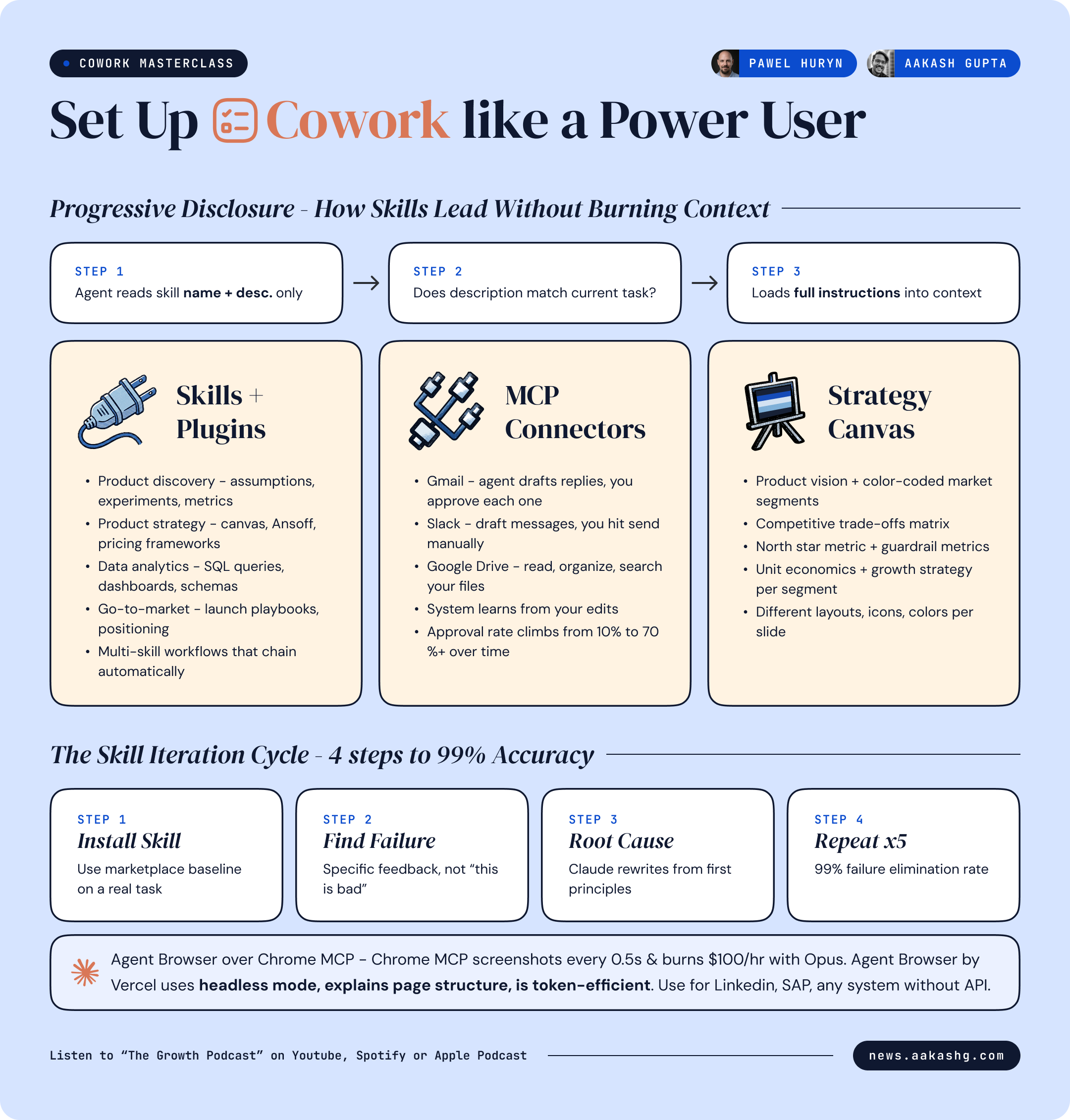
The agent reads only the name and description first. If the description matches the current task, it loads the full instructions. If it does not match, the instructions never enter your context window.
This is progressive disclosure. You can have dozens or hundreds of skills loaded. The agent consumes context only on the ones it needs right now. Here is what that looks like in practice.
Pawel’s PM skills marketplace has soared past 11,000 GitHub stars. Inside, there are numerous plugins. Each plugin bundles multiple skills.
Two plugins I’d highlight you install now:
Product discovery plugin - analyze feature requests, brainstorm ideas, plan experiments, create tracking metrics, identify and stress-test assumptions
Product strategy plugin - Ansoff matrix, pricing strategy, competitive analysis, product strategy canvas generation
Now here’s the caution:
Marketplace skills are just baselines.
The real ROI is in iteration. Here is the process I have found works:
Install a marketplace skill. Use it on a real task.
The output has problems. Give Claude the specific failure. Not “this is bad.” Something like “the acceptance criteria are missing edge cases around null values and the priority labels do not match our team’s P0-P3 scale.”
Tell Claude to read the conversation, identify the root cause of the failure, and rewrite the skill from first principles so it does not make that mistake again.
Test the updated skill on another real task. Find the next failure. Repeat.
After five or six iterations, the skill handles 99% of cases correctly. I gave you a full skill to improve skills automatically on Monday if you want to accelerate this cycle.
You cannot just sit and use some magic technique to get it right on the first try. Build, test, give feedback, iterate. That is the whole game.
Step 2 - MCP connectors for real tools
Cowork connects to your actual systems through MCP servers - and some are even more bundled into connectors. I covered building a PM OS from these connections with Mike Bal a few months ago.
You want to connect Gmail. Google Drive. Slack. Analytics tools. User research platforms. CRM. The more data flows in, the smarter every skill becomes.
Now here is how connectors work in practice for a PM.
In the episode, Pawel ran a live email demo on his inbox. One prompt:
How many unanswered emails do I have right now, count by category, no personal information?
The agent connected to Gmail, counted, and reported back. It even drafted replies.
Here’s our recommendation: start drafting your comms with this.
Configure the Gmail connector to draft-only mode. The agent proposes replies but cannot send.
Configure Slack the same way. Drafts appear with a “send” button you approve manually.
After every session, the system reviews your edits to its drafts and learns your voice. Next batch of drafts gets closer.
This is the AI-drafted email workflow I wrote about last year supercharged. The agent drafts. You approve. The agent learns from your edits. Your approval rate climbs over time.
Step 3 - Drive Strategy
AI really compounds when you don’t just use it to do work but to be a stratgic partner.
In the episode, Pawel loaded a product strategy skill via slash command (which I recommend - it ensures the right skill fires instead of relying on auto-detection).
The agent asked clarifying questions defined by the skill, then generated a full product strategy canvas as a PowerPoint deck.
Two things blew my mind. First, Claude is dramatically better at using PowerPoint than it was even two months ago. There is no excuse to walk into a stakeholder meeting with a bad presentation anymore.
Second, the output reflected the specific skill definitions around north star metrics and guardrails. A good skill is the difference between generic AI output and McKinsey-level output.
If you put these three steps together, you’re now a Cowork power user.
3. What Claude Code unlocks that Cowork cannot
At this point you are thinking - Cowork does everything I need. Why do I need Claude Code?
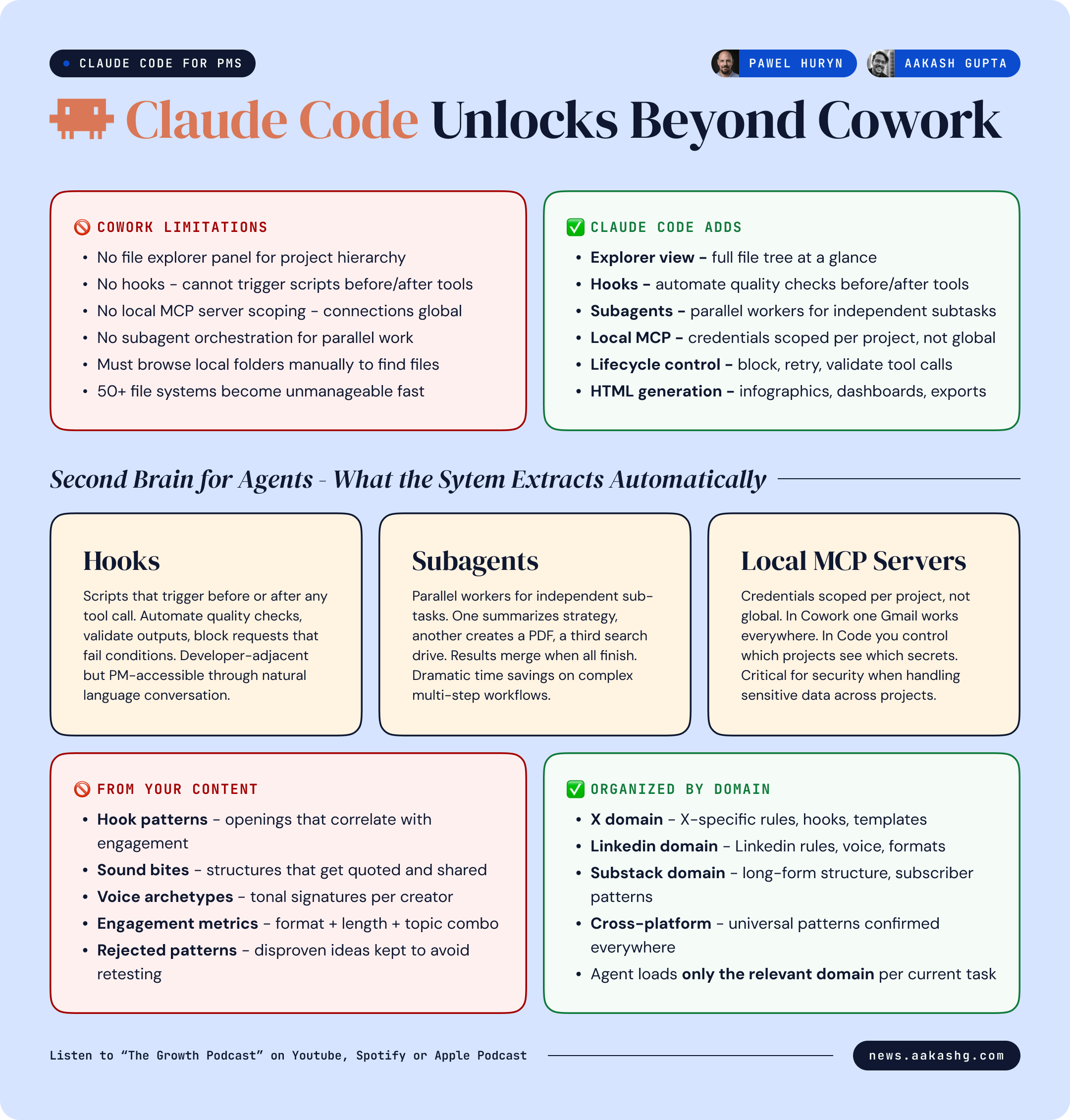
The answer is not about raw capability. If you load development plugins into Cowork, it can do similar things technically.
The answer is about interface, control, and systems that grow past 20 files:
The explorer view and multi-file systems
In Cowork, if you want to find a file the agent created, you use the little build in-browser.
This hits a wall fast. The moment your system grows to 50+ files - knowledge databases, skill files, templates, infographics, invoices, contracts, brand guides - you need the explorer panel. It shows folder structure. You expand directories. You click to open any file. You see what the agent has created and where it lives.
Any PM building a serious personal operating system will need this view. The file system IS the operating system.
Claude Code also gives you features Cowork lacks entirely:
Hooks - scripts that trigger before or after tool calls. Automate quality checks. Block requests that fail conditions.
Subagents - parallel workers that handle sub-tasks independently and report results back.
Local MCP servers - credentials scoped to specific projects. In Cowork, MCP connections are global across all sessions. In Claude Code, you define which connections each project can access. This matters for security.
Lifecycle control - what happens before a tool is called, what happens after, ability to block or retry.
If you want the foundations, I walked through the full Claude Code setup for PMs and the team OS pattern in separate guides.
HTML infographics and the component library
Every viral infographic from Product Compass - the Anthropic team calendar, the Claude Code pricing breakdown, the 74-release tracker - was built in Claude Code. Not Canva. Generated as HTML, iterated through natural language conversation, and exported as PNG.
The mechanism is more interesting than the output.
The system maintains a growing library of HTML components. When a new infographic performs well on social media, the agent analyzes it. It extracts the layout patterns, the visual components, the density characteristics. These get stored as reusable building blocks.
When a new infographic is requested, the agent assembles from the library. New layouts from proven components. Each new output that works feeds the library. The components compound.
The process works because of context engineering - feeding the agent the right information at the right time. Feed it winning infographics. It extracts patterns. Feed it your brand system. It applies constraints. Feed it new content. It generates within both.
Building your second brain for agents
Karpathy recently presented a system for building a personal wiki with LLMs. A knowledge base for humans. Agents organize your articles, attachments, notes into a browsable second brain.
The approach in the episode is the inverse. Build a second brain for your agents, not for yourself. You are the curator. You feed in articles, screenshots, infographics, competitor posts. The agent does not just store them. It decomposes them.
Feed it 10 high-performing LinkedIn posts from a specific creator. The agent extracts:
Hook patterns - what opening structures correlate with high engagement
Sound bites - phrases and sentence structures that get quoted and shared
Voice archetypes - tonal signatures that differentiate one creator from another
Engagement metrics - what format, length, and topic combinations drive reactions
It organizes this by platform. X in one domain. LinkedIn in another. Substack in another. Each domain accumulates its own knowledge. When you ask the agent to write for a specific platform, it loads only that platform’s rules.
The agent that wrote for X a month ago is measurably better at writing for X today. Because it has more data, more confirmed patterns, more rules to apply.
You are curating a knowledge base that makes every future session smarter than the last.
4. The self-improving knowledge system
Every PM building with Claude hits the same wall. Your CLAUDE.md grows. You keep adding instructions, examples, good output, bad output. Eventually it consumes half your context window on every prompt. A grammar check carries the same overhead as a strategy task.
This is the most important section of this newsletter. It is the difference between using Claude and building with Claude.
The CLAUDE.md router pattern
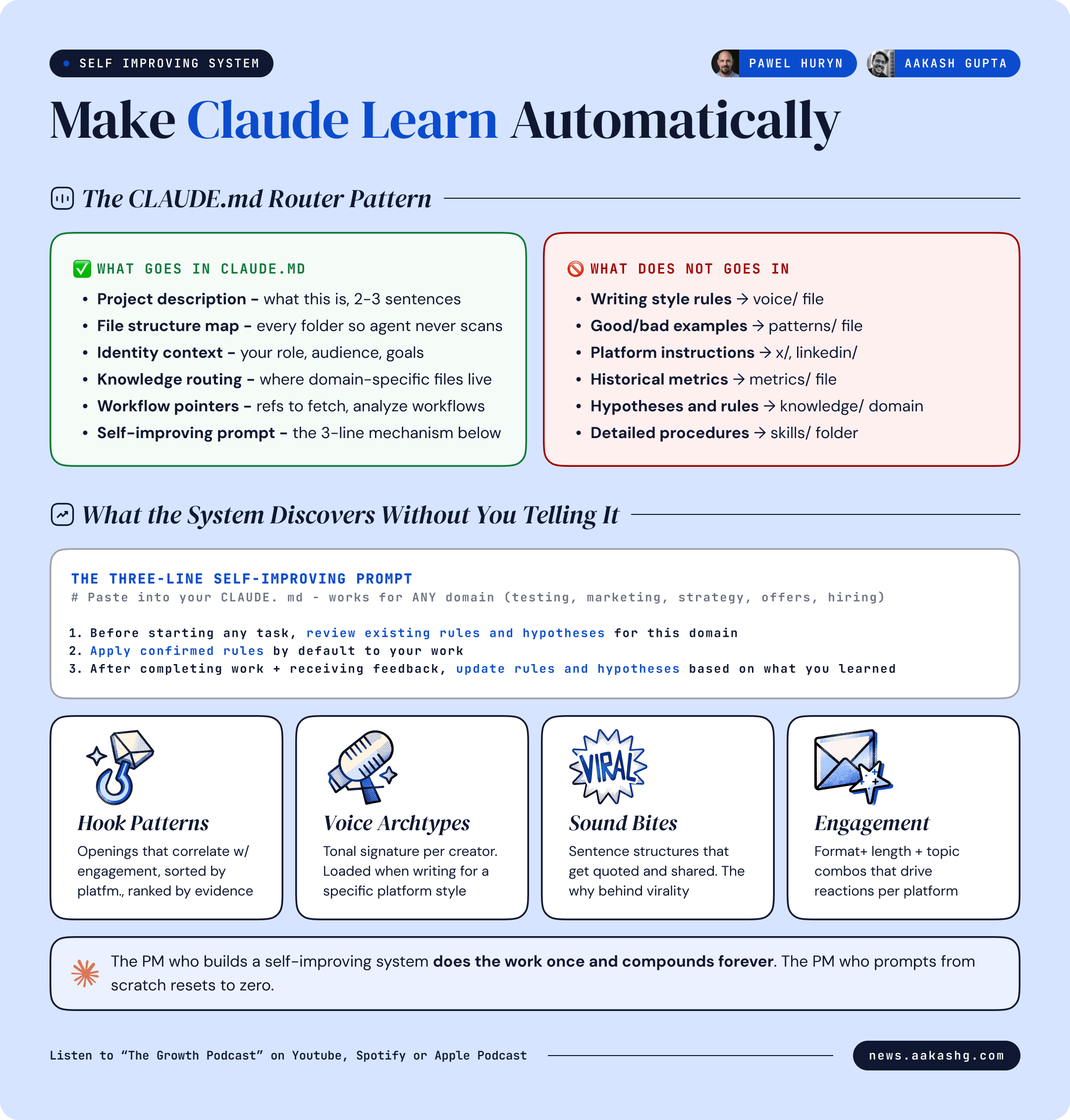
Do not put detailed instructions in your CLAUDE.md. Your CLAUDE.md has one job - explain the project structure and tell the agent where to find specific knowledge.
Here is what goes in CLAUDE.md.
Project description - what this project is about, in two or three sentences
File structure - what is in each folder so the agent does not scan the repo on every prompt
Who I am - basic context. Role. Audience. Goals
Knowledge system instructions - how to find domain-specific knowledge, how to route to the right file, how to update knowledge after tasks
Workflow references - pointers to workflow files for specific operations like fetching Twitter data, analyzing LinkedIn posts, or drafting Substack notes
Here is what does NOT go in CLAUDE.md.
Detailed writing style rules - put in a voice file
Lists of good and bad examples - put in a patterns file
Platform-specific instructions - put in platform-specific files
Historical data or metrics - put in a metrics file
The index file routes everything. X rules live in X knowledge files. LinkedIn rules live in LinkedIn files. Product strategy frameworks live in strategy files. The agent loads only the relevant domain for the current task.
I covered the foundations of this in my context engineering guide. The CLAUDE.md router is the implementation layer that makes context engineering work in practice.
Rules, hypotheses, and rejected patterns
This is where self-improvement actually happens. When the agent analyzes data - posts that performed, offers that converted, candidates that got hired, experiments that shipped - it does not just summarize what worked. It generates three types of knowledge:
Rules - patterns confirmed across enough data to apply by default. Example from the episode - “achievement-as-proof hooks outperform achievement-as-point hooks.” Confirmed across 46+ posts. The agent applies this automatically to every new hook it writes.
Hypotheses - patterns observed but not yet confirmed. The agent tracks these with evidence counts. A hypothesis can be promoted to a rule when evidence accumulates, or demoted to rejected when counter-evidence appears. Example - “emotional diversification correlates with higher average engagement.” Currently hypothesis, not yet rule.
Rejected - patterns that were considered but disproven by data. The agent keeps these to avoid re-testing dead ideas. Example - a specific hook format that was hypothesized to work but showed negative results across multiple tests.
The agent manages all three categories without being told what to look for. It discovers its own patterns. It updates its own confidence scores. It organizes by domain automatically.
In the episode, the knowledge database had entries the builder had never seen before. Hypotheses the agent generated independently from analyzing patterns across hundreds of posts. That is the compound effect.
The three-line prompt that makes any domain learn
You do not need to build the full system from day one. Here are the three instructions you paste into your CLAUDE.md. They work for any domain - testing, marketing, strategy, release notes, customer offers, interview prep, whatever:
Instruction 1 - Before starting any task in a specific domain, review existing rules and hypotheses for that domain.
Instruction 2 - Apply confirmed rules by default to your work.
Instruction 3 - After completing work and receiving feedback, update rules and hypotheses based on what you learned.
That is the entire mechanism. Show the system 10 good examples and 2 bad examples. Ask it to create something new. It reviews the rules it has already extracted. It applies the confirmed ones. You give feedback on the output. It updates the knowledge. The next output is better.
The knowledge self-organizes by domain. Pricing rules stay in pricing. Testing rules stay in testing. Marketing rules stay in marketing. You do not need to manage the taxonomy. The agent builds it from the data.
If you do nothing else after reading this, do three things this week.
Add the three-line self-improving prompt to your CLAUDE.md.
Feed it 10 examples of good work in one domain you care about.
Ask it to do one task in that domain and see what rules it applied.
That alone will put you ahead of most PMs still briefing from scratch every session.
5. The 24/7 PM workflow
If you can build a system that works while you are away from your desk, why would you limit yourself to working only when you are sitting at your laptop?
The answer most PMs give is “I would not.” The problem is they do not know how to set it up. So let’s explain it.
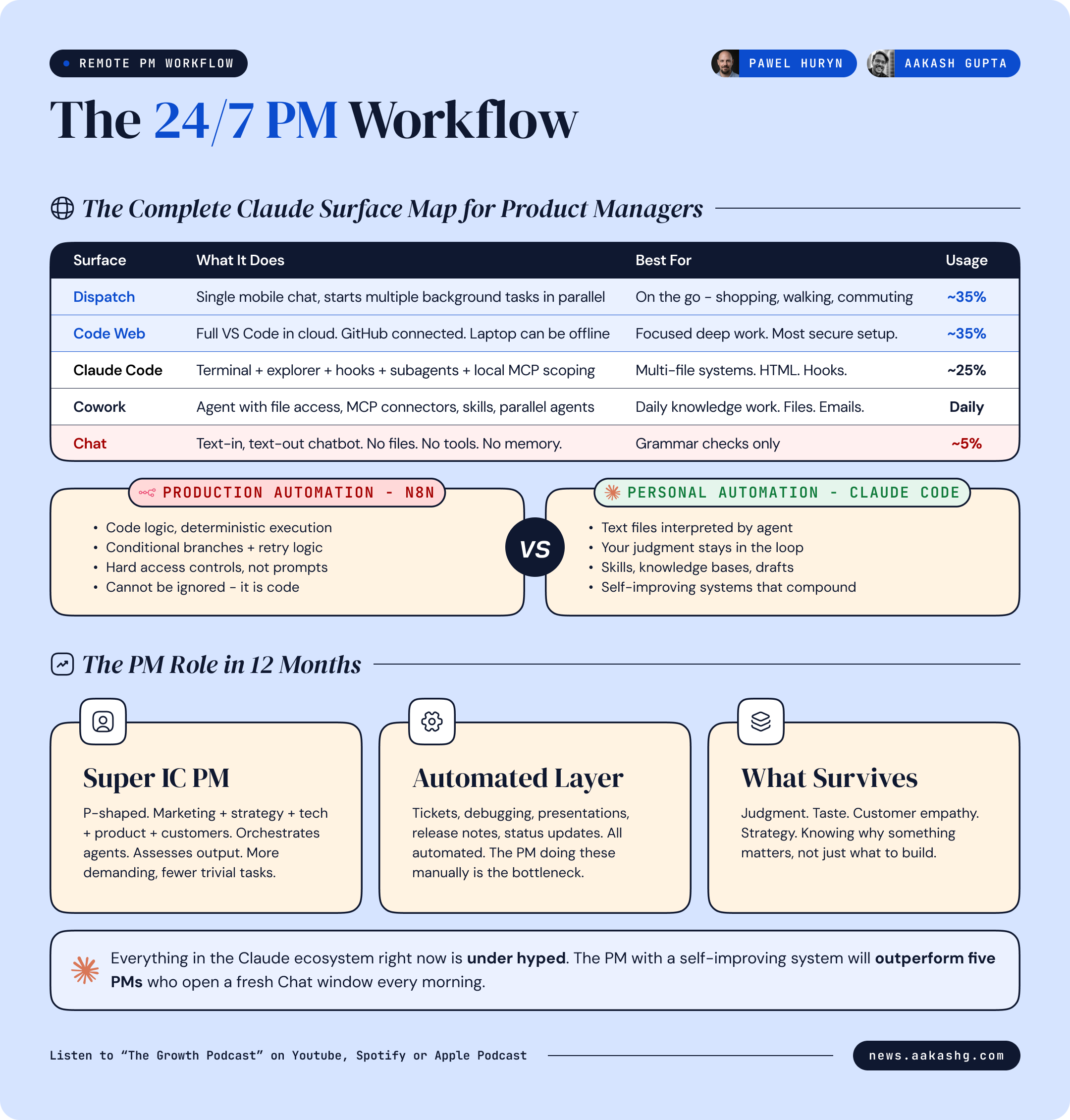
Anthropic shipped four remote surfaces - web sessions, remote control, Dispatch, and Channels. Not all four matter equally. Here is what does.
Dispatch as your mobile command center
Dispatch is a single chat interface on your phone (and desktop) that can start multiple background tasks simultaneously. You type “create an infographic for this text.” While it works, you type “how many emails did I get in the last two hours.” While both run, you type “analyze the last 5 posts by competitor X.”
Each task delegates to a separate agent thread. You monitor progress. You provide feedback. You approve outputs. You dispatch the next task. All from your phone.
The description from the episode was specific - “my life works much better integrated with life now. I do not have to have blocks dedicated to work. I go for shopping, I go somewhere with my kid and I just dispatch tasks. I provide text feedback in the chat. I look at the results. I dispatch another task and continue what I was doing.”
This is not about working 24/7. It is about decoupling PM work from the desk.
Code web sessions for focused work
When you need the full explorer view, the file tree, the terminal - use code web sessions. These run on Anthropic’s servers, connected to your GitHub repo.
The critical insight - put your entire operating system into GitHub. CLAUDE.md. Skills. Knowledge files. Everything syncs. Code web sessions point at your repo. Now you can access the same system from any device. Your laptop does not need to be online. This is also the most secure setup because everything stays on Anthropic’s infrastructure.
The pattern - start something on your desktop. Continue it on your phone through Dispatch. Finish it from a web browser through code web sessions. One system across every device.
I walked through the setup in my Claude Code guide. The GitHub sync step is the one most PMs skip.
When to use which (and the n8n question)
Here is the decision framework:
Dispatch - mobile, multiple lightweight tasks in parallel, quick feedback loops
Code web sessions - focused work with full file explorer, any browser, laptop offline is fine
Cowork - desktop knowledge work with files, the daily driver for most PM tasks
Claude Code - complex multi-file systems, hooks, subagents, HTML generation
Chat - grammar checks and one-off questions. 5% of your time
But here is the question everyone asks. If Claude Code can automate everything, is n8n dead?
No. And the distinction matters.
Everything above is personal automation. Your judgment stays in the loop. You approve drafts. You review outputs. You provide feedback. The agent suggests. You decide. This is where Claude Code wins.
Production automation is different. Customer ticket responses. Onboarding flows. Compliance checks. Data pipelines. For these, you need guarantees that Claude Code cannot provide.
Claude Code workflows are text files an agent interprets. The agent can respect the instructions. It can also ignore them. You cannot tell an agent “if the API fails, retry three times” and guarantee it will. You cannot enforce “verify customer email exists before sending” as a hard rule. You cannot prevent one customer from seeing another customer’s data with a markdown file.
For production systems, you need n8n or a similar workflow engine where the logic executes as code, not as suggestions. Conditional branches. Retry mechanisms. Access controls. Deterministic execution paths.
Personal automation - Claude Code. Text files. Agent interprets.
Production automation - n8n. Code logic. Deterministic execution.
Knowing which one you need is what separates a PM who ships from a PM who demos.
Final Words
The PM role in 12 months will not disappear. But it will compress vertically. Super individual contributor PMs at the bottom. CPO and CEO at the top. The middle thins.
Most of your time will be orchestrating multiple agents, switching contexts, assessing outputs. The trivial parts - tickets, debugging, presentations, release notes - will be automated. The PMs who survive are P-shaped or broader. Marketing. Strategy. Technology. Product. Customers. And enough about every area to delegate the work and assess the output.
Where to find Pawel Huryn
Related content
Podcasts:
Newsletters:
PS. Please subscribe on YouTube and follow on Apple & Spotify. It helps!