Check out the conversation on Apple, Spotify, and YouTube.
Brought to you by:
Customer.io: Send smarter messages using your product data
Amplitude: The market-leader in product analytics
Bolt: Ship AI-powered products 10x faster
Ariso: Your AI chief of staff for meetings, follow-ups, and coaching
Product Faculty: Get $550 off their #1 AI PM Certification with code AAKASH550C7
Today’s episode
If you haven’t coded before, you’re getting pinched on all sides. Builder PMs coming from technical backgrounds. Layoffs targeting the managerial class. It’s tough out there.
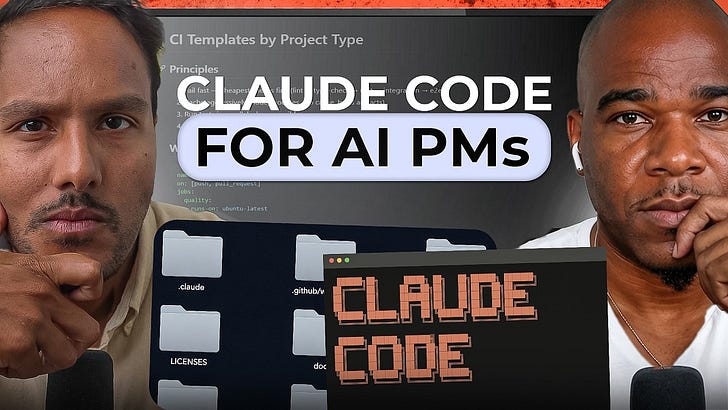
Today’s episode is the antidote. We show you a step-by-step process to graduate from tools like Lovable to multi-agent systems in Claude Code.
I’ve brought in Andre Albuquerque, who has worked with over 4,000+ students at Builders Camp, runs five business with Claude Code and … has never been a developer!
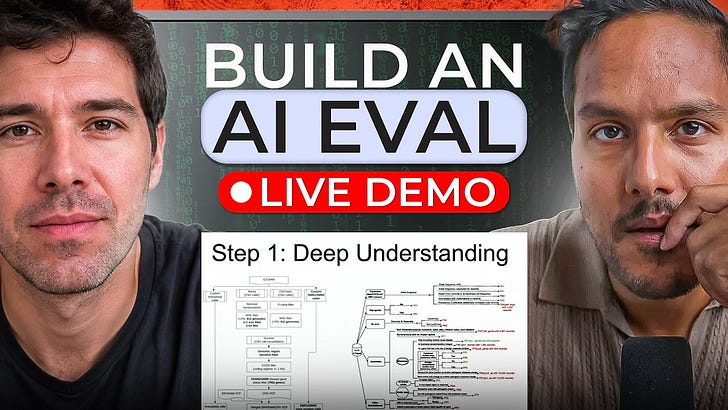
Live on the episode, he builds a fully functional product from scratch. And he describes things in the most easy-to-understand way.
If you have been putting off Claude Code because it feels too technical or intimidating to set up, this episode is for you.
If you want access to my AI tool stack - Dovetail, Arize, Linear, Descript, Reforge Build, Relay.app, Magic Patterns, Speechify, Bolt.new and Mobbin - become an annual subscriber ($150), and grab Aakash’s bundle.
If you want access to my AI PM customizations - PM OS, Job Search OS, and Prompt Library - become a founding subscriber ($250).
Newsletter deep dive
Thank you for having me in your inbox. Here is the complete guide to Claude Code for non-technical PMs:
Why non-technical PMs are getting left behind
The four levels of building
What changes when you start building
1. Why Non-technical PMs are Getting Left Behind
Andre identified three major blockers holding non-technical PMs back. None of them is your fault, but they are absolutely your problem to solve.
Blocker 1 - You are kept away from building
Thanks to corporate bureaucracy, non-technical PMs have essentially become the human API between customers and engineering. The job becomes more about translating requirements than anything to do with the actual product.
Andre has seen this from the inside across more than 4,000 product people in 30 countries. The pattern is the same everywhere: smart, capable PMs who have been systematically kept away from the one thing that would make them most valuable - building. In his words:
They’re bureaucrats. They’re stuck in JIRA, they’re stuck in Linear, they’re stuck in PowerPoints, they’re not actually building, they’re not pushing code, they’re not adding features, they’re dependent on their technical teams to do that.
Contrast that with AI-native organizations, where everyone builds. Even the CEO writes code. The Shopify CEO’s GitHub shows green every single week. LinkedIn literally scrapped its associate product manager program and replaced it with an associate product builder program.
One thing that is becoming increasingly clear is that companies expect you not just to “manage” things but ship real value. That is the gap you’re competing against, and the only way to survive this is to actively build.
Blocker 2 - The false ownership and Latency tax
When you label one person as the absolute “owner” of the product, you accidentally give everyone else a free pass to stop caring.
As Andre put it:
“You end up with squads that are completely disempowered. And it starts with the fact that there is a product owner rather than a team feeling like owners of the product.”
When you cannot build, you are forced to protect your territory using artificial authority, endless meetings, and rigid documentation. This protective behavior creates what I call the Latency Tax - the massive loss of time and context every time an idea gets passed down.
Think about how a standard feature gets built today.
A customer shares a painful problem → You write a PRD → Design turns it into wireframes → Engineering reviews it and estimates the story points. Finally, weeks later, it gets scheduled into a sprint.
By the time an engineer actually sits down to write the code, the original insight has passed through three departments over two to four weeks. That delay is your latency tax. When a PM builds the prototype themselves, that collapses to hours.
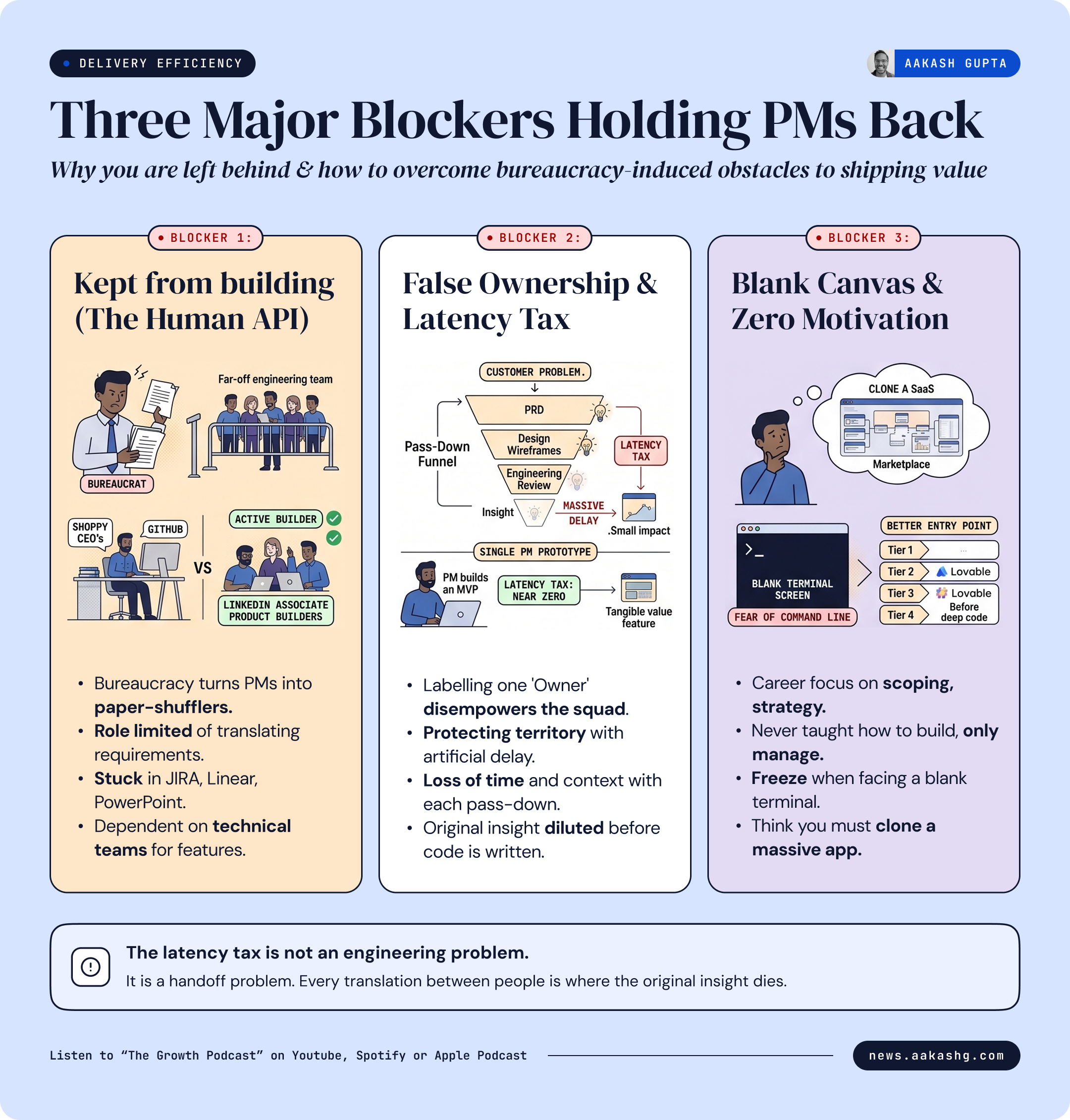
This is the same argument I made in my product strategy keynote. When a PM can build the functional prototype themselves, the Latency Tax drops to almost zero. That’s because the person who understands the user’s problem is the same person building the solution.
Your build will not be perfect, but it will be a tangible MVP focused on solving the user problem. Instead of handing down a static text mandate, you hand over something real that design and engineering can actually interact with and improve upon.
Blocker 3 - The Wrong Starting Point
This blocker is the most fixable - yet sadly, it’s the one that almost every online tutorial gets completely wrong.
“Open Claude Code and start prompting“ is a lame starting point, to be honest. Most tutorials assume you are buzzing with excitement and already know exactly what you want to create. But the basic reality is: as a non-technical PM, you were never taught how to build. Your entire career has been focused on scoping, strategy, and managing timelines.
Because of that, when you finally sit down to build, your brain automatically goes to a massive project like a marketplace or a SaaS platform. You think you need to clone a massive app just to practice. That feels way too complicated, completely useless for your actual day job, and impossible to finish - so you don’t even start.
Even if you do force yourself to try, you immediately freeze on step one. I know exactly how frightening a blank terminal screen is when you’ve never touched a command line.
The solution is a better entry point. Andre showed a specific four-level path that dramatically increases the odds you actually stick with this.
2. The Four Levels of Building
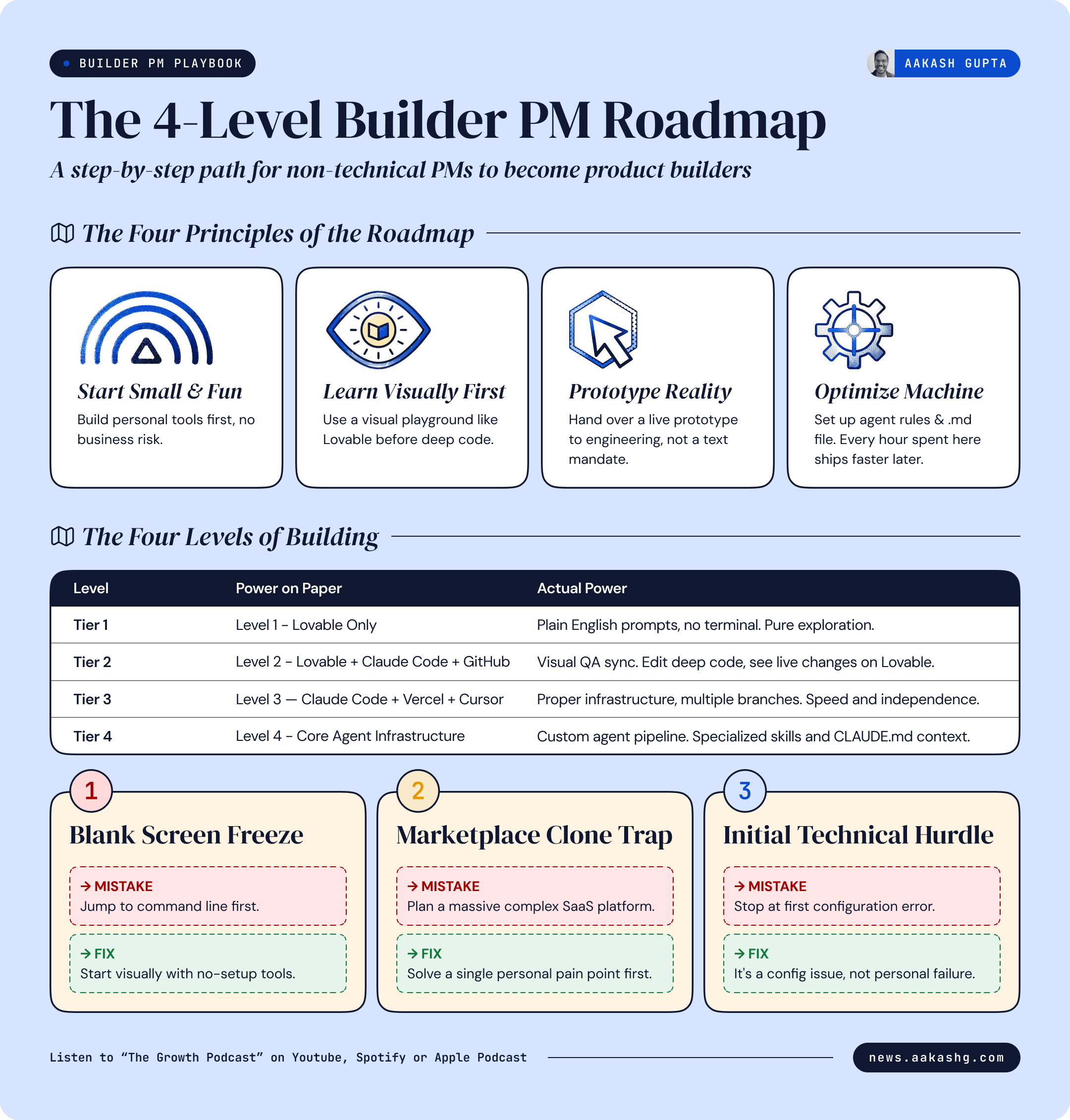
This is the exact four-level stack Andre uses to build your technical confidence without forcing you to learn how to code from scratch:
Level 1: Lovable only
Level 2: Lovable + Claude Code + GitHub
Level 3: Claude Code + Vercel + Cursor
Level 4: Multi-Agent Infrastructure Stack
One quick tip: do not try to jump straight to Level 4. Start with Level 1. It’s more fun that way.
Level 1 - Building with Lovable
Lovable is the right starting point for one reason: it is way less scary than Claude Code.
You open it up. You describe what you want to build in plain English, and boom - something appears on your screen. All of that without you writing a single line of code.
Andre’s first Lovable project was just a basic tool to manage his family’s vacation home availability. He highly recommends building a personal project first because it keeps things fun. Since there’s zero business risk, you can explore freely.
One underrated step at this level: ask Lovable to critique your own prompt before it builds. Ask it what you are missing. It will respond the way a good senior engineer would - listing your exact blind spots. That exercise will teach you faster than any product management course ever could.
The moment you feel comfortable on Lovable, you will naturally want more. You will want to build something more complex, more controlled, and that is exactly when you move to Level 2.
Level 2 - Lovable as QA Infrastructure
You are ready to tackle Claude Code, but vibe coding still feels scary. So what do you do?
Andre solved this beautifully by connecting Lovable and Claude Code through the same GitHub repository. You can push code with all the flexibility Claude Code offers, but you can still see the visual evolution of your product on Lovable.
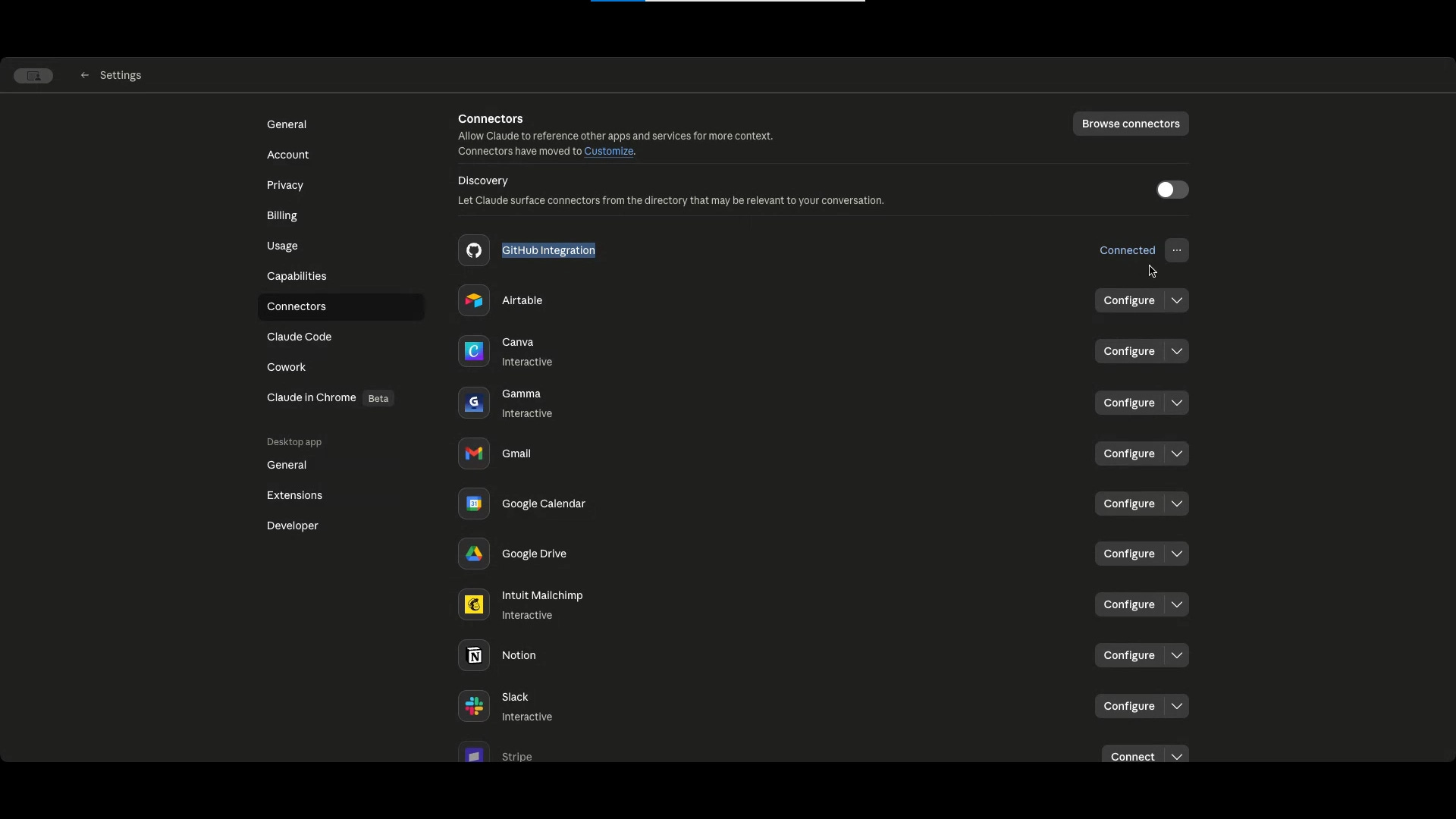
Three things to know before you start:
First, Claude Code is not just a code editor. You can have a real conversation with it just like any other LLM.
I did a full Claude Code walkthrough with Carl Vellotti that takes you from zero to confident. If you’re starting fresh, start there.
Second, Branch and merge sound technical, but the concept is simple: A branch is a copy of your project. You build on the copy. When you are happy, you combine it back with the main version.
Third, Even after Claude Code saves the changes, you need to click Publish in Lovable to make the app live for real users. Before you publish, you have a private preview link. Share it with your team, test it on your phone. Make sure it looks right first.
Now, here’s the exact setup:
Build the initial version on Lovable.
Connect that Lovable project to a GitHub repository (Lovable → Settings → GitHub).
Connect Claude Code to that same GitHub repository via the Connectors tab.
Build your features inside Claude Code. When you are happy with the changes, merge them into the repository.
GitHub automatically notifies Lovable of the change, and Lovable updates visually.
Use Lovable as your visual QA layer. See the change. Test it. Decide if you like it.
When you are happy, hit Publish inside Lovable to make it live for real users.
One critical rule: This sync only works in one direction. You must start on Lovable first. If you build a project in Claude Code first and push it to GitHub, you cannot port that code back down into Lovable. Start on Lovable, then extend it in Claude Code.
Level 3: Claude Code + Vercel + Cursor
Level 3 is when you start wanting speed.
The moment you start playing with Claude Code, you’ll see yourself very quickly wanting to build multiple features at the same time. That means working with multiple branches, and Lovable no longer fits the bill here.
The three tools at this level each do one job:
1- Claude Code: where you write and build 2- GitHub: where the code lives 3- Vercel: the bridge between your GitHub and your users
You may add Cursor for a visual layer. Andre actually runs Claude Code directly inside the Cursor terminal rather than using the standalone desktop app for two highly practical reasons:
First, Cursor has a great free plan. If Claude Code ever breaks or gives you a confusing technical error, you can simply paste that error into Cursor, and it will help you debug it.
Second, Cursor syncs with GitHub automatically once you log in -meaning all your projects link up without manual configuration.
The visual layout in Cursor also massively helps non-technical builders. You can see yellow branch lines sitting outside the main purple line. Yellow is where you are building. Purple is what users see. When you merge, they combine.
Also, I want to give you a heads up. When you first open Vercel, it will look complicated. Do not worry about most of it. Just find the preview link. Click it. See if the feature looks right. That is all you need to do.
If you want a step-by-step walkthrough of these exact stacks - Lovable, Claude Code, Cursor - I covered them from an experimentation angle in my Vibe Experimentation guide.
Level 4: The Machine That Builds The Machine
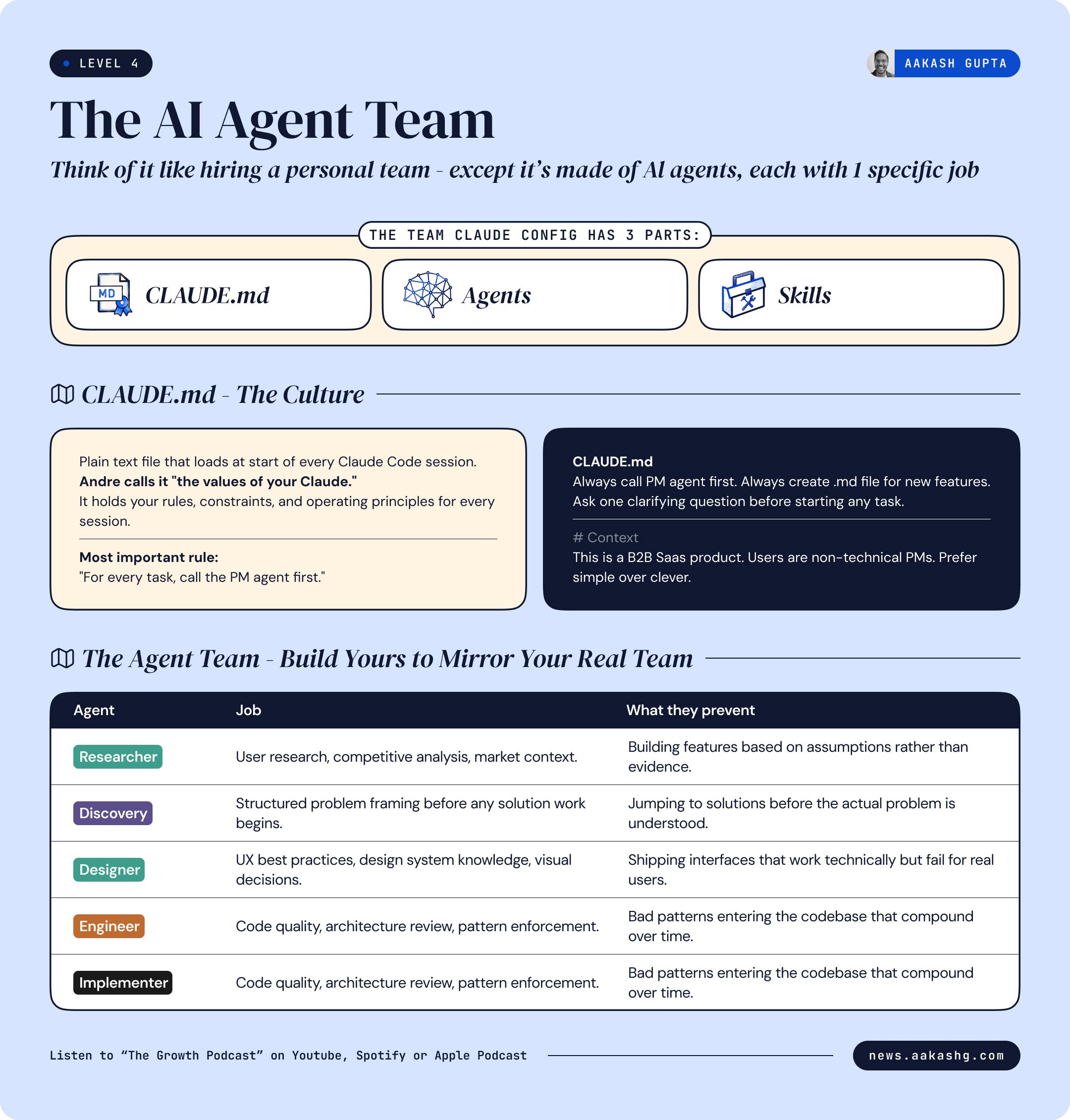
Level 4 is agents. Think of it like hiring a personal team, except your team is made of AI agents. Each agent has one specific job. They work together, and you act as the director, telling them what to create.
Andre calls it the Team Claude Config. It has three parts: a Claude.md, a set of agents, and a set of skills.
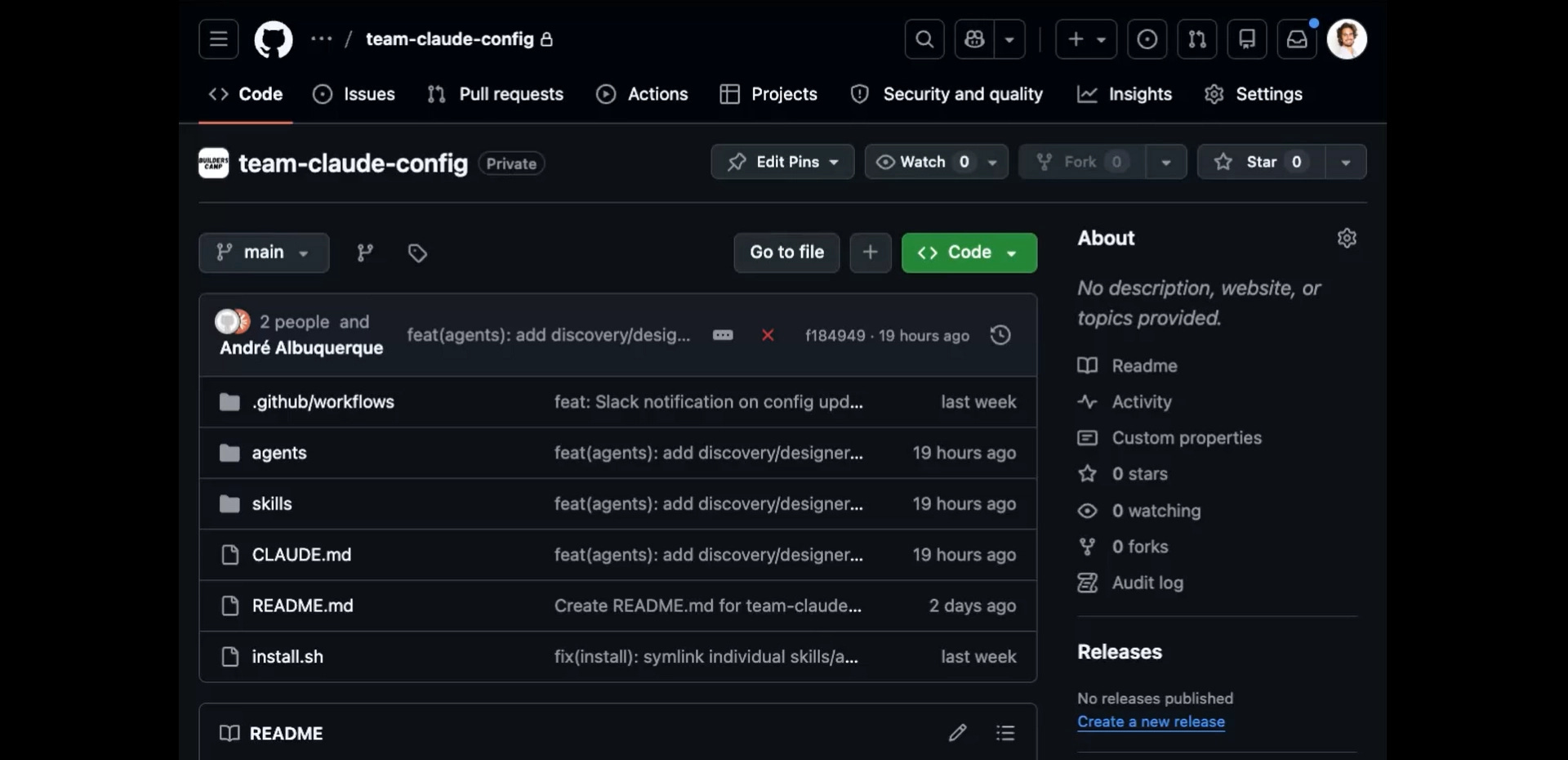
CLAUDE.md - the culture
CLAUDE.md is simply a text file that loads every single time you start a Claude Code session. Think of it like a list of core rules your AI team reads every morning before starting work.
Andre calls it “the values of your Claude.” It holds your rules, constraints, and operating principles. The most important rule Andre puts in his file is this: “For every single task, call the PM agent first.”
As you build, Claude.md should constantly evolve. When you catch yourself repeating the same instruction - “always use product context,” “create .md files,” “ask a clarifying question before starting” - add it to Claude.md. The next session starts with that rule already in place.
I have iterated on my own CLAUDE.md over 100 times. If you want a battle-tested version of what Andre is describing, grab it here.
The PM agent
The PM agent never does the work. Its only job is to receive the task and decide which agents handle which parts. Andre’s instruction inside the pm.md file: “Never do the work yourself because there’s going to be some agent better than you.”
The agents Andre built mirror his actual team:
Researcher - user research, competitive analysis, market context Discovery - structured problem framing before any solution work begins Designer - UX best practices, design system knowledge, visual decisions Engineer - code quality, architecture review, prevents bad patterns from entering the codebase Implementer - the one who actually writes the code
I strongly discourage you from copying someone else’s setup. Build a setup that mirrors your own team. How do they work? What do they care about? Write that down and turn it into agents.
Gabor Meyer, a PM at Google, took this to another level and has 21 agents. I broke down his full setup here.
The 50/50 Rule
Here’s the number that surprised me most in this conversation: AI-native teams spend 50% of their time improving the infrastructure and only 50% shipping features.
50% infrastructure. 50% features. That’s the split.
The logic is simple: the better the infrastructure, the faster and cleaner the shipping becomes. If you ignore this split, you end up shipping slop.
Slop is what happens when you let the AI do all the thinking for you. So it gives you the output, which looks functional, the UI looks super cool, but it doesn’t actually solve anything for the end user.
When something ships badly, your first instinct is to fix that one thing. Change the button. Redo the layout. Ask Claude Code to try again. That is the wrong way.
The right way is to ask: why did this happen? What rule is missing from CLAUDE.md? Which agent made the wrong call? Fix that. Because the next time you’re going to have a feature, you don’t want that to happen again. You improve the machine so that in the future it becomes way easier to just focus on the problem, ask your team, ask your agents, and ship the feature better.
Three Skills that Block Slop
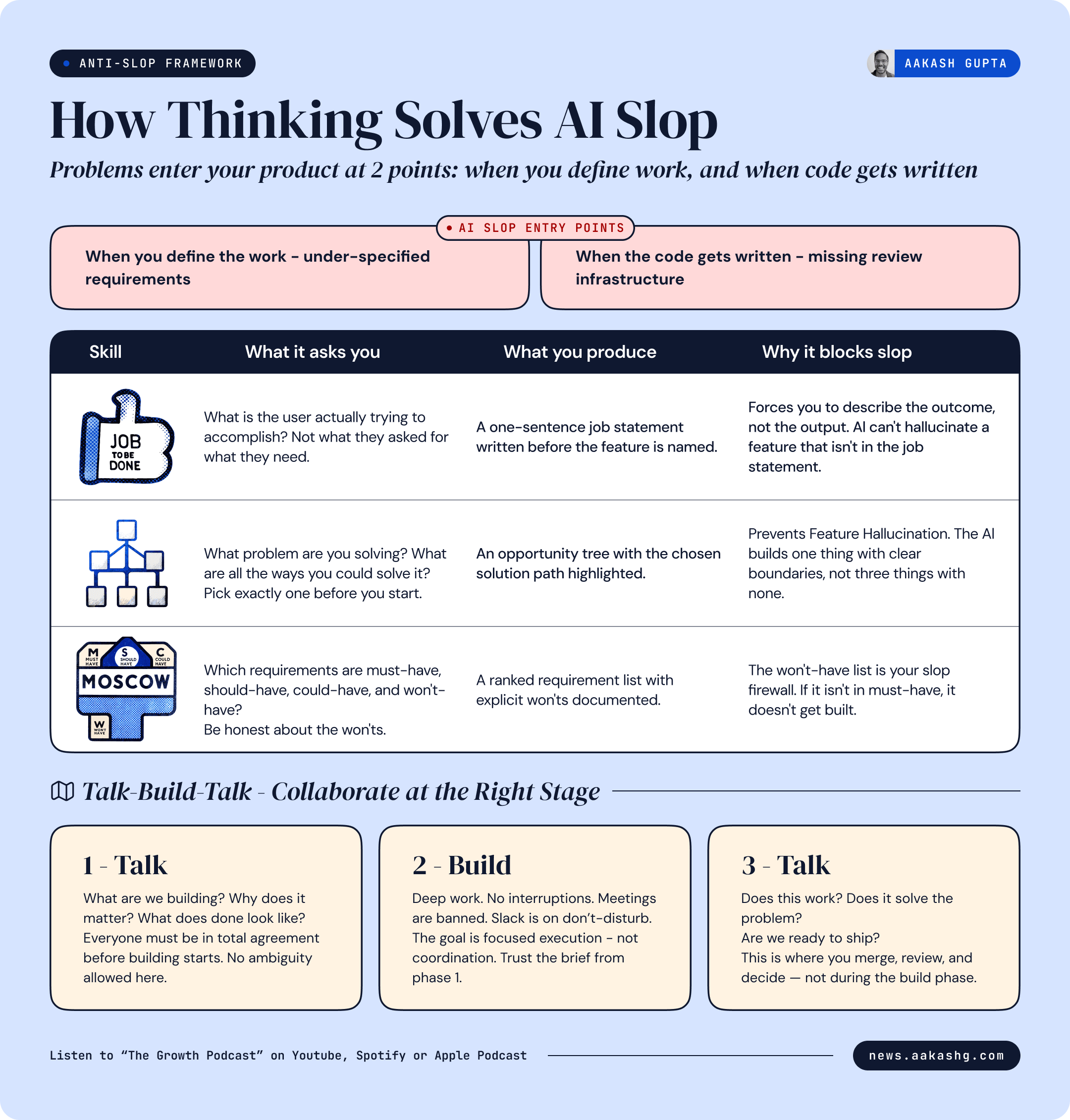
Slop enters your product at two points: when you define the work, and when the code gets written.
Andre runs three specific checks before building any new feature:
1- A Jobs to Be Done (JTBD) skill - what is the user actually trying to accomplish? Write it out clearly
2- An Opportunity Solution Tree (OST) skill - based on Teresa Torres’s framework - what problem are you solving? What are all the ways you could solve it? Pick one before you start.
I had Teresa Torres herself on the podcast to break down how OSTs work in the AI era. If you are going to use her framework as a skill, hear it from her first. She covers how AI can speed up discovery, but warns that AI summaries can miss 20-40% of important details if you pull humans out of the loop.
3- A MoSCoW skill - sort your requirements into must-have, should-have, could-have, and won’t-have. Be honest about the won’ts.
3. What changes when you start building
There is a kind of knowledge that only comes from building yourself. When you have built with Claude Code, watched it succeed, watched it fail, watched it produce slop, and watched it produce something genuinely useful, you develop what Andre calls builder’s gut.
This intuition is what creates Technical Empathy.
The most friction-heavy relationship in tech is between a non-technical PM and a Senior Engineer. This tension usually comes from the PM asking “How long will this take?” A question that reveals a total lack of technical empathy.
Andre told me about a feature he scoped before he started building. He estimated it would take his team a day. After he tried building a similar feature himself in Claude Code, he realized the “simple” request actually required restructuring how the database handled user sessions. What felt like a one-day ask was actually a three-day architectural change. He never would have known that without building it himself.
That experience repeats in small ways every week once you start building. You stop over-scoping AI features because you know where agents break. You write better specs because you understand what the agent is working against. You stop asking “can we add one more thing?” because you’ve felt the cost of scope creep in your own Claude Code sessions. You know what a branch conflict feels like. You know that “simple UI change” sometimes means rearchitecting three components.
Andre described the shift in how engineers respond to him now. Before he could build, standups felt adversarial. He’d push for timelines, they’d push back with technical objections he couldn’t evaluate. Now when an engineer says “that’s going to touch three services,” Andre knows what that means because he’s hit that wall himself. The conversation moves from negotiation to problem-solving.
“Imagine a reality where every single person in the product squad can do this for the actual backlog.”
That intuition sharpens every product decision you make. Engineers stop seeing you as an authority they have to answer to and start seeing you as a collaborator who actually understands the tradeoffs they’re navigating.
That is not a distant future. That is what these four levels lead to.
Where to find Andre Albuquerque
Related content
If you’re starting from zero, watch the Carl Vellotti walkthrough first. If you’re already in Claude Code and want to set up agents, the Gabor Meyer episode (21 agents) is your next step. If you want the team-level version of what Andre described, start with Hannah Stulberg’s episode on Team OS at DoorDash.
Podcasts:
Newsletters:
PS. Please subscribe on YouTube and follow on Apple & Spotify. It helps!