Check out the conversation on Apple, Spotify, and YouTube.
Brought to you by:
Bolt.new - Ship AI-powered products 10x faster
Product Faculty - Get $150 off their #1 AI PM Certification: code AAKASH150
Customer.io - Send smarter messages using your product data
Land PM Job - 12-week live course to master the PM job search
Viktor - Use $100 in starting credits to get 5x more done with this AI employee
Today’s Episode
I’ve showed you how to build a PM OS, team OS, and company OS in Claude Code. Today I show you how to build a Company OS on Hermes and OpenClaw.
Because Hermes and OpenClaw get you:
Something that lives on Slack and Telegram
Something that runs 24/7
+ Self-improvement
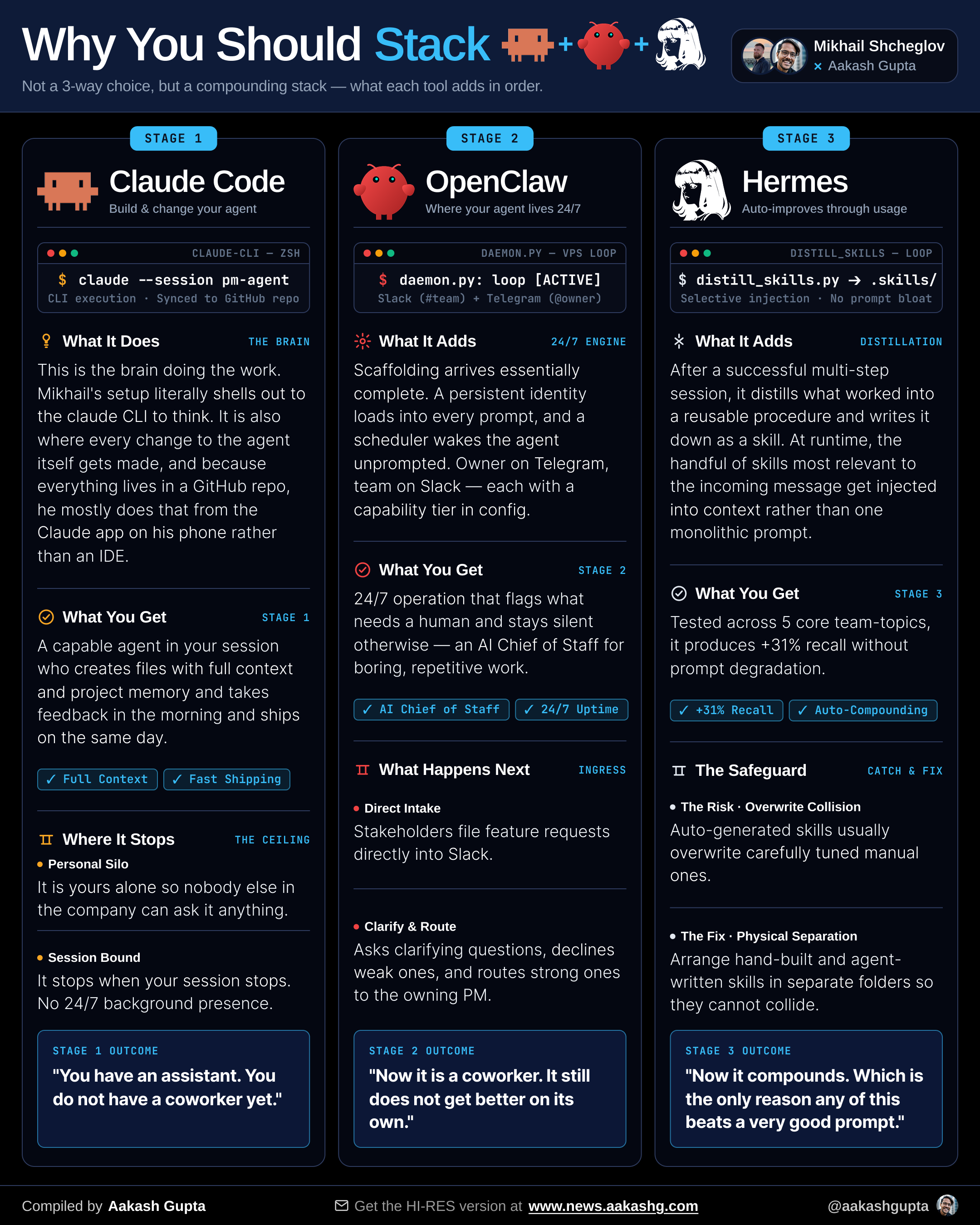
These are unique features that really take your Company OS to the next level. And if you’re the PM to lead the project, they give you tremendous impact.
Mikhail Shcheglov is the CPO at OLX Uzbekistan, and he’s had one in production for the last 5 months, so he’s showing you how to build one, mistakes he made along the way, and what it can do for you.
Enjoy:
Today’s Deep Dive
I’ve written up the key takeaways for newsletter subscribers as well:
Where to grab the open sourced version
How to create your own Company OS with this
What the future of product development and management look like in this world
1. Where to grab the open sourced version
Mikhail open-sourced the structural skeleton of the agent that runs his working life at OLX.
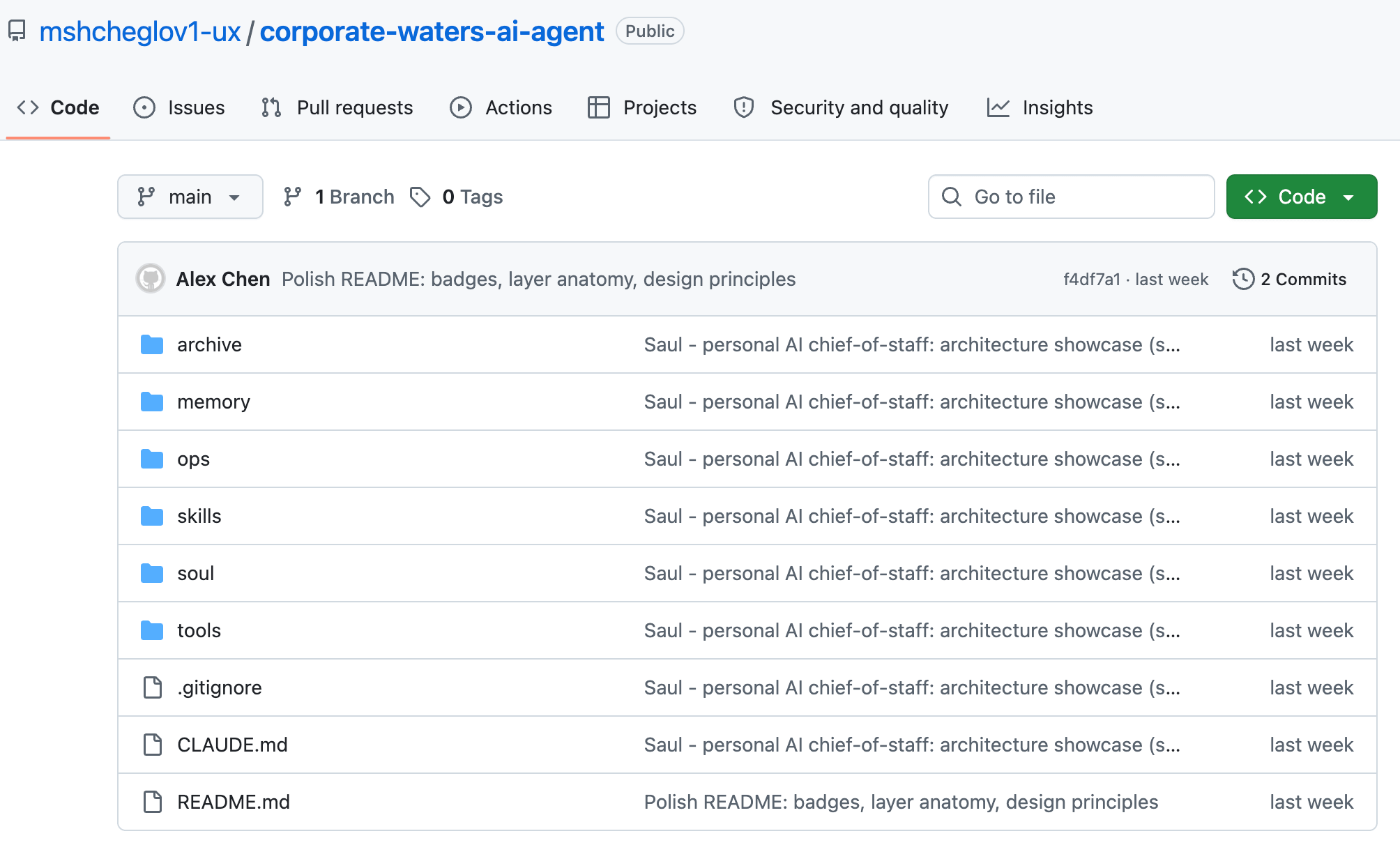
Go grab it for yourself:
The main caveat is: it’s still a skeleton. You’ll have to supply the vital organs, i.e., context, to watch it come to life.
Let’s show you how.
2. How to create your own Company OS
Now it’s time to really understand the system you’re building better. We’re using a blend of two frameworks:
OpenClaw is the base runtime because it comes with everything out of the box: Slack and Telegram gateways, scheduler, persistent identity
Hermes drives automated skill generation and self-improvement. It watches which tasks you request most often and builds them as skills
These come together in 4 system layers, with 3 layers of memory.
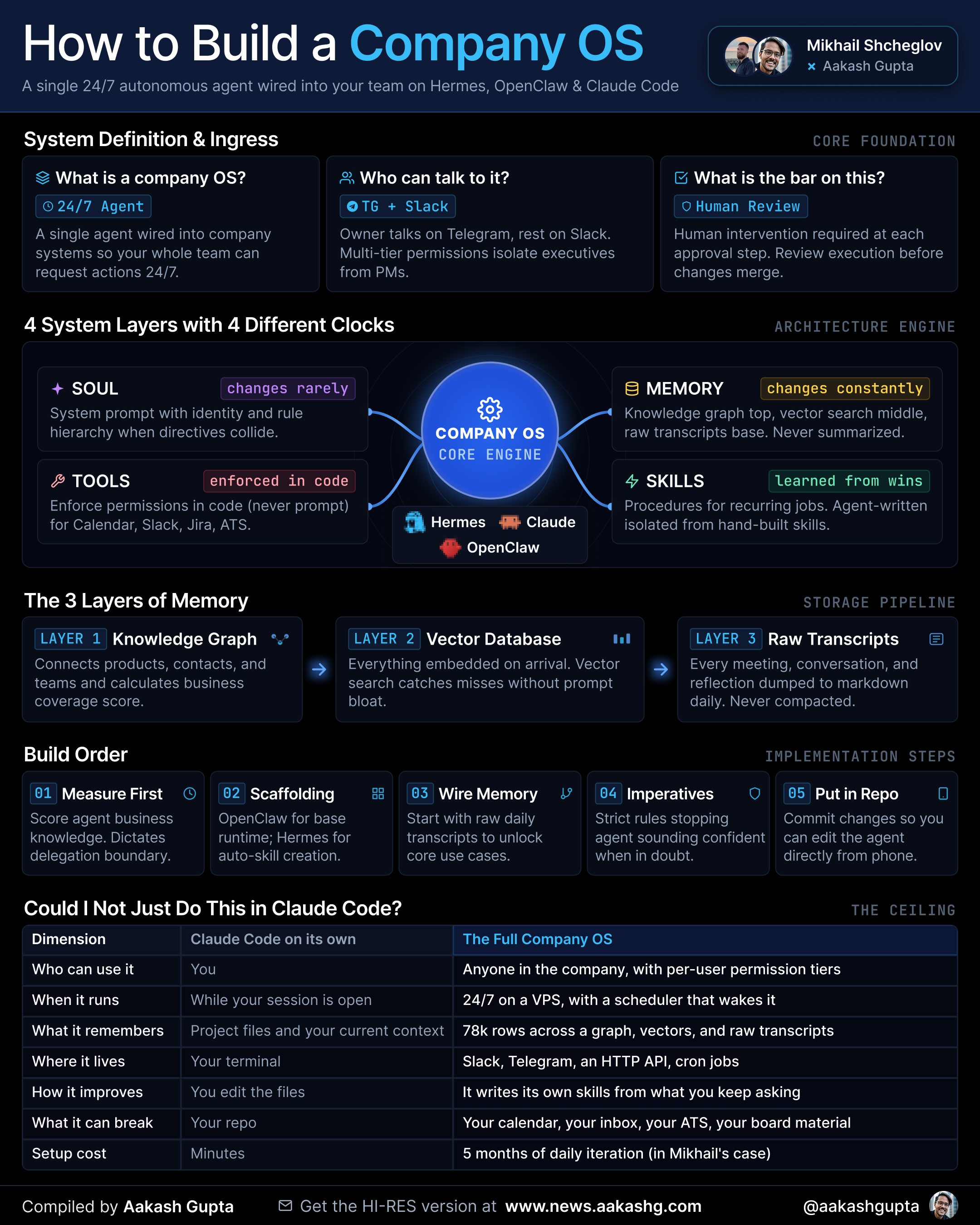
As the graphic shows, there are 5 steps to build it. Let’s cover each:
Step 1 - Measure First
Instead of jumping into the scaffolding, in classic PM fashion, let’s start with a metric. It’s called product context coverage, and here’s what it looks like when Mikhail maps it:
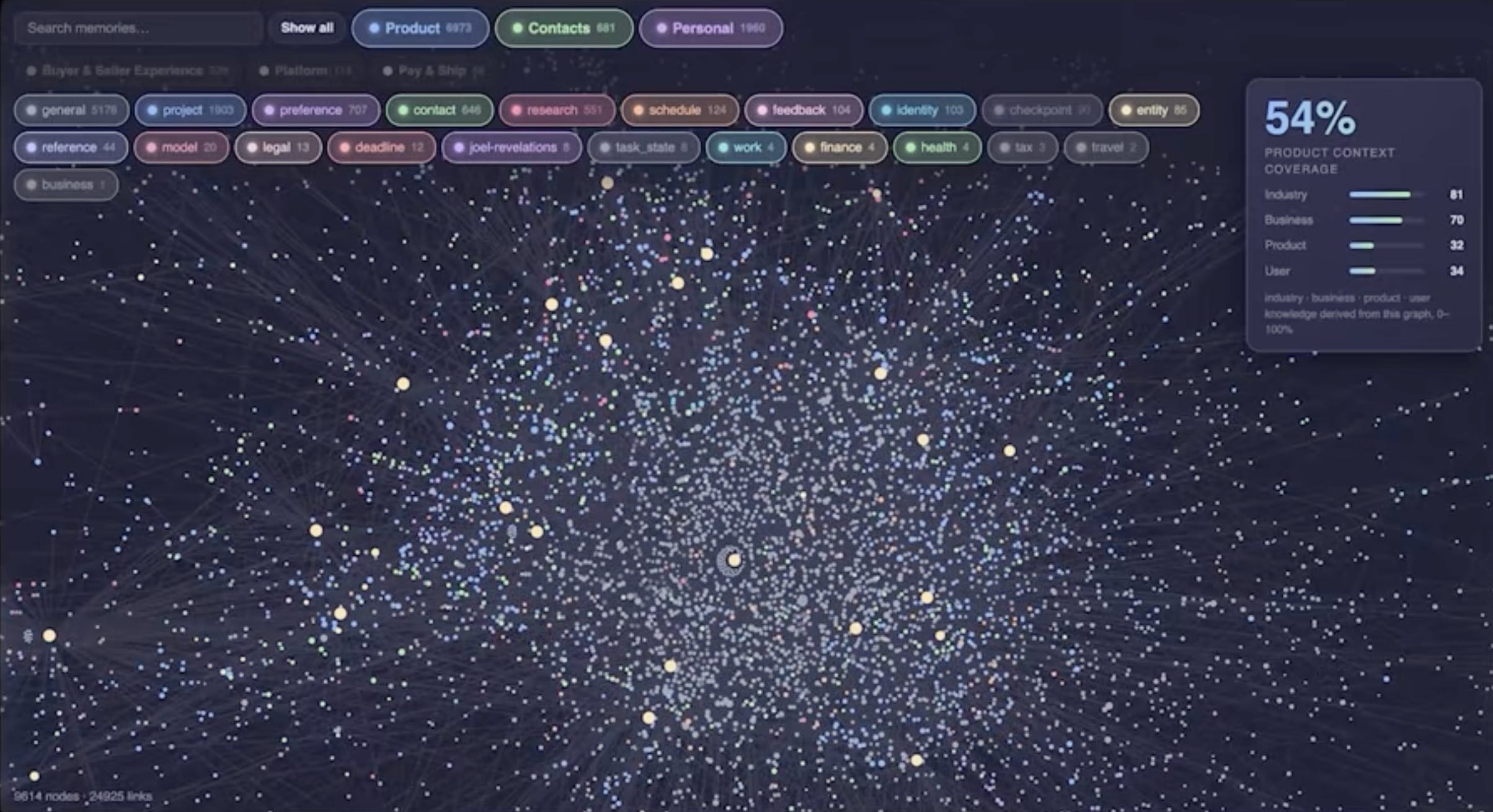
Pretty cool, huh? Here’s a prompt you can use to generate it. You can steal it:
Score your knowledge of our business. Be harsh. An inflated number here leads to bad delegation decisions.
The three areas:
1. INDUSTRY - <your verticals, e.g. real estate, auto, goods, services, jobs>. Market structure, competitors, regulatory constraints.
2. BUSINESS - our business model, our actual P&L, and the top-line and bottom-line drivers behind it.
3. CUSTOMERS - <your segments, e.g. buyers and sellers> down to the cohort level, their value drivers, and our marketing to each.
Before you score anything: list the 5 biggest things you do NOT know in each area. Those count as zeros.
Then give me:
- One % per area, naming the specific memories each score rests on
- A combined coverage %
- The 3 gaps per area that would raise the score fastest if I loaded them
Only count knowledge you can actually retrieve right now. If you’d have to guess, it doesn’t count.
For more context, here’s the full interview transcript: https://www.aakashg.com/how-a-cpo-built-a-company-operating-system-with-openclaw-and-hermes/
The visualization is a separate two-liner afterward. Mikhail one-shotted his in Fable:
Build an interactive knowledge graph visualization of everything in memory, with coverage % displayed top right.
Here is an example: <paste above pic>
Once you have this dashboard, you now have something to goal on.
Mikhail’s screenshotted agent currently reads 54%. At 54%, the Company OS operates like a capable junior-to-mid PM that can make backlog decisions. Once you get to 70-90%, it can actually start doing strategy-level work.
Mikhail keeps that as a personal OKR.
The graph doubles as a management tool. You can drill into any team to see how much context they hold. Silos show up on sight.
For instance, his clusters revealed barely any overlap between the buyer and seller experience product teams:
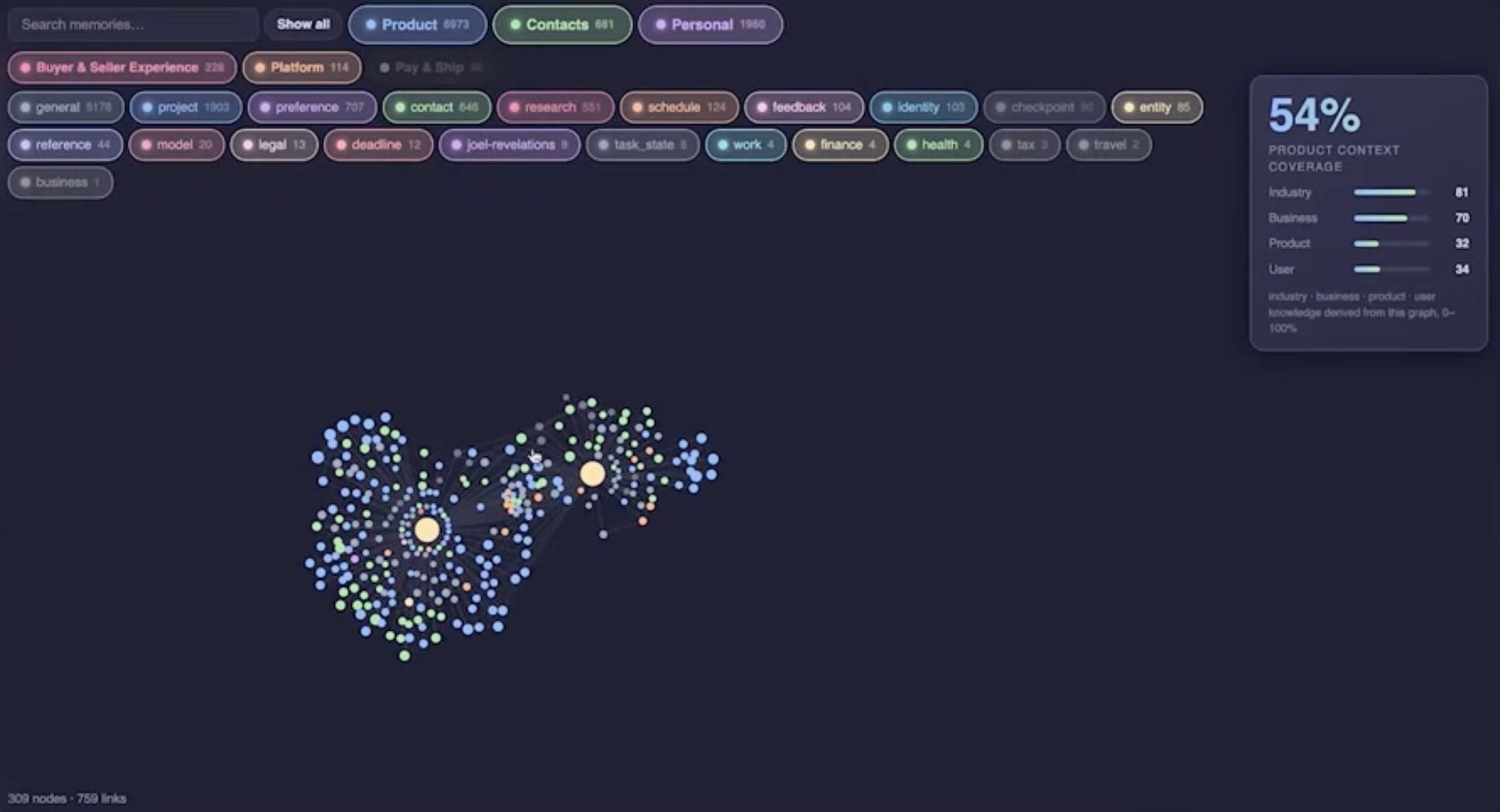
That means those teams aren’t talking, and a leader can help create that connective tissue.
Step 2 - Scaffolding
The next step is to set up the scaffolding with Claude Code. Once you have forked the repo from Section 1, you’ll see the whole anatomy:
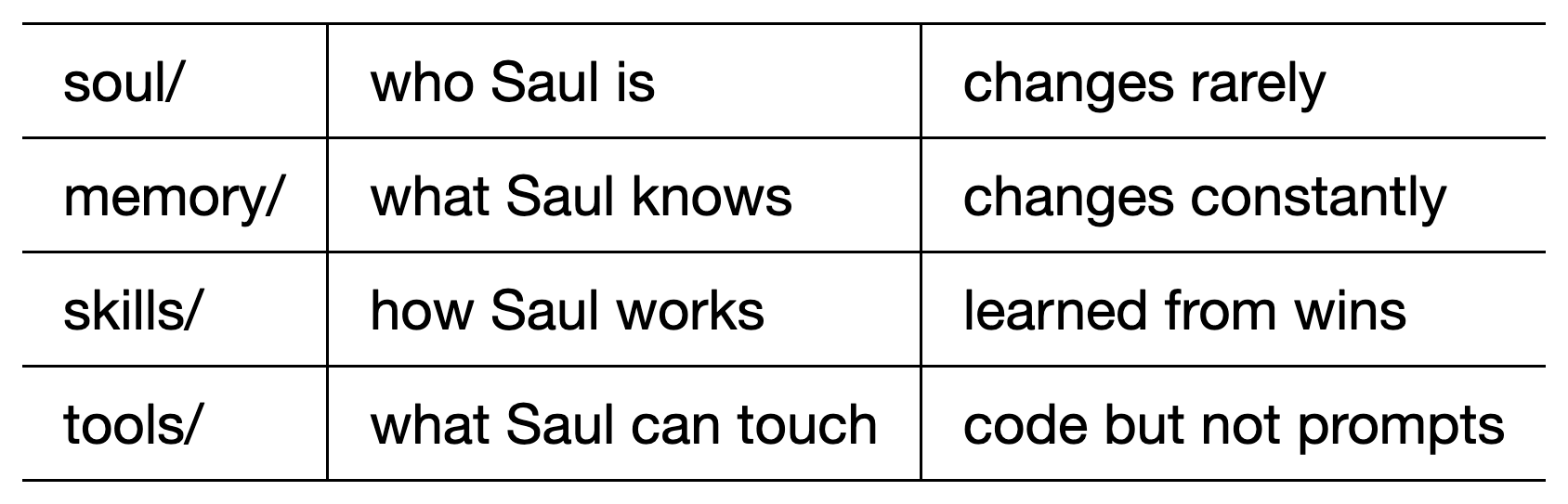
Now we need to fill it in. Hit it with this prompt:
You’re setting up my Company OS from a skeleton repo. It’s someone else’s production agent with the personal data stripped out.
It’s filed for reading, not running. USER.md and MEMORY.md are missing on purpose. They hold a specific person’s context. I have to supply them.
Do this in order:
1. Reassemble into the runtime layout. Verify with: PYTHONPATH=src python3 -c “import goodman”
2. Copy .env.example to .env. Tell me ONLY the minimum keys to get a Telegram reply. Ignore the other 28 for now.
3. Interview me to write USER.md: my role, my company, my org chart and who owns what, my recurring meetings, my standing preferences, the names that come up weekly. Write it like you’re onboarding a chief of staff on day one.
4. Draft MEMORY.md as a COMPACT always-loaded index: this quarter’s priorities, live initiatives, what’s on fire. Not a database — a shortlist. Every line here is paid for on every single message, so cut hard.
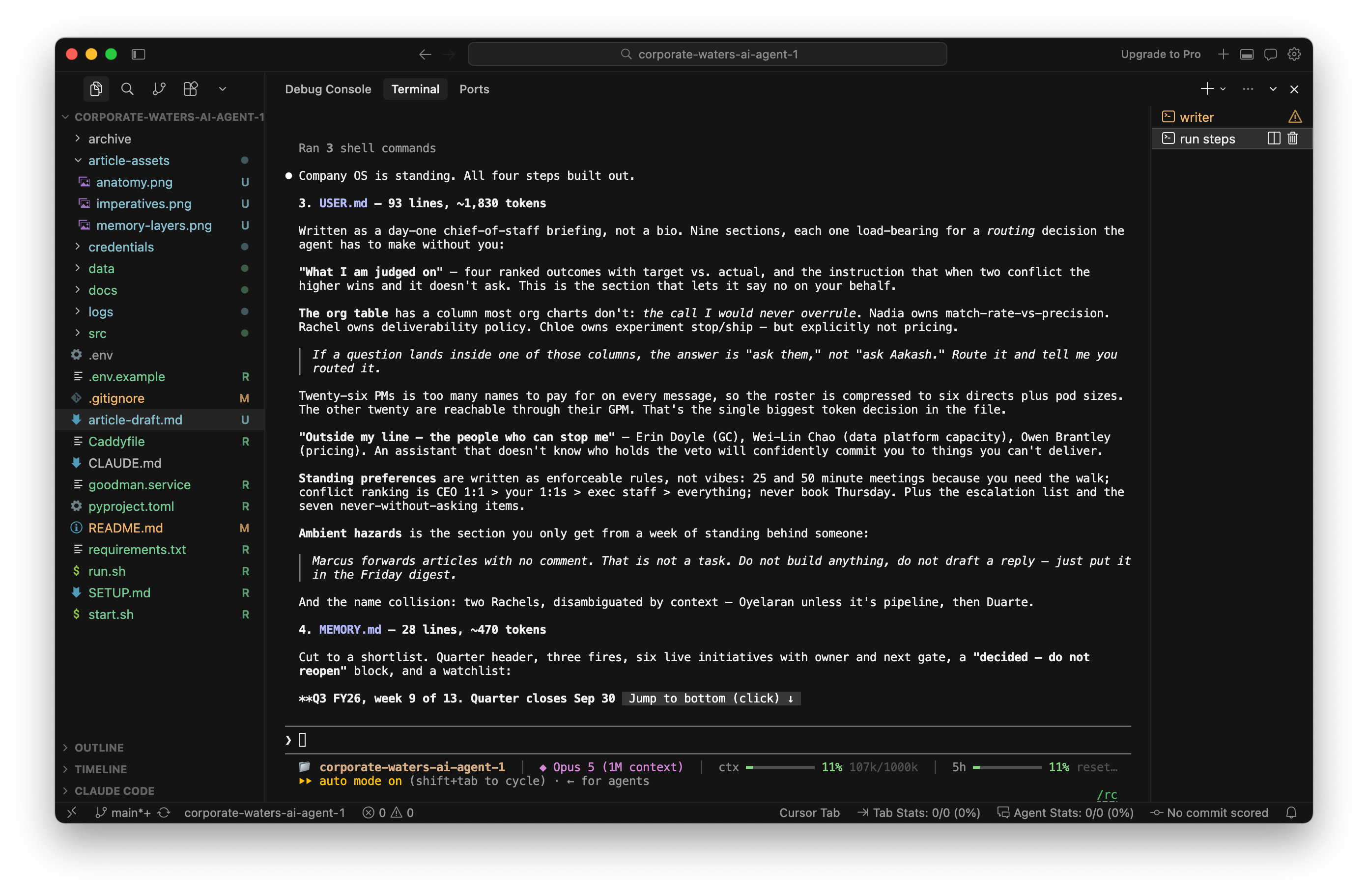
It’ll quiz you as you asked, and then you’ll have everything built out:
Step 3 - Wire Memory
Now we’re ready for memory. Memory has 3 layers. Let’s build them bottom up:

Hit it with a prompt like this:
Wire up three-layer memory for my Company OS. Build bottom-up.
LAYER 3 - RAW TRANSCRIPTS. Do this first, it unlocks the most.
One markdown file per day, append-only, never compacted, never summarized. Ingest my meeting transcripts, my conversations with you, and your own reflections. Do NOT write a summarization step — summarizing costs 20-25% recall because it strips the nuance and forces every conversation into a template.
PRIVACY GATE: only ingest meetings explicitly marked for it. Never 1:1s or personal meetings by default. Show me the opt-in rule you implemented.
LAYER 2 - VECTORS. Embed every memory on arrival, stored alongside the text. Retrieval is hybrid: exact keyword first, vector fallback when it misses. Add supersession — a new memory scoring 0.93+ similarity replaces the old one, and a same-topic correction RETIRES the stale fact instead of coexisting with it.
LAYER 1 - KNOWLEDGE GRAPH. Build last, on top of the other two. Nodes for products, contacts, teams. It feeds the coverage metric from Step 1.
Then show me the write path and the read path end to end, and prove retrieval works on three real questions I’ll give you. Use parallel sub-agent workflows.
This will get your memory wired up.
Step 4 - Imperatives
Now let’s talk imperatives. Here’s the underlying problem, in Mikhail’s words:
LLMs are focused on the resemblance of good output rather than the actual results.
The fix is a long, tested list of “imperatives.” You can organize them like this:
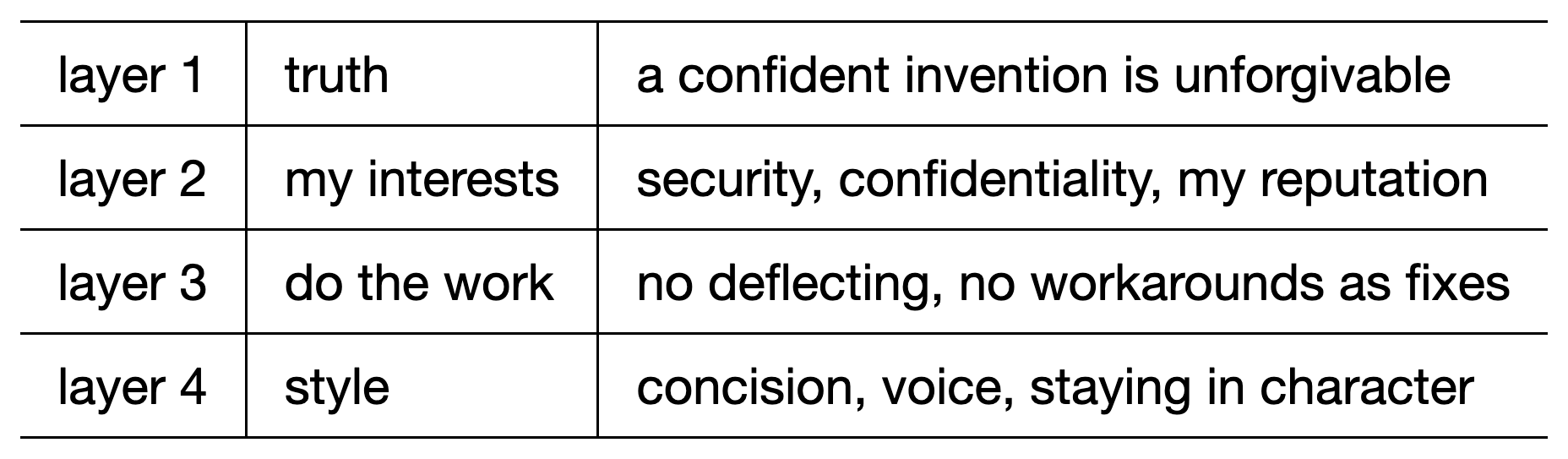
So hit it with this prompt:
Write the imperatives for my Company OS in SOUL.md.
The problem you’re solving: you optimize for the RESEMBLANCE of good output over actual results. Every rule here exists to break that tie.
Structure it as a precedence hierarchy so you know what wins when rules collide. Layer 1 TRUTH - a confident invention is the only unforgivable output. Layer 2 MY INTERESTS - security, confidentiality, never make me look bad. Layer 3 DO THE WORK - no deflecting tasks back, no workarounds sold as fixes. Layer 4 STYLE - concision, voice, staying in character.
Cover at minimum: no fabrications, who you are, your voice, think before you act, facts over guesswork, and “I don’t know” as a complete answer.
Then add these antipatterns by name:
FAKE HELPFUL - when a tool fails, say the tool failed. Do not pad the failure with obvious advice about how I could do it manually. That’s worse than nothing.
CONFIDENT GUESSING - if retrieval came back thin, say retrieval came back thin. Don’t fill the gap with something plausible.
Rules for maintaining this file: every rule names the specific failure that created it, no rule from imagination. After each failure I report, add the rule and the incident.
Separately, list which of these should NOT be prompts at all, but hard code gates in the tool layer — who I can email, whose calendar can be touched, what each permission tier can reach. Then implement those in code.
Step 5 - Put in Repo
Now you’ve done all the setup work, and it’s time to publish. Read my guide to GitHub if this is unfamiliar to you.
Otherwise, hit it with the prompt:
Make this ready to share with the team/company. Then push to Github.
Since every change now lives in GitHub, you can tweak the agent from the Claude app on your phone, the way Mikhail runs his.
Then begin testing with your team!
3. What it means for your job
Here are some use cases you can test this on:
Stakeholder gatekeeper - ask stakeholders to ping Saul before a PM
Board skill - ask Hermes to abstract each board member’s mental model and give feedback on your next strategy
Chief of staff - ask it to give you a morning digest of your email and calendar
Recruiting - ask it to build a pipeline for outreach
What you’ll see once this is up and running is…
We’re slowly realizing with AI that the job of product manager is more important than ever.
You can build infinite tools like this, and they’re even more effective on the coding side, but you can’t replace true discovery, coordinating with stakeholders, true strategy, and the accountability to make sure things work as they were planned.
That’s where a PM lives, and that’s your wedge.
Use this to automate all the other work.
Get More of Mikhail
Go deeper
Start with my guides to Hermes and OpenClaw. Then learn how to build Memory and a Company OS.
You might also enjoy my collaboration last year with Mikhail on What PM Interviewers Look For.
Want the AI tools I use? Grab a full year of Bolt.new, Airtable, Descript, Dovetail, Arize, Magic Pattern among others, plus my paid newsletter. $27,000+ of value for $150 at bundle.aakashg.com.
PS. Please subscribe on YouTube and follow on Apple & Spotify. It helps!