
Last month, your Claude setup worked perfectly.
This month, it feels like the AI is actively gaslighting you. It ignores your skills details and writes docs so lazy you end up rewriting them yourself.
If you’re like me, you find yourself scrolling through past chats, desperately trying to find that one version of a prompt that actually worked a few months back.
Where did it go? What skill version was it? Did I accidentally overwrite it when I updated my CLAUDE.md yesterday?
This is the exhausting reality of AI workspace drift.
When you don’t track your AI infrastructure, a single word shift can completely break your OS’s behavior. Top product managers are stopping this bleeding by moving their workspaces to GitHub.
So to build a truly bulletproof engineering manual for PM workspaces, I needed to partner with someone who done that himself.
Introducing Shubham Saboo
Shubham is a Senior AI Product Manager at Google and the mastermind behind Awesome LLM Apps - an open-source powerhouse with over 120 production-ready templates covering everything from multi-agent teams and MCP configurations to complex agent skills.
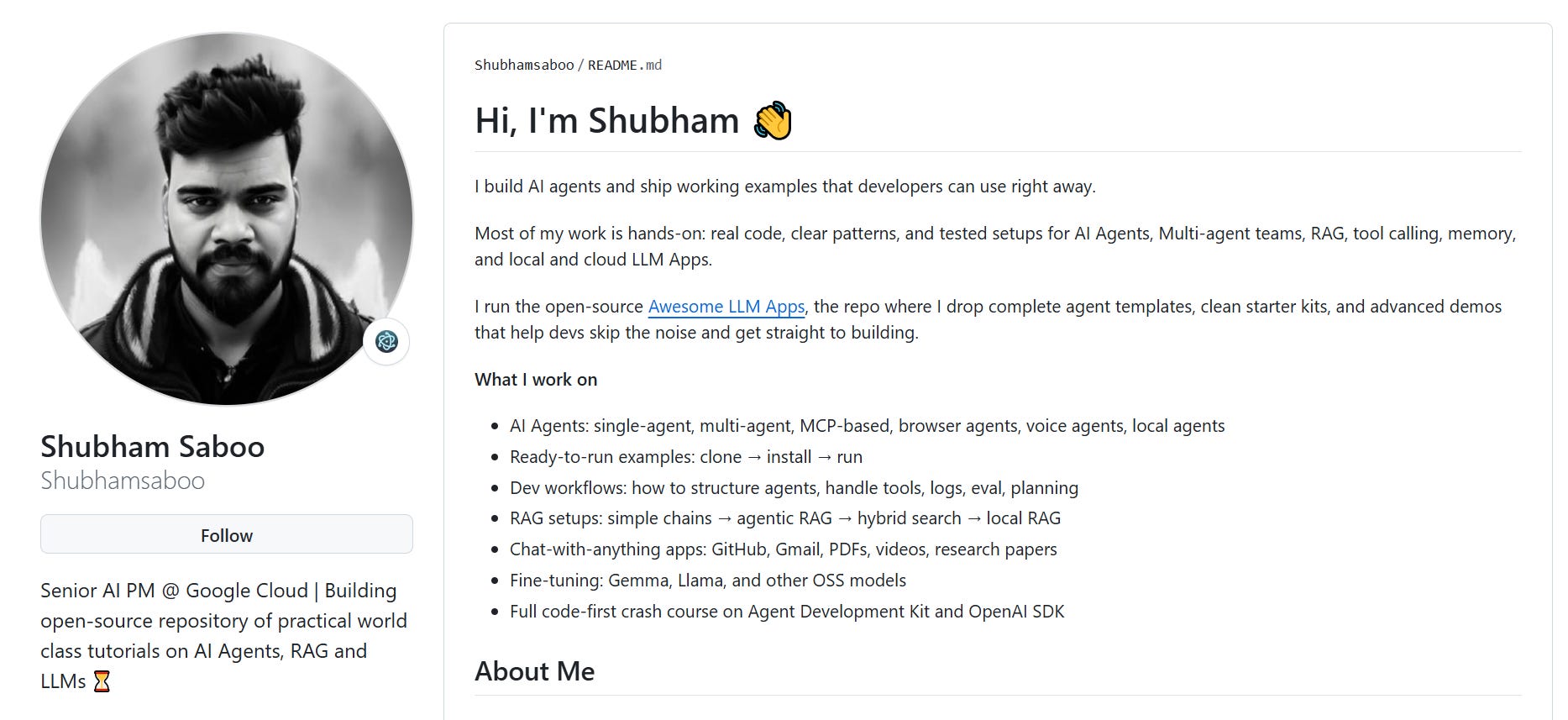
If his name sounds familiar, it’s because I recently wrote an entire breakdown piece on how his Github got him hired at Google. His repository has crossed an absurd 115,000 GitHub stars.
Today’s Post
Hannah Stulberg and Sidwyn Koh wrote an excellent GitHub 101 for non-engineers. My Ship Your First PR piece teaches the code PR workflow. Today, we are opening up the critical infrastructure layer that sits directly underneath both my PM OS and Team OS frameworks:
Three repos that cover 90% of PM work
The daily workflow: pull, branch, commit, push, review, merge
Four version control workflows for PM artifacts
The practice repo and your Monday move
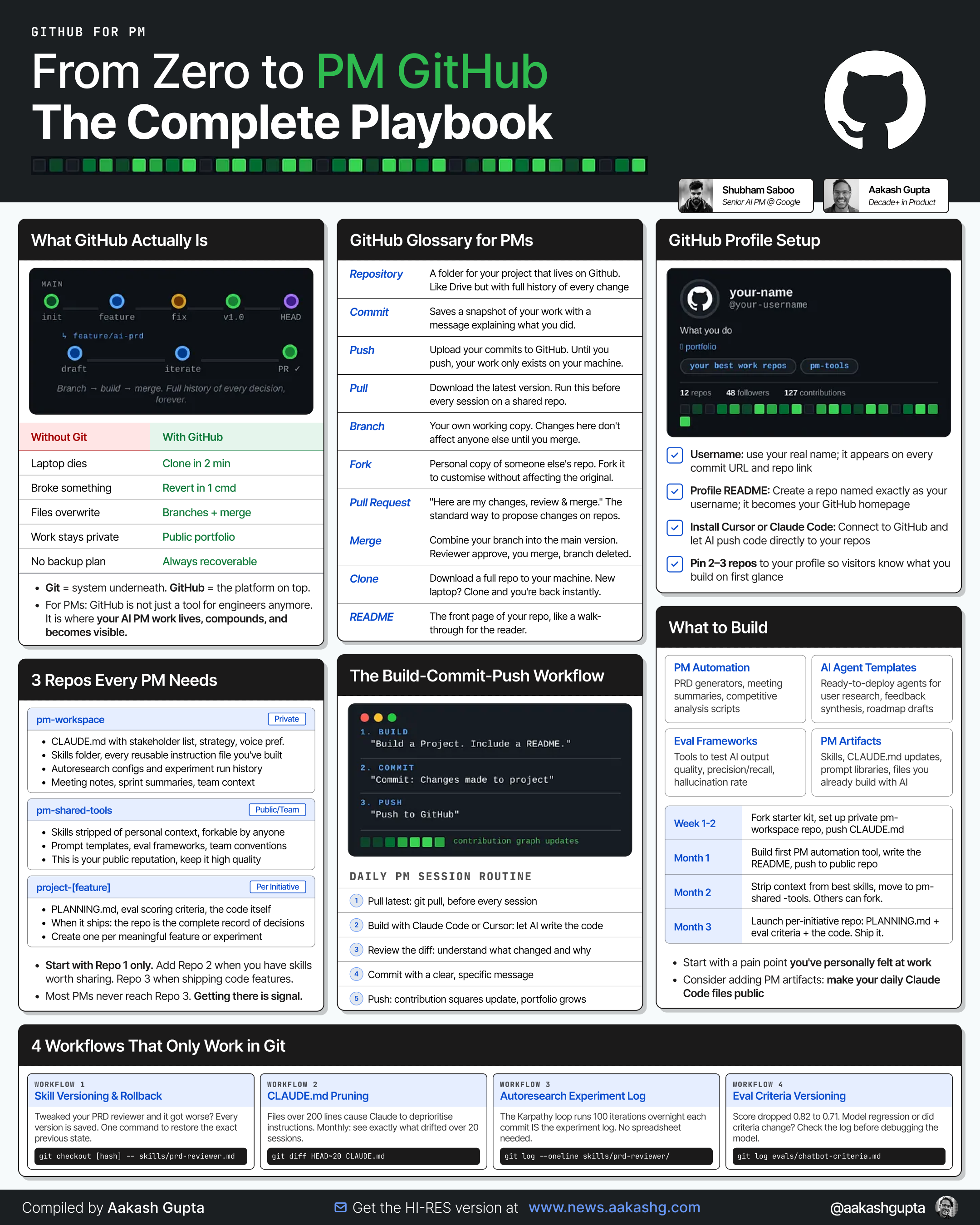
We are going to show you exactly where your artifacts should live, how to build a bulletproof memory layer for your AI, and how to configure our custom PM GitHub starter repo. Plus, you get 3 downloadable tools: a PM GitHub Starter Repo, a “Which Repo?” decision guide, and a PM .gitignore template.
New to Claude Code? Quick glossary: skills are reusable instruction files for Claude Code tasks. CLAUDE.md is the persistent context file Claude reads every session. Eval criteria are scoring functions. These files change constantly. Managing them is what the rest of the piece covers.
If you’re new to GitHub entirely, I put together the web’s first guide on PM Githubs.
1. Three Repos, One PM
Imagine your laptop dies tonight. How will you access your important files?
You’ve got a CLAUDE.md. You’ve got skills. Maybe eval criteria, prompt templates, project configs. They’re scattered across your machine. Some in the PM OS folder. Some in project directories. Some are in Downloads because you grabbed them from Slack two weeks ago.
If you’re not careful, all of that effort goes down the drain. This is why you need GitHub repos. Here are three repos that cover your whole PM workflow.
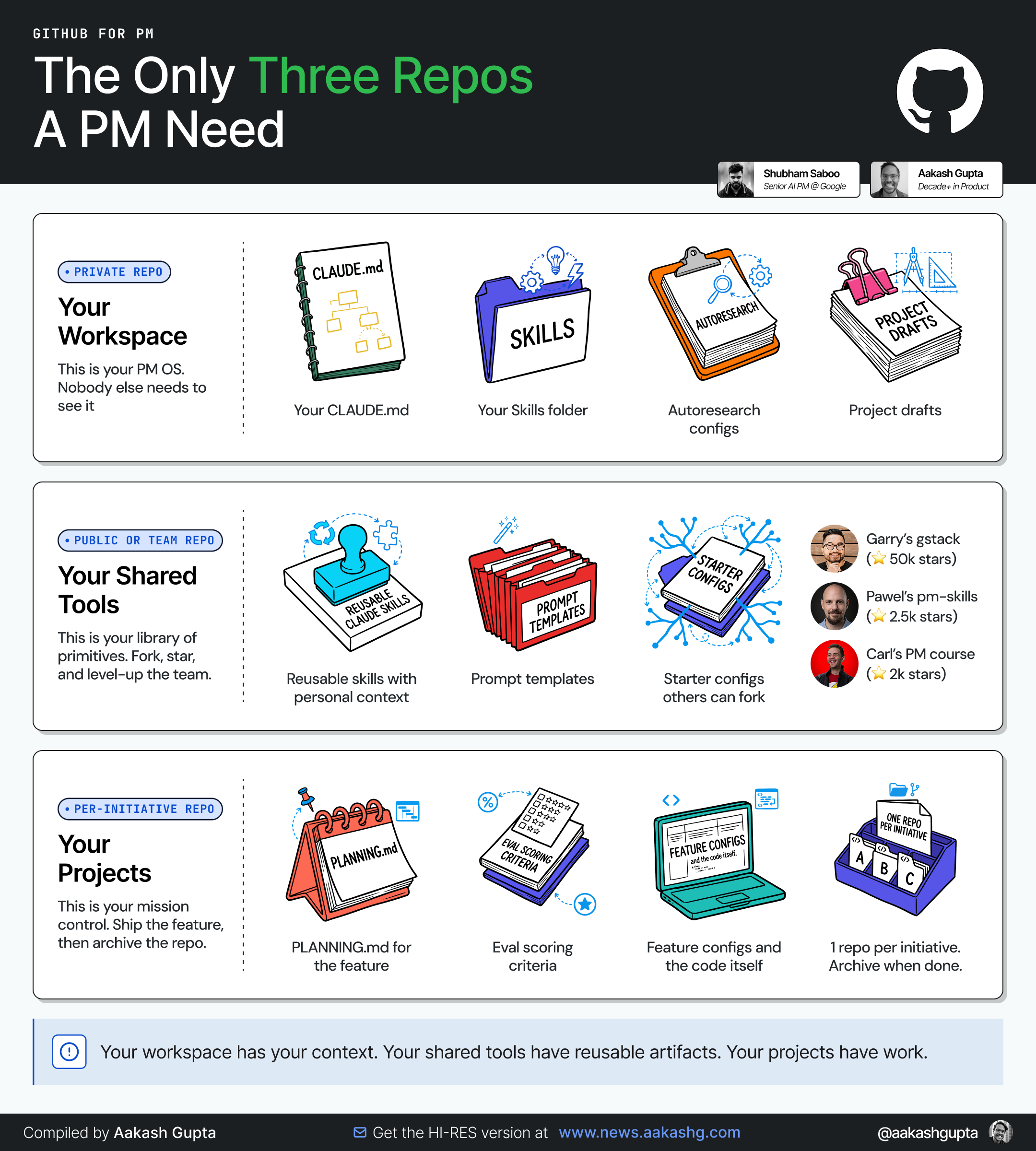
You won’t need all three when starting. You only need Repo 1 if you’re just a beginner. Repo 2, when you have skills worth sharing. Repo 3, when you’re shipping code with the PR workflow.
Your Workspace (Repo 1)
This is your private workspace containing everything that requires your personal context. This is where your PM OS lives.
Inside this repository, you store your personal CLAUDE.md (pre-loaded with your specific stakeholder list, company strategy, and communication preferences), your private skills/ folder, and your autoresearch configurations. When you open Claude Code inside this folder, your PM OS architecture boots up instantly, making every single custom skill available on launch.
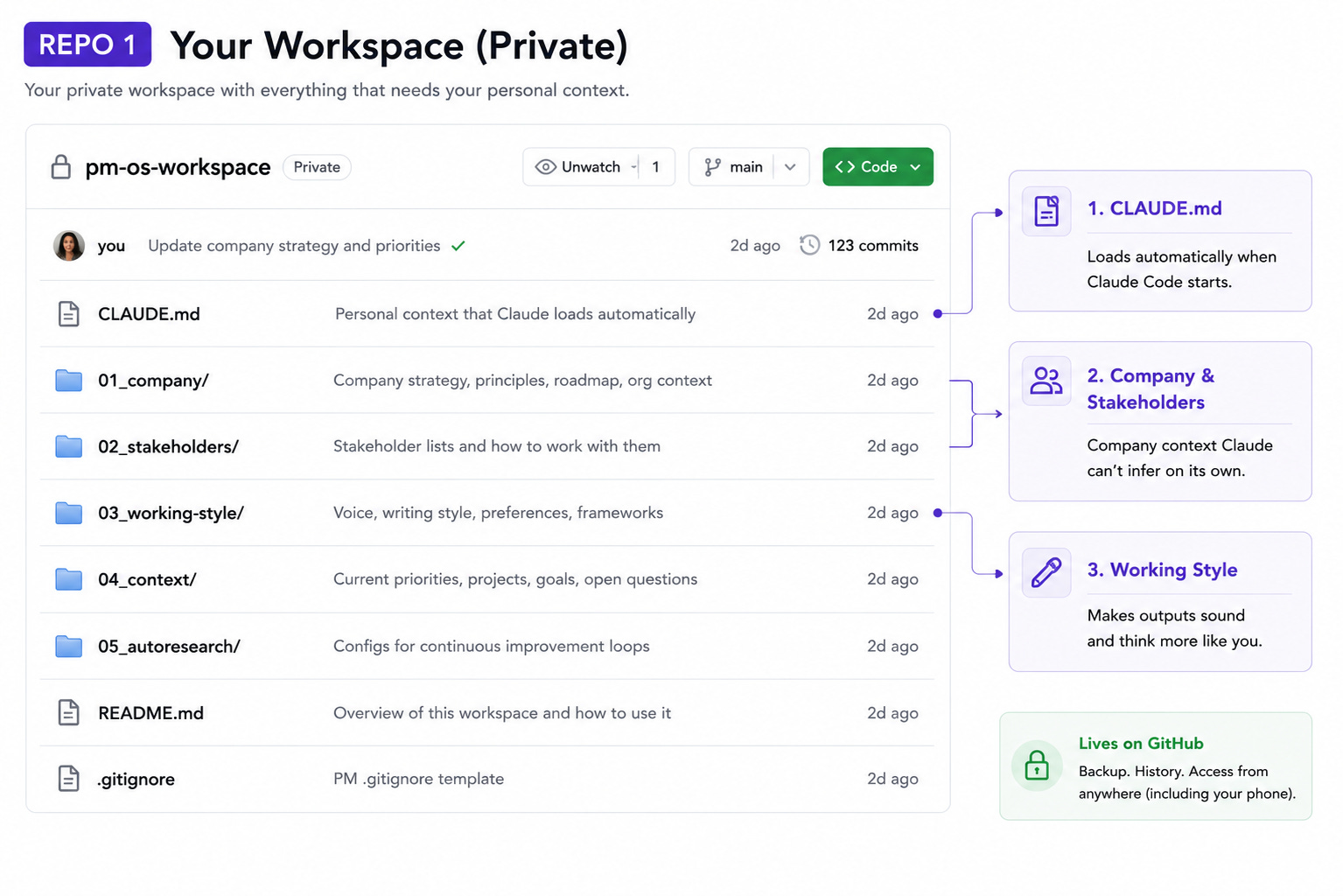
Why GitHub instead of just a folder on your machine?
Backup. Machine dies, you clone the repo on a new one. Back to full setup in 2 minutes. Same repo across machines, zero reconfiguration.
History. Every change to every file is tracked. When your CLAUDE.md was working better last month, you can see exactly what changed. When a skill breaks after a tweak, you restore the previous version in one command.
Phone access. Claude Code on the iOS app can read from your GitHub repo. You can start agents from your phone that read your CLAUDE.md and run tasks against your project files. Requires the files to be on GitHub, accessible from anywhere.
⚠️ Security note: Do not blindly push your PM workspace to GitHub. A private repo is not a privacy strategy. Before your first push, you must completely remove API keys, .env files, actual customer names, transcripts, internal strategy docs you are not allowed to upload, HR or performance feedback, raw Slack exports, and screenshots with sensitive information. Use .gitignore first. Then run a secret scan. Then push.
Your Shared Tools (Repo 2)
This is where your Team OS plugins live. It houses the skills, templates, and configurations that other PMs can fork, adapt, and run inside their own workspaces.
The core difference from your private workspace is simple: shared tools have all personal and company-specific context completely stripped out.
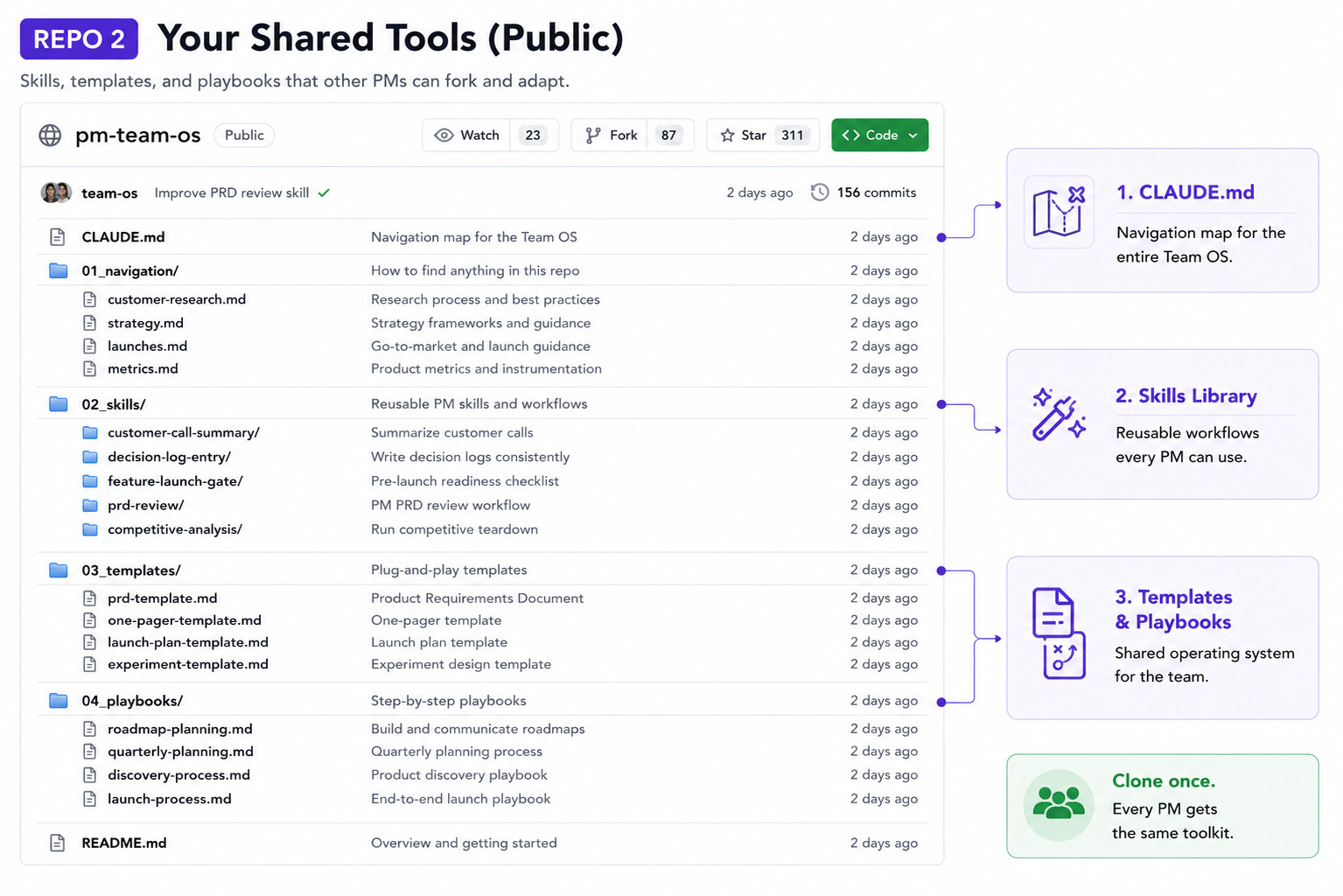
Hannah’s shared repo - her Team OS at DoorDash - has nested CLAUDE.md navigation files, shared skills (customer-call-summary, decision-log-entry, feature-launch-gate), analytics templates, and team context that any engineer, designer, or PM can query.
When her strategy partner started contributing, she cloned the repo and had the full team toolkit in 30 seconds.
On the public side, this category is exploding:
Garry Tan’s gstack: 23 specialist skills
Pawel Huryn’s pm-skills: 100+ skills across 8 plugins
Carl Vellotti’s claude-code-pm-course: interactive Claude Code course
My Steal 6 Skills piece shows what shareable skills look like.
Most PMs need this repo when they build a Team OS or when they’ve created enough skills worth sharing publicly.
Your Projects (Repo 3)
These are projects you are currently working on.
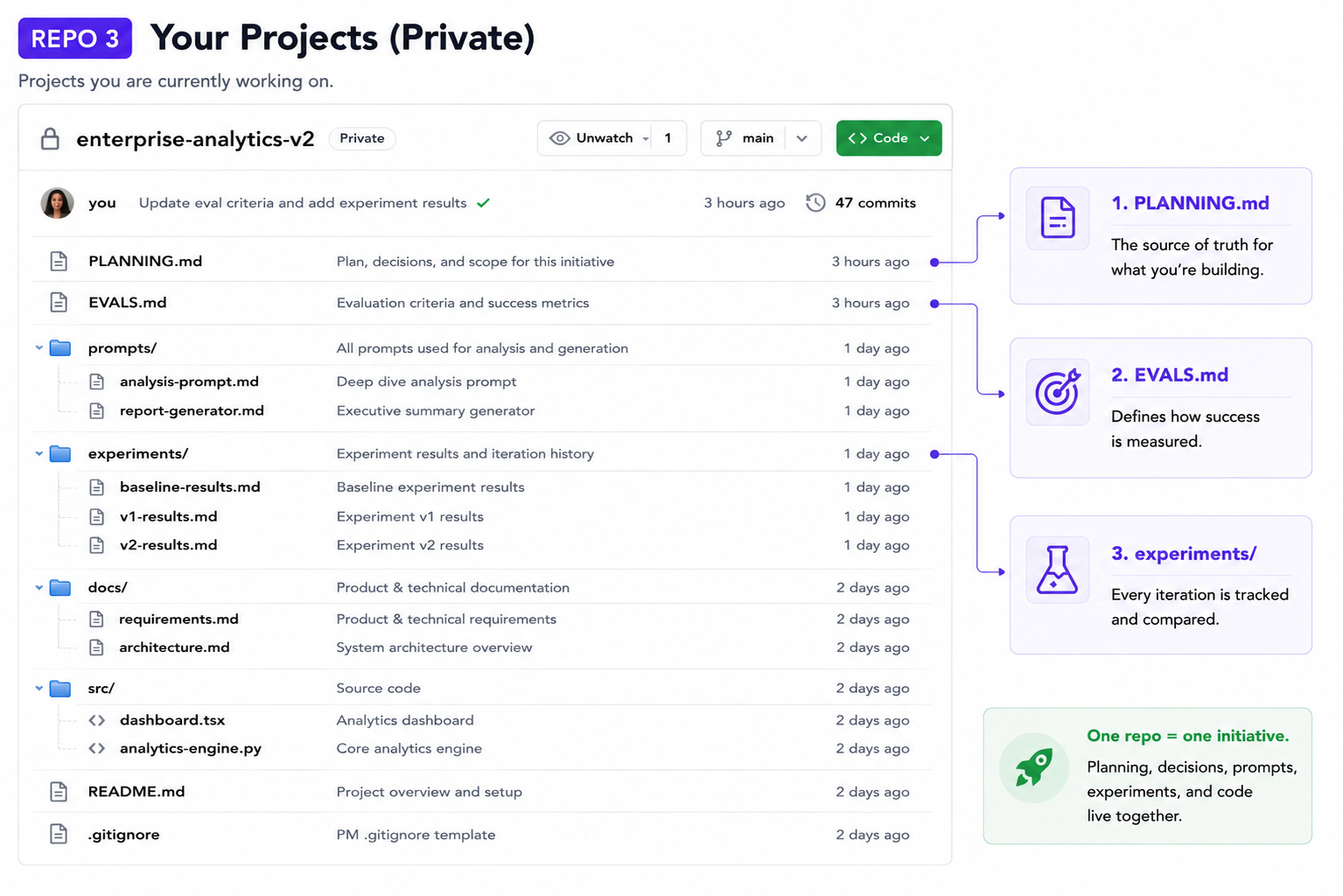
PLANNING.md for the feature. Eval scoring criteria from the experimentation piece. The code. One repo per initiative because different projects have different collaborators and different lifespans.
When the project ships, the repo is the complete record of what was built, why, and how it was measured. PLANNING.md revisions, eval criteria updates, prompt iterations, tracked in the commit history.
The Decision Guide
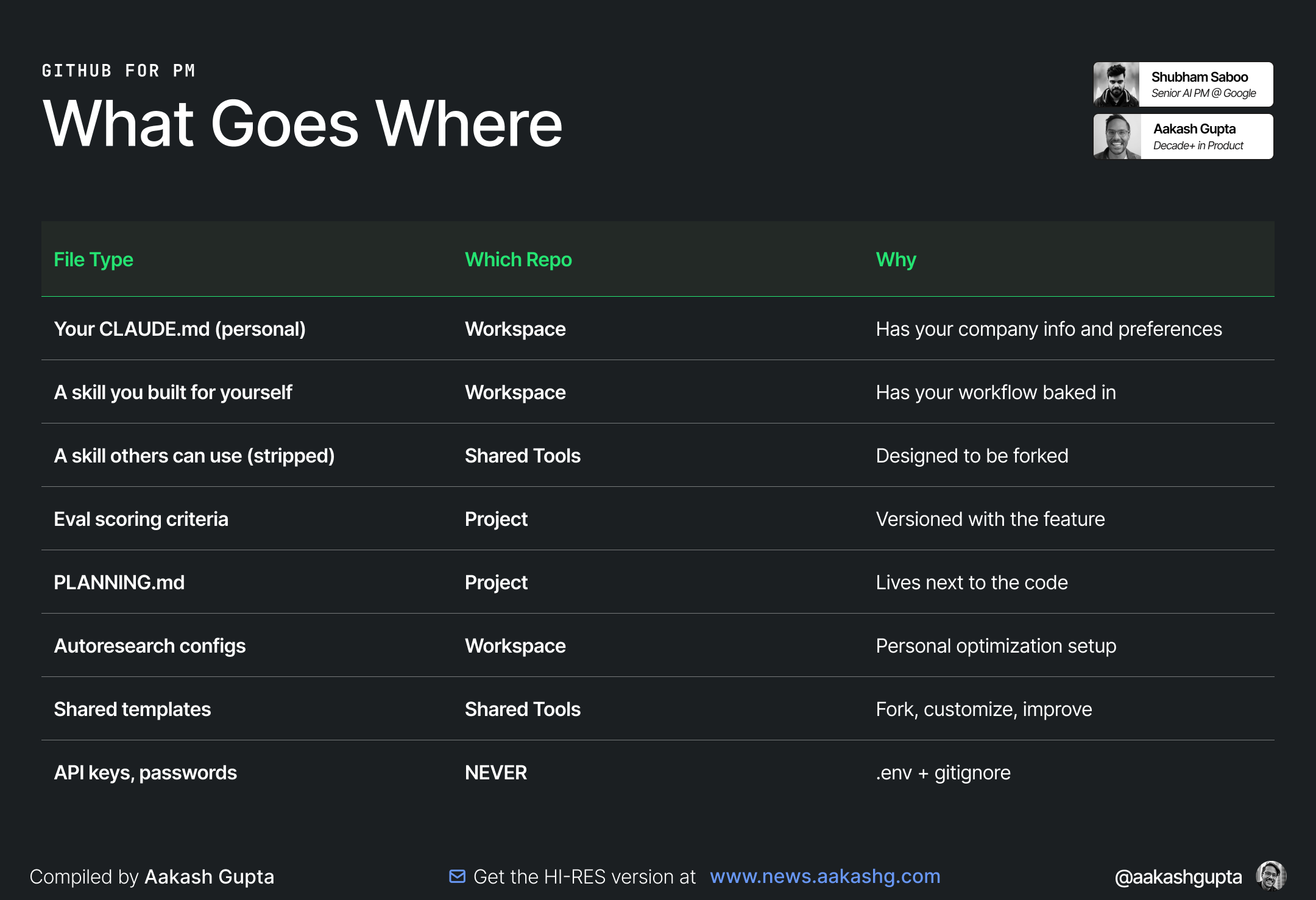
⚠️ Security note: The PM .gitignore template in the downloadables keeps secrets out of GitHub automatically. Set it up before your first push.
How This Connects
Coming from PM OS? You already have the folder structure: skills, context library, templates. Git is what keeps that folder managed over time. The /upgrade-to-team-os command from the Team OS starter kit scaffolds the team structure around your existing PM OS, and it assumes your PM OS is already in a git repo. The setup in Section 2 gets you there.
Coming from Team OS? You know the architecture: shared context, shared queries, shared discipline. The GitHub mechanics underneath are what make it work. Team OS says, “push to GitHub so you have version control,” and “I’ve had to revert my own CLAUDE.md multiple times after changes degraded performance.”
The pruning workflow in Section 3 is exactly that revert process. Team OS’s Phase 2 (the team contributing shared skills via PRs) runs on the same PR workflow taught here. When Hannah’s strategy partner submitted her first PR, she was committing a skill change with a descriptive message, getting it reviewed, and merging it so the whole team got the update.
Team OS is the architecture. The workflows below are the plumbing.
2. The Daily Workflow
Seven steps. The same rhythm every time you change a PM artifact.
Every command works by talking to Claude Code in natural language. No git syntax to memorize.
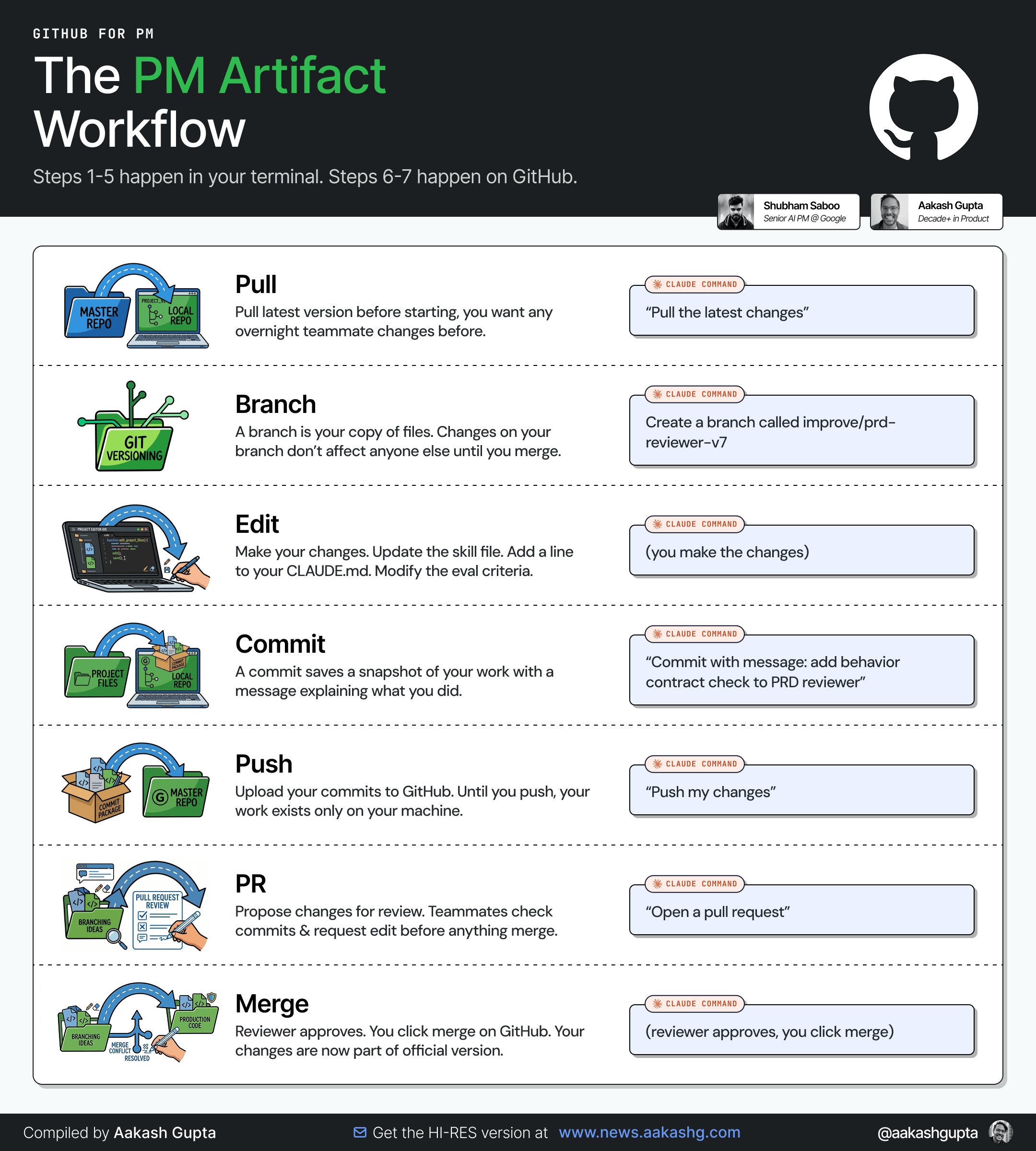
Pull
Before you start working, get the latest version. If a teammate updated the shared repo overnight, you want their changes before you start editing.
Claude Code: “Pull the latest changes from main.”
Branch
A branch is your own copy of the files. Changes on your branch don’t affect anyone else until you merge.
Name it after what you’re doing.
Claude Code: “Create a new branch called improve/prd-reviewer-v7.”
For solo work on your private workspace, you can skip branching and work directly on main. Branching matters most when you’re sharing a repo with your team (Team OS).
Edit
Make your changes. Update the skill file. Add a line to your CLAUDE.md. Modify the eval criteria.
The actual work happens here.
Commit
A commit saves a snapshot of your work with a message explaining what you did.
The message matters. “Update” tells you nothing in three months. “Add behavior contract check to PRD reviewer” tells you exactly what changed and why.
Claude Code: “Commit my changes with the message: add behavior contract check to PRD reviewer.”
Commit after every meaningful change. Not after every keystroke. Not after a full day of work. After each change you’d want to be able to roll back to individually.
If you’re unsure, commit more often.
Push
Upload your commits to GitHub. Until you push, your work exists only on your machine.
Claude Code: “Push my changes.”
After pushing: backed up, accessible from other machines, visible to teammates if the repo is shared.
Pull Request (PR)
A PR says: “Here are my changes. Please review before they become official.”
For PM artifacts in a shared repo, the review is about quality, not syntax. Does this skill improvement actually produce better output? Does this CLAUDE.md change follow team conventions?
Claude Code: “Open a pull request.”
Write a short description of what changed and why. The CONTRIBUTING.md in the practice repo has a template.
For your private workspace, you can skip PRs and push directly to main. PRs matter when the repo is shared.
Merge
Reviewer approves. You click merge on GitHub. Your changes are now part of the official version. Delete the branch.
Working solo? Merge your own PRs. The PR still serves as a record of what changed and why.
Seven steps, same rhythm every time. Pull, branch, edit, commit, push, PR, merge.
Hannah’s GitHub 101 goes deeper on each step with screenshots and troubleshooting. Ship Your First PR applies this cycle to code changes specifically. The four workflows in the next section build on top of this rhythm.
🔒 Below, you’ll read:
• Loop Engineering for your workspace asset
• The exact repo structure Aakash uses
• Four version-control workflows that save hours every month (skill rollback, CLAUDE.md pruning, autoresearch tracking, eval criteria versioning)
• A practice repo you can fork today
• The PM GitHub starter kit
If you’re serious about building a long-term AI operating system, the rest of the guide is for you.