Check out the conversation on Apple, Spotify, and YouTube.
Brought to you by:
Ariso - Ship AI agents and features faster, with fewer regressions
Bolt - Ship AI-powered products 10x faster
Pendo - The #1 software experience management platform
Product Faculty - Get $550 off their #1 AI PM Certification: code AAKASH550C7
Customer.io - Send smarter messages using your product data
Today’s episode
I’ve written about building a PM OS and Team OS in Claude Code. They are my top two most popular pieces of 2026.
Today is the upgrade: a company OS that enables even CSMs at your company to ship to production.
And this isn’t theoretical.
Jiaona Zhang “JZ” is the CPO at Laurel - which raised a $100M Series C - and her company actually runs on a Company OS. They have run into the problems and kinks. They’ve ironed them out. Now, they’re showing what works.
JZ is not some “AI purist.” She has led product at Airbnb, Dropbox, Webflow, and WeWork. She’s an AI realist.
And in this episode, she doesn’t hold anything back:
The Company OS that enables it all
How PMs go from product idea to shipped feature with agents
How she conducts AI PM interviews in this era, and how to ace them
This is one of the densest episodes I’ve ever recorded.
I hope you enjoy watching it as much as I did recording it.
To get access to my AI tool stack - Dovetail, Arize, Linear, Descript, Reforge Build, Relay.app, Magic Patterns, Speechify, Bolt.new and Mobbin - become an annual subscriber ($150), and grab Aakash’s bundle.
To get access to my AI PM customizations - PM OS, Job Search OS, and Prompt Library - become a founding subscriber ($250).
Newsletter Deep Dive
Welcome to the web’s first guide for how product leaders can create a Company OS to accelerate Claude Code adoption across their org:
How to build your Company OS
How to spread AI adoption beyond engineering
The new role of the PM in an AI-native team
How to get hired as an AI-native PM
1. How to build your Company OS
A company OS can unlock productivity across your organization. It takes the power of a concept like a PM OS beyond single PMs or product teams.
At Laurel, even CSMs are shipping to production.
Here’s how to build your own:
The architecture is simpler than you think
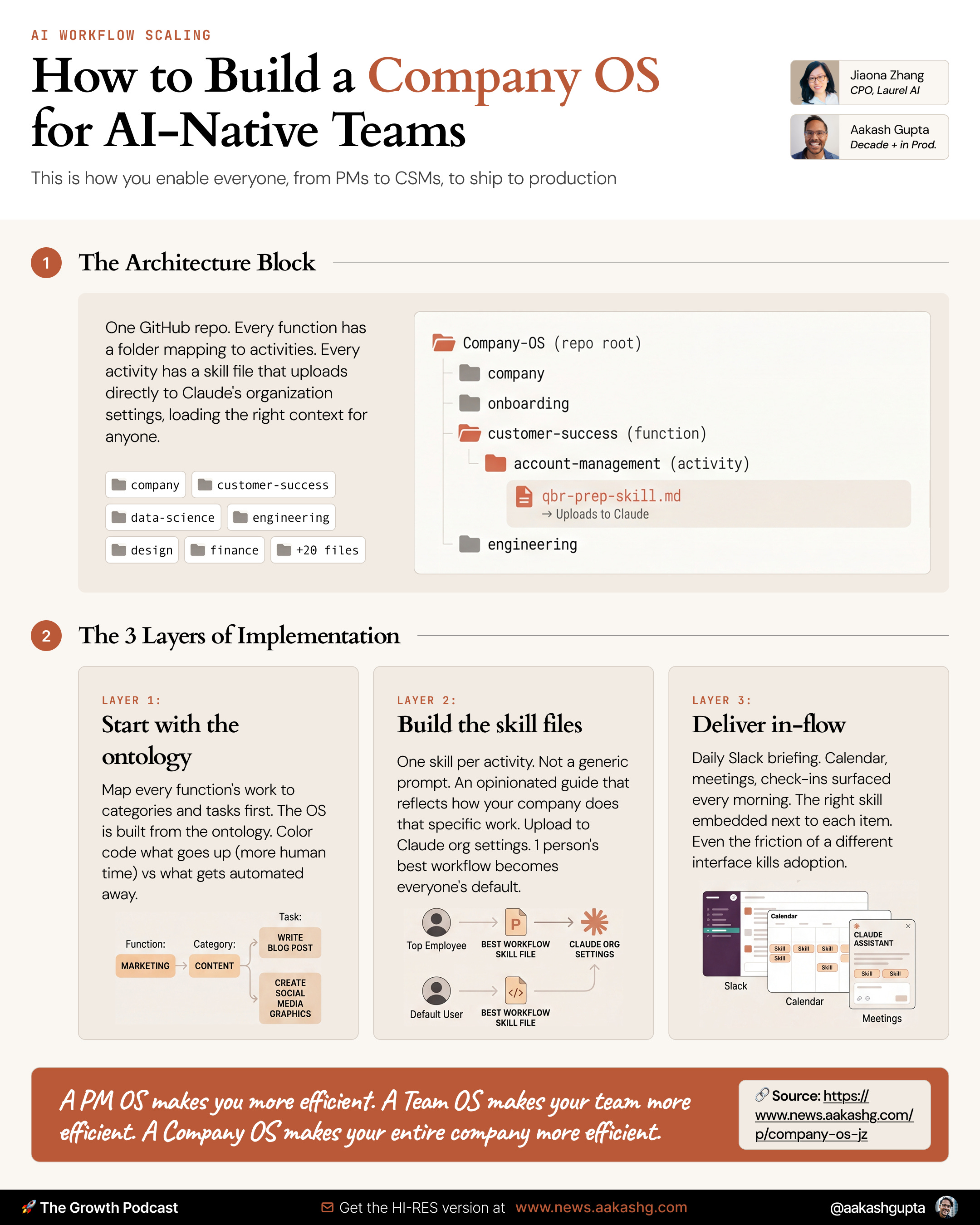
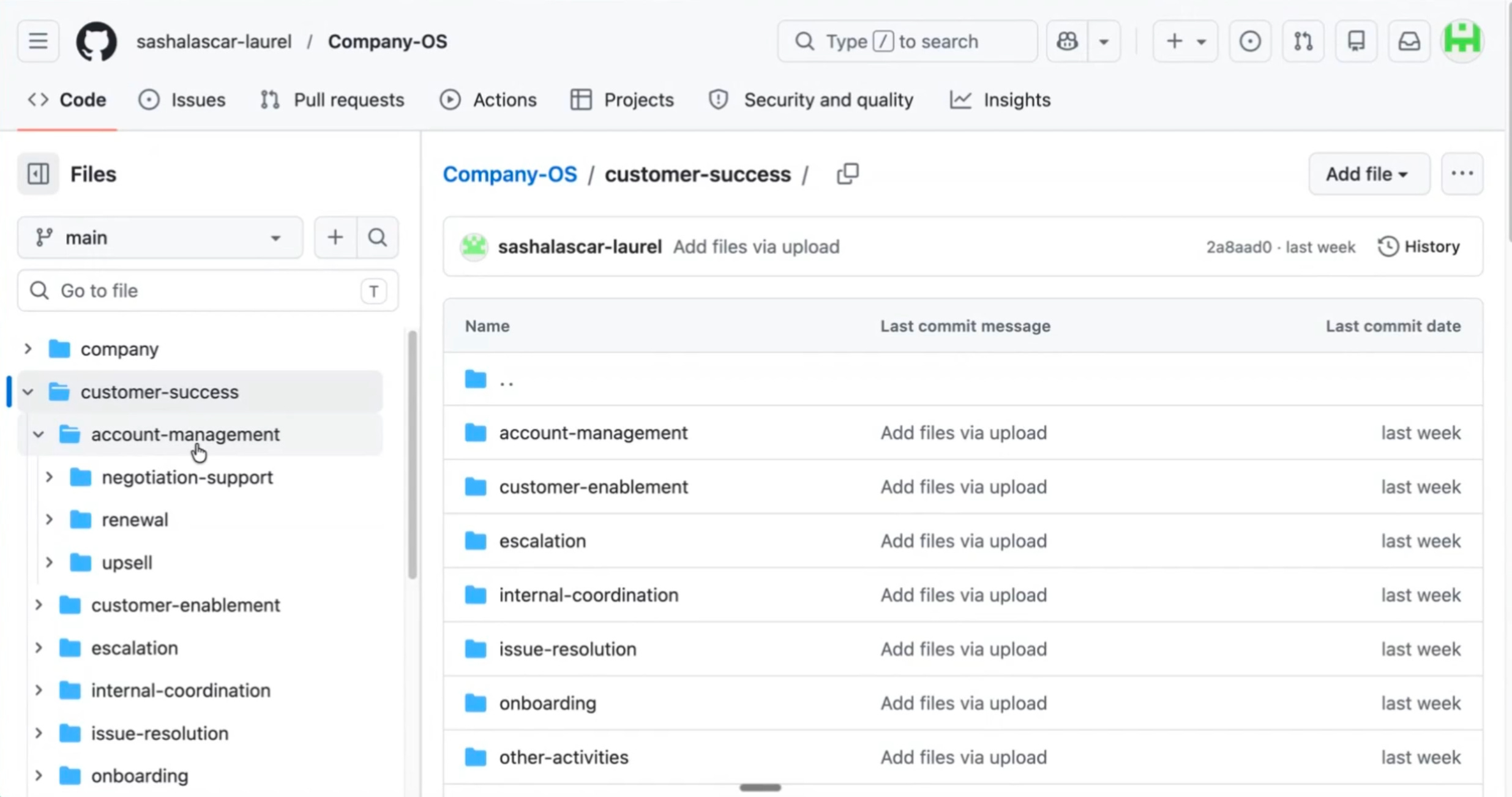
One GitHub repo. Every team in the company has a folder. Every folder maps to the activities that team does. Every activity has a skill file. The skill files go directly into Claude’s organization settings. Anyone who opens Claude already has the right skill loaded.
During the demo, JZ screenshared Laurel’s full GitHub structure live. Customer success, data science, design, engineering, finance, legal, marketing, all of it:
There are three layers to build your own.
Layer 1 - Start with ontology
PMs build the OS and then wonder why nobody uses it. They got the order wrong.
Start with the ontology like JZ. Map every function’s work to categories, then to tasks within each category. What should sales be doing? What should CS be doing? What should product be doing? This work map is what informs the folder structure. The OS is built from the ontology:
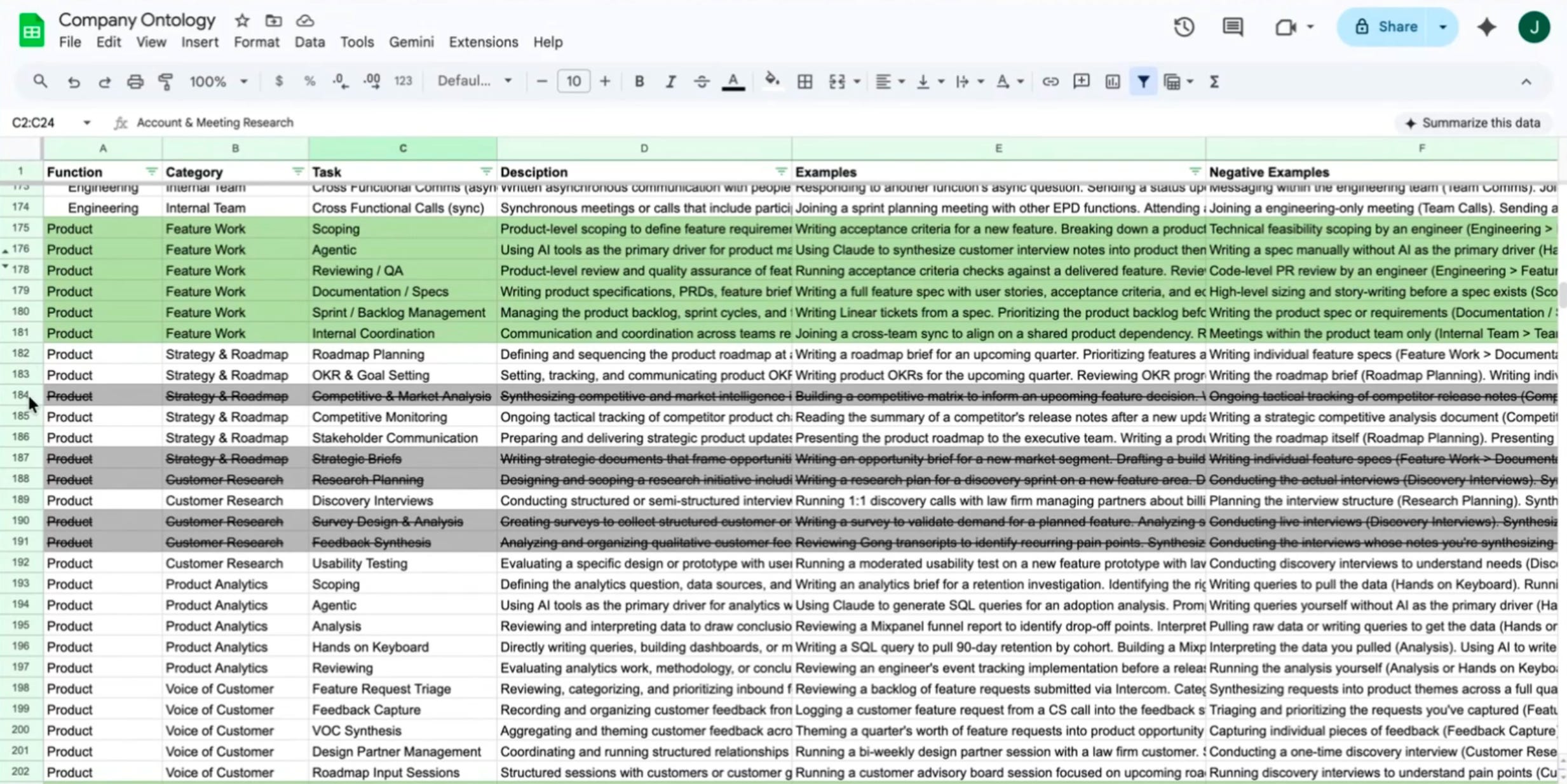
At Laurel, the ontology sits alongside the OS. For each function, it shows which activities should go up (more human time) and which should go down (automated away). For product, competitive analysis write-ups, stakeholder briefs, and research synthesis are in the “stop doing manually” column. Feature work, QA, and direct customer contact are in the “spend more time here” column. Color-coded. Visible to every leader.
This is the part most companies skip. They install tools before deciding what work actually matters.
Layer 2 - The skill file architecture
Once you have the ontology, build the skills.
A skill file is a Markdown document that encodes how to do a specific piece of work. Not just a generic prompt. A specific, opinionated guide that reflects how your company does that thing. How do you write a renewal email at your company? What does a good feature request look like when it comes from a CS rep? What questions do you ask before triaging a support escalation?
The skill file answers all of this. Upload it to Claude’s organization settings and it becomes available to everyone. The skill is called when needed. With this simple set up now one person’s best workflow becomes everyone’s default.
Layer 3 - The delivery layer
At Laurel, every customer facing team member gets a daily morning message in Slack. Calendar, meetings, check-ins, onboarding sessions, all surfaced. And embedded alongside each item, the skill to use. You have a renewal call at 10am. Here is the renewal skill. You have an onboarding session at 2pm. Here is the onboarding skill. The OS meets people where they already are.
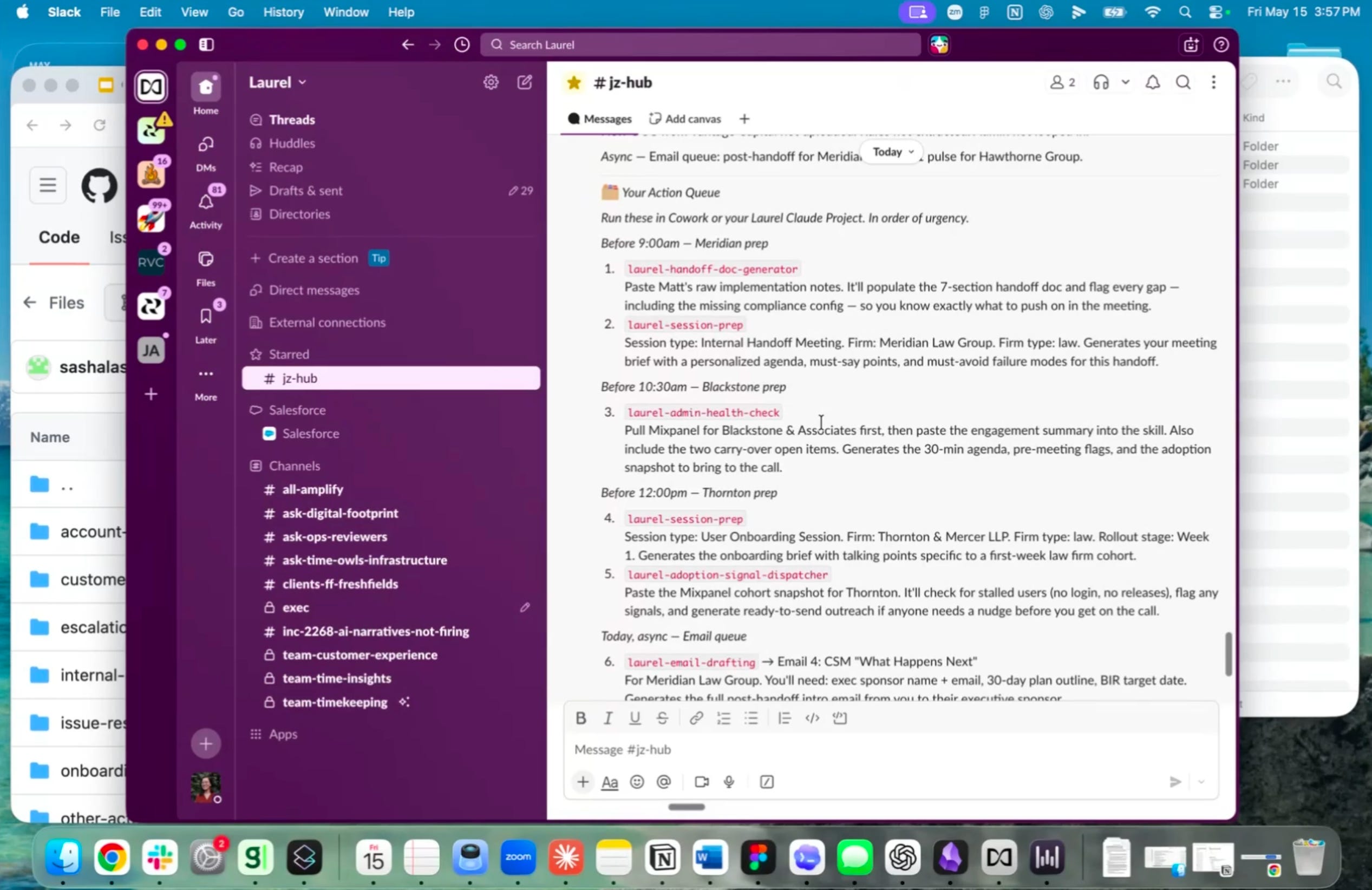
The 1% will always figure it out. The Company OS is how you make their workflow everyone’s default.
How to spread AI adoption beyond engineering
When AI adoption is everyone’s responsibility, it is no one’s responsibility. The person who was going to build the CS workflow is also running renewals, handling escalations, and onboarding three new accounts. The workflow never gets built. Leads to a huge gap.
The fix ↓
Step 1 - Dedicate a person to it
At Laurel, this role is called AI Operations. One person, full-time mandate, whose entire job is finding efficiencies, building workflows, and spreading what works to every function.
JZ describes it as the new BizOps:
AI ops is the new BizOps. Before, BizOps were doing really meaningful things, but often it was very high level, all the different hats, a lot of like market level stuff. Now, if you repurpose this idea of having BizOps, which is really again a Swiss Army knife in many ways, to finding people who are insanely curious, tinkering with the latest technology, and relentless about finding efficiencies, that’s the DNA I really look for.
Laurel started with one person, Sasha. Within months, every other function wanted their own Sasha. That demand is how you get budget. You demonstrate value with one person, then let the pull happen naturally.
If you are reading this as a leader who cannot yet hire for this role, the person closest to it already exists on your team. They are the one who figured out the Slack automation nobody asked them to build. Find them. Give them the mandate officially.
Step 2 - Run a companywide hackathon
The assumption that blocks AI adoption in non-technical functions is simple: you have to be technical to build something.
One hackathon breaks that assumption faster than any training program.
Laurel ran a companywide hackathon at their offsite roughly three months ago. Every team participated. Not just engineering. The explicit goal was to show that anyone can build. When a Customer Success manager ships something in a day, the story spreads. That story does more for adoption than any top down mandate.
If a full offsite feels out of reach, a single afternoon works too. Pick one function. Give them four hours and a clear problem to solve. Keep a low bar, make it like even a working Slack automation counts. A prompt template that saves 30 minutes a day counts. The goal is the first win over the perfect solution.
Step 3 - Make the culture visible
Some companies have a value on a slide that nobody reads after the presentation is done.
Laurel turned their “unreasonable hospitality” value into a workflow. When a Customer Success manager has a check-in coming up and has not had an in-person touch with that customer in a while, the OS surfaces it. Pulls from Gong transcripts what the customer loves. Suggests the gesture. Handles the logistics. If you can see, now the value is not just a slide anymore.
That is the part most leaders miss. Culture spreads through systems that make the right behavior the default behavior. You do not need everyone to be intrinsically motivated to show hospitality. You need a system that makes it easy enough that everyone does it anyway.
The same logic applies to AI adoption. Waiting for 99% of your company to become curious about AI on their own is a losing bet. Put the right skill in front of them at the right moment and curiosity takes care of itself.
2. The new role of the PM in an AI-native team
There is a version of this conversation happening on Reddit right now. A PM asking if their job is going away. Getting 200 replies, half of them panicked and other dismissive. Tbh, neither group is right.
The job is not going away. The shape of it is changing faster than most people want to admit.
Here is what the new shape actually looks like.
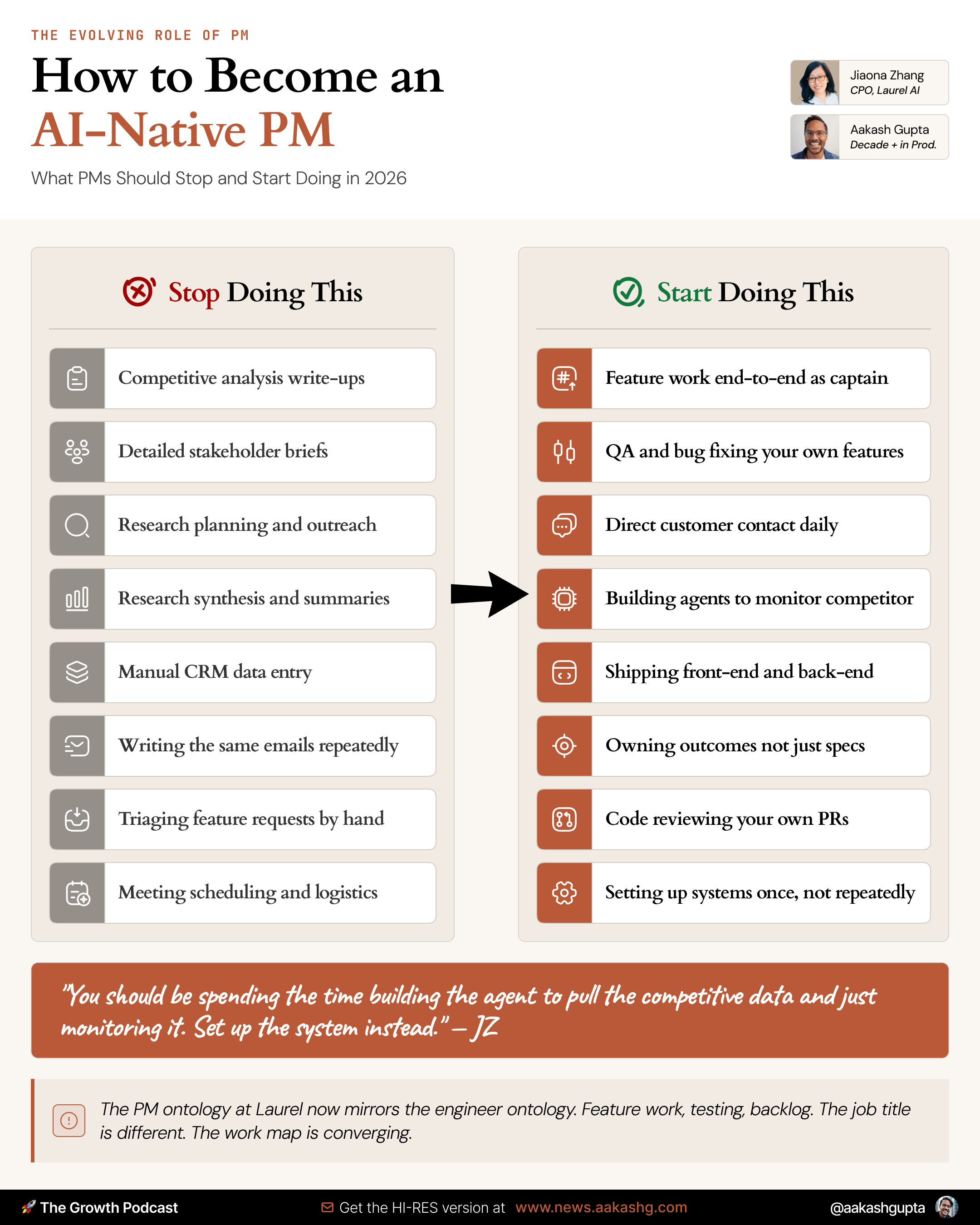
The captain model
Forget the old handoff chain. PM writes spec, sends to designer, designer sends to engineer, engineer sends back, designer says that is not what they designed. That loop is going down in AI-native teams.
The replacement is a captain model. Every feature has one person who owns it end-to-end.
The captain is whoever has the most important skill for that feature’s hardest problem:
Engineering captain - Architectural changes, system overhauls, anything where the codebase risk is the biggest variable.
Design captain - Interaction heavy features where the experience is everything and the engineering is straightforward.
PM captain - Features where customer understanding plus business context is the hardest thing to get right. Empty states. Onboarding flows. Anything where the content and the user insight matter more than the code.
That’s the full model.
Two track product reviews
Speed without alignment is just running in circles. The captain model needs guardrails.
At Laurel, there are two tracks:
Track 1 - Fast.
Small features, single captain, end-to-end ownership. Goes through the Ask Devin reviewers Slack channel. An engineer reviews the PR. A designer checks if needed. No formal product review meeting.
Track 2 - Full review.
Radical changes to core user interactions, architectural decisions, system level thinking required. This is what JZ calls a product strategy review. “Are we sure this is the right direction for the whole product?” Plus a separate architectural review - “Will the system actually support where we want to go?”
The question most teams get wrong is which track a feature belongs on.
The test is simple. If the change affects a core user interaction that touches the whole product, it is Track 2. If it is scoped to one workflow and the hardest problem is execution, it is Track 1. Temporary initiatives, despite being a frontend and backend feature, was Track 1. A redesign of how Laurel surfaces time across the entire day would be Track 2.
I covered the mechanics of PMs shipping to production in my PM guide to shipping your first pull request. The captain model is what makes that shipping sustainable at scale rather than a one-off experiment.
As an ending note, I would say…
The fundamentals of great product management never changed. What changed is that you can no longer hide behind process, meetings, and headcount.
The work is the work now.
3. How to Get Hired as an AI-Native PM
Ask someone on your team if they use AI. Everyone says yes. Ask them to show you. That is where the answer changes.
There is a framework that cuts through the noise immediately. Four levels. Every person, every team, every company sits somewhere on this scale.
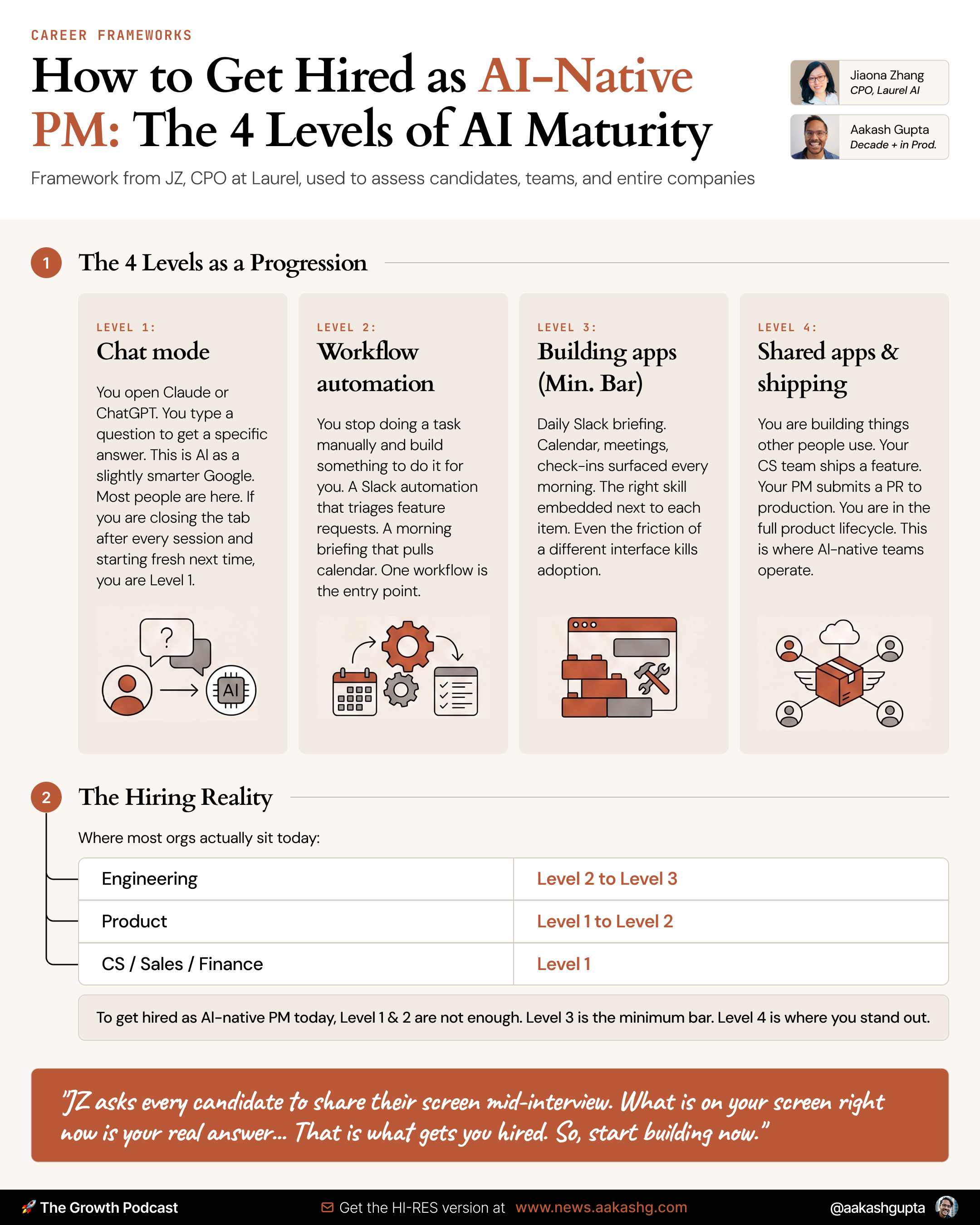
Level 1 - Chat mode.
You open Claude or ChatGPT. You type a question to get a specific answer.
This is AI as a slightly smarter Google. Most people are here. If you are closing the tab after every session and starting fresh next time, you are Level 1.
Level 2 - Workflow automation.
You stop doing a task manually and build something to do it for you.
A Slack automation that triages feature requests. A template that auto-populates from your CRM. A morning briefing that pulls your calendar and surfaces priorities. One workflow. That is the entry point. If you’re not familiar, I covered how to start building these in my AI Agents for PMs guide.
Level 3 - Building apps.
You identify something tedious enough to deserve a real tool, and you build an app.
Something with a UI, logic, and state. This is where builder PMs live. Mahesh Yadav broke down exactly how to get here in our episode on becoming a builder PM.
Level 4 - Shared apps and shipping to customers.
You are building things other people use. Your Customer Success team ships a feature. Your PM submits a PR that goes to production. You are in the full product lifecycle. This is where AI-native teams operate.
In most organizations, the engineering team is split between Level 2 and Level 3. Sales and Customer Success are mostly Level 1. Finance and legal are often at Level 0, which is not even on the scale.
The screen-share test
Here is how JZ uses this framework in practice. In every interview, she asks the candidate to screen share.
Within 60 seconds you know exactly where someone is. A Level 1 person has a bunch of Claude chat tabs open with one-off questions. A Level 3 person has a folder structure, a set of saved workflows, maybe an app they built last week.
The same test works for your team. Pick five people across functions. Ask them to show you how they use AI. Do not ask them to describe it. Watch it happen. You will have a clear map of where your company actually sits in under an hour.
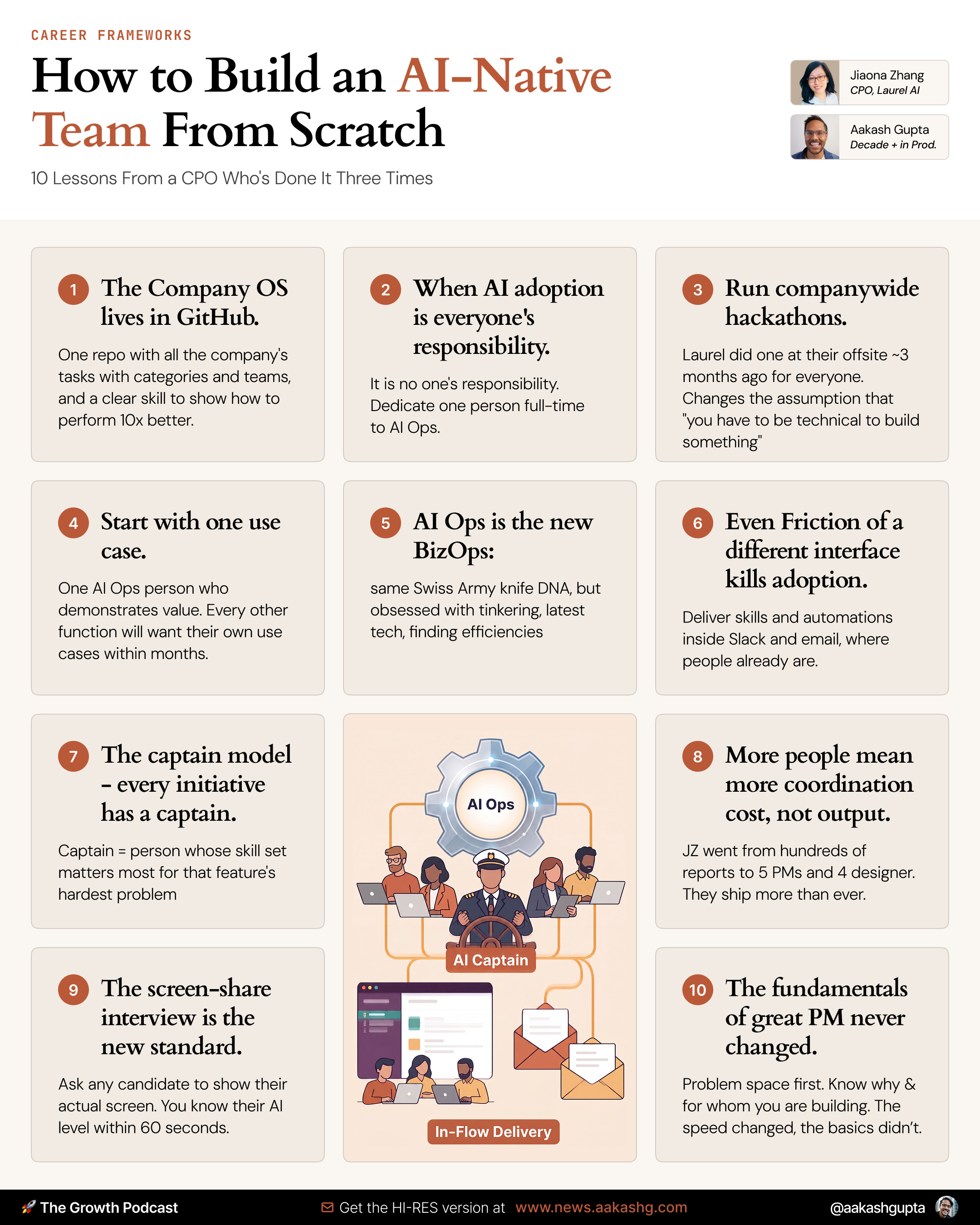
Here’s the most important takeaways in 1 infographic:
Where to find Jiaona Zhang
Related content
Podcasts:
How a VP Uses Claude Without Producing Slop - YouTube | Spotify | Apple
How to Build a Team OS in Claude Code - YouTube | Spotify | Apple
Newsletters:
PS. Please subscribe on YouTube and follow on Apple & Spotify. It helps!