Check out the conversation on Apple, Spotify and YouTube.
Brought to you by:
Jira Product Discovery: Move discovery and roadmapping out of spreadsheets
Vanta: Automate compliance across 35+ frameworks like SOC 2 and ISO 27001
Kameleoon: Leading AI experimentation platform
NayaOne: Airgapped cloud-agnostic sandbox
Product Faculty: Get $500 off the AI PM Certification with code AAKASH25
Today’s Episode
Claude Code hit $1B ARR in 6 months. But OpenAI is not just giving up.
ChatGPT’s new Codex is the most powerful way for product managers to build prototypes.
And it’s a far better way to use ChatGPT than the browser.
So every PM should know how to use it.
Today, I brought back the man behind my Claude Code tutorial, Carl Vellotti, for a full guide on how to use ChatGPT Codex for PMs:
This might be the most important podcast you watch all year.
(And not a single other PM podcast has even talked about this tool)
Your Newsletter Subscriber Bonus
For subscribers, each episode I also write up a newsletter version of the podcast. Thank you for having me in your inbox.
Today’s guide covers:
Getting Started: The Non-Technical PM’s Guide to Codex CLI
Classic PM Tasks: Documents, Meetings & PRDs with Codex
Advanced Prototyping: From Vibe Coder to Vibe Engineer
This is your complete Codex roadmap.
1. How to Get Started - The Non-Technical PM’s Guide to Codex CLI
If you’ve never touched a terminal, this is for you.
1a. Open Codex in an IDE

Carl opens Cursor and shows files Codex creates in real-time.
Workflow: Open project folder in Cursor → Terminal (Control + backtick) → Type codex.
Now you see files created, preview documents, navigate visually.
As Carl Says:
“Open it in an IDE. Easiest way to see what it’s actually doing.”
1b. The YOLO Mode Hack
Codex asks for permission constantly—every website, every command.
Solution:
codex --yoloFull access mode. No prompts. Just execution.
“Haven’t broken my computer yet. We’re in this directory so it won’t leave.”
1c. Codex vs Claude Code

Same task on both: Search web, summarize differences.
Claude Code: 3 searches simultaneously, ~2 min
Codex: One site at a time, asks permissions, ~4 min
Claude Code is faster, hides details. Codex shows every command—more verbose.
“It’s Apple versus Microsoft. Claude does things in a nicer interface. Codex shows you everything.”
2. How to Handle Classic PM Tasks with Codex
Codex shines at daily PM work.
2a. File Analysis Without Uploading
Run Codex from a folder, it accesses everything. No uploading.
Carl has demo folder (Taskflow) with interviews, notes, PRDs.
“What user interviews completed?” → Codex lists them
“Top 3 pain points?” → Returns: voice input reliability, integration gaps, template workflow
Creates document with direct quotes—no manual file providing.
2b. Template-Driven Workflows
Solution: Create /templates folder with markdown files.
Example: Discussion Points, Action Items, Risks & Blockers, Next Steps
Use: Summarize @meeting-notes using @template
Same format every time. Works for PRDs, one-pagers, research summaries.
2c. Socratic Questioning for Better PRDs
Problem: Asking Codex to write a PRD produces garbage without proper thinking.
Solution: Socratic template makes Codex ask YOU questions first.
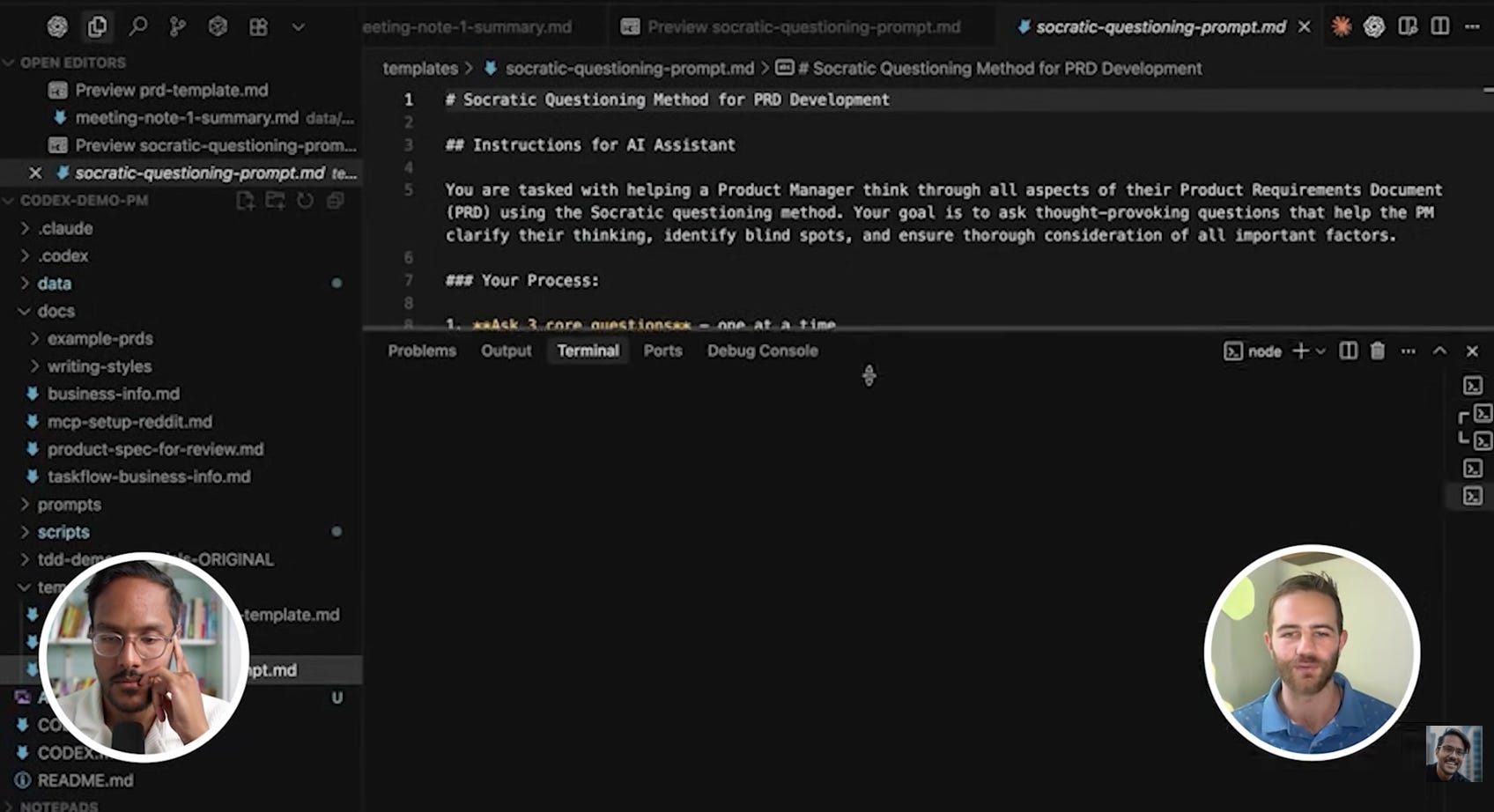
Questions: “Why is this helpful? Data, feedback, or strategic?” “What must work for V1?” “Edge cases?”
You answer. AI embeds your thinking.
Then Codex reviews context, templates, example PRDs, and writes.
Carl: “Goes from kind of there to a really good PRD almost right out of the box.”
3. Advanced Codex Techniques for Future Vibe Engineers
This is where Codex separates from the browser.
3a. Design Systems with Storybook
Vibe coder problem: “Make title pink” → wrong shade → 20 iterations → still janky
Vibe engineer solution: Storybook (npm run storybook)
See components visually, change colors instantly, see changes live without redeploying.
Carl changes recipe title to pink: read-only mode to see plan, then YOLO mode to execute. Updates in Storybook immediately.
Pre-built components: Use Shadcn UI for production-grade React components. Calendar, date picker, dropdown—all done.
“All the logic and difficult things, you get for free.”
3b. Test-Driven Development is The Unlock
Problem: AI says “Done!” but it’s broken. AI will lie and set variables to true to pass tests.
Solution: Write tests BEFORE building.
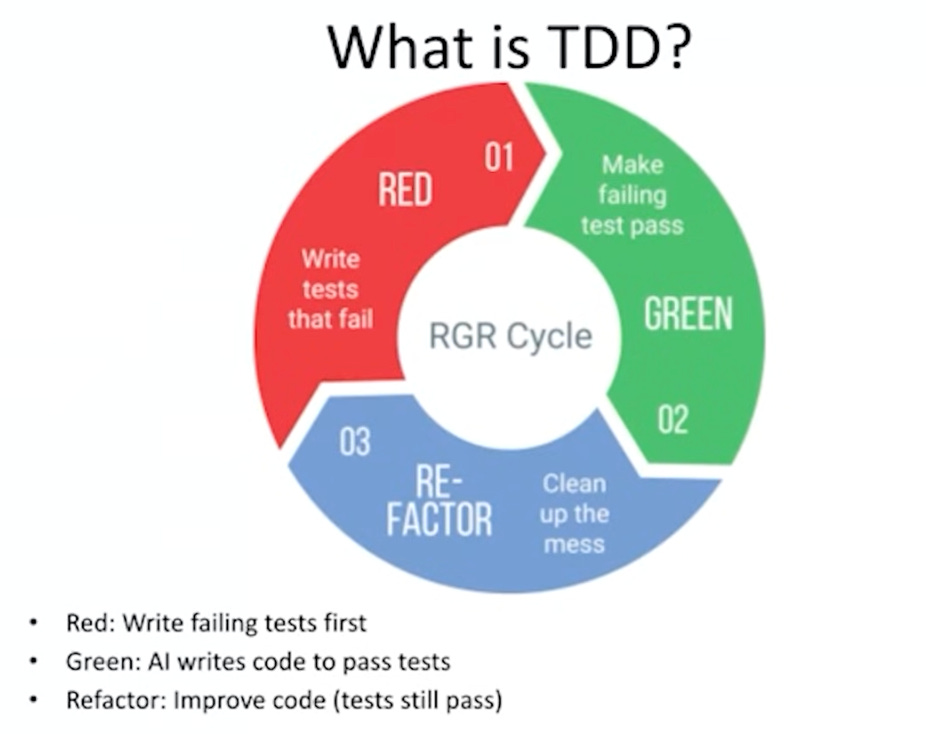
Red-Green-Refactor: Tests fail → Build until pass → Improve code
Carl’s macro calculator:
Tests: API returns calories, empty recipe returns null, missing data shows “N/A”, API fails retries 3x, divide by servings correctly
Told Codex: “Build to make tests pass.”
35 minutes. Zero touch. All tests green. Feature worked.
Carl: “If you write tests FIRST, they can’t cheat.”
3c. An Example - The TikTok Recipe Bot
Carl built this for his girlfriend: TikTok recipe extractor.
Problem: Recipe videos on TikTok. No written recipe. Just “comment and I’ll DM.”
Solution: Paste URL → Codex downloads video → Sends to Gemini (only model that processes video) → Gemini extracts recipe → Codex formats to PDF
How: Detailed implementation spec: architecture, data flow, APIs, error handling, retry logic, tests.
Gave to Codex in GPT-5 Codex mode. Left 35 minutes.
Built entire feature. Tests passed. Worked first try.
Carl:
“First time I saw the dream—give it a medium-sized feature and it just builds it.”

Where to Find Carl Vellotti
Related Content
Podcasts:
Newsletters:
PS. Please subscribe on YouTube and follow on Apple & Spotify. It helps!