
Welcome back to the AI Update.
Claude Cowork is not getting the hype it deserves. This is an LLM harness that lets your AI do all the work for you in systems you control:
Working in Excel or Powerpoint
Building Google Docs or Notion pages
More people should be using it. Today I’m giving you the ultimate guide to Claude Cowork.
But before we get there, let’s get you caught up on the week’s AI news that matters.

Lev8: Your AI-powered Connection Engine
Stop guessing who to talk to, and start connecting with the right people. I used Lev8 to easily find the people I want, and their contact information:
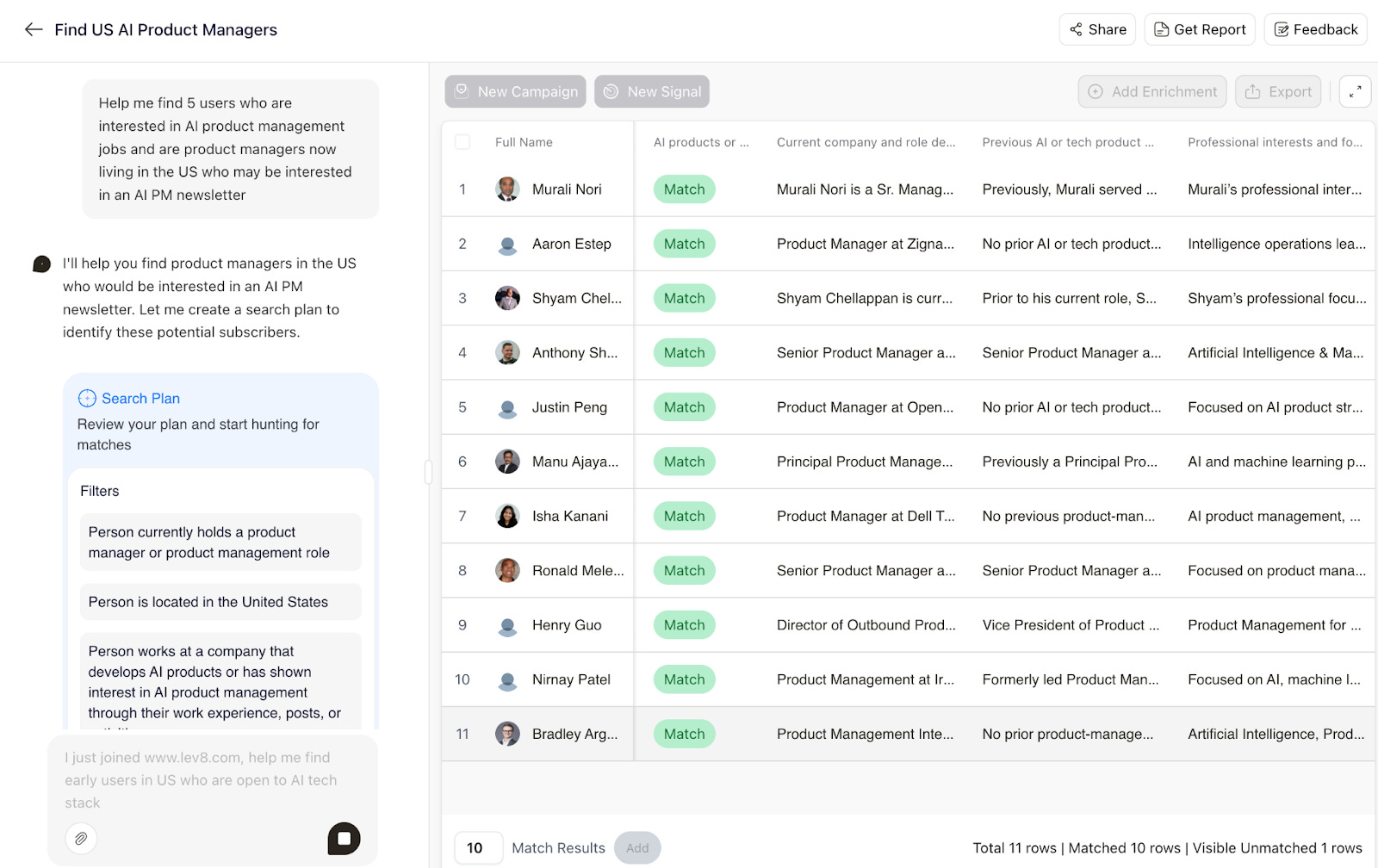
Just tell Lev8 who you’re looking for, and it’s like having a personal assistant scouring the web in real-time, bringing back only the most relevant, verified contacts
I’d love for you to try out Lev8. Here’s an exclusive invite just for you: HIIMLEV8

There’s a million AI news articles, resources, tools, and fundraises every week. You can’t keep track of everything. Here’s what mattered.
Top News
Seedance 2.0 is creating major buzz even before its US release
ByteDance released Seedance 2.0 this week. And it used the Sora playbook: going viral with massive, copyrighted content drops.
Irish filmmaker Ruairi Robinson typed a two-line prompt and got Tom Cruise fighting Brad Pitt on a rooftop. Within hours of restricted release, people were generating alternate endings to Game of Thrones, Optimus Prime fighting Godzilla, Spider-Man scenes with just a single prompt.


The model isn’t publicly available to the world yet. It’s accessible through ByteDance’s Jimeng (Dreamina) platform in China, with a global launch expected within the next two weeks. And it’s already the most talked-about AI model of the month from demo clips alone.
On benchmarks, Seedance 2.0 leads in motion consistency and temporal coherence across most video generation tasks. In head-to-head comparisons against Sora 2, Kling 3.0, and Veo 3, it wins on controllability and resolution. Sora 2 still edges it on pure physics simulation. Kling handles fast action sequences better. But for cinematic storytelling and brand creative, Seedance 2.0 is the new bar.
API access through partners like FLUX Context is confirmed for February 24th. Global public launch is expected late February or early March.
This is the moment AI video crosses from “impressive demo” to “usable production tool.” If you’re building anything that touches content creation, product demos, or marketing automation, pay attention.
Other Key News
Three major Chinese LLMs released: Qwen-3.5, GLM-5, and Minimax-M2.5. The Chinese open-source machine keeps churning out models almost as good as Anthropic and OpenAI at a fraction of the cost.
OpenAI upgraded Deep Research to GPT-5.2. Site-specific search, app integrations, full-screen reports. Each feature alone is incremental. Stacked together, they turn a chatbot into a research workflow that’s hard to leave. The model upgrade gets the headline. The workflow lock-in builds the moat.
AI safety at Anthropic might be in peril. The head of Safeguards Research resigned, saying pressures to ship are winning over values. Three other safety researchers left in the same month.
Resources
Andrej Karpathy shared a complete GPT in 243 lines of Python. Training loop, inference, optimizer, attention. The entire conceptual engine powering hundred-million-dollar training runs fits in fewer lines than a terms-of-service page.
AI doesn’t reduce work, it intensifies it. HBR piece worth reading if you manage a team adopting AI tools.
Tools
KimiClaw - Kimi released a cheap version of OpenClaw.
Happy Capy An agent-native computer in your browser, where you can describe what you need and it handles the rest. No setup, no learning curve. #1 on Product Hunt this week
Fundraising
Anthropic raised $30B at a $380B valuation. Led by GIC and Coatue. Second-largest private tech raise ever. Claude Code alone has a run-rate above $2.5B.
Simile AI raised $100M led by Index Ventures to build AI simulations of human behavior. Backed by Fei-Fei Li and Andrej Karpathy.
Apptronik raised $520M to boost production of its humanoid robot Apollo.
Events
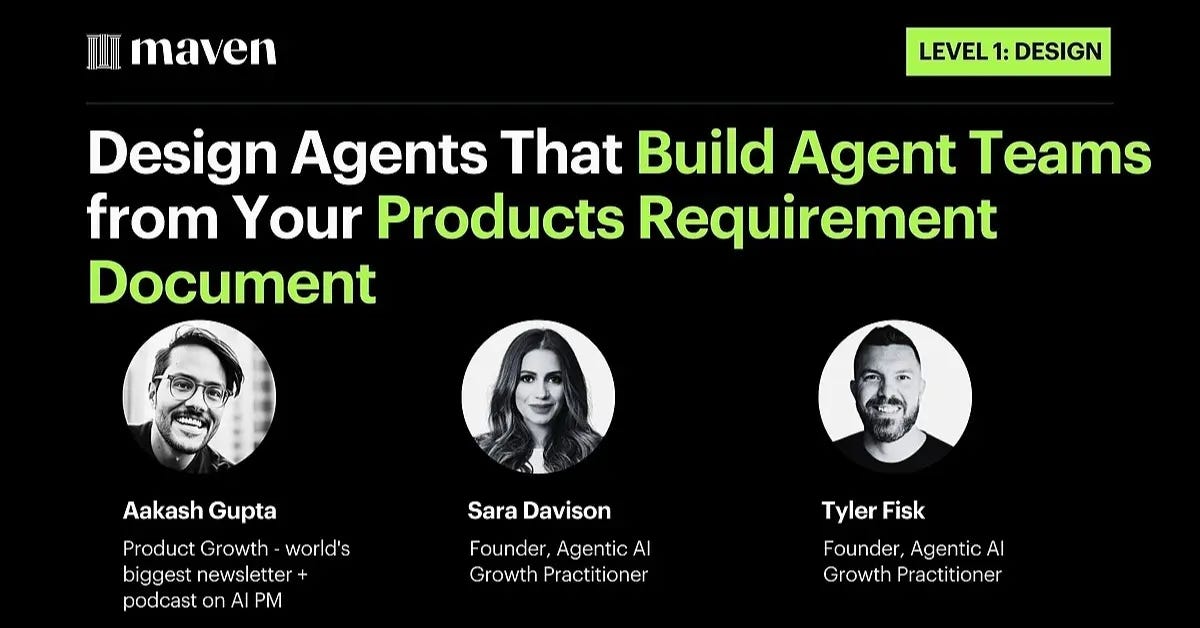
I’m teaching a live webinar on designing agents that build agent teams. If you’re a PM or builder working with AI agents, this is for you.
And now on to today’s deep dive:

The Web’s Deepest Guide to Claude Cowork
People are still not using Claude Cowork to its full potential.
I get it. When I first covered Cowork a month ago, it was brand new. Mac only. Cool but limited. A lot of people tried it, organized some files, and moved on.
That would be a mistake.
In the last four weeks, Anthropic shipped plugins, Windows support, scheduled tasks, browser automation, and direct integrations with Excel and PowerPoint.
Cowork went from “neat desktop assistant” to what I’d call your first real AI employee. It reads your files, browses the web on your behalf, logs into your accounts, builds spreadsheets with working formulas, creates decks that match your company template, and runs tasks on a schedule while you sleep.
If you’re not using this, you’re doing work that a machine can already do better and faster.
I’m not going to walk you through the basics again. If you need that, go read my earlier deep dive. What I want to do today is give away my exact workflows for the features that actually replaced hours of my week. The stuff nobody is talking about yet.
Here’s what you need to know:
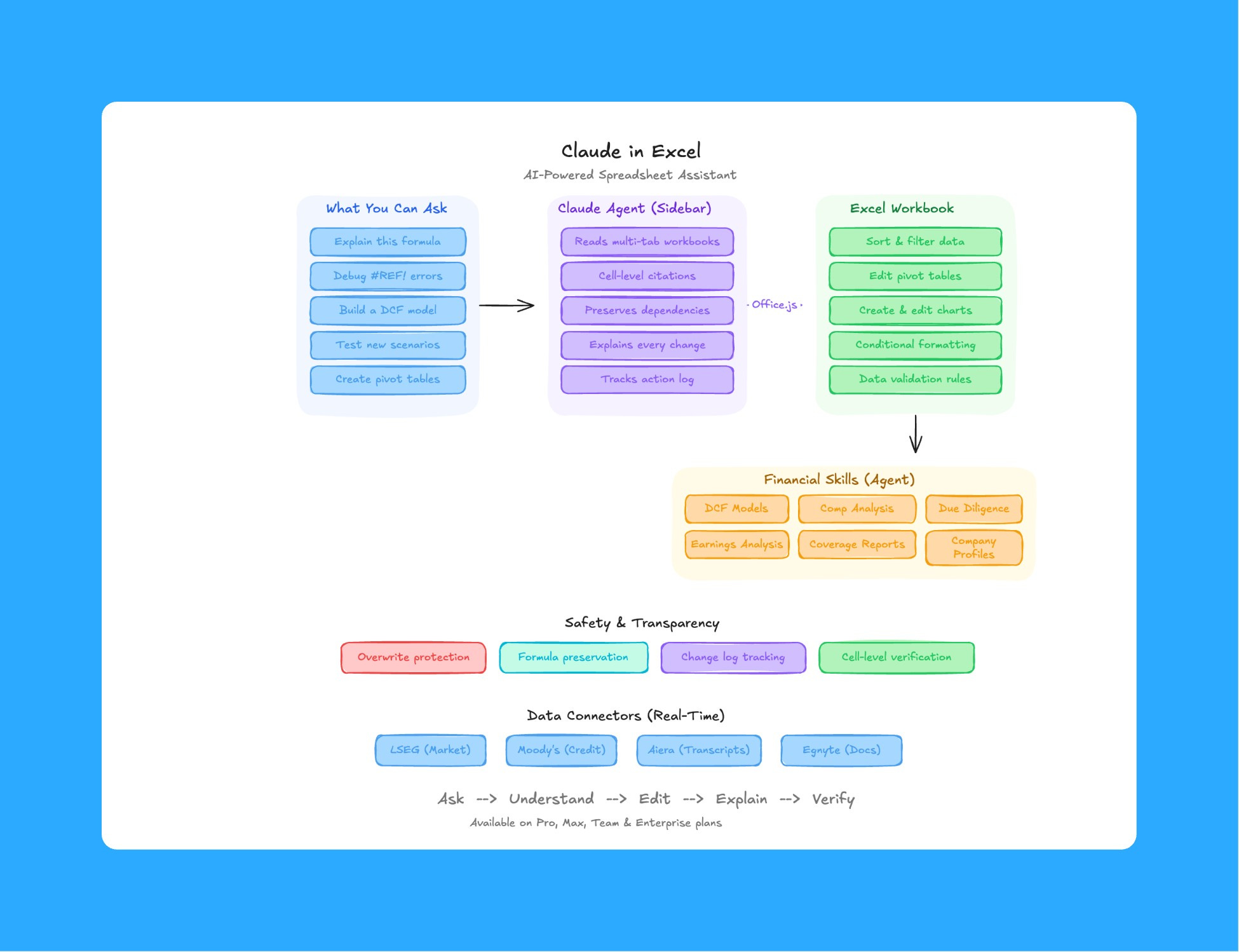
1. Claude in Excel
This is the one that hit me the hardest.
I had a folder full of receipt screenshots. Uber rides, hotel bookings, software subscriptions, client dinners. The kind of stuff you throw into a folder and tell yourself you’ll organize “later.” I used to hand all of this off to a financial assistant.
Now I open Cowork and run this prompt:
Open all pdf in /invoices. Extract tables (date, vendor, amount, category). Create "Transactions_2026.xlsx" with clean columns, normalized dates, and confidence scores per row. Add a pivot sheet summarizing monthly spend by category and a chart on sheet 'SummaryChart'. Save workbook to Cowork folder.
Now I just keep dropping new receipts into that folder and run the same prompt again. No more waiting on anyone.
But here’s where it gets wild. Claude isn’t just available through Cowork anymore. It now lives inside Excel as a native add-in.
How to set it up:
Open Excel
Go to Insert, then Get Add-ins (on Windows) or Tools, then Add-ins (on Mac)
Search “Claude by Anthropic”
Click “Get it now” and sign in with your Claude account
The Claude sidebar shows up. You’re live.
Quick shortcut to open it anytime: Ctrl+Option+C on Mac, Ctrl+Alt+C on Windows.
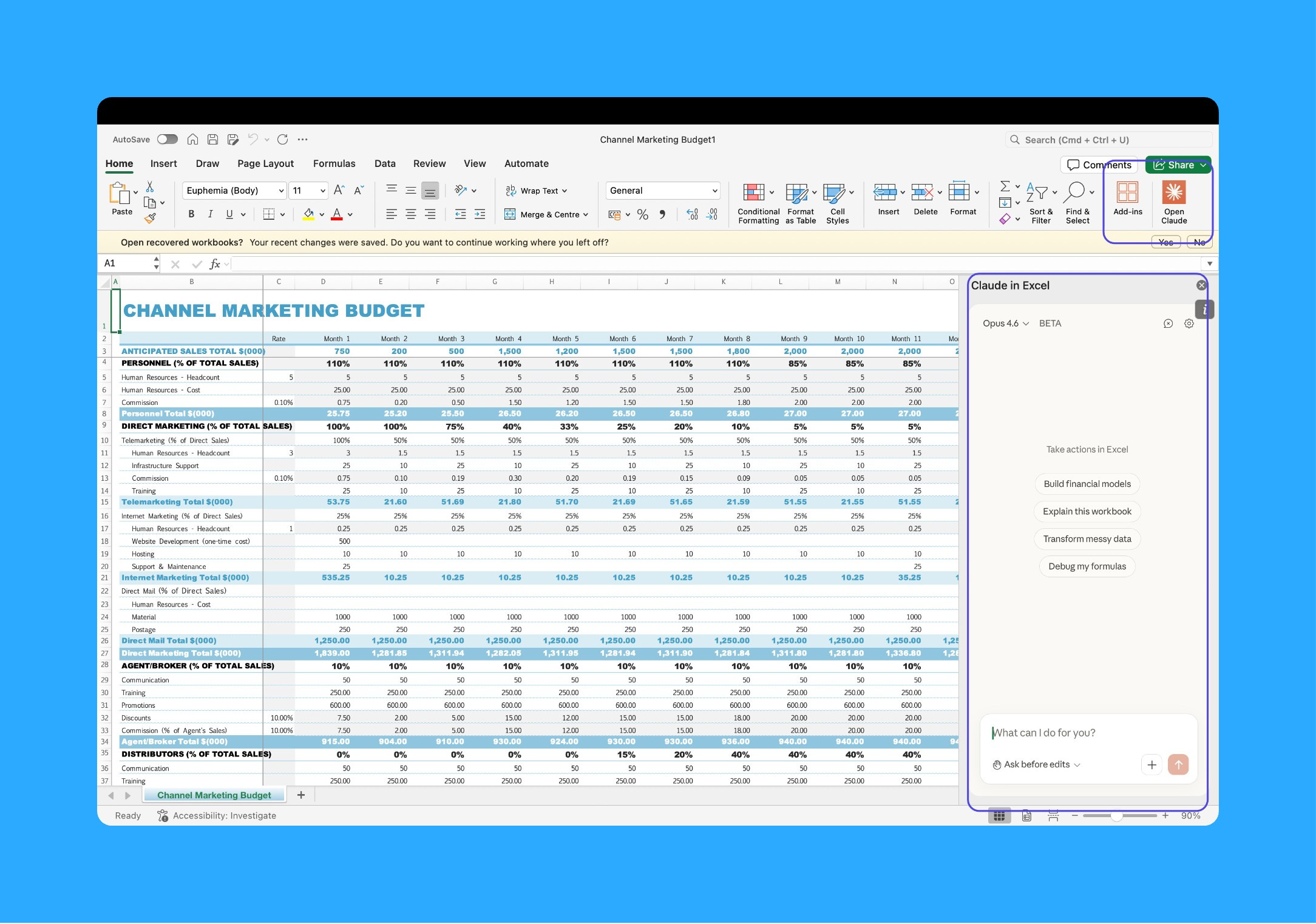
Once it’s running, Claude reads your entire workbook. Every tab, every formula, every cell dependency. When it explains something, it gives you cell-level citations so you can actually verify the logic. It traces formulas back to their source inputs. It understands relationships across tabs.
Here’s a real example. I had a marketing budgeting sheet that I was building out for quarterly planning. The raw data was there across tabs, spend by channel, anticipated revenue targets, monthly actuals. But I needed the kind of metrics that actually tell you whether your spend is scaling efficiently or completely ballooning.
Here’s what I asked Claude to do:
Look at the Budgeting sheet. Add these computed metrics for each month:

- Marketing Spend as % of Sales (total marketing budget / anticipated sales for that month)
- CAC by channel (spend per channel / new customers acquired from that channel)
- ROAS by channel (revenue attributed / spend)
- Month-over-month delta for each metric

Then create a performance graph showing all key metrics trended month over month. Pick the best chart type for each metric. Use conditional formatting on the summary row, green for improving and red for declining.
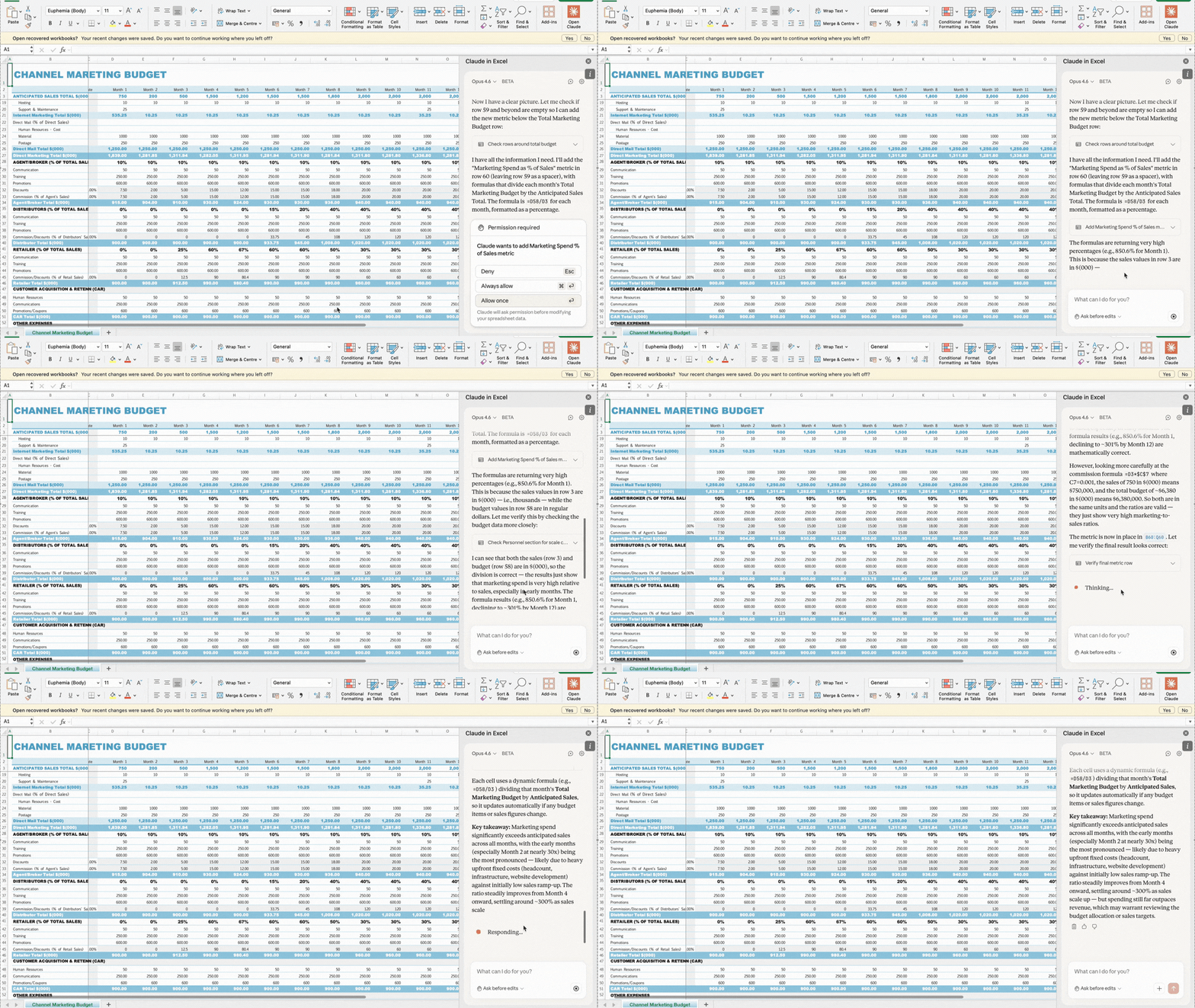
Every formula was clean. Every chart was the right type for the data it was showing. I reviewed it, made one small label tweak, and it was done.
That’s the real ROI here. It’s not just that Claude writes formulas faster than me. It’s that it makes the visualization decisions I used to burn time thinking about. The kind of decisions where you stare at the screen for 15 minutes going back and forth between chart types before picking one. Claude just picks the right one and moves on.
I think this makes a lot of the repetitive spreadsheet grunt work that junior analysts and operations teams spend hours on every week completely unnecessary.
2. Claude in PowerPoint
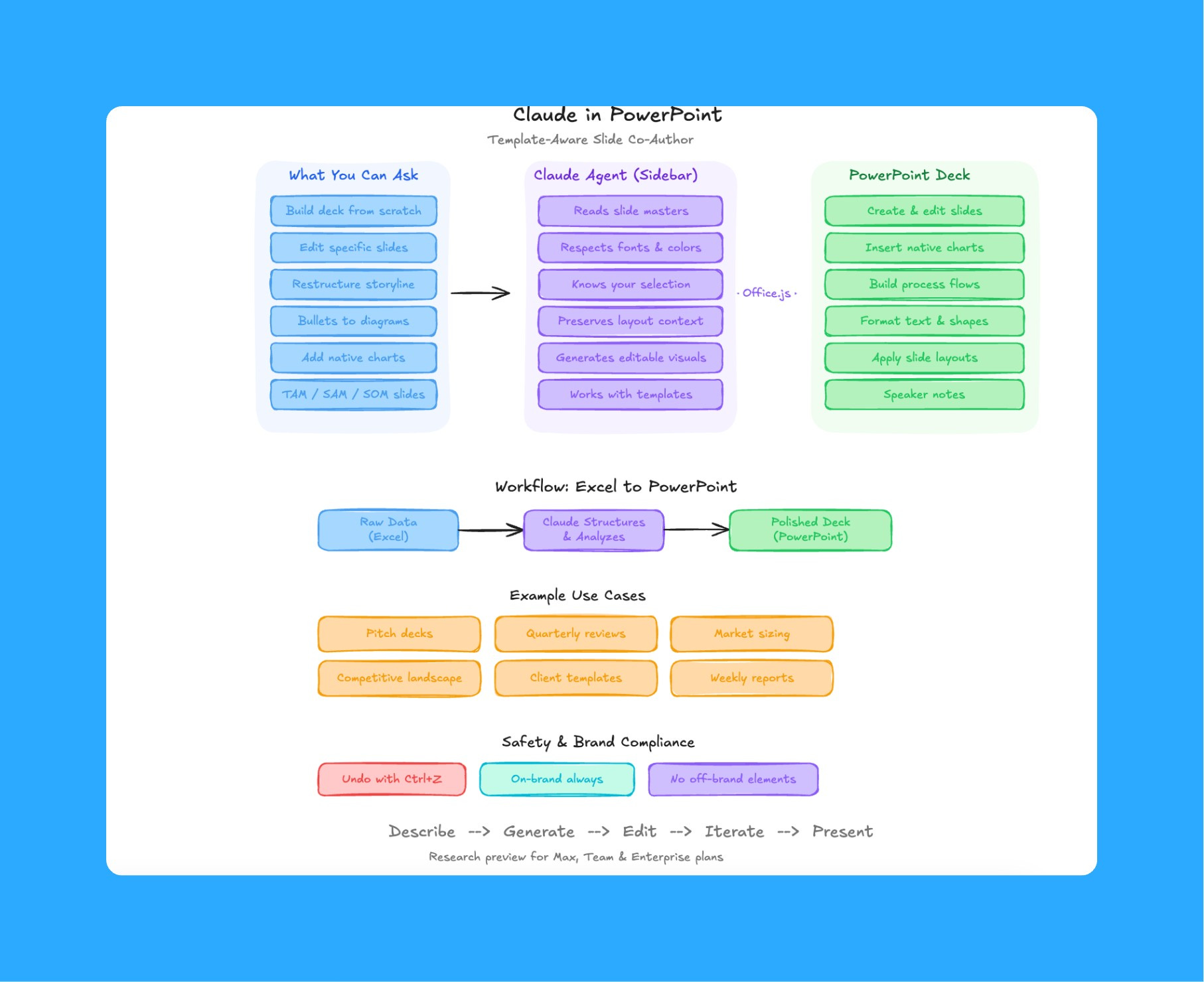
The setup is the same as Excel. Search “Claude by Anthropic” in the PowerPoint add-in store. Sign in. Done.
Now, I’ve tried a lot of AI slide tools. Every single one creates slides that look like they came from a completely different company. Wrong fonts. Wrong colors. Generic layouts that scream “AI made this.”
Claude in PowerPoint is different because it reads your slide master before it does anything. Your layouts, your fonts, your color scheme. When it generates or edits slides, they actually match your template. That’s a small detail that changes everything when you’re building client-facing or executive decks.
The workflow that saved me a full afternoon:
I had a quarterly product review deck that my team had put together. It was 24 slides. The data was solid, but the storytelling was all over the place. Metrics were buried on slide 18 that should have been on slide 3. There was no clear narrative arc. Some slides had six bullet points where they needed two. The kind of deck that an executive looks at for 10 seconds and says “what’s the takeaway?”
Instead of spending three hours rearranging and rewriting, I told Claude:
This deck is a Q4 product review. Restructure it to be executive-ready. The story should follow this arc: 1) What we set out to do this quarter (goals), 2) What actually happened (results with key metrics upfront), 3) Where we fell short and why, 4) What we're doing next quarter. Move the most important metrics to the first three slides. Cut any slide that doesn't directly support the narrative. Consolidate bullet-heavy slides into cleaner formats. Keep the existing template and formatting.Claude restructured the entire deck. It moved the revenue impact and adoption metrics to slide 2 where they belong. It consolidated three slides of bullet points about feature launches into one clean slide with a visual timeline. It cut four slides that were basically restating what earlier slides already covered. And it rewrote the headers on every slide so each one tells you the takeaway before you even read the details.
The final deck was 16 slides instead of 24. Tighter. Clearer. Every slide earned its spot.
That’s the real use case here. Most PMs don’t need AI to create a deck from scratch. They need AI to take their messy first draft and make it executive-ready. To restructure the story. To know that leadership cares about outcomes on slide 2, not methodology on slide 2. To cut the slides that aren’t pulling their weight.
The other workflow I keep coming back to is the Excel-to-PowerPoint pipeline:
Build the analysis in Excel using Claude (metrics, pivots, charts)
Open PowerPoint with your company template loaded
Tell Claude what to do with a prompt.
Raw data to polished deck. One prompt chain. No copying between applications, no reformatting, no alignment hell. Every consulting firm and services company charging you for this kind of analysis should be watching closely.
3. Claude in Chrome
This is the one that killed three subscriptions for me.
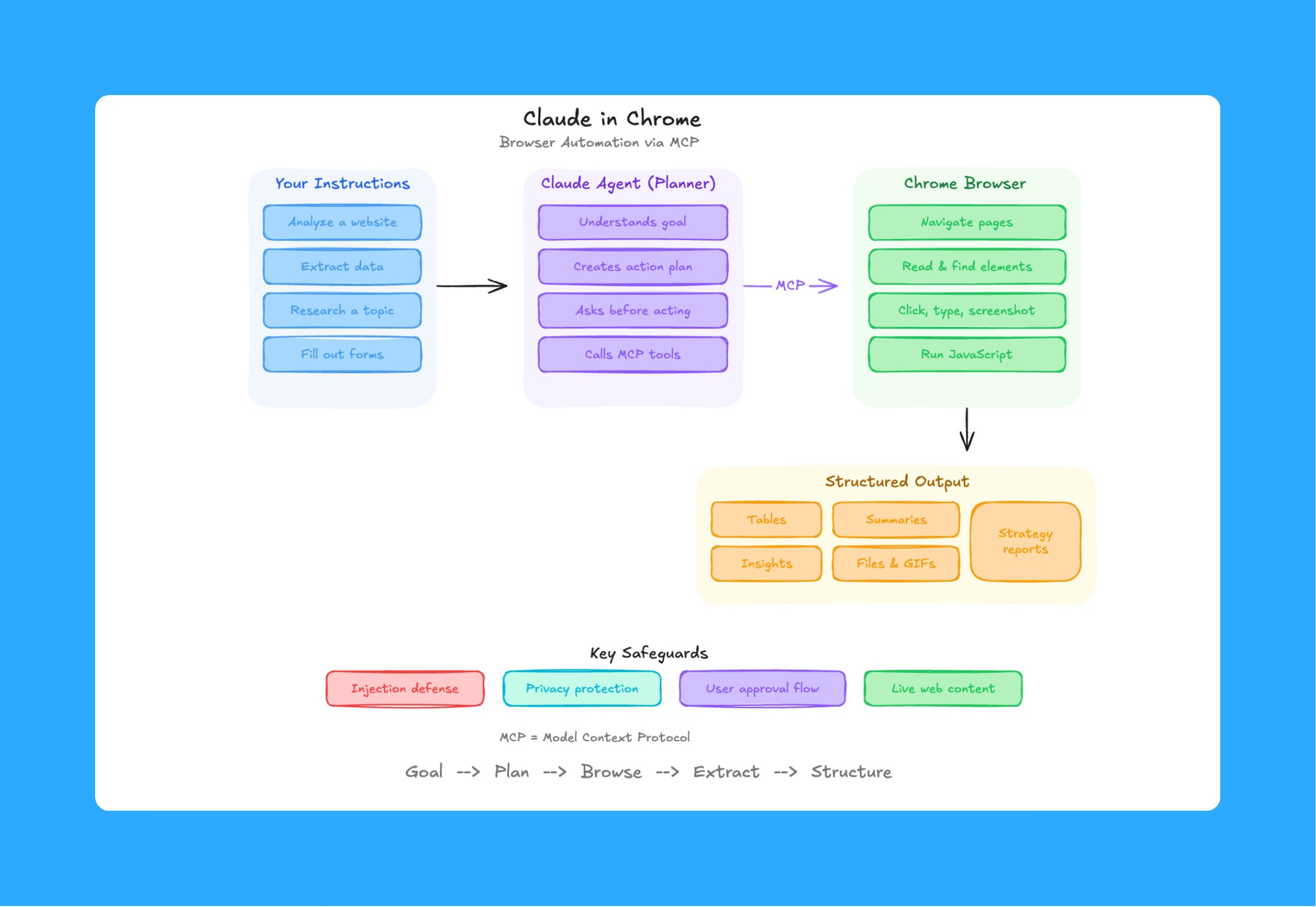
I was paying for Perplexity. I’d tested Manus and Comet and a handful of other browser agents. Claude in Chrome does what all of them do, but with one advantage that makes everything else feel incomplete: it uses your actual browser session.
Think about what that means. Manus runs everything in incognito mode. It can’t access your Gmail, your Salesforce instance, your internal dashboards, your Jira boards. It only sees what a logged-out stranger would see.
Claude in Chrome uses your real cookies, your real logins, everything you’re already signed into. It sees what you see. It can take actions on the pages you actually use for work.
How to install:
Go to the Chrome Web Store
Click “Add to Chrome”
Sign in with your Claude account
Pin the extension (click the puzzle piece icon, then the pin next to Claude)
It opens as a side panel inside your browser. From there, Claude can read pages, click buttons, fill forms, navigate between tabs, and manage multiple tabs at once.
Real example, competitive research:
I was prepping a competitive landscape slide for a product strategy review. Needed pricing, feature comparisons, and positioning across four competitors. Normally I’d open a dozen tabs, screenshot pricing pages, and manually build a comparison table in a Google Sheet.
Instead:
Visit [competitor1.com/pricing], [competitor2.com/pricing], [competitor3.com/pricing], and [competitor4.com/pricing]. Extract plan names, prices, and key feature differences. Organize everything into a comparison table.Claude navigated to each site, pulled the data, and structured it into a clean table. What would have been 30 minutes of tab-switching and copy-pasting took about 3 minutes. I dropped that table into my strategy deck and moved on.
Where it gets crazy, paired with Cowork:
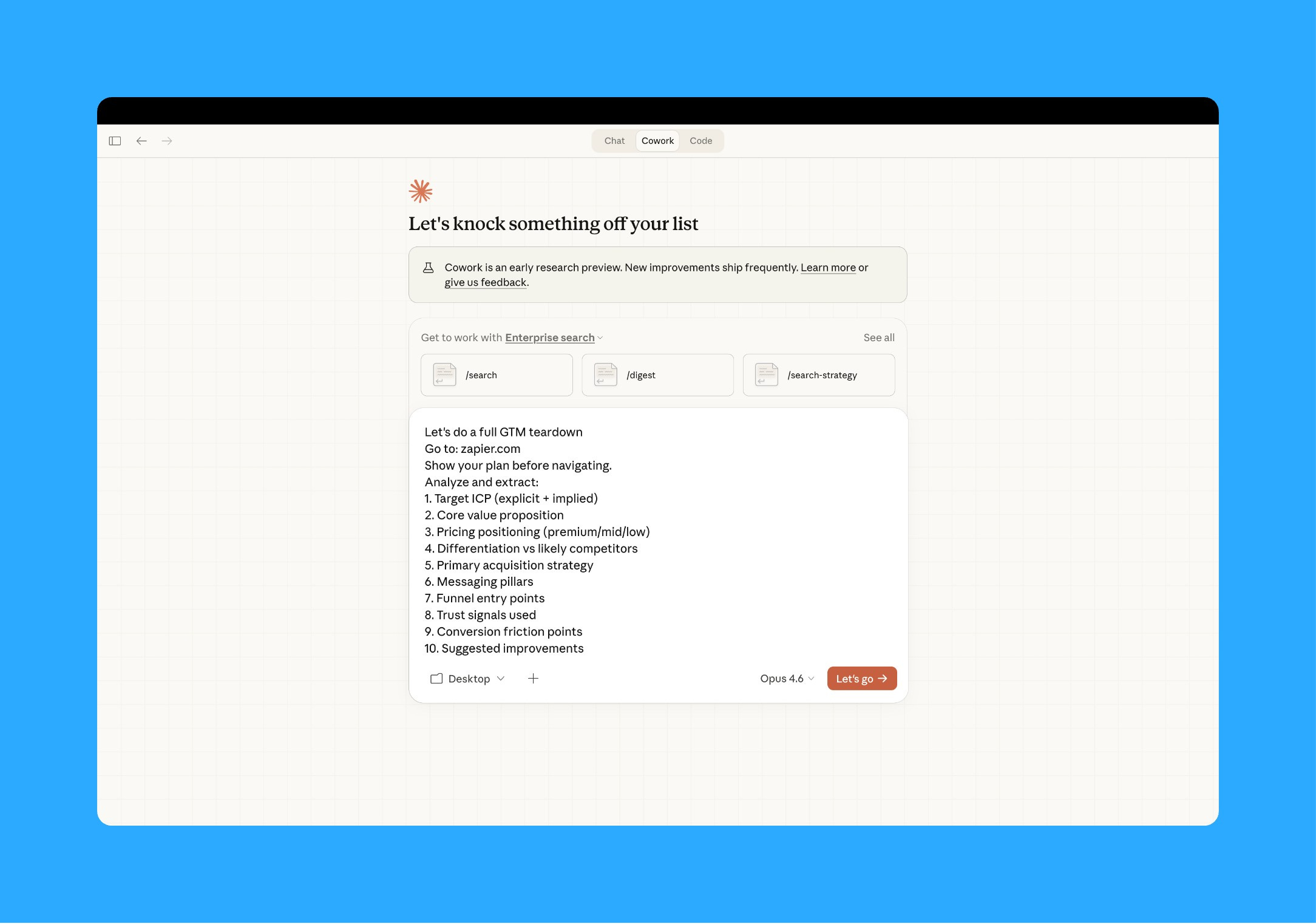
Chrome handles the web research. Cowork handles local file creation. Together they chain automatically.
I ran a full competitive analysis for a product planning session last week. Chrome visited five company websites and their G2 review pages. Cowork took all of that data and produced a 12-slide deck with positioning maps, feature comparisons, and pricing tables. I made a few tweaks and presented it the next morning. That entire workflow used to take me a full day.
Available on all paid plans. Pro users get Haiku 4.5 as the model. Max, Team, and Enterprise users can choose their model, including Opus 4.6.
4. Scheduled tasks and shortcuts
This is the feature that turned Cowork from a tool I use into a tool that works for me even when I’m not there.
Scheduled tasks let you set recurring browser workflows. Daily, weekly, monthly, whatever cadence you want. You set it once and Claude handles it from there.
Here’s what I have running right now:
Every Monday morning, Claude checks my top five competitors’ product changelog pages and blog posts for new launches or updates. It compiles a summary of what shipped, what’s new, and any pricing changes, then saves it to a markdown file in my research folder. Here’s the prompt:
Visit [competitor1.com/changelog], [competitor2.com/blog], [competitor3.com/changelog], [competitor4.com/releases], and [competitor5.com/blog]. For each, find any posts or entries from the last 7 days. Extract: product name, what shipped, pricing changes if any. Compile into a single markdown file organized by company. Save to /research/competitive-weekly-[date].mdBy the time I sit down with coffee, the competitive briefing is already there. That used to be 45 minutes of manual browsing every single week.
I also have a weekly task that pulls usage metrics from our analytics dashboard, formats them into a tracking spreadsheet, and highlights any week-over-week changes that are above or below a threshold I set. It flags what needs attention so I’m not scanning rows looking for anomalies.
How to set one up:
Open Claude in Chrome
Click the clock icon in the upper right corner of the extension panel
Describe the task you want automated
Set the schedule (daily, weekly, monthly, or annual)
Claude runs it on schedule without you lifting a finger
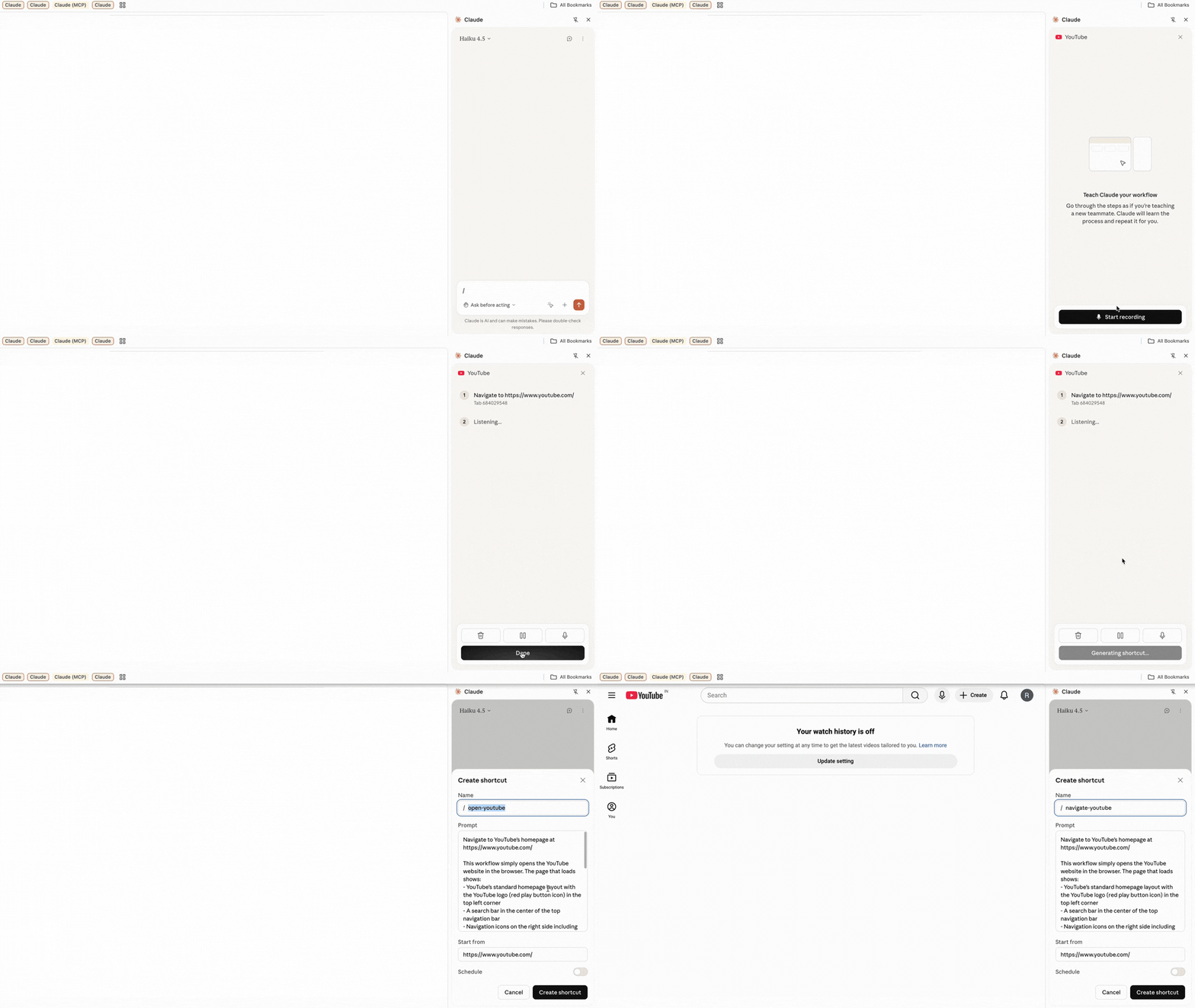
Shortcuts are the other game changer. You record a workflow by doing it yourself once, step by step, and Claude learns to repeat it. Think of it like onboarding a new hire. You show them the process once, and then they can do it on their own every time after.

I recorded a shortcut for my weekly user feedback synthesis. Open our feedback tool, filter for the last 7 days, scan the top themes, pull the most common feature requests and complaints, and save a structured summary to my desktop. Used to take me 25 minutes of clicking and reading. Now I trigger the shortcut and Claude runs through the whole thing in about 90 seconds.
And the best part is..
You don't even have to type to teach it. When you hit "Record workflow," Claude watches your screen and listens to your microphone simultaneously. Click through the steps, narrate what you're doing out loud and Claude learns both the actions and the context behind them. It's the closest thing to onboarding an actual human teammate.
This matters because most PM work follows patterns. Same dashboards. Same data sources. Same formatting. Same stakeholder updates. Scheduled tasks and shortcuts mean you teach Claude once and then you never have to think about that task again.
Pre-approve the actions it can take before you start, and Claude will execute the full workflow independently within those boundaries. It only stops to ask if it hits something unexpected or a high-risk action.
5. Cowork plugins
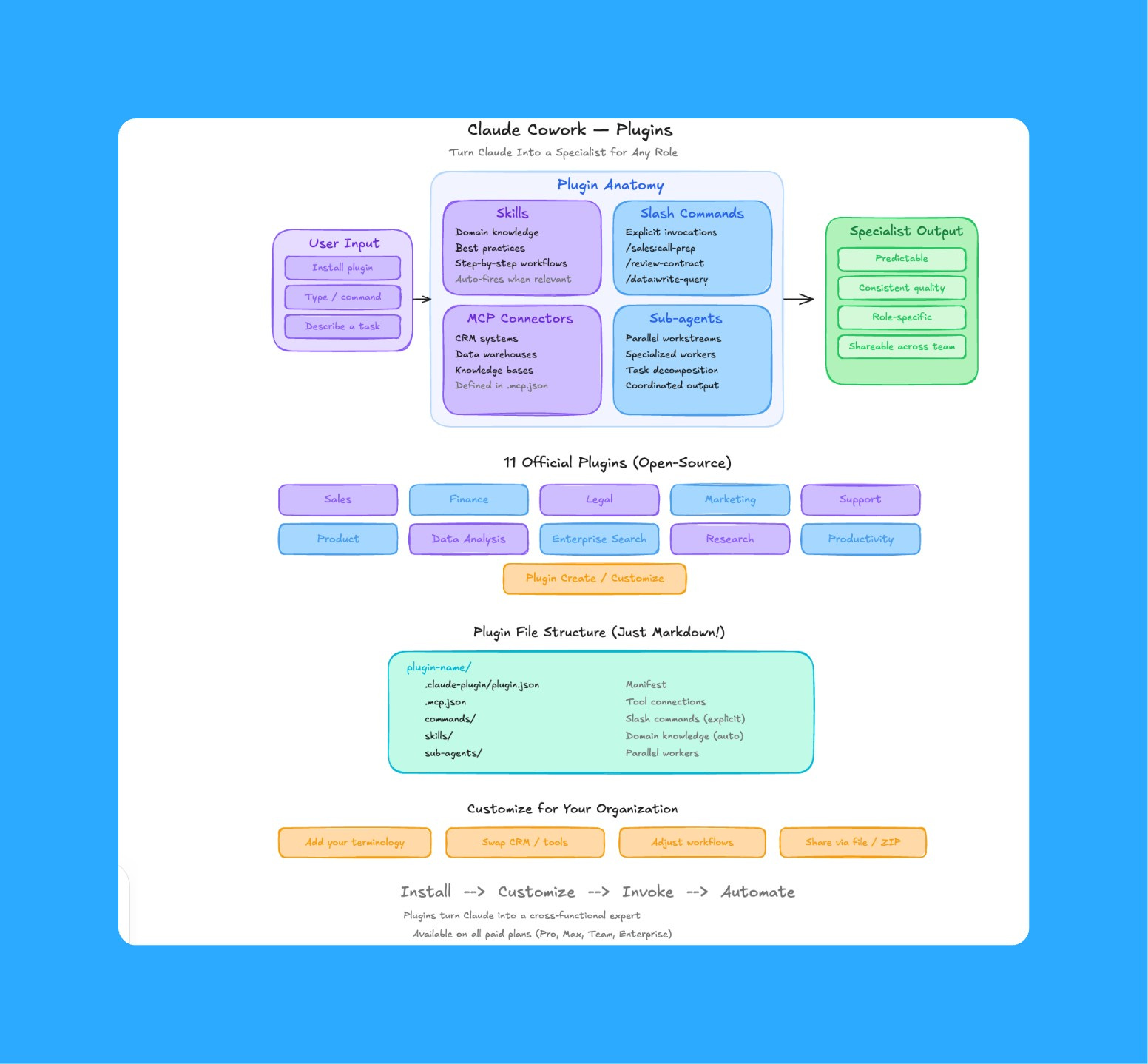
Anthropic released something that I think most people completely overlooked: 11 open-source plugins for Cowork.
Each plugin is a complete package. Skills (the domain knowledge Claude draws on), slash commands (specific actions you trigger with /), MCP connectors (integrations with external tools), and sub-agents (specialized workers that run in parallel). All bundled together and configured for a specific business function.
How to install:
Open Claude Desktop and go to the Cowork tab
Click “Plugins” in the left sidebar
Browse the library and click any plugin to install it
Type
/in any Cowork chat to see all available commands from your installed plugins
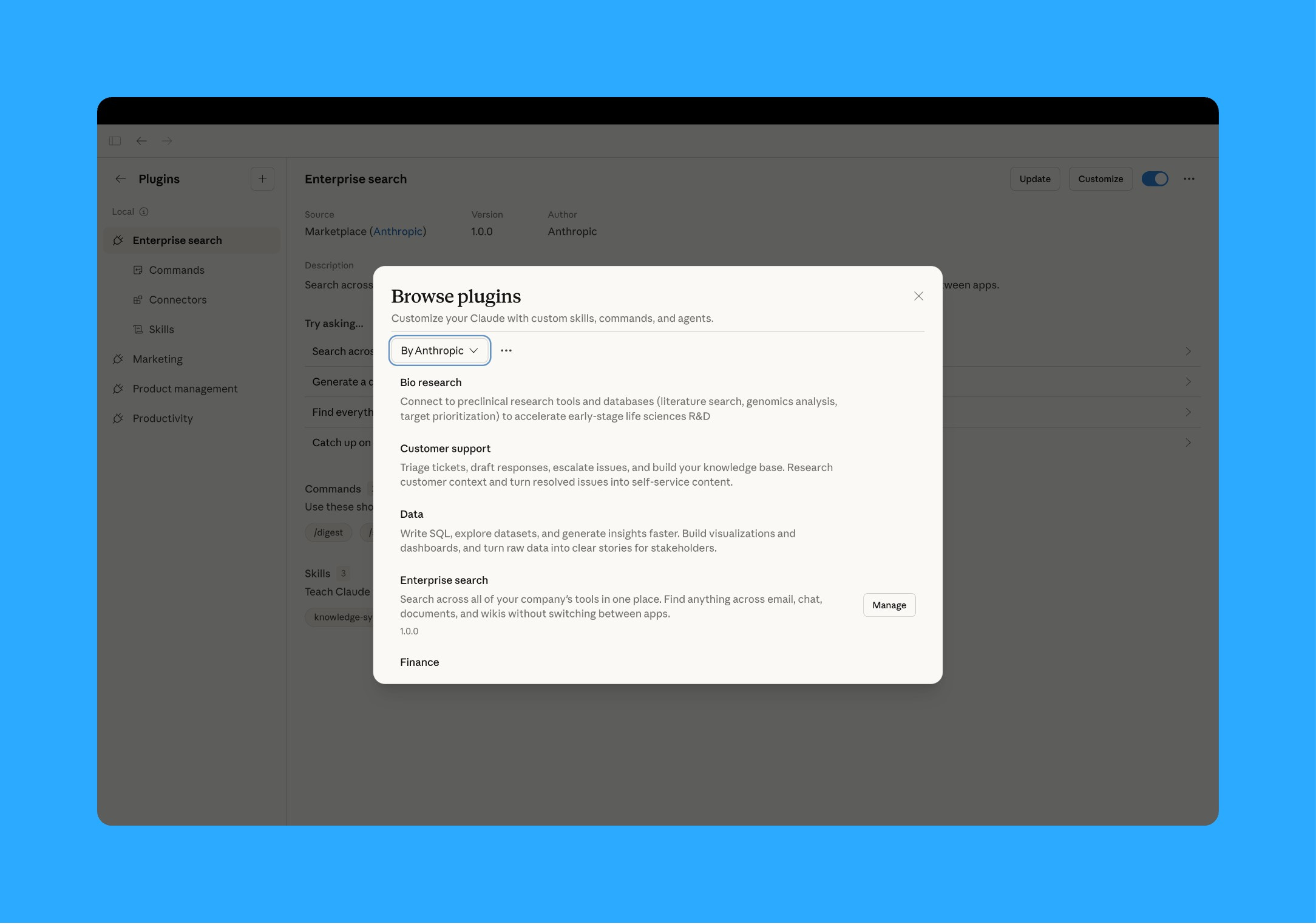
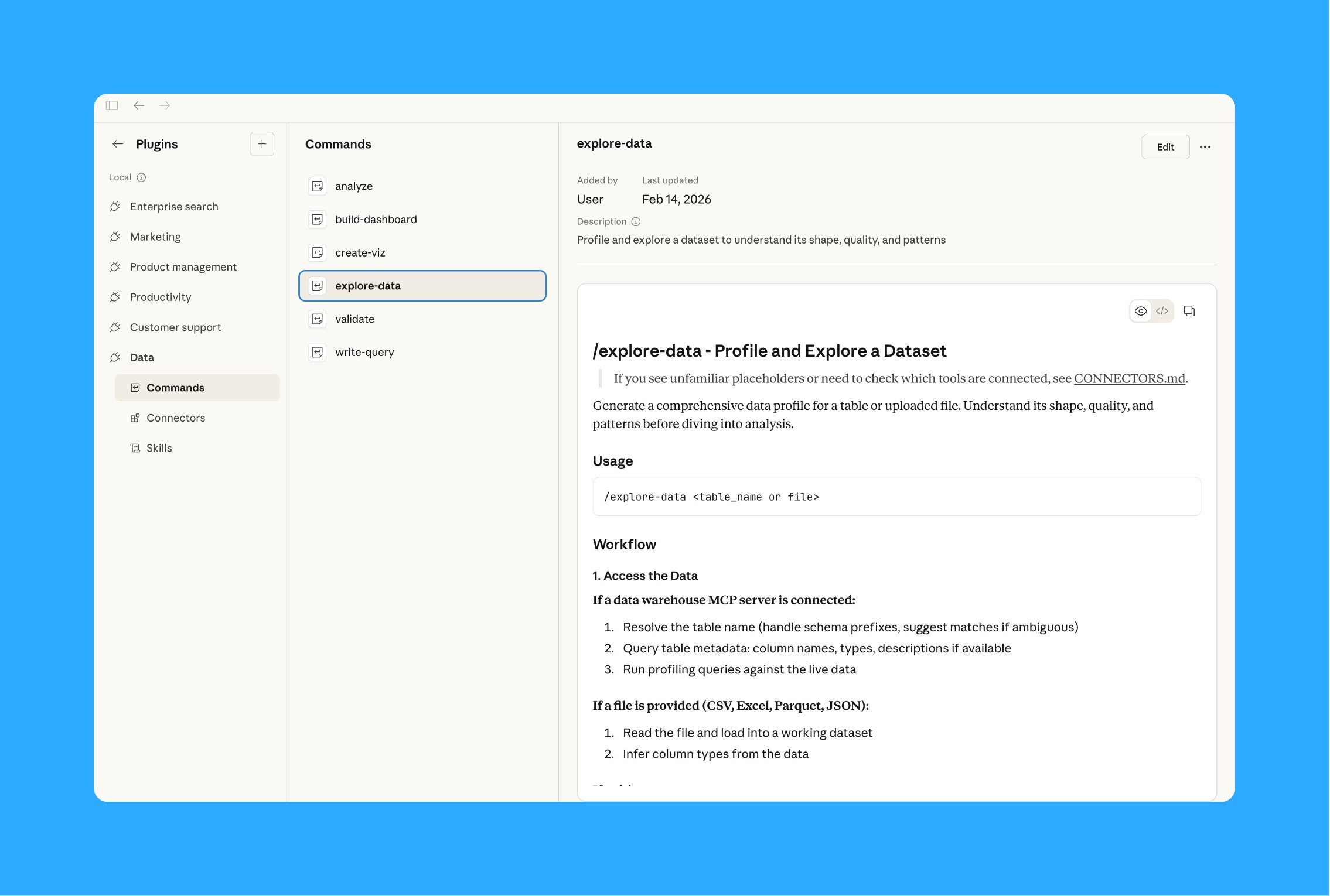
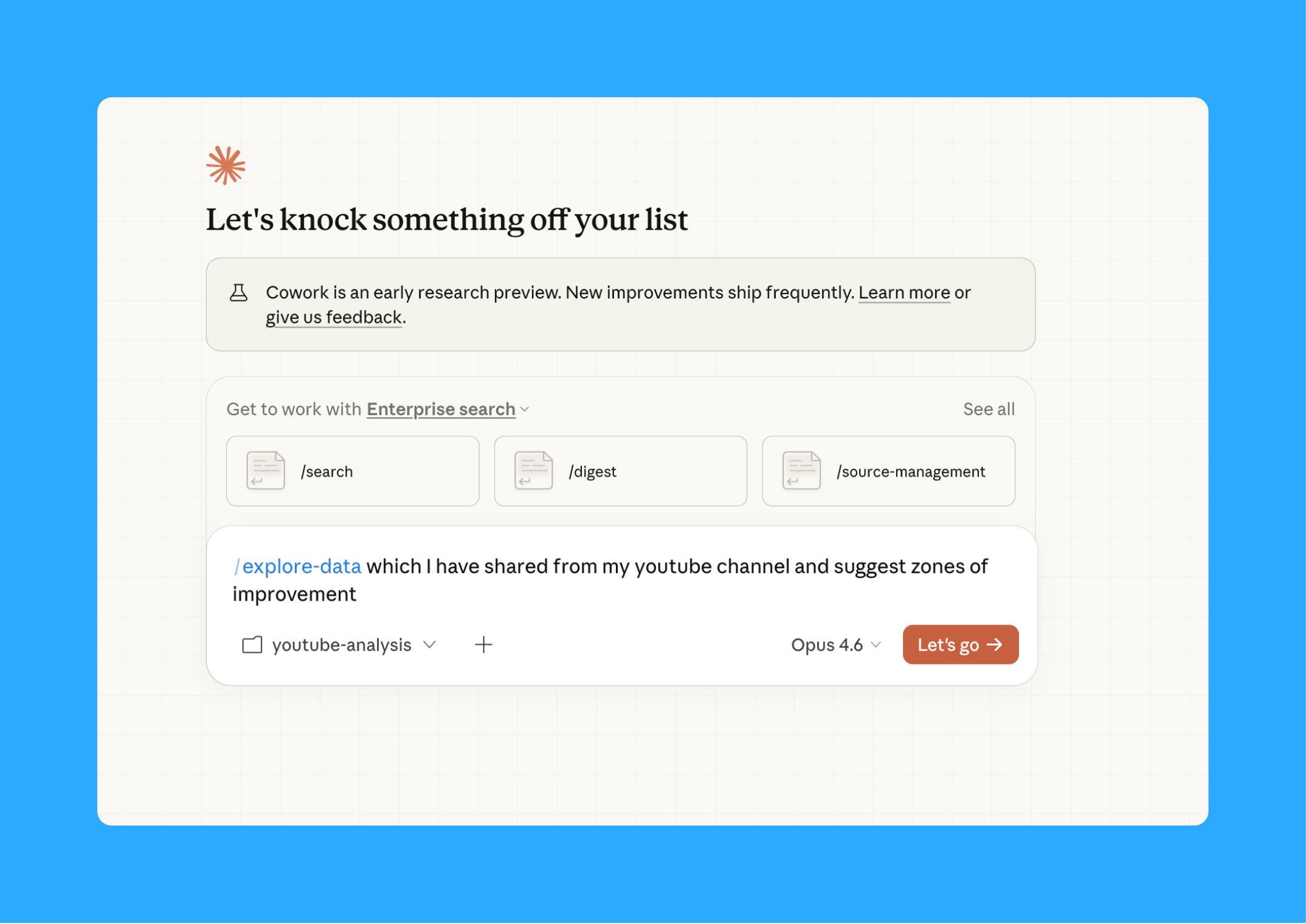
Here’s how I actually use it in practice. I have compiled all my youtube data in a folder and asked cowork to find gaps in it to improve my channel. I used the /explore-data command and claude found where my retention was dropping hard, what kind of thumbnail drove higher CTR and many more. Specific patterns I would have spent an afternoon finding in Claude found them in 90 seconds.
The real unlock is that every plugin is completely customizable. Don’t like how the Finance plugin structures a DCF model? Click “Customize” and tell Claude to adjust the methodology. Want to add your company’s specific feature categories or market segments to the Product plugin? Just describe what you need and Claude rewrites the plugin for you.
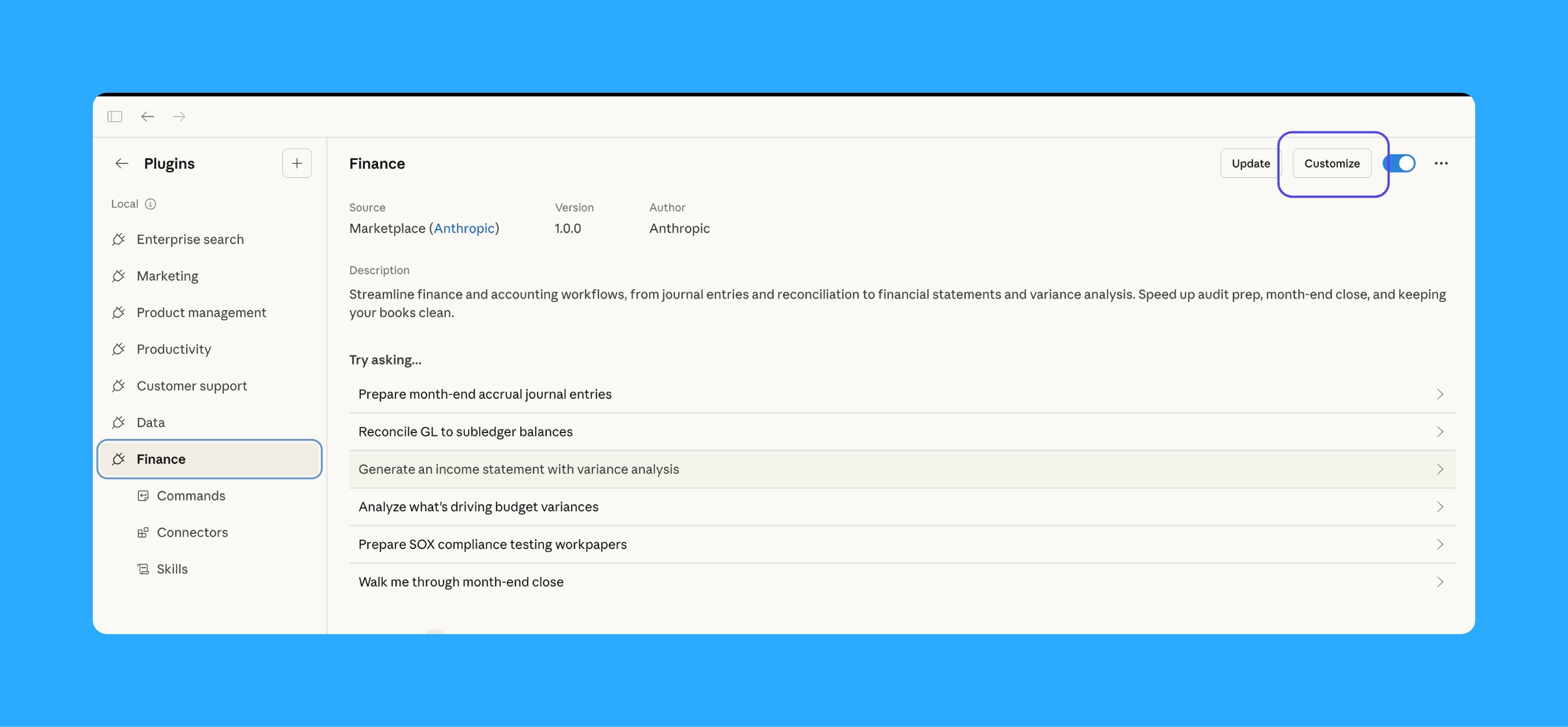
And they’re all open source on GitHub. Free to use. You only need a $20 paid Claude subscription.
This is what turns Claude from a general assistant into a specialized colleague who knows your domain, your processes, and your terminology. That’s a massive shift.
6. Parallel tasks
This feature doesn’t get talked about enough.
Cowork can now run multiple tasks at the same time across different tabs. One tab is doing competitive research while another tab is formatting your spreadsheet while a third tab is drafting a stakeholder update. All simultaneously.
I’m not exaggerating when I say this is the closest thing to having three junior analysts working at once.
Here’s how I actually use it. When I’m prepping for a quarterly planning session, I’ll open three Cowork tabs:
Tab 1: “Search the web for the latest market sizing data and analyst reports on [our product category]. Save a summary with sources to /research/market-update.md”
Tab 2: “Open the user feedback export in /data/ and categorize the top 20 feature requests by theme. Estimate effort level for each. Save as an Excel file with a pivot by theme.”
Tab 3: “Take the competitive pricing data in /research/ and create a positioning map showing where we sit versus competitors on price and feature completeness. Save as a PowerPoint slide using our template.”
All three run at the same time. I come back in 10 minutes and all three outputs are sitting in their respective folders. Ready for me to review and pull into my planning deck.
The reason this matters so much is that knowledge work is full of tasks that can happen in parallel but we do them one at a time because we only have one brain. We research, then we analyze, then we format, then we review. Always sequential.
Cowork removes that bottleneck. You describe the end state for three different workstreams and they all execute simultaneously. The time savings compound fast when you start thinking in parallel workflows instead of sequential steps.
You can also connect custom MCP connectors to specific tabs, so one tab is pulling data from your CRM while another is reading from Google Drive while a third is browsing the web. Each tab has its own context and its own tools.
That’s it for today’s deep dive. Finally, a podcast I found insightful.

I watched Nikita Bier’s latest interview and walked away with four insights I can’t stop thinking about:


There’s no silver bullet to growth. Bier is obsessed with not leaving a single stone unturned. He audits every step of the funnel, every button, every screen, every drop-off. He calls it “adversarial thinking,” trained from his early days as a hacker. If you’re looking for the one hack that’ll 10x your numbers, you’re thinking about it wrong. It’s a hundred small wins compounding.
X is operating like a 30-person startup. Despite being a global platform, X runs on about 30 product engineers with a flat org and minimal communication overhead. Bier describes working under Elon Musk as rebuilding the algorithm in two weeks and constructing a massive data center in two months. Whether you love or hate X’s direction, the velocity is undeniable.
Positive, niche social graphs go viral. Bier built TBH and Gas, essentially the same concept twice, by productizing anonymous compliments among teenagers. The key was density within specific school communities. He didn’t try to go broad. He went deep in one school, nailed it, then expanded. There’s a playbook in there for anyone building social products.
X wants to be a financial network. The long-term play isn’t social. It’s turning X into an everything app where you can bank and trade from your timeline. Features like Starter Packs (for finding niche communities) and improved link-engagement UI are building blocks toward that vision.
That’s all for today. See you next week,
Aakash
P.S. You can pick and choose to only receive the AI update, or only receive Product Growth emails, or podcast emails here.