Check out the conversation on Apple, Spotify, and YouTube.
Brought to you by:
Bolt.new - Ship AI-powered products 10x faster
Product Faculty - Get $550 off their #1 AI PM Certification with code AAKASH550C7
Customer.io - Send smarter messages using your product data
Ariso - Ship AI agents and features faster, with fewer regressions
Jira Product Discovery - Plan with purpose, ship with confidence
Today’s episode
Six months ago, I showed you Codex is the best way to use ChatGPT for PM work.
Those who tried it have had great reviews:


But most of the content out there for PMs is all about Claude Code (myself included). So I wanted to get you the advanced setup for Codex, that’s up to date as of June 2026.
That’s what today’s episode is - an inside look at expert usage of Codex, from an OpenAI PM himself.
Abhi Muchhal is an International Growth PM at OpenAI and before that was at Meta and Nubank. He opened his actual setup on camera: the harness… everything. Then he covered how to crack a role like OpenAI yourself.
To get access to my AI tool stack - Dovetail, Arize, Linear, Descript, Reforge Build, Relay.app, Magic Patterns, Speechify, Bolt.new and Mobbin - become an annual subscriber ($150), and grab Aakash’s bundle.
To get access to my AI PM customizations - PM OS, Job Search OS, and Prompt Library - become a founding subscriber ($250).
Newsletter Deep Dive
Thank you for having me in your inbox. Here is the complete guide to using Codex like a senior PM:
The PM’s Ultimate Guide to Codex
The Codex harness setup
Automations that run while you sleep
Prototyping without a designer or engineer
How ChatGPT has Grown to 1B monthly active users
[BONUS] How to break into AI PM at a company like OpenAI
1. The PM’s Ultimate Guide to Codex
In this section, we cover:
How to setup Codex or your agent’s harness
The 3 automations Abhi swears by
How to build prototypes in Codex
The Codex harness setup
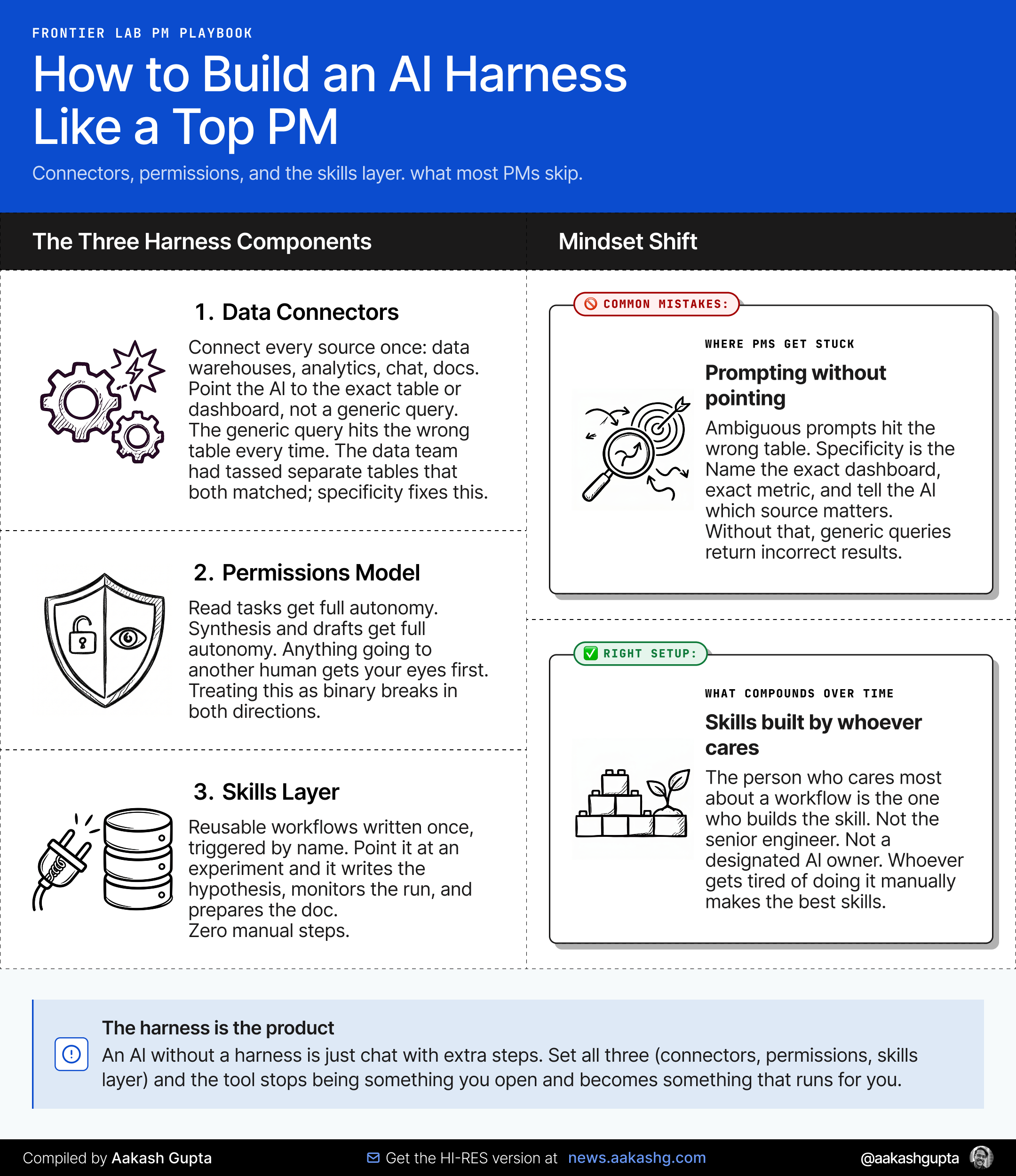
As I wrote in my Ultimate Guide to ChatGPT Codex, the harness is what separates a one off interaction from a persistent system. It is the connectors, the folder structure, the permissions model. Without it, you are just using a very expensive autocomplete.
Data connectors
The first thing to set up is every data source Codex needs to know about.
At OpenAI, the international growth team was pulling from seven or eight sources. Tableau dashboards. Databricks dashboards. Different tools, cadences, and formats.
Connect all of them.
The permissions model
Give Codex three levels of permission:
Reading tasks get full autonomy.
Synthesis and writing drafts get full autonomy
Anything going to another human needs your approval.
Skills, skills, skills
One growth engineering team at OpenAI got tired of running experiment reviews by hand. So they built a skill. Point it at a StatSig experiment, and it writes the hypothesis, monitors the experiment, and generates a postmortem and recommendation automatically.
That is what skills are. Reusable workflows, written once, triggered by name. PMs skip this layer entirely because building a skill feels like an engineering task. It is not.
When asked who builds these skills, Abhi said:
“The beautiful thing about Codex is that the person who cares the most is the one who makes the skill. It doesn’t matter if it’s an engineer, an analyst, or even a PM. I’ve made some skills as well.”
I’ve been hammering this home for months. Good skills are everything!
Abhi’s Top 3 Automations
Abhi swears by three automations:
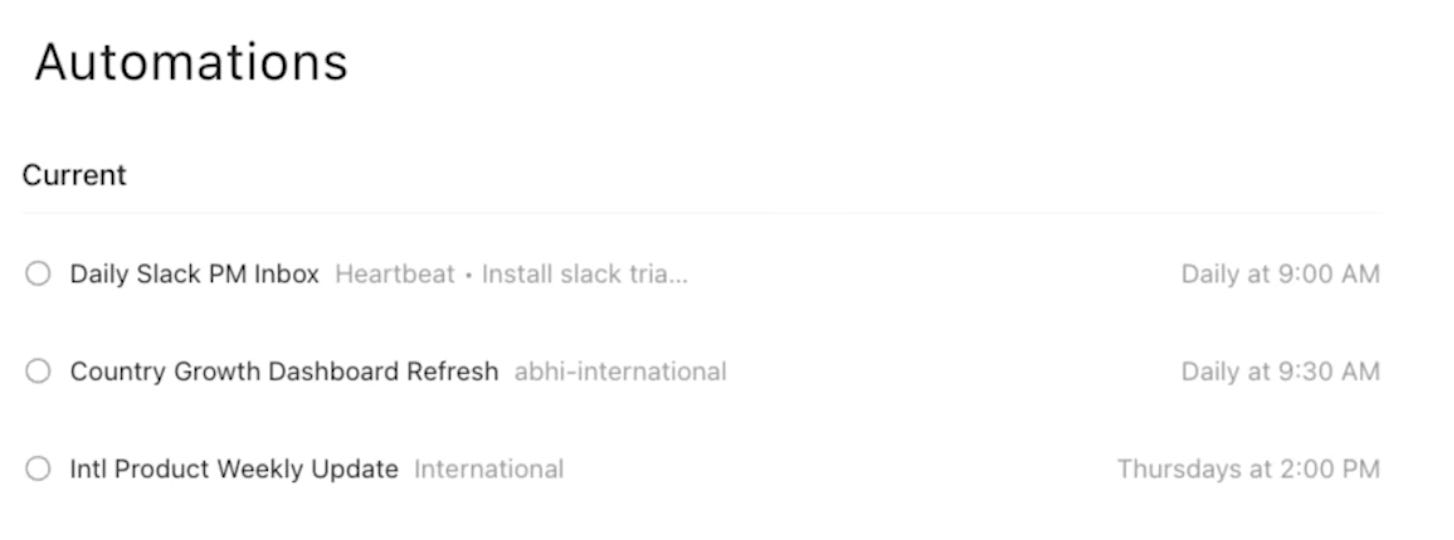
Automation 1 - Daily Slack triage
Abhi works across time zones. By the time he wakes up, his Slack has 200 unread messages across a dozen channels. He was missing important things because there’s no priority filter for him.
So he built a Slack inbox triage that runs every day at a fixed time. It knows which channels matter, which senders are priority, and what kinds of messages need a response. It delivers detailed outline, things you have not read that you should, and things you have not replied to that are waiting.
The key prompt structure:
Review all Slack messages in [channel list] since yesterday.
Flag anything from [priority names] I have not responded to.
Flag anything that mentions [blocker / decision needed / deadline].
Do not flag general FYI posts or reactions.
Format as a brief numbered list. No summaries longer than one line each.
Automation 2 - A dashboard that updates itself
Abhi’s team was pulling from seven or eight different sources to understand how ChatGPT was growing across priority markets.
So he built a web app that pulls from all of them, refreshes every morning at 9:30 AM, and gives you the combined view plus the key takeaway. Country tabs. Top line metrics. Codex generated strengths and risks for each market relative to peer countries.
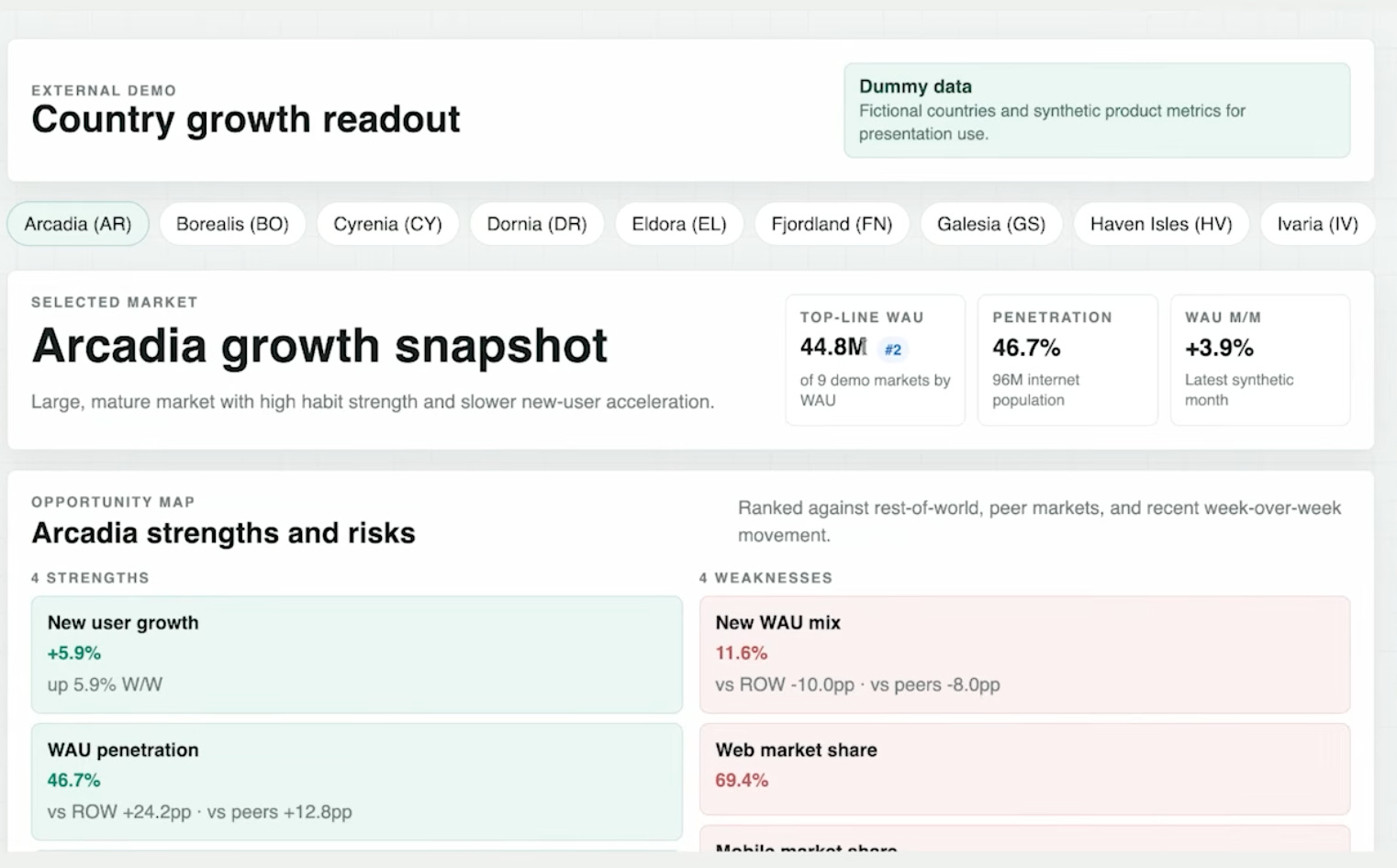
Let’s take a moment here and ask yourself - what are the sources you check manually every week, and what would it look like if they were in one place with a machine generated TLDR waiting for you?
Automation 3 - A weekly update
The weekly stakeholder update is the most time consuming, least value added task on most PM calendars. It pulls from Slack, Google Drive, Notion, and the same dashboards powering the growth view.
So he automated the synthesis. Codex pulls from every source, writes the first draft, and posts it to a channel he owns. He reviews it, edits the things that need his judgment, and sends it to his stakeholder group.
Prototyping without a designer or engineer
Before AI, getting a prototype in front of engineers meant writing a PRD, convincing a designer to prioritize your request, doing two or three rounds of mocks, and then finally handing something over. That whole loop could take three weeks for a simple feature. OpenAI cuts the loop, as Abhi described it:
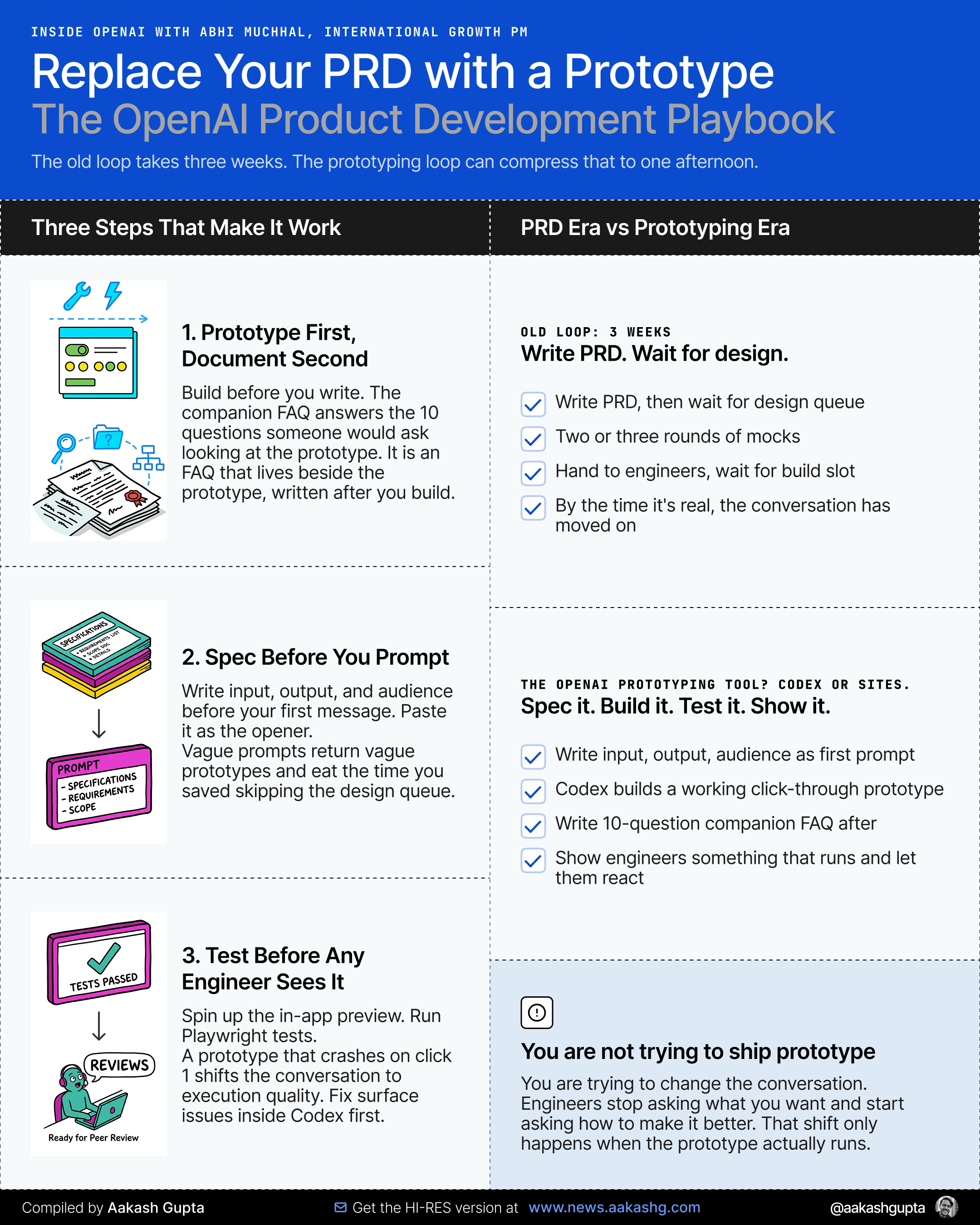
Step 1 - Replace the PRD with a prototype plus companion doc
A prototype with a companion doc that addresses the obvious questions gets to the same place faster and creates a better conversation.
The companion doc answers ten questions. Why are we doing this. What must work for V1. What are the edge cases. What does success look like. It’s more like an FAQ that lives beside the prototype.
Showing a working prototype changes the quality of the conversation. Engineers stop asking what you want and start asking how to make it better. That shift leads to a huge leap in productivity.
Step 2 - Spec the output before you prompt
Vague prompts return vague prototypes. Before you send a single message, write down three things:
Input: [what data sources or user inputs does this need]
Output: [what does the finished thing show, specifically]
Audience: [who is going to look at this and what are they trying to decide]
Paste that as your first message. Everything Codex builds follows from that. The more specific the spec, the less time you spend in correction loops.
Step 3 - Preview in app before handing off
Codex can now spin up a local preview inside the interface. You do not need to open a browser. You do not need to configure localhost.
Run the preview. Check the layout. Ask Codex to match a specific brand aesthetic if needed. Use Playwright to verify the fix. Then hand it to engineering team.
The biggest failure mode at this stage is showing an engineer a prototype that crashes in the first click. Test it before you show it. Codex will catch most of the surface level issues itself.
Getting to 80% without engineering time is non negotiable.
2. How ChatGPT has Grown to 1B monthly active users
There is an assumption baked into every AI PM playbook written in the last two years. The user has a desk. The user reads English. The user has a knowledge worker job that involves staring at a screen.
Abhi’s job is to break that assumption.
As International Growth PM at OpenAI, he is responsible for markets where knowledge workers are a single-digit percentage of the working population. India is under 10%. Brazil is 10-20%. These are OpenAI’s fastest-growing markets.
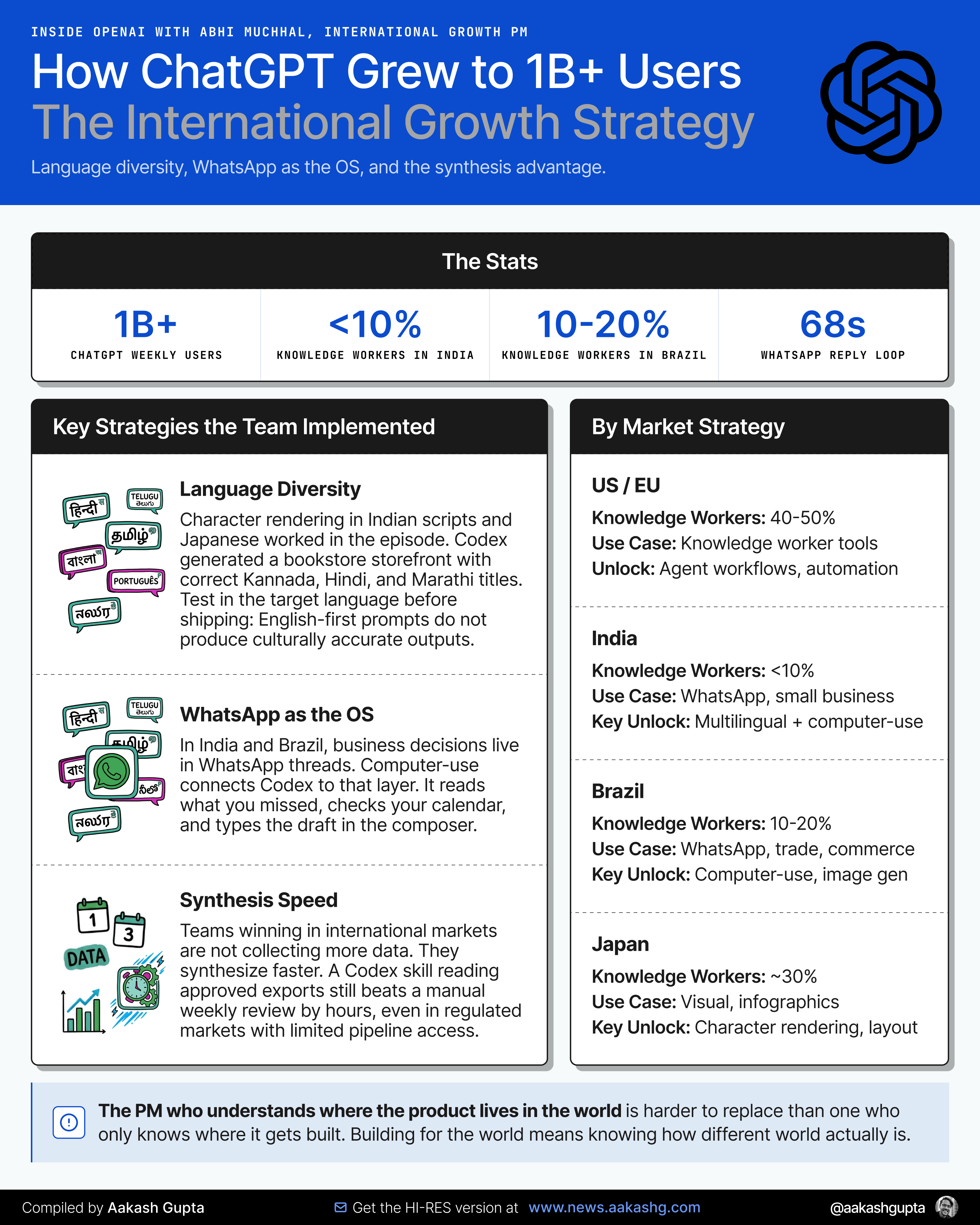
He emphasized three strategies the team implemented that I want you to notice:
Building for language diversity
The people in Bangalore opening a bookstore are not thinking in English. They want a website in Kannada. They want invoice templates in Hindi. They want a YT shorts caption that lands for an audience in Tamil Nadu.
Codex can generate, translate, and format across languages at a level that was not possible 18 months ago. Character rendering in Indian scripts, Japanese manga-style layouts, multilingual infographics.
Synthesizing information that lives on WhatsApp
In markets like India and Brazil, business happens on WhatsApp.
With checking everything manually you can now point Codex at your WhatsApp desktop app, ask it to summarize what you missed, identify action items, and draft a reply based on your calendar availability. In the episode, this entire flow took just over a minute. The reply appeared in the WhatsApp composer, pre-typed, waiting for you to hit send.
This is a workflow every PM building for international markets should understand.
Validating decisions in markets you are not in
The hardest part of international growth PM work is not building the product. It is understanding whether a feature that works in the US will land in Southeast Asia or West Africa.
Codex cannot replace user research. But it can synthesize the data you already have and surface the gaps faster. In growth work, the teams running the fastest are not collecting more data. They are synthesizing what they have with more precision.
For regulated markets or markets where your data pipeline is limited, the synthesis layer matters even more. If your Databricks dashboards are behind a compliance firewall, a Codex skill that only reads from approved exports still beats manual review by hours.
The PM who understands where their product actually lives in the world is harder to replace than the PM who only knows where it is built.
3. How to break into AI PM at a company like OpenAI
The question I get most from PMs reading this newsletter is some version of - how do I get from where I am to OpenAI, Anthropic, or a frontier lab?
I wrote a complete guide on breaking into OpenAI here. Since then, I have talked to four OpenAI PMs on this podcast.
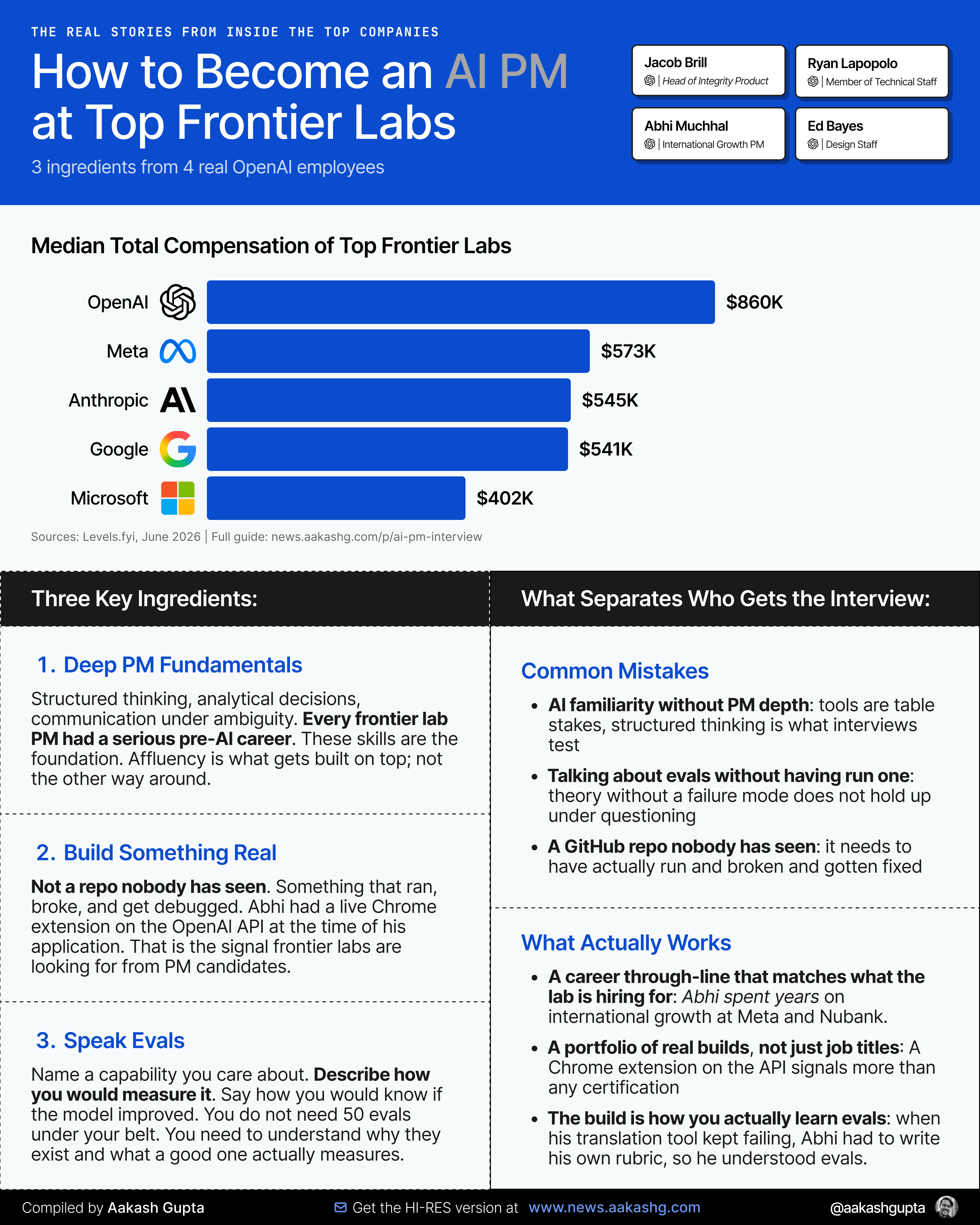
Three key ingredients come through from the 4:
Key Ingredient 1 - Deep PM fundamentals, not just AI familiarity
Every frontier lab PM I have talked to had a serious pre AI career. Not just a familiarity with the tools. Deep PM fundamentals. Structured thinking. Analytical decision making. Communication under ambiguity.
This should be reassuring. The PM skills you have built are not obsolete. They are the foundation. The AI fluency is what you build on top.
What I covered in my AI PM job search guide still holds. The comp at frontier labs is real, but the evaluation criteria are not that different from a strong senior PM role anywhere. You need to show you can own a problem end to end.
Key Ingredient 2 - You have to build something
Every OpenAI PM I have spoken to built something with the APIs before they were hired.
Not a side project that exists as a GitHub repo nobody has seen. Something that actually ran. Something you had to debug. Something where you discovered what Codex or GPT could not do and had to work around it.
The builder credential matters because it is the only way to know what the model actually fails at. You cannot interview your way into that knowledge. In Abhi’s case he built a Chrome extension for real time language translation, deployed it on the OpenAI API, and was demoing it at the time of their application.
One honest caveat here. This path is more accessible to PMs who have slack time to build and who can access paid API credits. If you are in a market where that is not trivially affordable, start smaller. A Codex CLI project on your own machine costs almost nothing to run. The goal is to understand failure modes, not to ship a production app.
Key Ingredient 3 - Speak the language of evals
This is the one that surprises most PMs.
Evals are how frontier labs measure progress. A rubric that defines what good looks like for a specific capability, a baseline measurement, and a goal to beat.
You do not need to have run 50 evals to talk about this fluently. You need to understand why they exist, what they replace, and what a good eval measures versus a bad one. I covered this in depth in my LLM Judge guide and in the Ankur Goyal episode where we built one live on camera.
The PMs who get the farthest in frontier lab interviews are the ones who can say: here is a capability I care about, here is how I would measure it, here is how I would know if the model improved.
Every PM who can think in evals is already speaking the language of the companies building the future. That’s it for today, try to reread and understand the full workflow. See you in the next episode.
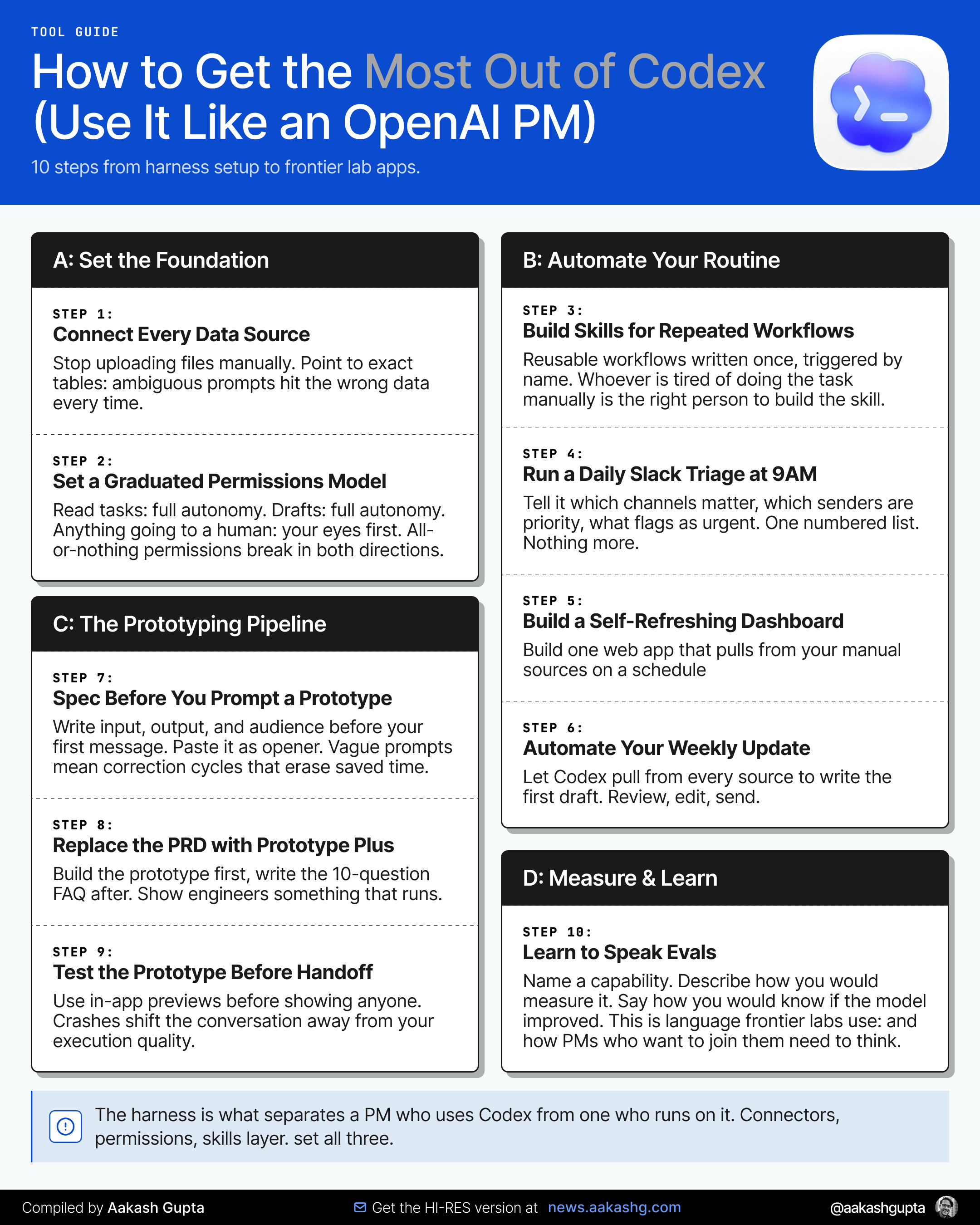
Bonus. How to Get the Most Out of Codex:
Where to find Abhi Muchhal
Related content
Podcasts:
Newsletters:
PS. Please subscribe on YouTube and follow on Apple & Spotify. It helps!