
I’ve run in-app surveys at Apollo, Affirm, and Epic Games. Almost all of them were bad. Response rates in the single digits. Data too vague to change a single roadmap decision. At one point I concluded surveys didn’t work.
Then I partnered with PostHog to analyze 4.2 million survey responses across nearly 6,000 in-app surveys. What we found upends most of what PMs think they know about surveys.
This Reddit post captures what most teams experience:
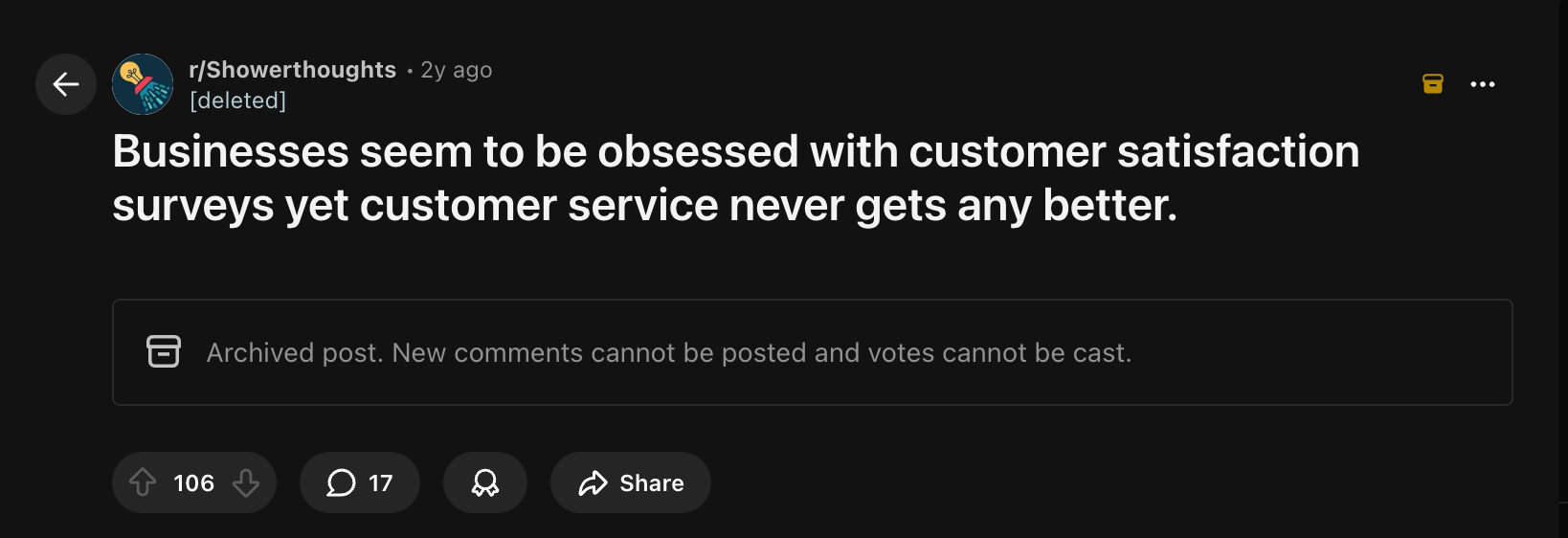
106 upvotes. 17 comments. Near unanimous agreement.
The problem was never surveys. The problem was how they ran them.
They send surveys. They collect data. Nothing changes. Users stop responding. The PM concludes “surveys don’t work” and goes back to guessing.
Meanwhile, every PM I know is obsessed with shipping AI features. Prototyping with Claude Code, building agents, vibe coding products in an afternoon.
Most of these AI features will fail. But the teams shipping them won’t know why until their retention curves tell them months later. By then the feature has shipped, the PR cycle is done, and the data is pointing at a problem they can’t diagnose.
Catching it early requires talking to users at the right moment. In-app surveys do that better than any other tool in a PM’s kit.
Today’s Post
Today’s post is a collaboration with Jina Yoon, Adam Bowker, and Cory Slater at PostHog. We’ve jointly put together the ultimate guide to in-app surveys:
The 5 Survey Mistakes Exposed by 4 Million Responses
Real Survey Teardowns from 6 Companies
The In-App Survey Playbook
Two Claude Skills You Can Download Today
How to Analyze Your Survey Data with AI
1. The 5 Survey Mistakes Exposed by 4 Million Responses
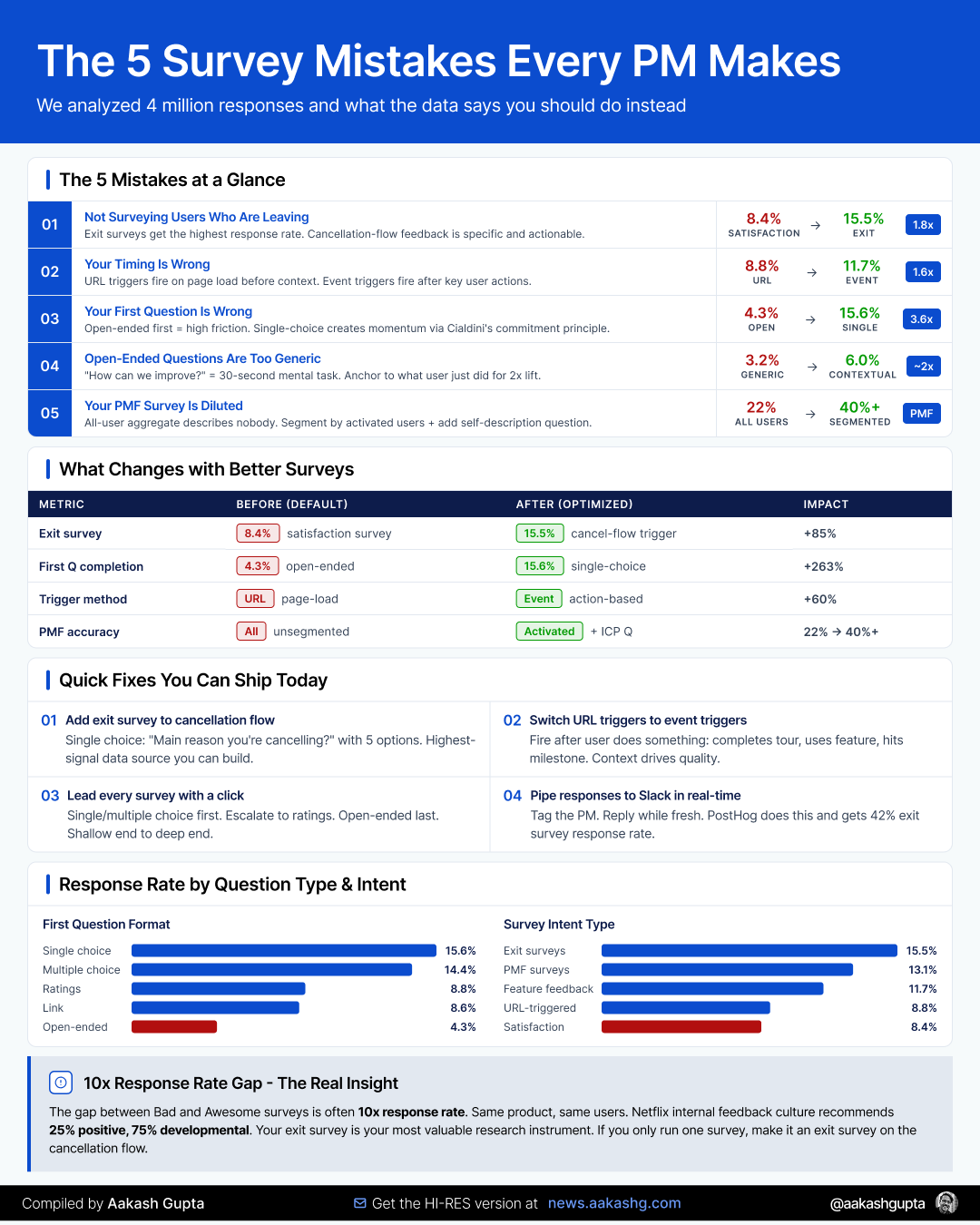
Mistake 1 - You’re Not Surveying Users Who Are Leaving
We often assume users who are leaving are already upset. Why would they take time to give feedback?
Wrong. Exit surveys got the highest response rate (15.5%) of any survey intent type. Compare that to general satisfaction surveys at 8.4%.
PostHog gets an impressive 42% response rate on exit surveys for their Session Replay product. The feedback is specific enough to act on:
“I wish I could set it to sample only 1% of sessions.”
“It would be awesome to limit the total amount of recordings per month.”
“We’d definitely continue using if we were sure this is HIPAA and SOC2 compliant.”
Each of those is a product decision you can make tomorrow. Compare that to “Great product, love it!” from a satisfaction survey.
Reed Hastings writes about Netflix’s feedback culture in No Rules Rules: the ratio inside the company is 25% positive, 75% developmental. Negative feedback is always more actionable.
The fix: Always have an exit survey. If you’re only going to run one survey, make it an exit survey. Trigger it on the cancellation or downgrade flow. You’ll catch users at the moment they’ve made their decision, when the feedback is freshest. This is the highest-signal input you can get for your retention strategy.
Mistake 2 - Your Timing Is Wrong
Have you ever been hit with a “How can we improve?” popup right after visiting a website for the first time?
That’s URL-based targeting. Surveys triggered when a user lands on a page. Many teams use it because it’s easy to deploy.
Event-triggered surveys get 1.6x more responses than URL-based targeting (11.7% vs 8.8%). Users who get surveyed on page load are in a background tab, mid-task, or never actually see it.
This is what Sprig figured out when they rebuilt on event-driven architecture. Surveys fire based on what the user just did, not what URL they’re on. That single shift is what let them scale their infrastructure to over 10 billion API interactions per month.
The fix: Trigger your surveys right after the user does something relevant. After they complete a product tour. After they use a feature. After they hit a milestone. If you need a refresher on where those moments sit in the user journey, my onboarding and activation guides map them out.
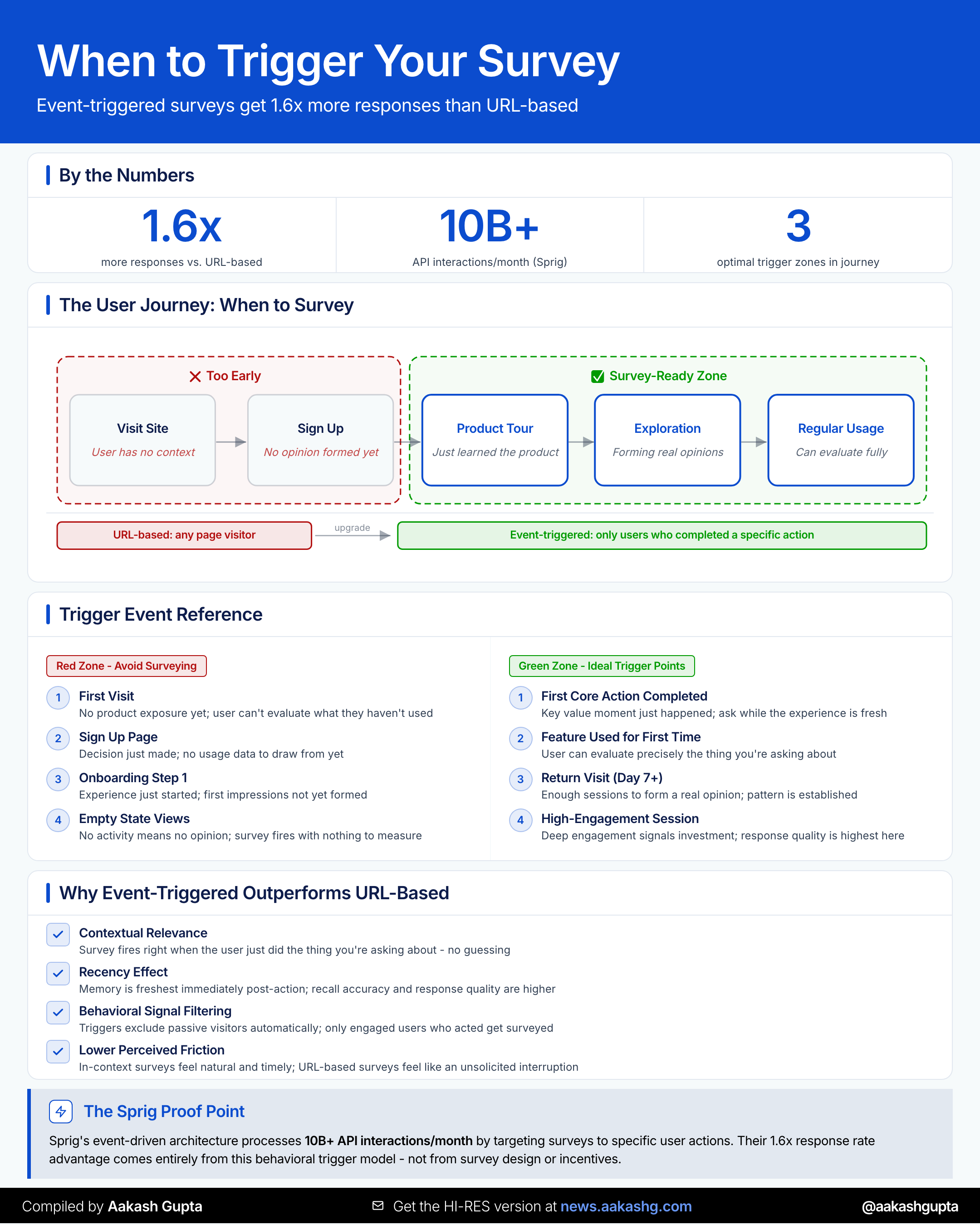
And your first question’s format alone creates a 3.6x response rate gap. More on that below.
Mistake 3 - Your First Question Is Wrong
First impressions matter. Your survey’s first question is the whole ballgame.
Surveys that started with a single-choice question get 3.6x more responses than those that started with an open-ended one.
The full ranking:
Single choice: 15.6%
Multiple choice: 14.4%
Ratings: 8.8%
Link: 8.6%
Open-ended: 4.3%
This tracks with behavioral psychology. Cialdini’s commitment and consistency principle says small, low-cost actions create momentum. Same reason Yelp asks you to write a review before asking you to sign up.
The fix: Lead with single or multiple choice. Escalate to ratings. End with open-ended. Shallow end to deep end.
The format sequence is what the data validates. The specific questions are yours to customize.
Mistake 4 - Your Open-Ended Questions Are Too Open
Open-ended questions are low response rate by nature (4.3%). Typing takes more effort than clicking.
But you can do much better by asking them well.
The default “What can we do to improve our product?” in PostHog only gets 3.2%. Questions that connect to the user’s context get 6%. Nearly 2x from framing alone.
Generic questions fail because they ask the user to scan every feature, every frustration, every wish, then prioritize, then articulate. That’s a 30-second mental task. They close the popup.
Three better approaches (adapt to your product):
Anchor to what they just did: “What did you think about that template creation process?”
Use dead time: “Before we load your dashboard, what metrics matter most to you?”
Give something back: “Want to earn a certificate for completing this training? Tell us your email.”
Another option: the foot-in-the-door technique for recruiting interview candidates. Launch a single-choice question first. People who respond are psychologically primed to say yes to “Would you be open to a 15-minute call?” Your survey becomes your interview recruitment pipeline. One of the best ways to feed your continuous discovery practice.
Mistake 5 - Your PMF Survey Is Diluted
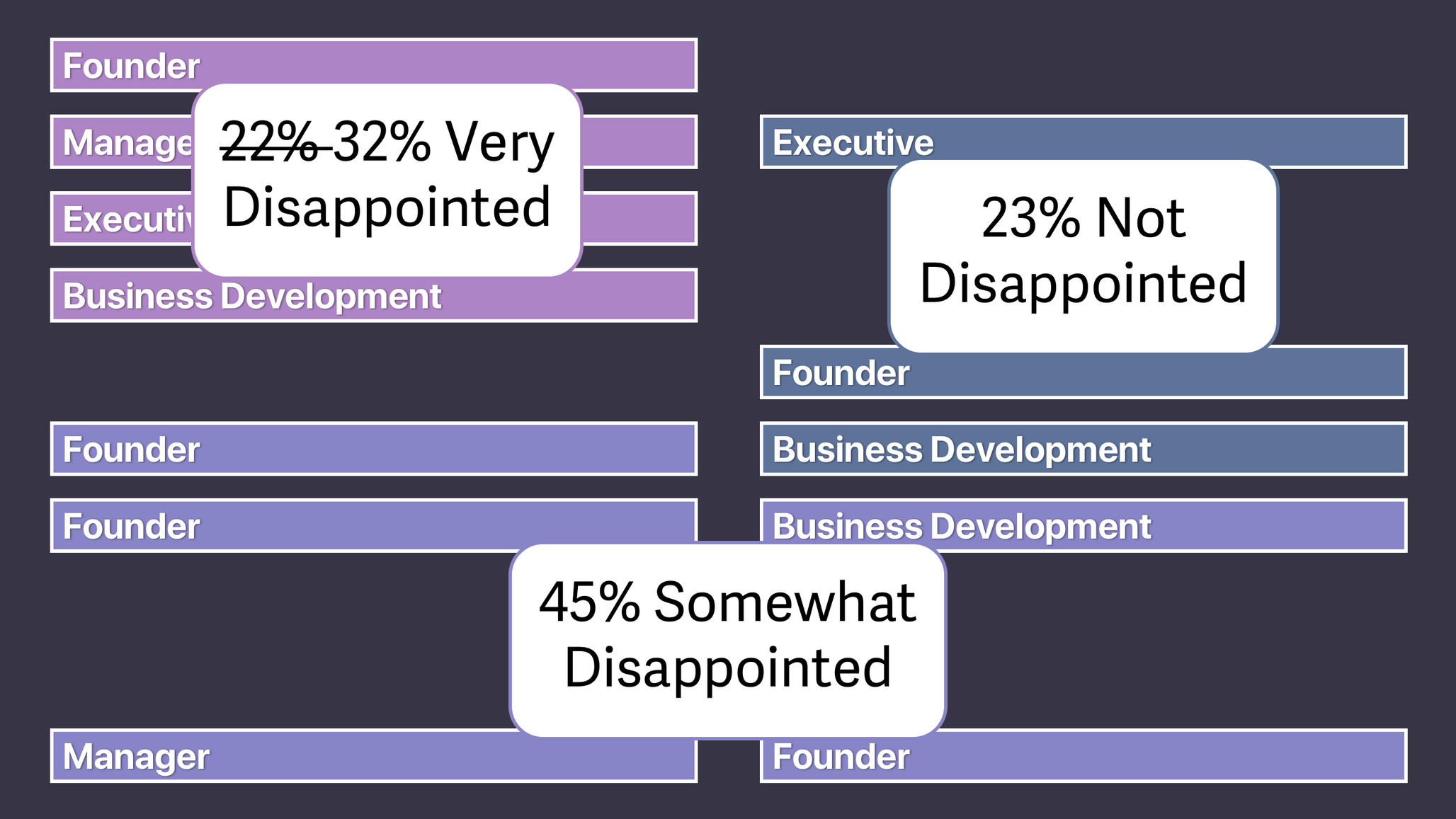
Sean Ellis coined the famous PMF question: “How would you feel if you could no longer use this product?” If 40%+ say very disappointed, you’ve hit product-market fit.
But PMF surveys only get a 13.1% response rate. Buffer’s team wrote about this on their open blog: you need 40-50 active user responses before the signal stabilizes. That means surveying 300-400 active users.
At a startup, you might not have 300 active users. You survey everyone, including yesterday’s signups and free trial lurkers. Their responses dilute your signal.
At a big company, you have plenty of responses but from a mix of power users, casual browsers, enterprise admins, and freemium tire-kickers. The aggregate describes nobody.
Superhuman’s fix (from Rahul Vohra’s First Round Review piece): add a second question: “What type of people do you think would most benefit from [product]?”
Happy users almost always answer by describing themselves. Those self-descriptions become your ICP. Superhuman went from 22% “very disappointed” to above the 40% threshold by narrowing their focus based on these responses.
The fix: Only trigger PMF surveys after activation milestones. If your aha moment is “collaborate on a board with two people” (Miro), only survey users who’ve crossed that threshold. Users who haven’t activated will say “somewhat disappointed” and that’s noise.
And contextualize with the self-description question. Your PMF score and your ICP definition come from the same survey.
2. Real Survey Teardowns from 6 Companies
The 5 mistakes tell you what not to do. The 6 companies below show what running this well looks like end to end. Six different survey types, six different decisions they drove.
Superhuman’s PMF Segmentation Engine
Source: Rahul Vohra, First Round Review
Section 1 covered the segmentation move. Here’s what Section 1 didn’t cover: the fourth question.
Superhuman’s survey had four questions, not three. The fourth was “How can we improve?” and it’s where the roadmap came from.
“Very disappointed” users told them what was already working. “Somewhat disappointed” users who valued speed told them what was missing. The top request from that second group was a mobile app. Superhuman built it.
That’s the dual job of the Superhuman survey. The first three questions tell you who to build for. The fourth tells you what to build next. The survey told them exactly what to build and exactly what to ignore.
Slack’s 3-Question Onboarding Personalization
Source: Appcues evolution teardown, Userpilot teardown
Slack asks three survey questions during workspace creation: team name, what you’ll use Slack for, and invite teammates. The answer to “what will you use Slack for” gets reflected back immediately in the workspace setup.
The user’s answer is immediately reflected in the product. You see your own words in the channel name. Onboarding feels tailored from minute one. And Slack gets free segmentation data: they now know what problems each workspace is trying to solve.
Slack’s onboarding has changed at least 3 times since 2014. Each version reduced friction. But the 3-question survey persisted across every iteration. That tells you something.
PostHog’s Slack Response Pipeline
Every survey response at PostHog pipes into a dedicated Slack channel instantly. Someone responds within minutes. Not automated. Human.
Their numbers: 42% exit survey response rate on Session Replay. Users share detailed, actionable feedback because they know someone is reading.
Teams that treat survey responses as the start of a conversation keep getting responses. Teams that don’t watch response rates decay. (If you want more data like this from the PostHog team, their newsletter is here.)
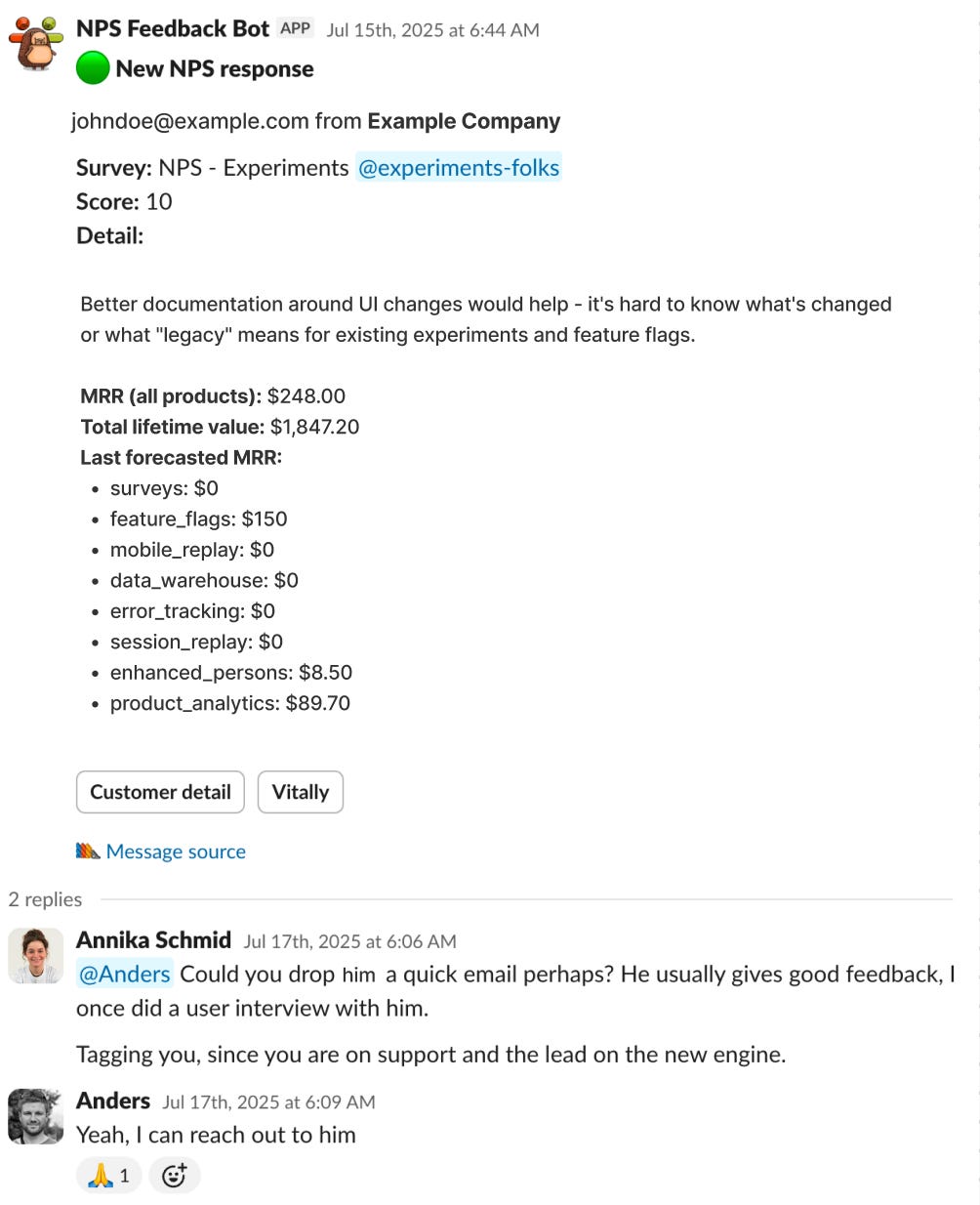
Three patterns connect Superhuman, Slack, and PostHog. Context beats generic timing. Surveys feed product decisions, not spreadsheets. And closing the loop with human follow-up is the difference between 4% and 42% response rates. Three more companies show different angles on the same principles.
🔒 The full guide continues for paid subscribers.
Below: The complete In-App Survey Playbook with four survey templates, conditional branching flows, and 12 bad/good/awesome mockups showing exactly what to ship for every survey type. Two downloadable Claude Skills (a Survey Analyzer that scores your draft survey and rewrites weak questions, and a Survey Generator that builds complete surveys from a goal). A 30-minute AI analysis workflow that turns a CSV export into a 1-page action brief, replacing 10+ hours of manual synthesis. Three more teardowns (Amplitude, Miro, Sprig). And a printable poster with the complete framework.