
Welcome back to the AI Update.
We had two major new model releases this week, Opus-4.6 and GPT-5.3-Codex. But the most important update, for my money was neither.
It was the Codex App.
And that’s why OpenAI hasn’t even released GPT-5.3-Codex in ChatGPT. You all are stuck on GPT-5.2, while Codex users are living in the future.
That’s today’s post.

AI Prototyping Like the Best
72% of the Fortune 500 is using Bolt as their AI prototyping tool of choice.
That’s because AI prototyping completely changes the game for product managers.
Instead of being stuck in the problem space forever, you can immediately get to work in the solution space.
And Bolt is the best tool for this, because you don’t just create throwaway prototypes. You create code that engineers can actually use because Bolt is connected to your code base and your design system.

There’s a million AI news articles, resources, tools, and fundraises every week. You can’t keep track of everything. Here’s what mattered.
Top News
Anthropic dropped Claude Opus-4.6. Everyone’s fixating on the 1M token context window, up from 200K. That’s roughly 1,500 pages of text, which means Claude can now read and reason across entire codebases without losing the plot halfway through.
But the context window isn’t the real story here. It is Agent Teams.
Multiple Claude instances now work in parallel on shared codebases. Instead of one agent grinding through tasks sequentially, a lead agent delegates to teammates who coordinate with each other while you sleep.


Anthropic says it’s a 4-5x throughput increase per developer. From what I’ve seen in Claude Code, I believe it.
Interestingly, they also released fast mode at 6x the cost and 2.5x faster output.
OpenAI’s response is equally fascinating in today’s deep dive.
Other Key News
OpenAI launched Frontier platform. Enterprise hub to build, deploy, and manage AI agents across CRMs, databases, and internal tools.HP, Intuit, Oracle, State Farm, and Uber already onboard.
OpenAI began testing ads. This is a stark departure from its competition.
Anthropic ran Super Bowl ads mocking OpenAI’s decision to put ads in ChatGPT.
Shopify CEO endorsed Pi over every funded AI coding tool.
Nvidia paused gaming GPUs, data center revenue hit $51.2B last quarter while gaming was $4.3B. No new gaming GPU this year, first time in three decades.
Claude in PowerPoint reads layouts, fonts, and matches corporate templates. Production-ready slides first try. No more fighting with alignment or brand guidelines.
Resources
Anthropic revealed they built a 100K-line C compiler using 16 parallel Claude instances for $20K. The agents worked across 2,000 coding sessions, debugging their own code and coordinating without human intervention.
Google’s PaperBanana: Closes the last gap in fully AI-generated papers.
Fundraising
ElevenLabs raised $500M at $11B valuation, tripling their valuation in one year with Sequoia leading the Series D.
Andreessen Horowitz raised $15B, their largest fund ever. $1.7B is going to AI infrastructure (Cursor, OpenAI, ElevenLabs, Black Forest Labs), another $1.7B for apps, $6.75B for growth.
Nvidia nears $20B bet on OpenAI as the AI giant hunts a $100B+ round at $830B valuation. Jensen Huang confirmed this will be “the largest investment we’ve ever made.” Amazon is eyeing $50B, SoftBank discussing $30B.
And now on to today’s deep dive:

Codex Is the Best App OpenAI Has Ever Made
OpenAI counterpunched Opus-4.6’s launch by dropping GPT-5.3. But with catch: it’s Codex only.
Well, there’s a very good reason for that. Codex is the best app OpenAI has ever made. By far.
You tell it what to build, go to sleep and wake up to finished features waiting for review.
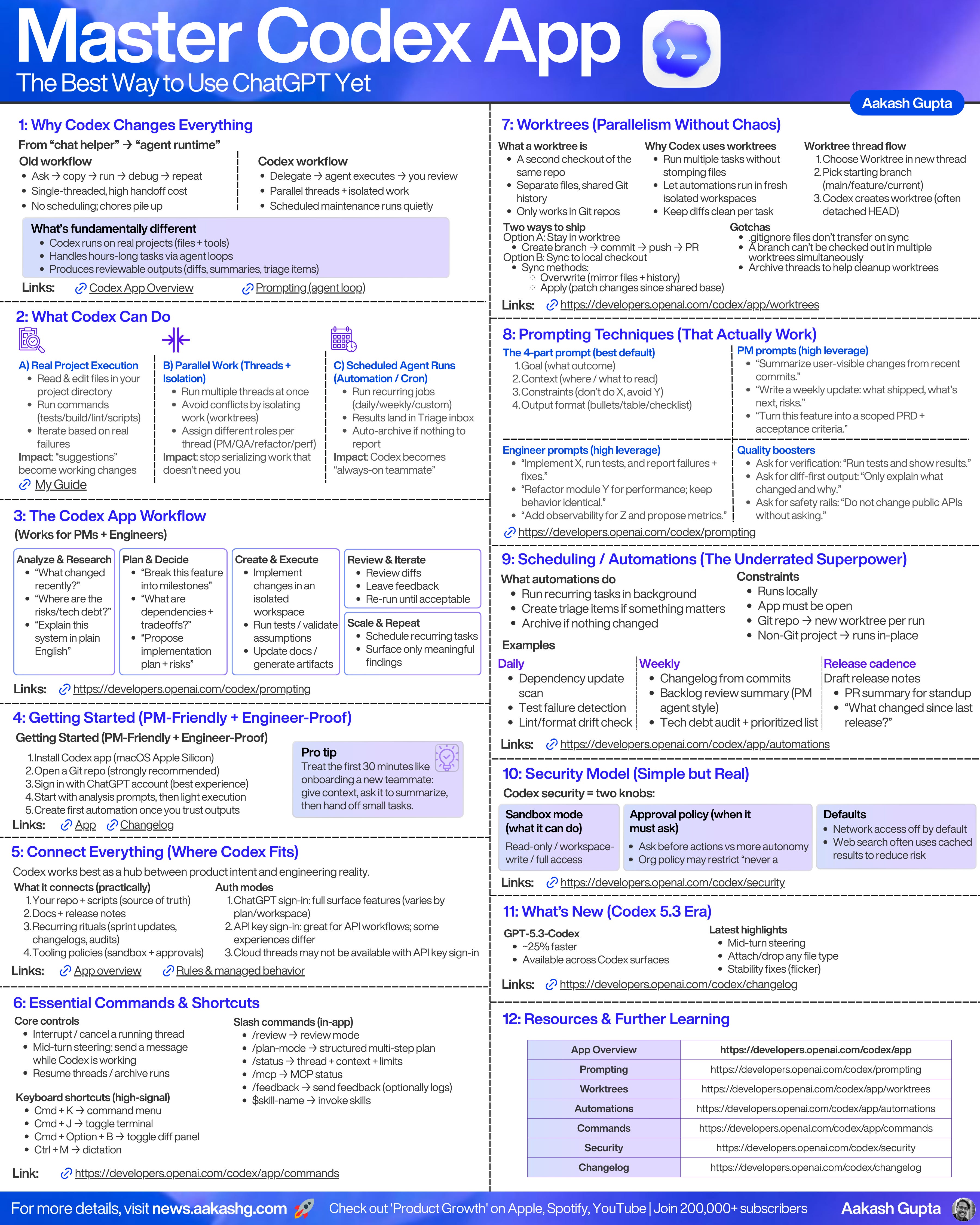
Before I show you how to actually use this, let me give you the full picture. I condensed everything into one cheat sheet below. Save it, print it out, then we'll walk through the key pieces.
Today’s Guide
Getting Started with Codex in 5 Minutes
Powerful Workflows That Run While You Sleep
Built-In Automations (The Real Power)
Mid-Turn Steering (New in 5.3)
For Developers: Worktrees, Code Review Loops, and Cloud Execution
1. Setup Codex App in 5 mins
1A. Configure
Download the app from developers.openai.com/codex/app. Mac only for now ( Windows is coming soon)
Sign in using ChatGPT account or API key
Open a Git repo. This is critical. Codex works way better with Git. Worktrees require it. Clean diffs depend on it.
Choose GPT-5.3-Codex. GPT-5.2 is by default and weaker.
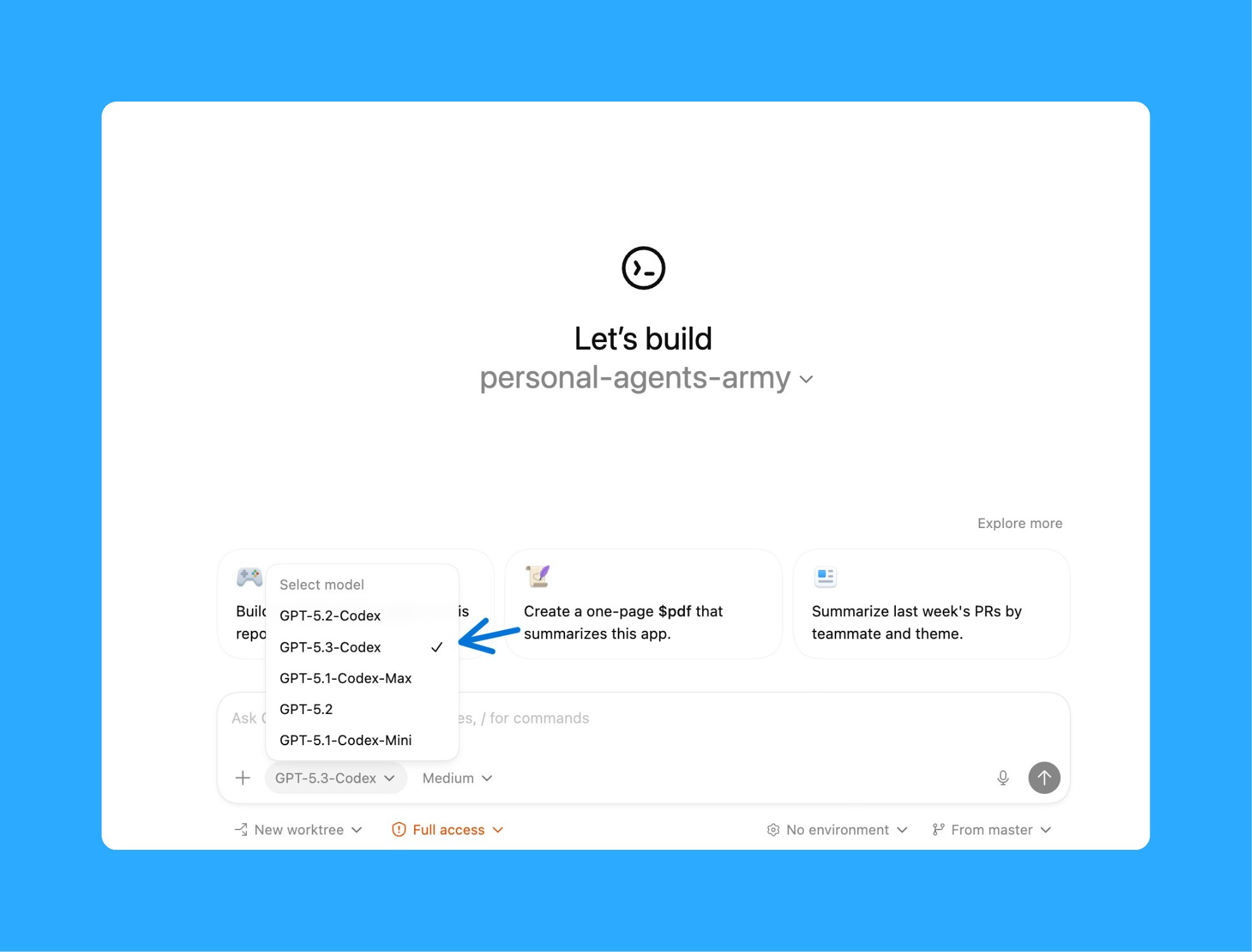
Test it. Create a new thread (⌘N). Type: “Summarize what’s in this project.” Hit enter.
1B. Setup your MCPs
This is the step most people skip. But it turns Codex from “coding tool” into a delegation engine for PMs.
MCPs are what let Codex talk to your tools. Without them, Codex can only work with files on your machine. With them, it can pull data from Zendesk, create tickets in Linear, check your Google Calendar, scrape competitor sites.
The question to ask yourself: what data sources do I use for my PRDs, strategy docs, and weekly updates today that I want Codex to have access to?
Here are the ones I recommend connecting:
Support tickets (Zendesk, Intercom)
Project management (Linear, Jira)
Docs (Google Drive, Notion)
Calendar and email (Google Calendar)
Analytics (PostHog, Amplitude, Pendo)
Code (GitHub MCP server)
You set these up in the MCP servers settings panel inside the Codex App:
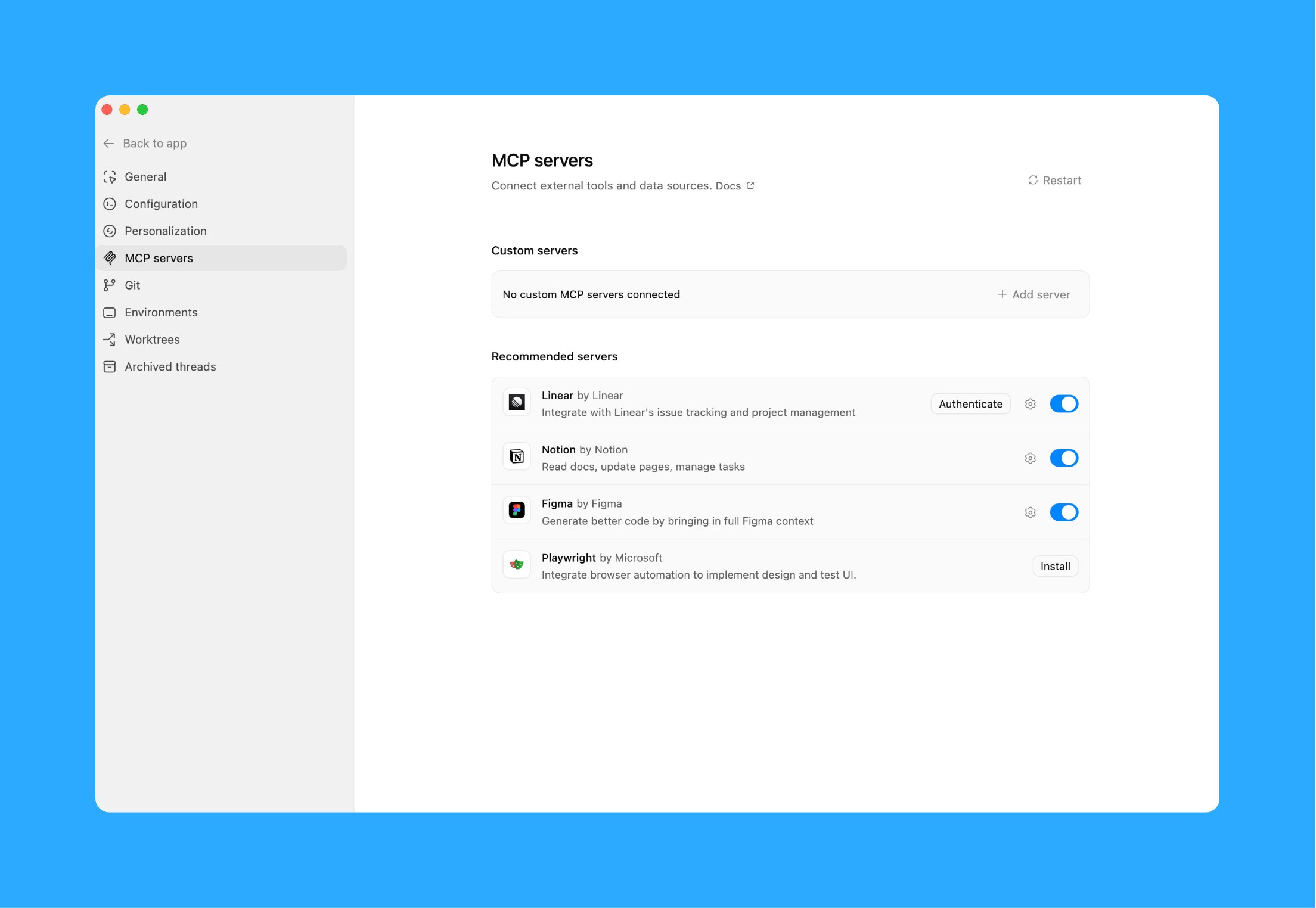
For each tool, you’ll walk through an OAuth flow or paste in an API key. Codex will guide you through it. The whole process takes about 10 minutes for 3-4 tools.
Once your MCPs are connected, everything in section 2 becomes possible.
2. Workflows That Run While You Sleep
Workflow 1: Meeting Writeups → Action Items → Linear Tickets
As PMs, the power of the pen is one of the most important powers we wield. After a meeting, we send out the takeaways. We define what was decided.
Here’s how I use Codex for this entire loop.
Step 1: Record the meeting with Speechify, Otter, or whatever transcription tool you use. Drop the transcript file into your project folder.
Step 2: Create a new Codex thread (⌘N). Tell it to process the transcript:
Process this meeting transcript: [drag file in]

Output:
1. Summary (3-4 sentences — what was discussed and decided)
2. Key decisions made (with who made them)
3. Action items with owners and deadlines
4. Open questions that need follow-up
5. Draft Slack message for #product-updates

Tone: casual, direct, actionable. No fluff.
Hit enter. Codex will read the transcript and output formatted notes with action items extracted.
Step 3: If you have Linear MCP connected, take it one step further in the same thread:
Now create Linear tickets for each action item above.
Include: title, description, priority level, effort estimate.
Assign to the owner mentioned in the transcript.
Codex creates the tickets directly in Linear. No copy-pasting. No manual entry.
Why use Codex for this instead of an AI note-taking tool? Because Codex has your full project context. It knows your product, your team, your priorities. A generic tool gives you a generic summary. Codex gives you a PM summary with tickets that match your team’s format.
The whole process takes about 10 minutes. The old way took 1-2 hours between writing up notes, formatting them, and creating tickets manually.
Workflow 2: Competitive Intelligence
This used to eat 45 minutes every Monday. Pull up competitor sites, check changelogs, scan Product Hunt, read blog posts, look at G2 reviews.
Now I have Codex do it.
Step 1: Create a new thread. Give Codex the scope:
Analyze these competitors for changes in the past 7 days:
- [Competitor 1]: [website URL], [changelog URL]
- [Competitor 2]: [website URL], [changelog URL]
- [Competitor 3]: [website URL], [changelog URL]

Also check their G2 pages for new reviews mentioning features we compete on.

Focus on: new features launched, pricing changes, positioning shifts, notable hiring.

For each change, tell me:
- What changed
- Why it matters to us
- Recommended action: ignore / monitor / respond

Output as a markdown report I can share with my team.
Step 2: Review the report Codex generates.
The real power here: turn this into a weekly automation (we’ll cover how in section 3). Schedule it for Sunday night. Wake up Monday with the report in your inbox.
Optional: If you have your analytics MCP connected, you can add a follow-up in the same thread:
Now cross-reference the features [Competitor X] launched against our own usage data.
- Do we already have similar functionality? What's our adoption rate?
- Are users requesting this in support tickets?
That’s competitive intel + internal data in one pass.
Workflow 3: User Research Synthesis
This is where Codex saves me the most time. The process is almost identical to what I do in Claude Code with my PM OS.
Step 1: Transcribe your interviews. Use Otter.ai, Zoom transcripts, or upload audio directly. Drop the transcript files into your project folder.
Step 2: Create a new thread. Tell Codex what to do:
Process these customer interview transcripts: [drag files in]

For each interview, extract:
- Key observations (what they said and did)
- Pain points (explicit problems mentioned)
- Workarounds (hacks they've built to solve the problem)
- Emotion signals (frustration, delight, confusion)
- Direct quotes worth saving (verbatim)

Then synthesize across ALL interviews:
- Group observations into themes (affinity mapping)
- Rank themes by frequency × severity
- Output:
  1. What to build (prioritized recommendations)
  2. What NOT to build (low-priority themes to ignore)
  3. Open questions (what needs more validation)
  4. Success metrics (how to measure if we solved it)
  5. Quote bank (15-20 quotes I can drop into PRDs)
Codex creates individual observation notes for each interview, then does the affinity mapping across all of them:
The output looks like what you’d get from a junior researcher who spent 6-8 hours on this. Except it takes 20 minutes.
Optional: Multi-Source Synthesis
This is where it gets really powerful. If you have Zendesk and PostHog MCPs connected, you can combine qualitative and quantitative data in the same thread:
Now cross-reference the top 3 pain points from the interviews against:
- Support tickets from Zendesk (past 90 days): how many users reported this?
- Product analytics from PostHog: what's the drop-off rate at each pain point?
- NPS responses: what are detractors saying about these issues?

Find patterns across all sources. Prioritize by signal strength.
This will output:
Executive Summary (1 page for leadership)
Full Synthesis Report (complete analysis)
Quote Bank (for PRDs and presentations)
Workflow 4: PRD Creation + Multi-Perspective Review
As PMs, the PRD is still one of our most important artifacts.
Step 1: Create a new thread. Give Codex your feature context:
Create a PRD for [describe your feature].

Reference these documents for context: [drag in meeting notes, research synthesis, competitive analysis]

Include:
- Hypothesis (what we believe and why)
- Strategic fit (how this connects to company goals)
- User stories with acceptance criteria
- Non-goals (what we're explicitly NOT doing)
- Success metrics (how we'll measure impact)
- Rollout plan (phases, percentages, kill criteria)
- Edge cases and error states
The clearer you describe the feature, the better the output. Point to the meeting notes where you discussed it, the research synthesis from Workflow 3, the competitive analysis from Workflow 2. Codex uses all of it.
Step 2: Run multi-perspective reviews in the same thread:
Now review this PRD from 7 different perspectives:

1. Engineering: Is this technically feasible? What's the effort estimate? What are the dependencies?
2. Design: Does the user flow make sense? What's missing from the UX?
3. Executive: Does this align with company strategy? What's the ROI?
4. Legal: Any compliance, privacy, or regulatory concerns?
5. UX Researcher: What assumptions need validation before we build?
6. Skeptic: What could go wrong? What are we overlooking?
7. Customer Voice: Would a user actually want this? What would they say?

For each perspective, give me: top 3 concerns, questions to answer before building, and a confidence score (1-10) on whether we should proceed.
You get 7 perspectives on your work in 2 minutes. No meetings. No calendar Tetris. No waiting three days for feedback from legal.
After trying this process, you’ll never go back to the old way. PRD creation goes from 4-8 hours to about 90 minutes, and that includes the review cycle.
3. Built-In Automations (The Real Power)
Here’s the problem with every workflow above: they’re great when you remember to run them. But you’re busy. You forget. Or you do it Monday one week and skip it the next.
Codex solves this. It has automations built directly into the app. You schedule recurring tasks. They run automatically in isolated worktrees while you’re offline.
This is what turns Codex from “AI assistant I use sometimes” into “always-on teammate.”
How to Create an Automation
Open the Automations panel in Codex. Click “Create automation.” You’ll see:
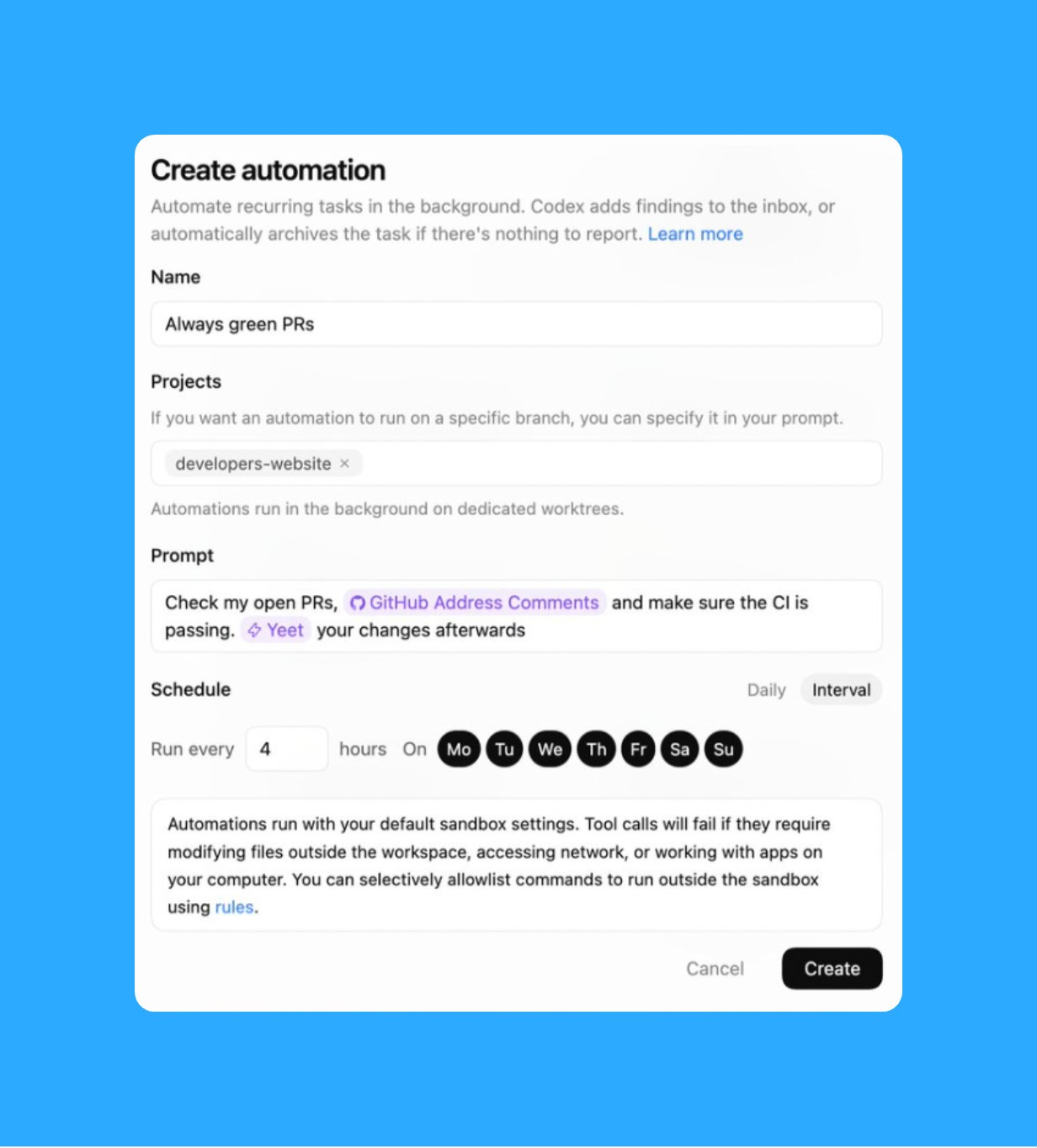
Name: Give it a clear name (e.g., “Weekly Competitive Intel”)
Projects: Select which repo/project it runs against
Prompt: Paste your prompt (same ones from section 2)
Schedule: Pick frequency (daily, weekly) and specific days/times
Hit Create. That’s it. Codex runs this on schedule in the background.
The Automation I Recommend Starting With
Every day you do repetitive work that could be automated, but you don’t realize it’s repetitive until you’ve done it 10 times. You manually check metrics. You copy error logs into tickets. You update Slack when things ship. You scan PRs for TODOs that should become tickets.
These could all be skills. But you’re too busy doing the work to step back and notice the pattern.
So I set up this automation: every Sunday night, Codex reads how I used it that week and builds new skills based on what I kept asking for. My most common workflows become one-click commands.
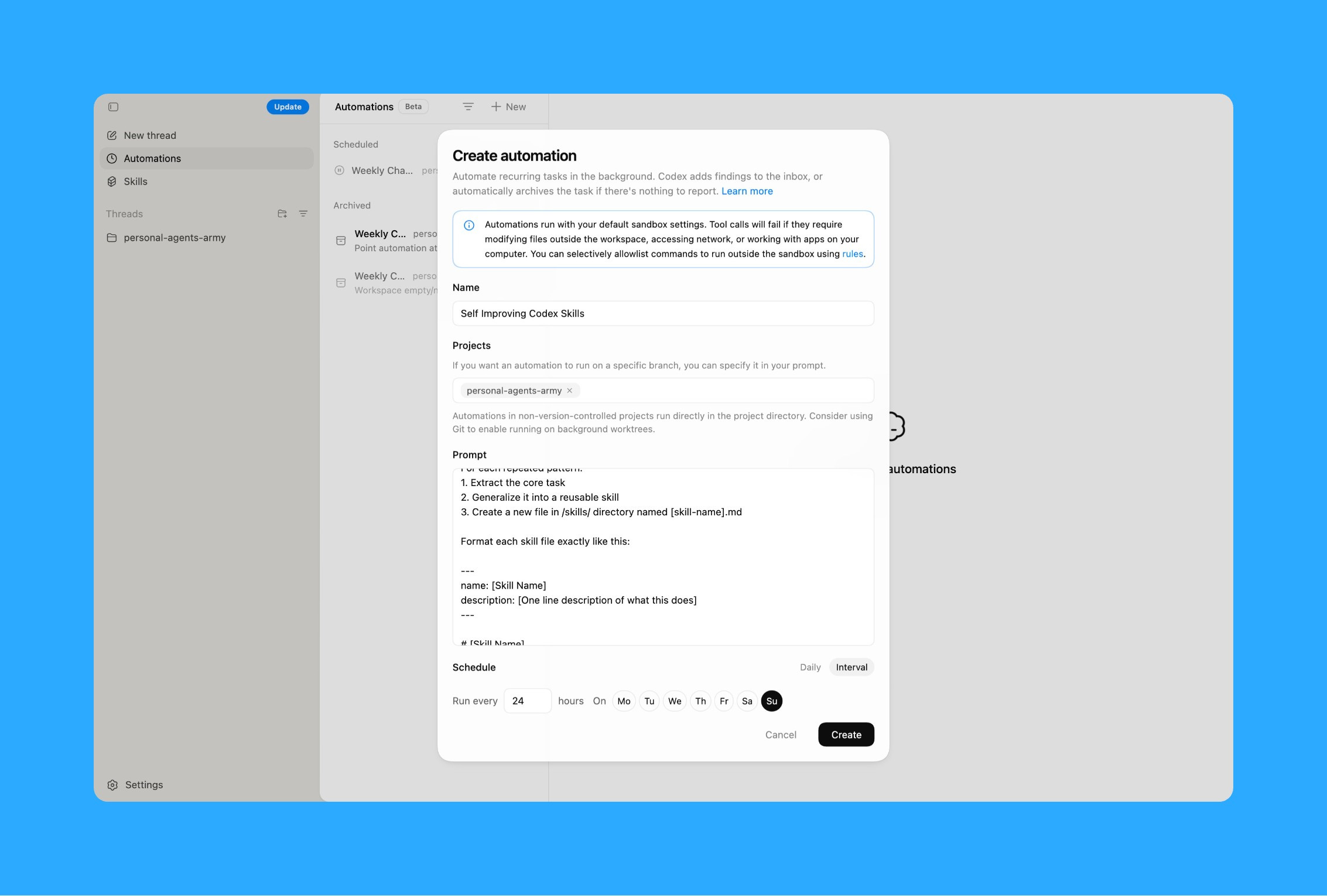
Next week when I need to do a research synthesis, I just say “Use the Research Synthesis skill” instead of writing out the full prompt again.
Your Codex gets smarter every week based on how you actually use it. And this compounds. Every new thread reads the updated skills documentation. Every session starts smarter than the last one.
Other Automations Worth Setting Up
Weekly competitive analysis: Run Sunday night, report ready Monday morning (use prompt from Workflow 2)
Daily metrics summary: Pull key metrics from PostHog/Amplitude every morning, flag anything unusual
Sprint retro prep: Every other Friday, pull completed Linear tickets and draft a retro summary
Roadmap updates: Weekly check on Linear, update your Notion roadmap with what shipped
4. Mid-Turn Steering (New in 5.3)
This feature matters for PMs just as much as developers.
Before: if Codex was synthesizing your research in the wrong direction, you had to wait for it to finish. Then tell it to start over. Wasted 20 minutes.
Now: you see what Codex is doing in real-time. You realize it’s grouping feedback by user role when you wanted it grouped by pain point. You send a message while it’s working: “Stop. Regroup these by pain point, not by persona.”
Codex sees your message mid-task. Adjusts course immediately. Continues with your new instruction.
You just saved 20 minutes by catching the mistake early.
5. For Developers: Worktrees, Code Review Loops, and Cloud Execution
Everything above applies to developers too. But here’s what makes Codex specifically powerful for engineering workflows.
Cloud Execution
One of the most under-appreciated features of the Codex App is cloud execution. Codex can run tasks in isolated cloud containers instead of on your local machine. The agent still works on your repo but the execution happens remotely.
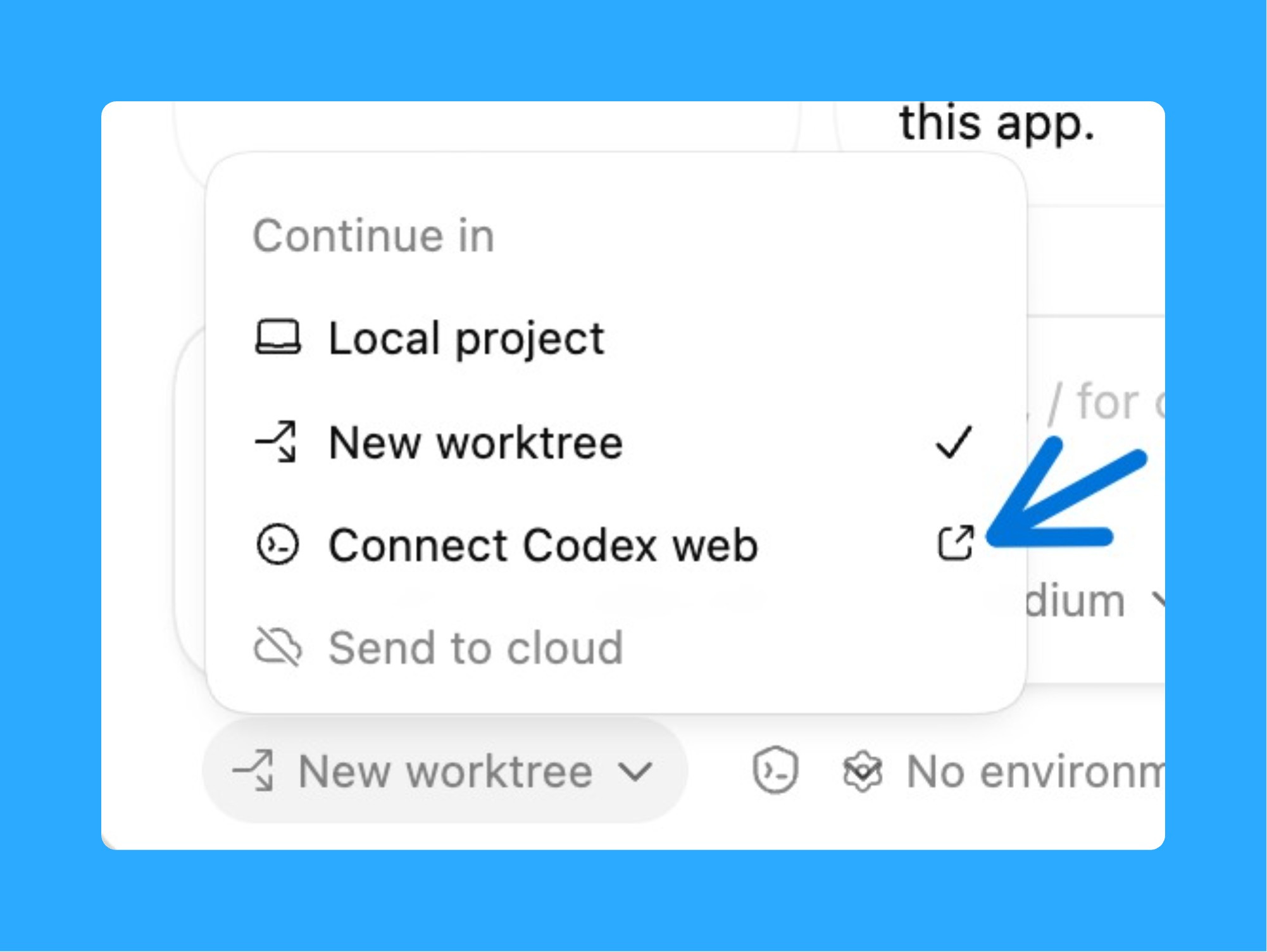
I close my laptop, come back after a coffee, and the refactor is done.
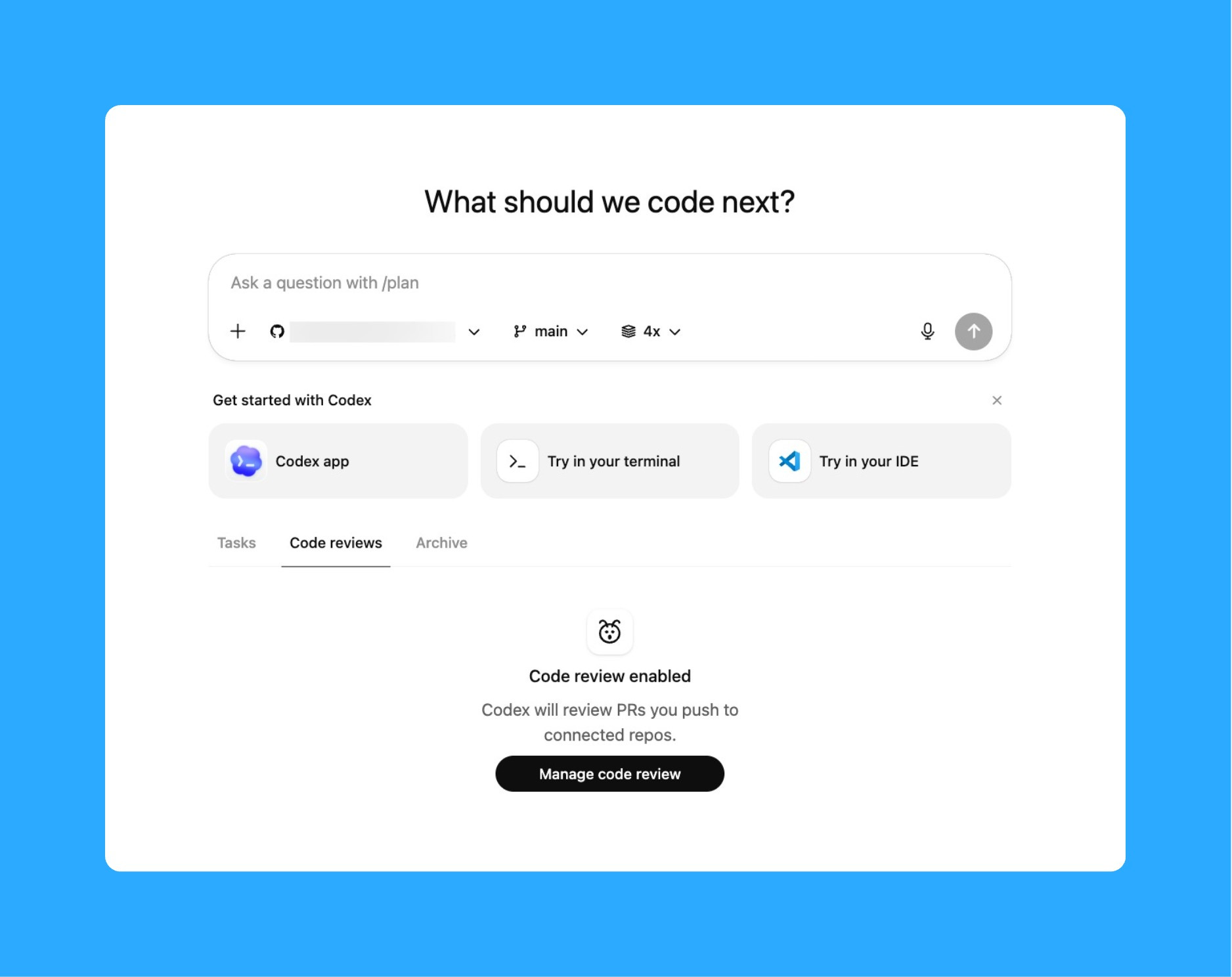
Enable Code Review in Codex Web to catch bugs before they ship. When enabled, Codex flags potential issues in your changes and suggests improvements, making automated code feedback part of your normal workflow.
Worktrees: Run 4 Agents Simultaneously
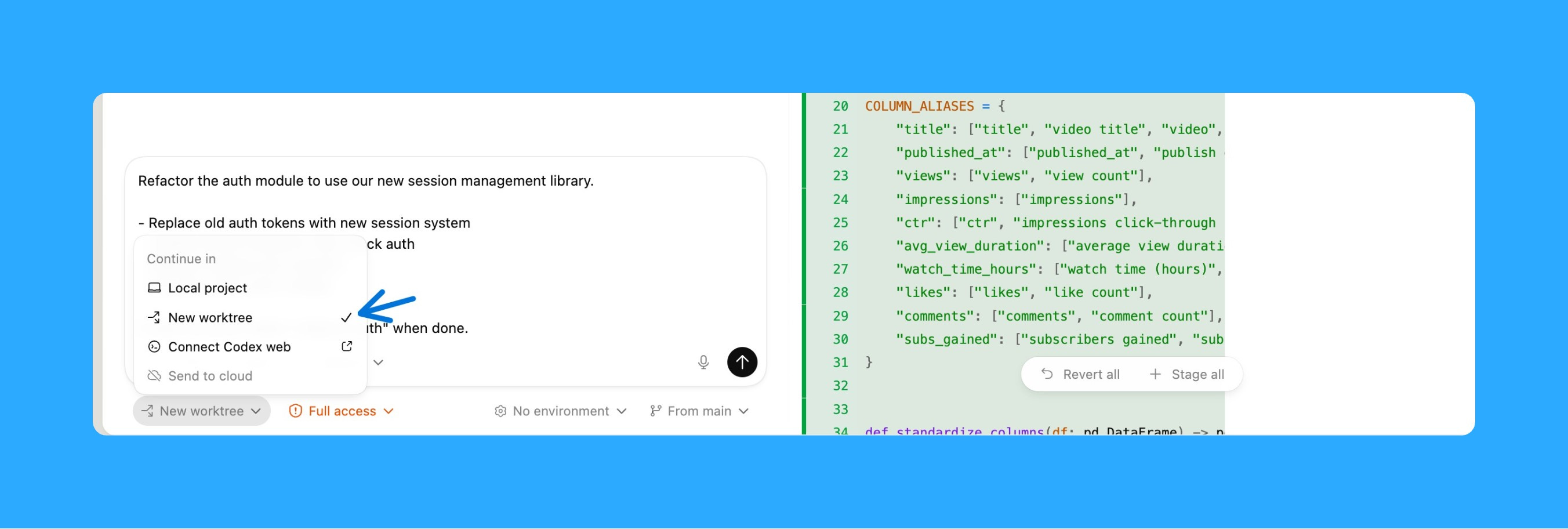
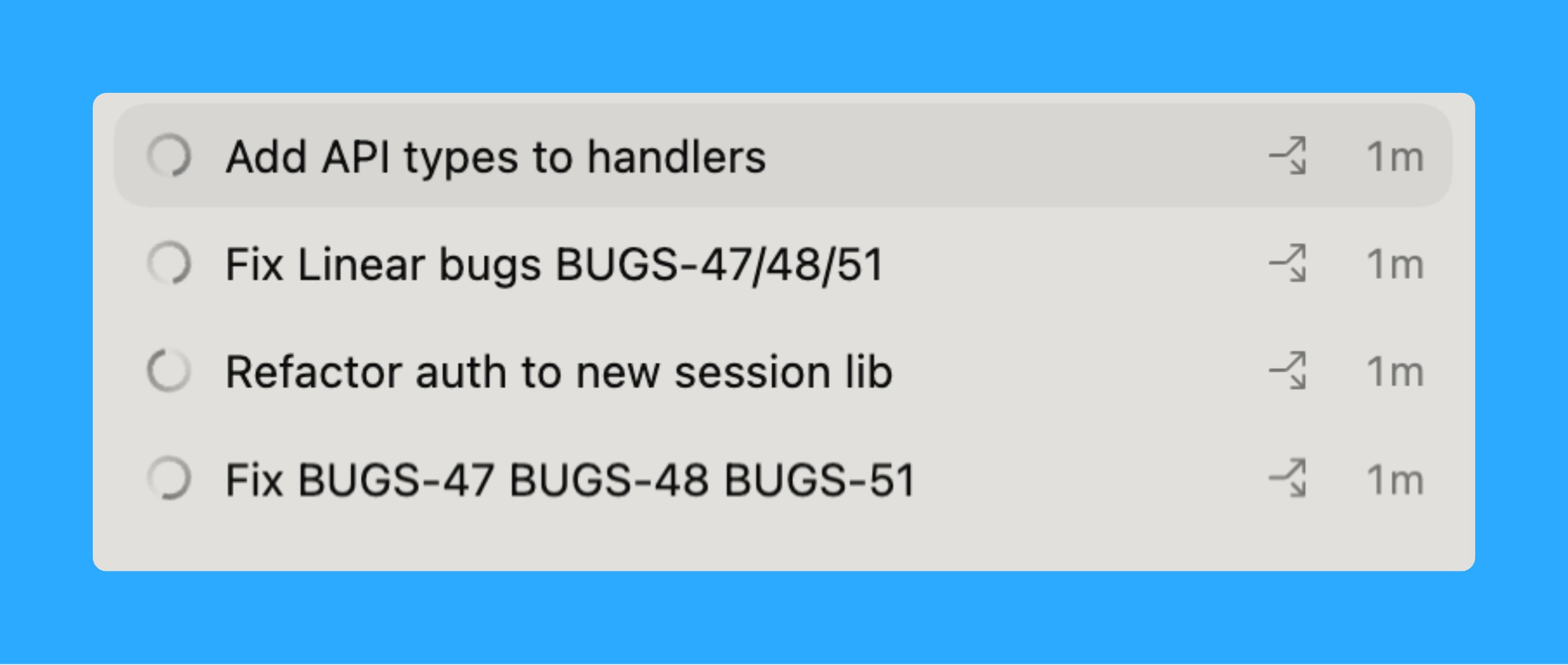
Worktrees are isolated copies of your Git repo sharing the same history. Four branches checked out simultaneously, each in its own folder, each running a different agent.
Setup: ⌘N → click “Worktree” instead of “Local” → pick your starting branch → Create. Repeat for each parallel task. One agent refactors auth, another fixes bugs, a third runs performance audits. No conflicts between them.
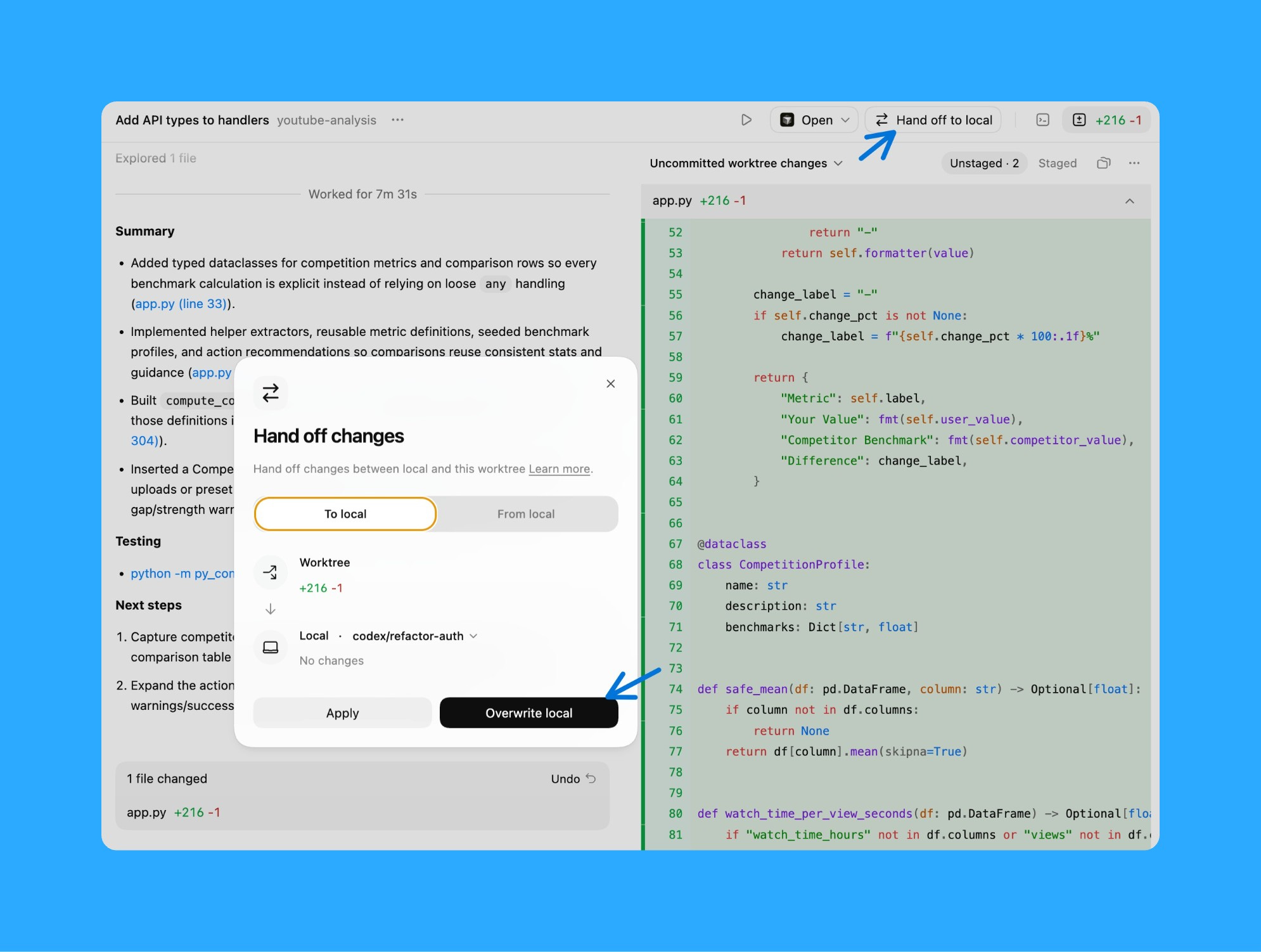
When a worktree agent finishes, you have two options:
Option 1: Tell Codex to create a branch, commit changes, push, and open a PR. It does everything automatically.
Option 2: Click “Hand off to Local” in the worktree thread. Review locally and merge when ready.
Archive completed threads to clean up old worktrees. Right-click thread → Archive.
Automated Code Review Loop
I submitted code with 3 problems last week: a type error, a style issue, and a broken test. Went to lunch. Came back 90 minutes later to find Codex had fixed all three, run the tests, and resubmitted. Two minutes reviewing instead of two hours context-switching.
Here’s the automation:
You need the GitHub MCP server. Once it’s running, Codex checks your open PRs every 4 hours, addresses review comments and CI failures, and resubmits. You get a notification with what changed. Click, review, approve.
That’s it for today’s deep dive. Finally, a podcast I found insightful.

I watched Elon’s latest interview on Dwarkesh Podcast and honestly, some of his predictions are wild but worth paying attention to.
AI is moving to space:
Musk thinks within 36 months, space becomes the best place to run AI compute because it bypasses the real bottleneck we’re hitting on Earth: permitting and electrical grids that can’t keep up.
Solar panels in space are 5-10x more effective because there’s no atmosphere and no day-night cycles, which means you don’t need massive battery backups. This isn’t sci-fi, it’s regulatory arbitrage to get around the fact that U.S. electrical output has basically flatlined.
The robot economy is going to explode
Here’s the curve that matters: When humanoid robots like Optimus can build other robots, you get what Musk calls an “infinite money glitch.”
Three exponentially growing factors multiply each other: digital intelligence, chip capability, and physical dexterity. When robots manufacture robots, this whole thing goes supernova. His estimate? The global economy could expand by 100,000x, which is bigger than the total energy output of Earth today.
Pico-management when it matters
Musk’s approach is what he calls “pico-management” drilling into microscopic details only when they’re the bottleneck for the entire company. He does skip-level meetings with engineers to avoid getting “glazed” by polished presentations that hide real problems.
When he hit walls, he switched Starship to stainless steel and now he’s planning internal chip manufacturing because suppliers can’t scale fast enough. The pattern: when you hit a wall, own the entire stack.
That’s all for today. See you next week,
Aakash
P.S. You can pick and choose to only receive the AI update, or only receive Product Growth emails, or podcast emails here.